Doom-emacs: [HOWTO] multiedit outside of the selection
Thanks a lot for this amazing project. I have some questions/suggestions to improve multiedit functionality:
I would like to have multi-cursor edit using a keybind + mouse button. Also would like to be able to navigate outside of the selected region once occurrences are marked.
- What are you trying to achieve?
Something like this in VScode for the first request:
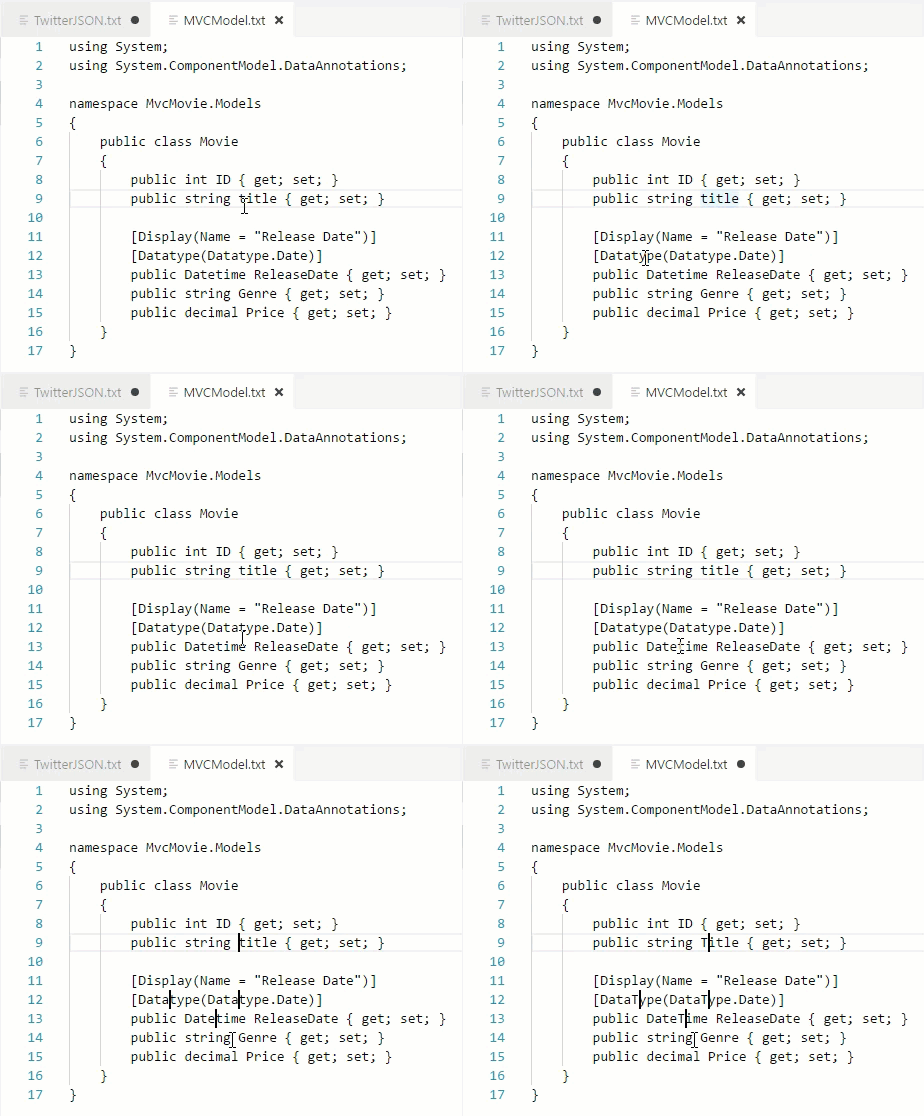
And freedom in movement when occurrences are selected using evil-multiedit or multiple-cursor.el. - What have you tried?
I triedevil-multiedit-toggle-marker-herewhich just allows to add text at the selected points. Also tried binding:
(global-set-key (kbd "C->") 'mc/mark-next-like-this)
(global-set-key (kbd "C-<") 'mc/mark-previous-like-this)
(global-set-key (kbd "C-c C-<") 'mc/mark-all-like-this)

(global-set-key (kbd "C-S-c C-S-c") 'mc/edit-lines)

(global-set-key (kbd "C-S-<mouse-1>") 'mc/add-cursor-on-click)
Include the output of `M-x doom/info` or `~/.emacs.d/bin/doom info` here.
emacs   version    26.3
        features   XPM JPEG TIFF GIF PNG RSVG IMAGEMAGICK SOUND GPM DBUS GSETTINGS GLIB NOTIFY ACL GNUTLS LIBXML2 FREETYPE M17N_FLT LIBOTF XFT ZLIB TOOLKIT_SCROLL_BARS GTK3 X11 XDBE XIM MODULES THREADS LIBSYSTEMD LCMS2
        build      Aug 29, 2019
        buildopts  (--prefix=/usr --sysconfdir=/etc --libexecdir=/usr/lib --localstatedir=/var --with-x-toolkit=gtk3 --with-xft --with-modules 'CFLAGS=-march=x86-64 -mtune=generic -O2 -pipe -fno-plt' CPPFLAGS=-D_FORTIFY_SOURCE=2 LDFLAGS=-Wl,-O1,--sort-common,--as-needed,-z,relro,-z,now)
        windowsys  x
        daemonp    server-running
doom    version    2.0.9
        build      HEAD -> develop, origin/develop, origin/HEAD 50cab5276 2019-11-28 22:04:34 -0500
system  type       gnu/linux
        config     x86_64-pc-linux-gnu
        shell      /usr/bin/zsh
        uname      Linux 5.3.12-1-MANJARO #1 SMP PREEMPT Thu Nov 21 10:55:53 UTC 2019 x86_64
        path       (~/.local/bin/ /usr/local/bin/ /usr/bin/ /bin/ /usr/local/sbin/ /usr/lib/jvm/default/bin/ /usr/bin/site_perl/ /usr/bin/vendor_perl/ /usr/bin/core_perl/ /opt/servo/ /usr/lib/emacs/26.3/x86_64-pc-linux-gnu/)
config  envfile    envvar-file
        elc-files  0
        modules    (:completion (company +tng +auto +rust +lsp +files) helm ido ivy :ui doom doom-dashboard hl-todo modeline nav-flash ophints (popup +all +defaults) treemacs vc-gutter vi-tilde-fringe window-select workspaces :editor (evil +everywhere) file-templates fold multiple-cursors rotate-text snippets :emacs dired electric ibuffer vc :term eshell shell term vterm :tools ansible docker (eval +overlay) flycheck flyspell (lookup +docsets) lsp magit pdf rgb :lang data emacs-lisp (javascript +lsp) latex markdown (org +dragndrop +ipython +pandoc +present) perl php (python +pyenv +lsp) (rust +lsp) sh :config (default +bindings +smartparens))
        packages   (n/a)
        elpa       (n/a)
 haditim
All 2 comments
While we _might_ be able to strong-arm evil-multiedit into doing this, this is more evil-mc's jurisdiction. I would also suggest you use that instead of multiple-cursors which, as you know, lacks evil support. On the other hand, I am not familiar with getting it to work with the mouse, as I do not use the mouse.
With the default keybinds, you can place a cursor down by pressing gzz. They'll be dormant until you press gzt to toggle them or until you switch to insert mode.
To get the mouse workflow working, perhaps something like this would work:
(defun make-cursor-here-then-move (event)
  (interactive "e")
  (save-excursion
    (let (mouse-drag-and-drop-region)
      (mouse-drag-region event))
    (evil-mc-make-cursor-here)))

(map! :i "<mouse-1>" #'make-cursor-here-then-move)
I've tried it with "<C-mouse-1>" but it didn't work very well. I'll look into it more next weekend.
 hlissner
on 9 Dec 2019
hlissner
on 9 Dec 2019
Thanks a lot for the reply. Seems that evil-mc is exactly what I needed. I don't know why I hadn't recognized its existence in Doom.
Also the code for mouse click seems to be working although it starts to select the text at the same time, loses the first cursor and catches the last mouse position into the cursors (w/o a click). I wished evil-mc had a function similar to mc/add-cursor-on-click.
Thanks again for the amazing project and thanks for taking time on this.
haditim
on 10 Dec 2019
Related issues
 benjaminbauer
·
3Comments
benjaminbauer
·
3Comments
 pieterdd
·
3Comments
pieterdd
·
3Comments
 ashiklom
·
3Comments
ashiklom
·
3Comments
 askurihin
·
3Comments
askurihin
·
3Comments
 waymondo
·
3Comments
waymondo
·
3Comments
Most helpful comment
While we _might_ be able to strong-arm evil-multiedit into doing this, this is more
evil-mc's jurisdiction. I would also suggest you use that instead ofmultiple-cursorswhich, as you know, lacks evil support. On the other hand, I am not familiar with getting it to work with the mouse, as I do not use the mouse.With the default keybinds, you can place a cursor down by pressing
gzz. They'll be dormant until you pressgztto toggle them or until you switch to insert mode.To get the mouse workflow working, perhaps something like this would work:
I've tried it with
"<C-mouse-1>"but it didn't work very well. I'll look into it more next weekend.