Doom-emacs: Ivy switch buffer is slow in main workspace
Observed behavior
Running SPC b b in the main workspace produces noticeable lag. Keypresses are reflected in the minibuffer a second or so after they are pressed. For what it's, worth, I'm not sure if this is a known issue, but I don't see this when running helm instead of ivy.
Expected behavior
The lag after keypresses shouldn't be seconds-long.
Steps to reproduce
- Have several buffers available to switch between in the main workspace.
- Press
SPC b b
System information
Click to expand
- OS: darwin (x86_64-apple-darwin18.2.0)
- Emacs: 26.1 (Feb 22, 2019)
- Doom: 2.0.9 (develop 31eb845f6b4a13ca054909c8d225da9ea3df711c)
- Graphic display: t (daemon: nil)
- System features: JPEG RSVG IMAGEMAGICK NOTIFY ACL GNUTLS LIBXML2 ZLIB TOOLKIT_SCROLL_BARS NS MODULES THREADS LCMS2
- Details:
  elisp
  env bootstrapper: nil
  elc count: 0
  uname -a:  Darwin Siddharths-Work-MacBook-Pro.local 18.2.0 Darwin Kernel Version 18.2.0: Thu Dec 20 20:46:53 PST 2018; root:xnu-4903.241.1~1/RELEASE_X86_64 x86_64
  modules:   (:feature eval (evil +everywhere) file-templates (lookup +docsets) snippets workspaces :completion company ivy :ui deft doom doom-dashboard doom-quit evil-goggles hl-todo modeline nav-flash treemacs (popup +all +defaults) vc-gutter vi-tilde-fringe window-select :editor fold multiple-cursors rotate-text :emacs dired electric imenu term vc :tools flycheck lsp magit :lang data emacs-lisp latex markdown (org +attach +babel +capture +present +protocol) (python +pyenv) (sh +fish) :config literate (default +bindings +snippets +evil-commands) sid)
  packages:  n/a
  exec-path: (/usr/bin /bin /usr/sbin /sbin /usr/local/Cellar/emacs-plus/26.1/libexec/emacs/26.1/x86_64-apple-darwin18.2.0)
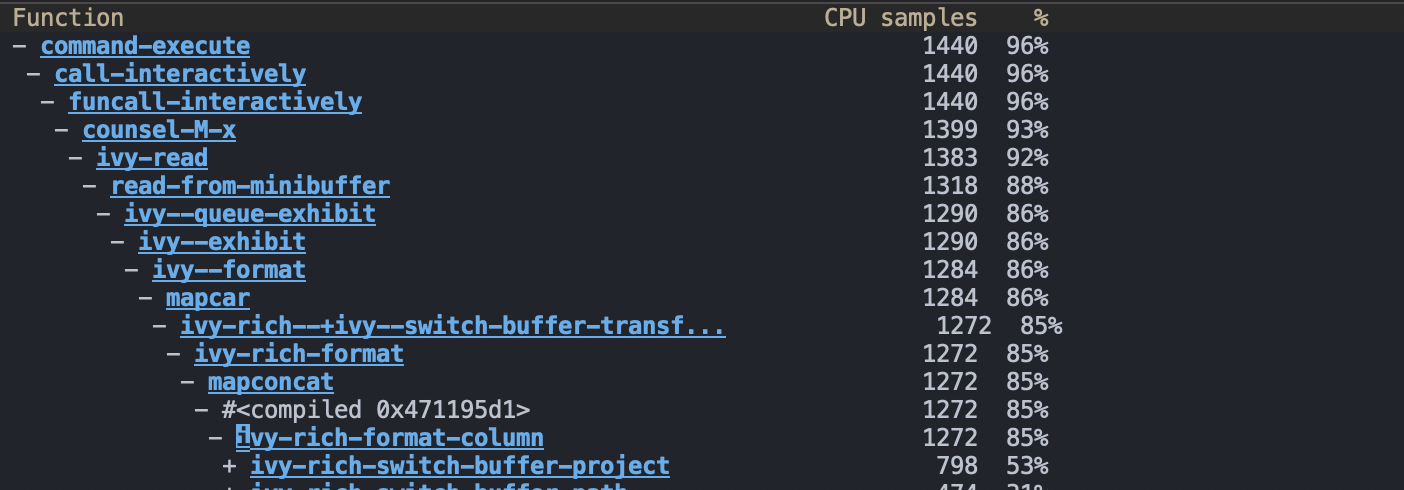
I've attached a screenshot of the profiler output on pressing SPC b b for reference:
 siddharthshekar
All 18 comments
I cannot reproduce this. Could you share your buffer list? I'd like an idea of what assortment of major modes, file locations, buffer states (modified, read-only, etc), and buffer names might contribute to this slowness.
Could you also unfold more of the profiler output under ivy-rich-switch-buffer-project?
 hlissner
on 10 Apr 2019
hlissner
on 10 Apr 2019
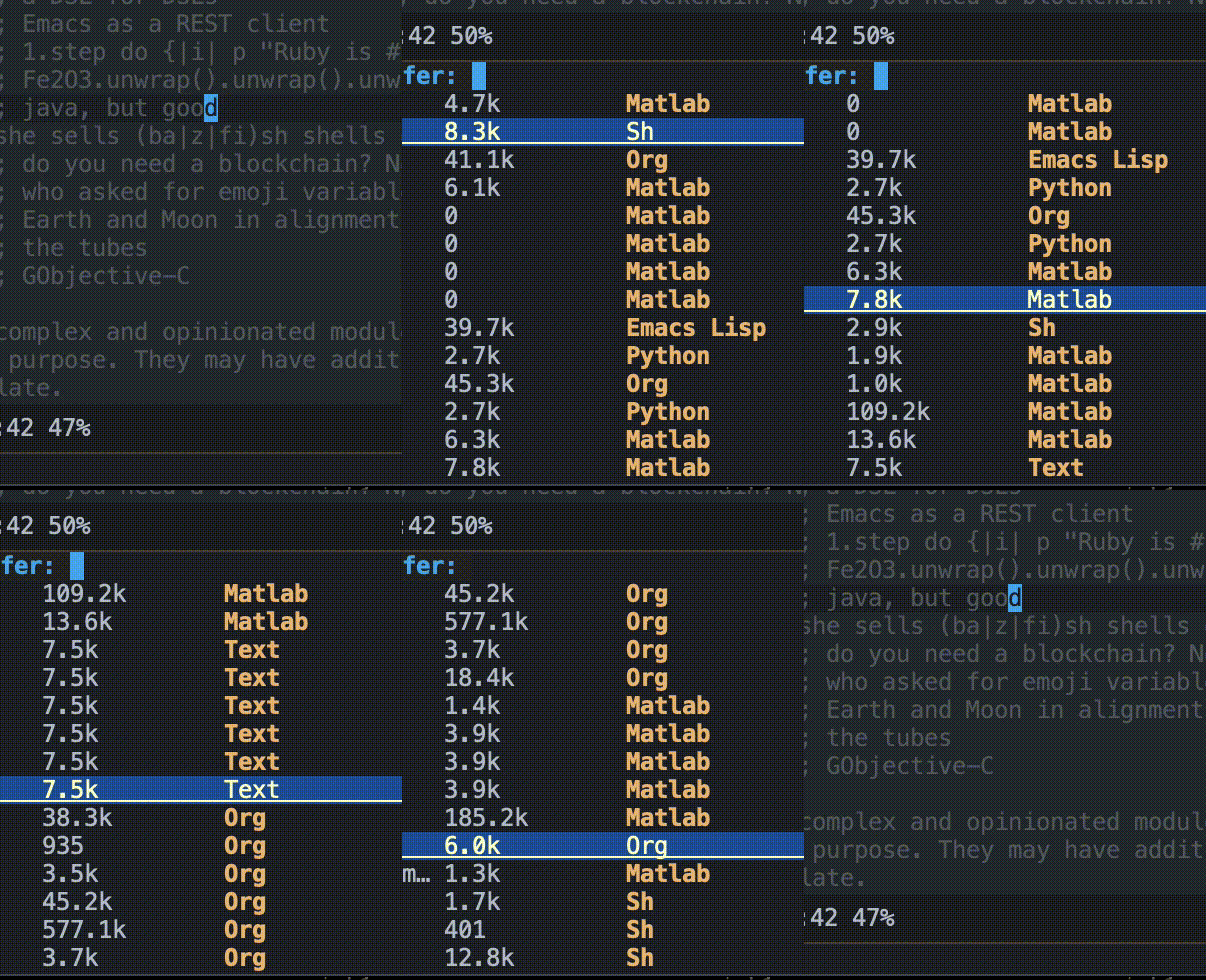
I invoke SPC b b and have Ctrl j pressed continuously. The scrolling is pretty bad. My apologies for not being able to reveal the full minibuffer, but I'm on a work machine right now.
siddharthshekar
on 10 Apr 2019
- Does
M-x ivy-switch-buffersuffer from this? - How about
M-x counsel-switch-buffer? - Does this help:
;; in ~/.doom.d/config.el
(advice-add #'+ivy-rich-buffer-name :override #'identity)
ivy-switch-bufferdoes suffer from this.counsel-switch-bufferis fast and responsive.- Adding that advice didn't really help.
siddharthshekar
on 10 Apr 2019
i maybe missing something but have you tried those?
(setq which-key-idle-delay 0.1
which-key-idle-secondary-delay 0.1)
Because i also noticed that, and above fixed it for me.
 nxtk
on 10 Apr 2019
nxtk
on 10 Apr 2019
@NXTk, I'm not sure if it's related to which-key. In any case, changing those settings didn't work for me.
siddharthshekar
on 10 Apr 2019
@siddharthshekar Do you have (setq +ivy-buffer-preview t) in your config?
Or do you have any remote (tramp) buffers open?
EDIT: Also, does this help?
(after! ivy
  (setq ivy-switch-buffer-faces-alist nil)
  (ivy-set-display-transformer 'internal-complete-buffer nil))
I haven't changed +ivy-buffer-preview myself and it's set to nil. I also don't have any tramp buffers open.
I tried out the snippet you provided but no dice. I've been running on the same workspace session for the last several days so I'll try starting a brand new session and see if I can reproduce this issue.
siddharthshekar
on 10 Apr 2019
Update: Still seeing this issue. I looked around a little bit and perhaps this is a related issue?
siddharthshekar
on 16 Apr 2019
That does look related, but they haven't figured out the cause yet.
While we wait for a fix (or I find an interim solution), a simple workaround could be to disable ivy-rich:
;; place in ~/.doom.d/config.el
(remove-hook 'ivy-mode-hook #'ivy-rich-mode)
I also met this problem when I tried to open 'remote' files in OSXFUSE volumes.
In my case, counsel-switch-buffer became fast and smooth after doom-dashboard was removed. But this didn't fix the ivy-switch-buffer.
 hek14
on 27 May 2019
hek14
on 27 May 2019
Is this still an issue?
hlissner
on 22 Sep 2019
I can reproduce the slowness and it's essentially the fault of ivy-rich and/or projectile. The gist of it is that projectile-name is slow and that ivy-rich calls it for every single buffer.
 rgrinberg
on 22 Sep 2019
rgrinberg
on 22 Sep 2019
I still see this happening, but I've altered my workflow to a) just staying in the appropriate workspace for the most part, and b) typing out the first few characters of the buffer I want to switch to if I'm in the main workspace.
siddharthshekar
on 25 Sep 2019
Just to note that I am experiencing this issue as well on mac.
Experiencing the same:
- ivy-switch-buffer does suffer from this.
- counsel-switch-buffer is fast and responsive.
EDIT Currently Upgrading and updating. Thanks for the announcements on discord!
EDIT2 Much faster with newest version! thank you.
 CThuleHansen
on 4 Nov 2019
CThuleHansen
on 4 Nov 2019
This looks like I'm facing similar problem on Windows now as @siddharthshekar - massive slowdown when holding ctrl+j or down arrow key. Luckily with (ivy +fuzzy) its not as painful.
If you "tap" buttons instead of holding them down its much better, but when you hold button down it looks like on that gif: https://user-images.githubusercontent.com/1447996/55842299-b7da6800-5ae7-11e9-8863-18d29ea8a562.gif
You might want to check the issue I linked above for more info.
 EtiamNullam
on 18 Jul 2020
EtiamNullam
on 18 Jul 2020
See a possible workaround here: https://github.com/Yevgnen/ivy-rich/issues/87#issuecomment-689581896_
 haji-ali
on 9 Sep 2020
haji-ali
on 9 Sep 2020
I am still experiencing huge slow downs similar to described above. Workaround by @haji-ali does not improve the issue.
 cvanelteren
on 23 Oct 2020
cvanelteren
on 23 Oct 2020
Related issues
 governorgoat
·
3Comments
governorgoat
·
3Comments
 gueorgui
·
3Comments
gueorgui
·
3Comments
 laishulu
·
3Comments
laishulu
·
3Comments
 pieterdd
·
3Comments
pieterdd
·
3Comments
 idoo
·
3Comments
idoo
·
3Comments
Most helpful comment
See a possible workaround here: https://github.com/Yevgnen/ivy-rich/issues/87#issuecomment-689581896_