Doom-emacs: bug: launching with file path will create two windows instead of one
Observed behavior
Starting emacs with filename or path with create two new windows rather than one.
emacs init.el:

emacs .:
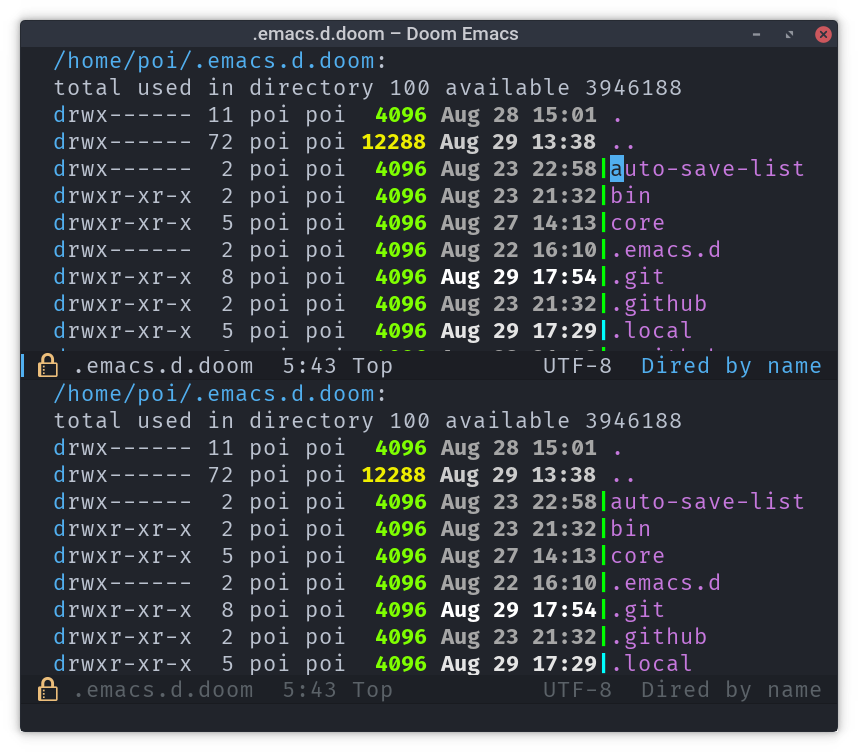
Expected behavior
Create one window.
Steps to reproduce
- Running the above commands.
System information
Click to expand
- OS: gnu/linux (x86_64-pc-linux-gnu)
- Emacs: 26.1 (Jul 05, 2018)
- Doom: 2.0.9 (develop ee4d3172935c645fb41ef7f1b085b93ce0e99904)
- Graphic display: t (daemon: nil)
- System features: XPM JPEG TIFF GIF PNG RSVG IMAGEMAGICK SOUND GPM DBUS GSETTINGS NOTIFY ACL GNUTLS LIBXML2 FREETYPE M17N_FLT LIBOTF XFT ZLIB TOOLKIT_SCROLL_BARS GTK3 X11 MODULES THREADS LIBSYSTEMD LCMS2
- Details:
elisp
elc count: 0
uname -a:  Linux yuudachi-laptop 4.18.5-arch1-1-ARCH #1 SMP PREEMPT Fri Aug 24 12:48:58 UTC 2018 x86_64 GNU/Linux
modules:   (:feature (evil +everywhere) file-templates snippets spellcheck (syntax-checker +childframe) workspaces :completion (ivy +fuzzy) :ui doom-dashboard doom-modeline doom-quit evil-goggles fci hl-todo neotree (popup +all +defaults) vc-gutter vi-tilde-fringe window-select :editor rotate-text :emacs ediff electric hideshow imenu :tools magit :lang emacs-lisp javascript latex (org +attach +babel +capture +export +present) rust (sh +fish) web :config)
packages:  n/a
exec-path: (~/.cargo/bin/ ~/.yarn/bin ~/.cargo/bin ~/.yarn/bin /usr/local/bin /usr/bin /bin /usr/bin/site_perl /usr/bin/vendor_perl /usr/bin/core_perl /usr/local/sbin /usr/local/bin /usr/bin /usr/lib/jvm/default/bin /usr/bin/site_perl /usr/bin/vendor_perl /usr/bin/core_perl /usr/lib/emacs/26.1/x86_64-pc-linux-gnu)
 PoiScript
All 18 comments
I am unable to recreate this. It is likely a symptom of another issue. Could you check your *Messages* buffer for errors or warnings during startup? You can open it with SPC h m, :m or M-x view-echo-area-messages.
 hlissner
on 29 Aug 2018
hlissner
on 29 Aug 2018
I can reproduce this error.
The Messages buffer doesn't say anything.
I'll try to git bisect until I find the problematic commit.
 UndeadKernel
on 29 Aug 2018
UndeadKernel
on 29 Aug 2018
Alright, I bisected the problem down to this commit:
6eafdd7c62d4d5d891deca0027ad168a45d5ddb4
That's the first commit where I experience the problem of two windows opened when specifying a file in the command line. The commit has many changes so I cannot visually determine what the problem could be.
UndeadKernel
on 29 Aug 2018
Yes, there was an error but it seemed to be related with company:
The ‘:company-backend’ setting is deprecated, use ‘set-company-backend!’ instead
Doom loaded 359 packages across 39 modules in 1.470s
I just updated to the latest develop branch and commented out all my custom installed packages and configuration. The bug is still present. Below is my init.el that may be useful.
init.el
(doom! :feature
      ;debugger          ; FIXME stepping through code, to help you add bugs
       eval              ; run code, run (also, repls)
       (evil +everywhere); come to the dark side, we have cookies
       file-templates    ; auto-snippets for empty files
      ;(lookup           ; helps you navigate your code and documentation
      ; +devdocs         ; ...on devdocs.io online
      ; +docsets)        ; ...or in Dash docsets locally
       snippets          ; my elves. They type so I don't have to
       spellcheck        ; tasing you for misspelling mispelling
       (syntax-checker   ; tasing you for every semicolon you forget
        +childframe)     ; use childframes for error popups (Emacs 26+ only)
       workspaces        ; tab emulation, persistence & separate workspaces

       :completion
       (company          ; the ultimate code completion backend
        +auto)           ; as-you-type code completion
      ;(helm             ; the *other* search engine for love and life
      ; +fuzzy)          ; enable fuzzy search backend for helm
      ;ido               ; the other *other* search engine...
      (ivy               ; a search engine for love and life
       +fuzzy)           ; enable fuzzy search backend for ivy

       :ui
       doom              ; what makes DOOM look the way it does
       doom-dashboard    ; a nifty splash screen for Emacs
       doom-modeline     ; a snazzy Atom-inspired mode-line
       doom-quit         ; DOOM quit-message prompts when you quit Emacs
       evil-goggles      ; display visual hints when editing in evil
       fci               ; a `fill-column' indicator
       hl-todo           ; highlight TODO/FIXME/NOTE tags
      ;modeline          ; snazzy, Atom-inspired modeline, plus API
      ;nav-flash         ; blink the current line after jumping
       neotree           ; a project drawer, like NERDTree for vim
      ;treemacs          ; a project drawer, like neotree but cooler
       (popup            ; tame sudden yet inevitable temporary windows
        +all             ; catch all popups that start with an asterix
        +defaults)       ; default popup rules
      ;(pretty-code      ; replace bits of code with pretty symbols
      ; +fira)
      ;tabbar            ; FIXME an (incomplete) tab bar for Emacs
      ;unicode           ; extended unicode support for various languages
       vc-gutter         ; vcs diff in the fringe
       vi-tilde-fringe   ; fringe tildes to mark beyond EOB
       window-select     ; visually switch windows

       :editor
      ;(format +onsave)  ; automated prettiness
       multiple-cursors  ; editing in many places at once
      ;parinfer          ; turn lisp into python, sort of
       rotate-text       ; cycle region at point between text candidates

       :emacs
       dired             ; making dired pretty [functional]
       ediff             ; comparing files in Emacs
       electric          ; smarter, keyword-based electric-indent
      ;eshell            ; a consistent, cross-platform shell (WIP)
       hideshow          ; basic code-folding support
       imenu             ; an imenu sidebar and searchable code index
      ;term              ; terminals in Emacs
      ;vc                ; version-control and Emacs, sitting in a tree

       :tools
       editorconfig      ; let someone else argue about tabs vs spaces
      ;ein               ; tame Jupyter notebooks with emacs
      ;gist              ; interacting with github gists
      ;macos             ; MacOS-specific commands
      ;make              ; run make tasks from Emacs
       magit             ;
      ;password-store    ; password manager for nerds
      ;pdf               ; pdf enhancements
      ;prodigy           ; FIXME managing external services & code builders
      ;rgb               ; creating color strings
      ;tmux              ; an API for interacting with tmux
      ;upload            ; map local to remote projects via ssh/ftp
      ;wakatime

       :lang
      ;assembly          ; assembly for fun or debugging
      ;(cc +irony +rtags); C/C++/Obj-C madness
      ;clojure           ; java with a lisp
      ;common-lisp       ; if you've seen one lisp, you've seen them all
      ;crystal           ; ruby at the speed of c
      ;csharp            ; unity, .NET, and mono shenanigans
       data              ; config/data formats
      ;erlang            ; an elegant language for a more civilized age
      ;elixir            ; erlang done right
      ;elm               ; care for a cup of TEA?
       emacs-lisp        ; drown in parentheses
      ;ess               ; emacs speaks statistics
      ;go                ; the hipster dialect
      ;(haskell +intero) ; a language that's lazier than I am
      ;hy                ; readability of scheme w/ speed of python
      ;(java +meghanada) ; the poster child for carpal tunnel syndrome
       javascript        ; all(hope(abandon(ye(who(enter(here))))))
      ;julia             ; a better, faster MATLAB
       latex             ; writing papers in Emacs has never been so fun
      ;ledger            ; an accounting system in Emacs
      ;lua               ; one-based indices? one-based indices
      ;markdown          ; writing docs for people to ignore
      ;nim               ; python + lisp at the speed of c
      ;nix               ; I hereby declare "nix geht mehr!"
      ;ocaml             ; an objective camel
       (org              ; organize your plain life in plain text
        +attach          ; custom attachment system
        +babel           ; running code in org
        +capture         ; org-capture in and outside of Emacs
        +export          ; Exporting org to whatever you want
        +present)        ; Emacs for presentations
      ;perl              ; write code no one else can comprehend
      ;php               ; perl's insecure younger brother
      ;plantuml          ; diagrams for confusing people more
      ;purescript        ; javascript, but functional
      ;python            ; beautiful is better than ugly
      ;qt                ; the 'cutest' gui framework ever
      ;racket            ; a DSL for DSLs
      ;rest              ; Emacs as a REST client
      ;ruby              ; 1.step do {|i| p "Ruby is #{i.even? ? 'love' : 'life'}"}
       rust              ; Fe2O3.unwrap().unwrap().unwrap().unwrap()
      ;scala             ; java, but good
       (sh +fish)        ; she sells (ba|z)sh shells on the C xor
      ;solidity          ; do you need a blockchain? No.
      ;swift             ; who asked for emoji variables?
       web               ; the tubes

       ;; Applications are complex and opinionated modules that transform Emacs
       ;; toward a specific purpose. They may have additional dependencies and
       ;; should be loaded late.
       :app
      ;(email +gmail)    ; emacs as an email client
      ;irc               ; how neckbeards socialize
      ;(rss +org)        ; emacs as an RSS reader
      ;twitter           ; twitter client https://twitter.com/vnought
      ;(write            ; emacs as a word processor (latex + org + markdown)
      ; +wordnut         ; wordnet (wn) search
      ; +langtool)       ; a proofreader (grammar/style check) for Emacs

       :collab
      ;floobits          ; peer programming for a price
      ;impatient-mode    ; show off code over HTTP

       :config
       ;; For literate config users. This will tangle+compile a config.org
       ;; literate config in your `doom-private-dir' whenever it changes.
      ;literate

       ;; The default module set reasonable defaults for Emacs. It also provides
       ;; a Spacemacs-inspired keybinding scheme, a custom yasnippet library,
       ;; and additional ex commands for evil-mode. Use it as a reference for
       ;; your own modules.
       (default +bindings +snippets +evil-commands))
Press SPC b B (or M-x switch-to-buffer) and see if there's a buried *Warnings* buffer in hiding. Could be that it was displayed, then replaced, and may provide some insight into the true cause of the problem.
hlissner
on 29 Aug 2018
Yes, I can confirm that the commit 6eafdd7 introduced this bug.
PoiScript
on 29 Aug 2018
No, I can't see any *Warnings*.
PoiScript
on 29 Aug 2018
Could you try disabling :feature workspaces and see if the problem goes away?
hlissner
on 29 Aug 2018
Yeah I reported this a while ago. Still a problem.
 HaoZeke
on 29 Aug 2018
HaoZeke
on 29 Aug 2018
@hlissner I disables it but the problem still remains.
PoiScript
on 30 Aug 2018
@PoiScript Could you try disabling :ui popup as well and see if the problem goes away?
hlissner
on 30 Aug 2018
@hlissner it still exists.
PoiScript
on 30 Aug 2018
Just to be extra sure, could you try placing this:
(message "-- %s %s" (get-buffer "*Warnings*") delayed-warnings-list)
At the end of your ~/.doom.d/init.el _and_ ~/.doom.d/config.el, then restart Emacs, check M-x view-echo-messages-area and find out what they logged (and paste them here)?
hlissner
on 30 Aug 2018
-- nil nil [2 times]
Doom loaded 359 packages across 39 modules in 1.394s
I get this too, I thought it was as a result of moving to BSPWM. For some reason it opens like this only from a GUI application like Thunar and even Ranger. But if I open it from the terminal, then it doesn't open in two windows
 mustaqimM
on 14 Sep 2018
mustaqimM
on 14 Sep 2018
If it helps, I get this problem with sway as well, so it's likely got nothing to do with the window manager.
HaoZeke
on 14 Sep 2018
Phew! I was finally able to reproduce this and track down the culprit. As of cc1c28a this should be fixed.
Emacs insists on opening initial-buffer-choice even when files are passed to emacs, and does so in splits, so I just set it to nil if any arguments to emacs are files. Not the most elegant solution, but it'll do until I think of a better one.
Please update and let me know if that's not the case and I will reopen this.
hlissner
on 21 Sep 2018
It's working perfectly now, thanks for the fix @hlissner
HaoZeke
on 21 Sep 2018
Related issues
 ashiklom
·
3Comments
ashiklom
·
3Comments
 governorgoat
·
3Comments
governorgoat
·
3Comments
 waymondo
·
3Comments
waymondo
·
3Comments
 driftcrow
·
3Comments
driftcrow
·
3Comments
 oyarsa
·
3Comments
oyarsa
·
3Comments
Most helpful comment
Phew! I was finally able to reproduce this and track down the culprit. As of cc1c28a this should be fixed.
Emacs insists on opening
initial-buffer-choiceeven when files are passed toemacs, and does so in splits, so I just set it to nil if any arguments to emacs are files. Not the most elegant solution, but it'll do until I think of a better one.Please update and let me know if that's not the case and I will reopen this.