Doom-emacs: org-capture buffer broken? Cannot backspace and/or delete text?
Observed behavior
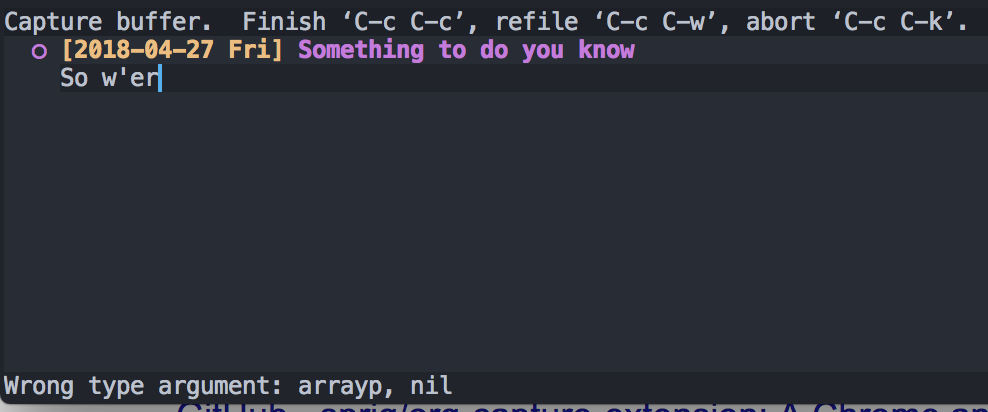
When entering org-mode capture via SPC - X am unable to delete any previous input when in vim INSERT mode. Any backspace results with an error: _Wrong type argument: arrayp, nil_
Expected behavior
Should be able to press Delete / Backspace to delete input?
Steps to reproduce
On develop branch:
1) Open any file in project
2) Open org capture mode through SPC - X
3) Begin input
4) Attempt to delete previous input by using delete / backspace key
5) _Wrong type argument: arrayp, nil_ error.
System information
Click to expand
- OS: darwin (x86_64-apple-darwin17.5.0)
- Emacs: 25.3.1 (Apr 23, 2018)
- Doom: 2.0.9 (develop https://github.com/hlissner/doom-emacs/commit/39b08b4d05fb754080f54011c8ee770a1d645a84)
- Graphic display: t (daemon: nil)
- System features: JPEG RSVG IMAGEMAGICK NOTIFY ACL GNUTLS LIBXML2 ZLIB TOOLKIT_SCROLL_BARS NS MODULES
- Details:
  ```elisp
  uname -a:  Darwin Pauls-Macbook-Pro.local 17.5.0 Darwin Kernel Version 17.5.0: Fri Apr 13 19:32:32 PDT 2018; root:xnu-4570.51.2~1/RELEASE_X86_64 x86_64
  modules:   (:feature (eval nil) (evil (+everywhere)) (file-templates nil) (lookup (+devdocs +docsets)) (services nil) (snippets nil) (spellcheck nil) (syntax-checker nil) (version-control nil) (workspaces nil) :completion (ivy nil) :ui (doom-dashboard nil) (doom-modeline nil) (doom-quit nil) (evil-goggles nil) (hl-todo nil) (nav-flash nil) (vi-tilde-fringe nil) (window-select nil) :tools (ein nil) (electric-indent nil) (eshell nil) (gist nil) (imenu nil) (impatient-mode nil) (make nil) (neotree nil) (password-store nil) (pdf nil) (rotate-text nil) (term nil) (tmux nil) (upload nil) :lang (cc nil) (crystal nil) (clojure nil) (csharp nil) (data nil) (elixir nil) (elm nil) (emacs-lisp nil) (ess nil) (go nil) (haskell (+intero)) (hy nil) (java (+meghanada)) (javascript nil) (julia nil) (latex nil) (ledger nil) (lua nil) (markdown nil) (nix nil) (ocaml nil) (org (+attach +babel +capture +export +present +publish)) (perl nil) (php nil) (plantuml nil) (purescript nil) (python nil) (rest nil) (ruby nil) (rust nil) (scala nil) (sh nil) (swift nil) (web nil) :config)
  packages:  (ace-link ace-window adaptive-wrap alchemist all-the-icons anaconda-mode android-mode async auctex auto-compile auto-yasnippet avy (centered-window :recipe (centered-window :fetcher github :repo anler/centered-window-mode)) cider clj-refactor cmake-mode coffee-mode command-log-mode company company-anaconda company-auctex company-dict (company-glsl :recipe (company-glsl :fetcher github :repo Kaali/company-glsl)) company-go company-inf-ruby company-irony company-irony-c-headers company-lua company-php company-racer company-restclient company-shell company-sourcekit company-statistics company-web counsel counsel-css counsel-dash counsel-projectile crystal-mode csharp-mode cuda-mode demangle-mode devdocs dired-k disaster dockerfile-mode doom-themes dumb-jump editorconfig ein elixir-mode elm-mode (emacs-snippets :recipe (emacs-snippets :fetcher github :repo hlissner/emacs-snippets :files (*))) emmet-mode ensime eslintd-fix ess ess-R-data-view ess-smart-equals evil evil-anzu evil-args evil-collection evil-commentary evil-easymotion evil-embrace evil-escape evil-exchange evil-goggles evil-indent-plus evil-ledger evil-matchit evil-mc evil-multiedit evil-numbers evil-org evil-snipe evil-surround evil-textobj-anyblock evil-vimish-fold evil-visualstar (exec-path-from-shell :ignore nil) expand-region flycheck flycheck-cask flycheck-crystal flycheck-elm flycheck-irony flycheck-ledger flycheck-perl6 flycheck-plantuml flycheck-popup-tip flycheck-pos-tip flycheck-rust flyspell flyspell-correct flyspell-correct-ivy fringe-helper gist git-gutter-fringe git-link git-timemachine gitconfig-mode gitignore-mode glsl-mode go-eldoc go-guru go-mode gorepl-mode graphql-mode groovy-mode haml-mode haskell-mode haxor-mode helpful hide-mode-line highlight-indentation highlight-numbers highlight-quoted hindent hl-todo htmlize hy-mode hydra imenu-anywhere imenu-list impatient-mode inf-crystal inf-ruby intero irony irony-eldoc ivy ivy-bibtex ivy-hydra ivy-rich ivy-rtags ivy-xref js2-mode js2-refactor json-mode julia-mode ledger-mode less-css-mode lua-mode macrostep makefile-executor markdown-mode markdown-toc meghanada merlin mips-mode modern-cpp-font-lock moonscript multi-term nasm-mode nav-flash neotree nix-mode nlinum nlinum-hl nlinum-relative nodejs-repl nose ob-crystal ob-go ob-mongo ob-rust ob-sql-mode ob-translate omnisharp opencl-mode (org-bullets :recipe (org-bullets :fetcher github :repo Kaligule/org-bullets)) org-download org-plus-contrib org-tree-slide (osx-clipboard :ignore nil) overseer ox-pandoc ox-reveal pass password-store pcre2el pdf-tools perl6-mode persistent-soft persp-mode php-boris (php-extras :recipe (php-extras :fetcher github :repo arnested/php-extras)) php-mode php-refactor-mode phpunit pip-requirements plantuml-mode prodigy projectile psc-ide pug-mode purescript-mode quelpa quickrun racer rainbow-delimiters rainbow-mode rake restclient rjsx-mode (rotate-text :recipe (rotate-text :fetcher github :repo debug-ito/rotate-text.el)) rspec-mode rtags ruby-refactor rust-mode sass-mode sbt-mode scala-mode shackle shader-mode shrink-path skewer-mode slime smart-forward smartparens smex solaire-mode ssh-deploy stylus-mode swift-mode swiper tide toc-org toml-mode tuareg typescript-mode undo-tree use-package vi-tilde-fringe vimrc-mode visual-fill-column web-beautify web-mode wgrep which-key xref-js2 yaml-mode yard-mode yasnippet)
  elc dirs:  n/a
  exec-path: (/Users/paulsaumets/dev/work/project-test/node_modules/.bin/ /Users/paulsaumets/.rvm/gems/ruby-2.4.2/bin/ /Users/paulsaumets/.rvm/gems/ruby-2.4.2@global/bin/ /Users/paulsaumets/.rvm/rubies/ruby-2.4.2/bin/ /usr/local/Caskroom/google-cloud-sdk/latest/google-cloud-sdk/bin/ /Users/paulsaumets/.nvm/versions/node/v8.11.1/bin/ ~/bin/ /usr/local/sbin/ /bin/ /usr/local/bin/ /usr/bin/ /bin/ /usr/sbin/ /sbin/ /Users/paulsaumets/.rvm/bin/ /usr/local/Cellar/emacs-plus/25.3/libexec/emacs/25.3/x86_64-apple-darwin17.5.0/)
  ```
 skalfyfan
All 9 comments
I'm unable to reproduce this.
Could you do M-x toggle-debug-on-error, invoke the error, and paste the resulting backtrace here?
 hlissner
on 28 Apr 2018
hlissner
on 28 Apr 2018
@hlissner sure thing! Here you go:

Here I am beginning to type a TODO item using the todo template. I start hitting BACKSPACE just after _..djf_ in the screenshot and continually get the error. That's why you see it happened [11 times]. I kept trying to hit backspace and kept getting the error. 🤔
I've tried completely wiping my org dir (rm -rf ~/org) and it hasn't helped. The issue keeps popping up.
Hope this helps?
skalfyfan
on 28 Apr 2018
This happens only the first time I do SPC-X
Does not happen on subsequent captures with me. I am using Master branch on MacOs.
Seems like it works for me, not sure what fixed it(tinkered with config a lot), will debug once i encounter it again..
 baljeet
on 28 Apr 2018
baljeet
on 28 Apr 2018
@baljeet Interesting! I just noticed this too. If I wipe my org home dir rm -fr ~/org then I will see this issue using _org-capture_ for each of the default templates (notes and todos). After the ~/org directory is re-created and after entering _org-capture_ mode, the first time I enter any of these templates (todo or notes) I encounter this issue.
After I encounter the issue and close org-capture (C-c C-k) then if I go in a second time then the issue seems to disappear? 🤔
skalfyfan
on 29 Apr 2018
@skalfyfan I've still yet to reproduce this. I was hoping when you enabled toggle-debug-on-error, you would receive a backtrace, rather than some errors in the log. Does it not trigger a backtrace?
@baljeet You mentioned you use the master branch of Doom. I would highly recommend switching to develop, a lot has changed, but also a great many bugs have been resolved there.
In any case, do either of you still have this issue? Doom (and the lang/org module) have undergone quite a number of changes, so perhaps it was fixed indirectly?
hlissner
on 2 Jun 2018
I had the same issue in develop branch.
 linuxing3
on 5 Jun 2018
linuxing3
on 5 Jun 2018
@hlissner I did try develop branch around a month back and it was breaking for me, will try it again (maybe tomorrow)...
baljeet
on 9 Jun 2018
If you can reproduce it, please see if you can trigger a backtrace (turn on M-x toggle-debug-on-error, trigger the error, and copy the output of the new Backtrace popup). That would be help me debug this issue a lot!
hlissner
on 15 Jun 2018
I've finally reproduced this. A combination of 3f2318bc, b5baeb81 and 02caf4ee should fix this issue.
Why it happens: If your org-capture target file doesn't exist, Emacs will try to create it. However, the file templates module sees this new, empty org file and kicks in, throwing in an org template and expanding it with yasnippet. This happens before org-capture sets up its capture window, confusing yasnippet in the process.
Those errors came from a snippet command that is attached to backspace, which expects a snippet to be active, but since it isn't...
Anyhow, please update and let me know if the issue resurfaces!
hlissner
on 16 Jun 2018
Related issues
 rgrinberg
·
3Comments
rgrinberg
·
3Comments
 gueorgui
·
3Comments
gueorgui
·
3Comments
 laishulu
·
3Comments
laishulu
·
3Comments
 benjaminbauer
·
3Comments
benjaminbauer
·
3Comments
 Ptival
·
3Comments
Ptival
·
3Comments