Hello.
I was curious if there is any easy way to use Python 3 in place of Python 2.
Thank you
 octothorpeSpeed
All 6 comments
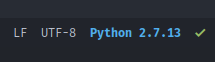
This strongly depends on how you manage python versions on your system. I use pyenv, which lets me set the default python versions system-wide, for the current shell, or for specific directories, and Doom is configured to pick this up. So if you have python3 enabled, syntax checking, code evaluation, the repl, etc. should all be using python 3. You'd also be able to see it in the mode-line:
If pyenv isn't for you, this should be enough to get everything working (assuming your python executable is named "python3"):
(setq python-shell-interpreter "python3"
      flycheck-python-pycompile-executable "python3")
Let me know if that works for you.
 hlissner
on 25 Sep 2017
hlissner
on 25 Sep 2017
Conda is also a great way to manage python virtual environments!
 jcrotts
on 27 Sep 2017
jcrotts
on 27 Sep 2017
This strongly depends on how you manage python versions on your system. I use pyenv, which lets me set the default python versions system-wide, for the current shell, or for specific directories, and Doom is configured to pick this up. So if you have python3 enabled, syntax checking, code evaluation, the repl, etc. should all be using python 3. You'd also be able to see it in the mode-line:
If pyenv isn't for you, this should be enough to get everything working (assuming your python executable is named "python3"):
(setq python-shell-interpreter "python3"
      flycheck-python-pycompile-executable "python3")
Let me know if that works for you.
Hi hlissner, the command
(setq python-shell-interpreter "python3"
      flycheck-python-pycompile-executable "python3")
did not work for me and my doom emacs still detects python2.7. I don't use pyenv and I just run python3 to launch python3. What can I do to make doom show python3?
 NieTiger
on 21 Apr 2020
NieTiger
on 21 Apr 2020
@tiega Can you be more specific? Where does it "show python3"? If in the modeline, then add this to your config:
(setq doom-modeline-env-python-executable "python3")
See doom-modeline for other config options.
hlissner
on 22 Apr 2020
@hlissner Yes in my modeline it still shows python 2.7.17 even after adding the following to my config:
(setq python-shell-interpreter "python3"
      flycheck-python-pycompile-executable "python3")
(setq doom-modeline-env-python-executable "python3")
Anything else I could try? Thanks!
NieTiger
on 22 Apr 2020
This alone worked for me (in vanilla Doom).
(after! python
  (setq python-shell-interpreter "python3"))
If it doesn't work for you, please double check your config. There is likely a conflict.
hlissner
on 22 Apr 2020
Related issues
 randomizedthinking
·
3Comments
randomizedthinking
·
3Comments
 AloisJanicek
·
3Comments
AloisJanicek
·
3Comments
 luisenrike
·
3Comments
luisenrike
·
3Comments
 waymondo
·
3Comments
waymondo
·
3Comments
 ashiklom
·
3Comments
ashiklom
·
3Comments
Most helpful comment
This strongly depends on how you manage python versions on your system. I use pyenv, which lets me set the default python versions system-wide, for the current shell, or for specific directories, and Doom is configured to pick this up. So if you have python3 enabled, syntax checking, code evaluation, the repl, etc. should all be using python 3. You'd also be able to see it in the mode-line:
If pyenv isn't for you, this should be enough to get everything working (assuming your python executable is named "python3"):
Let me know if that works for you.