Domoticz: MySensors V_TEXT variable two-way update
Status for this bug is following:
- Have been around from the beginning of V_TEXT sensor presentation ~couple of years.
- There have been questions about this on Domoticz and MySensors forums without specific answers why it works like it does
- Latest related bug issue on this git repository is about one year old and response: "not easy to implement" -> issue closed
- MySensors is widely used home automation framework and Domoticz the most used companion controller with it
And the actual issue:
If you define V_TEXT sensor in MySensors node:
- It will show ok in utility tab on Domoticz
- You can update it normally in the node and the update will be transferred to Domoticz
- You can update this sensor in Domoticz via REST API, scripts etc, but the update will never be signaled back to the node.
For node to receive the update you need to (these are community made hacks I have seen so far):
- Have a dummy loop in node sketch to periodically send a request command. When Domoticz receives this request command, it will send the current V_TEXT value changeg or not. This is against every good coding practices.
- Create a script on Domoticz which sends (MySensors message) with a netcat command or MQTT publish directly to the node or gateway when the V_TEXT sensor is updated. Basically this is a diversion/bypass functionality to the very core of Domoticz logic.
- Use dimmer as a dummy parameter passing sensor so that when dimmer value is something then the node does something eg. if dim value is 33% then send specific IR code. Problem is that this just looks plain stupid and is misleading from user perspective.
- Classic dummy switch on Domo: If V_TEXT value is changed in Domo, change dummy switch status and when the node gets the dummy switch status update it knows to send the request command so that Domo will actually send V_TEXT value. Probably the most used work-around, but also complicated and requires extra dummy defintions in both ends.
Domoticz knows how to send the V_TEXT value (request command from node). Why in the earth it cannot send the update when the sensor is updated in it? For example I have one virtual selector where every level action is a REST API update to one V_TEXT sensor. These updates are just numbers telling to the node which led animation I want to run. The text sensor on Domo gets updated as it should, but the updates will never be signaled back to the node.
This is not a small nuance, but a quite big problem with many home automation projects. Basically it means that you cannot pass parameters to the nodes which is quite a mandatory functionality with any even little more advanced projects than basic switch/temp ones. From MySensors perspective everything is similar with other sensor types. I tested this with OpenHAB and V_TEXT updates on gui was transferred like any other sensor updates to the node.
After so long time having this bug around and people really struggling with it, it would be nice to hear even a short explanation why this is so hard? Of course updateable V_TEXT sensor field on Domo gui would be nice, but even having REST/Script V_TEXT sensor updates signaled back to the node would be a very welcome step forward with this.
 sushukka
All 15 comments
This is not a bug, it is just not implemented. Better file a feature request on the forum as this is only used for bug fixes.This is an Open Source project, feel free to add your contribution to the project.
 sweetpants
on 7 May 2018
sweetpants
on 7 May 2018
Ok, this is now added to the forums's "suggestions" board. Hope it will be noticed.
I wrote this "bug" report here to see if there are actually anyone reading or giving a fck anymore. No responses in the forums, and as mentioned earlier there is already: https://github.com/domoticz/domoticz/issues/220 in this git from 11/2015 addressing this issue. Open source or not, this is very long period.
Also just stating "code it yourself" is not very fruitful especially when it seems to be a common answer. Without any explanation you think that I could dig into your code and build this feature especially when you, the author, say that it's hard to implement?
You have a great widely used open source product, but after playing with many open source communities, Domoticz community atmosphere is sadly not very good. Main developers unmotivated, stressed out, too wide development scope...dunno, but it shows and makes harder to get people attracted contributing to this project.
sushukka
on 7 May 2018
Well, you don't have to use Domoticz. If you are not satisfied with it, please move to another (commercial) product and see if you get it supported there. The main developers work hard to implement new features and stability all in their spare time and your feature request is probably low on the list. BTW, i'm not one of the developers
sweetpants
on 7 May 2018
Just underlining my point. What was your added value to this question? Do it yourself, go away? Also why this issue should be low on the implementation list? Because it's not easy to implement? MySensors community is quite big and active and this is one of the biggest issues Domo has from its perspective.
This problem has been known for three years soon, I have been hacking around this for over a year now. After these three years there are still no explanation why this cannot be implemented. Is it Javascript related front-end issue, problems to register the update event in lower level event-management, is this sensor type somehow protected or locked from Domoticz's perspective... No place to start any investigation, brainstorming or helping to fix this. Moreover I assume that being able to pass the V_TEXT value back to the nodes would be useful from other APIs perspectives too than just MySensors.
I like to use Domoticz and would like to make it better. Have spread a good word of it to many people. Problem is this drama argumentation and dwarf attitude when you try to ask something. I don't want to be nasty, but just helping to point out one big issue many Domoticz users are facing now. I don't have much else to complain, it's a good product and that's why I'm still using it even there are lots of other open source alternatives available.
sushukka
on 7 May 2018
@sushukka, this is an open source project.
Meaning, those years you waited for 'someone' to add this feature ... could have been used to study a little c++ programming.
And you might have been able to implement this yourself.
I don't think it is that hard at all to implement this at all... Where did you read that a Domoticz core (c++) developer (or me) said it is to hard to implement ?
Steps to implement:
- create a sketch with a V_TEXT sensor (maybe use this as base https://forum.mysensors.org/topic/1957/lcd-clock-and-text-sensor-node-with-new-v_text/2)
- when there is an update to the text sensor (from a script/json.. not by a mysensor update itself), check if this text sensor belongs to a MySensor controller, if yes, send it to the controller
Also, as @sweetpants said, it is NOT a bug, it is just not implemented yet.
As you probably know, we all work on Domoticz in our spare (and sparse) time !
And some developers work on different parts of Domoticz, because they find that part more important.
Flaming to a old and respected user will not do you any good.
As you can create your own MySensor sketches (i hope !?) which are kind of c++ based, it should not be that hard to at least try implementing it, and if something does not work, or if you have any troubles during implementation, then just ask !
 gizmocuz
on 10 May 2018
gizmocuz
on 10 May 2018
Okey, after several hours work, i hope i can make you a happy domoticz user again
New beta, version 9418
You can now use the json api to directly update the text sensor and the MySensor S_INFO/V_TEXT child:
http://127.0.0.1:8080/json.htm?type=command¶m=udevice&idx=1063&nvalue=0&svalue=Yeah!!
AND... it is now possible to also update text/mysensor devices via Blockly, for example:
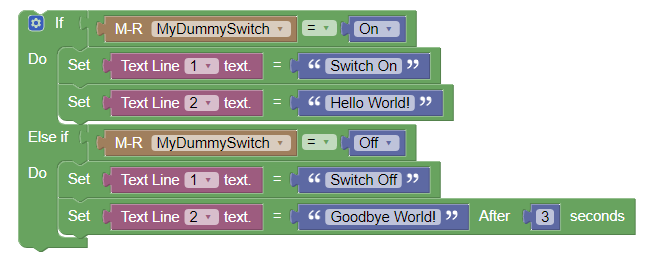
Or you can use Lua/dzVents/Python:
return {
    on = {
        timer = {'every minute'}
    },
    execute = function(domoticz)
        domoticz.devices('Text Line 1').updateText('hallo daar!')
    end
}
In your MySensors node, in the presentation function, present the text sensors to Domoticz.
I also directly request the latest value here:
void presentation()
{
    // Send the sketch version information to the gateway and Controller
    sendSketchInfo("V_TEXT LCD Sensor", "1.1");

  present(LCD1_CHILD_ID, S_INFO, "Text Line 1");
  present(LCD2_CHILD_ID, S_INFO, "Text Line 2");

  // Initializations
  requestTime();            // get the time from controller (handled by receiveTime)

  request(LCD1_CHILD_ID, V_TEXT, 0);           // request latest value from controller
  request(LCD2_CHILD_ID, V_TEXT, 0);          // request latest value from controller
}
The V_TEXT values are received via the 'receive' function like:
void receive(const MyMessage &message)
{
  if (message.type!=V_TEXT) // Text messages only
    return;

  // Write some debug info
  Serial.print("Message: ");
  Serial.print(message.sensor);
  Serial.print(", Message: ");
  Serial.println(message.getString());

  if (message.sensor == LCD1_CHILD_ID ) {
    snprintf(lastLCD1, sizeof(lastLCD1), "%20s", message.getString());  // load text into LCD string
  }
  else if (message.sensor == LCD2_CHILD_ID) {
    snprintf(lastLCD2, sizeof(lastLCD2), "%20s", message.getString());
  }
}
Seems to work great!
Here is the complete sketch
gizmocuz
on 10 May 2018
Hello,
I started already digging in to the source code after your first post, but didn't get far before you already had implemented the whole thing! 😮 👍 Thousand thanks!
I can read and write semicore C code. I have around 100 sensors connected to Domoticz, around 50 sketches averaging 500 lines each. So from C perspective I'm still getting there and still having challenges to understand all "& * :: vector << sstr" kind of notations. Have started to contribute in some small open source projects where my competence is somewhat useful, but Domoticz is little bit out of my reach yet.
And where I got the impression this feature implementation would be challenging: https://github.com/domoticz/domoticz/issues/220 Some developer named @gizmocuz gave that statement... 😄 I git checked code changes you made for this request and have to say that it would have taken ages to me to figure all that out. Maybe I could have managed to write some simple mess but the most challenging part is that I have no idea of the internal structure how everything is connected together. However, now after this change and reading it in code level, I got some small glimpse of the inner life of Domoticz. Maybe someday I'll know enough to be able to help with Domoticz development.
I tested this with couple of nodes. Took some time to get rid off the extra dummy switches, clean the sketch from different work-arounds, but now it seems to work just as it should! 👍 Have tested comprehensively with one normal MySensors Arduino Nano + NRF24L01 node connected to Ethernet MySensors Gateway -> no problems! However, I just started testing one ESP8266 MQTT node and it has some problems, but I have to dig deeper before claiming anything here. Just wanted to write an status update without longer delay.
And now according to the old issue #220 where there was a request to have a panel on web gui setting those values...doesn't sound that hard anymore. Either code own html snippet with the json command or change the V_TEXT sensor Domoticz html code to do that. This opens lots of new possibilities for MySensors users eg. pass short speech-to-text commands directly to the nodes, LCD screen updates, make nodes more generic and guide them by parameters/codes sent from Domoticz...
One question: does Domoticz have some limitation for the length of the TEXT sensor? I know that MySensors has 24bytes payload size, but just asking for another projects accessing directly Domoticz JSON API.
I'll inform MySensors forum of this update. There will be many happy faces after this! 😄
sushukka
on 10 May 2018
@sushukka, great it's working !
Not sure about MQTT, i have not much experience with this, but if you can walk me through how this should work (what needs to be send) i could have a look at this as well.
From what i see in the MQTT code, it does call "m_mainworker.UpdateDevice", so it also should work there.
The Internal text length is 200 characters.
Indeed i think that we should make sure that the text length is within the payload limit.
In the next beta i have add a check for this via:
void MySensorsBase::SendTextSensorValue(const int nodeID, const int childID, const std::string &tvalue)
{
std::string string2send = tvalue;
if (string2send.size() > MAX_PAYLOAD_LENGTH)
string2send.resize(MAX_PAYLOAD_LENGTH);
SendNodeCommand(nodeID, childID, MT_Set, V_TEXT, string2send);
}
where MAX_PAYLOAD_LENGTH is 25 (https://www.mysensors.org/download/serial_api_20)
gizmocuz
on 11 May 2018
Hello,
It seems that MQTT messages are not passed to Mosquitto if using JSON update for V_TEXT sensor.
I have two virtual selectors for one node. One for IR commands and one for LED animation choice for home number LED canvas. Also there are DHT temp sensor included. All in this node because of the physical proximity in real world.
LED selector has 10 different levels and everyone calls a python script like this:
script:///home/pi/domoticz/scripts/python/hnumber_led_mode.py 11
The hnumber_led_mode.py looks like this:
#!/usr/bin/env python3
"""
Script for sending LED mode update to MySensors home number lighting strip.
Initiator: Domoticz dummy selector switch
Trasnport: MQTT broker
Destination: home number MySensors node with V_TEXT sensor

"""
#import paho.mqtt.publish as mqttClient
import paho.mqtt.client as mqttClient
import sys

ledMode = sys.argv[1]
print("Parameter is: " + ledMode)

client = mqttClient.Client("Python")
client.username_pw_set(username="xxx",password="xxx")
client.connect("nnn", port)
client.publish('domoticz/out/HomeNum_IR/0/1/1/0/47',ledMode, retain=False)

"""
'mys-out/99/1/1/0/47' is the MQTT topic, and is decoded as follows:
0: Node ID (when using ESP8266 GW node is always 0)
1: ChildId
1: command (Set in this case)
0: ACK (None in this case)
47: V_TYPE (V_TEXT in this case)
"""
If I use the script the command will be transferred ok to the domoticz/out/HomeNum queue. I looks like this when monitoring it with MQTTbox Chrome extension:
LED mode (V_TEXT) to 2 change:
2
qos : 0, retain : false, cmd : publish, dup : false, topic : domoticz/out/HomeNum_IR/0/1/1/0/47, messageId : , length : 37
Dimmer change (to 52%):
52
qos : 0, retain : false, cmd : publish, dup : false, topic : domoticz/out/HomeNum_IR/0/2/1/1/3, messageId : , length : 37
If using JSON API in Domoticz there will appear no updates to this queue.
Alternative for MQTT is to use ESP8266 Ethernet MySensors Gateway and corresponding Python script would then look something like this:
#!/usr/bin/python3

import socket
from time import sleep

def gwsend(hostname, port, content):
    s = socket.socket(socket.AF_INET, socket.SOCK_STREAM)
    s.connect((hostname, port))
    sleep(1)
    s.sendall(content)
    s.shutdown(socket.SHUT_WR)
    s.close()


string = str.encode("some text")  # Your TEXT message
gwsend("ESP8266_IP", 5003, b"2;1;1;1;47;" + string + b"\n")
However as mentioned before, ethernet gateway communication seems to work with V_TEXT now without these scripts. Haven't tested it yet with ESP8266 but should be working as my previous test was against Arduino based MySensors ethernet GW. From MySensors and Domoticz perspective this is pretty much the same than MySensors Ethernet GW on ESP8266 Wifi.
The sketch code is here (changed the original long one to shorter test sketch):
/*
 * V_TEXT, Domoticz, MySensors MQTT test sketch
 */
// Enable debug prints to serial monitor
#define MY_DEBUG

#define MY_GATEWAY_MQTT_CLIENT
#define MY_GATEWAY_ESP8266

#define MY_ESP8266_SSID "xxx"
#define MY_ESP8266_PASSWORD "xxx"

// Set this node's subscribe and publish topic prefix
#define MY_MQTT_PUBLISH_TOPIC_PREFIX "domoticz/in/TestNode"
#define MY_MQTT_SUBSCRIBE_TOPIC_PREFIX "domoticz/out/TestNode"

// Set MQTT client id
#define MY_MQTT_CLIENT_ID "TestNode"

// Enable these if your MQTT broker requires username/password
#define MY_MQTT_USER "xxx"
#define MY_MQTT_PASSWORD "xxx"

// Set the hostname for the WiFi Client. This is the hostname
// it will pass to the DHCP server if not static.
#define MY_ESP8266_HOSTNAME "ESP8266-Test"

// MQTT broker ip address.
#define MY_CONTROLLER_IP_ADDRESS xxx

// The MQTT broker port to to open
#define MY_PORT nnn

#include <ESP8266WiFi.h>
#include <MySensors.h>

MyMessage msgTest(0, V_TEXT);

int i = 0;
String temp = "";

void presentation() {
  sendSketchInfo("ESP8266-Test", "1.0");
  present(0, S_INFO, "V_TEXT - Test");
}

void setup() {
  Serial.begin(115200);
}

void loop() {
  wait(20000);
  temp = "Counter:" + String(i++);
  send(msgTest.set(temp.c_str()));
}

void receive(const MyMessage &message) {
  if (message.type==V_TEXT)
      Serial.println("V_TEXT update");

  Serial.print("MySensor message received:");
  Serial.println(message.sensor);
  Serial.println(message.type);
  Serial.println(message.sender);
}
Okey this goes a bit to far for me.
What i just tested, when you update a V_TEXT sensor, this is also pushed to MQTT:
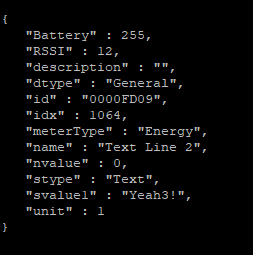
So that part is working.
So you say when you force a update via MQTT, it is not send to MySensors ?
If that is the issue, please specify what you send to MQTT to trigger a V_TEXT change, if possible with an example command line
gizmocuz
on 12 May 2018
Hmm, by which method you update the V_TEXT sensor, JSON?
I updated the test sketch in my previous comment because the original one had too much irrelevant code. Now minimal sketch which has the same problem.
I get only PING responses back from Domoticz and it seems that the node gets them too. However, all values to the V_TEXT sensor I update via JSON interface will be updated in Domoticz but will not be sent to the MQTT queue. Here is an overview picture of the testing:

Node seems to receive the PING messages as they are shown in the Arduino monitor. If the message would be a "normal" message, Receive function should catch it and execute the Serial.print commands in the sketch. I converted the sketch to Ethernet/ESP8266 GW:
/*
 * V_TEXT, Domoticz, MySensors MQTT test sketch
 */
// Enable debug prints to serial monitor
#define MY_DEBUG

//#define MY_GATEWAY_MQTT_CLIENT
#define MY_GATEWAY_ESP8266

#define MY_ESP8266_SSID "xxx"
#define MY_ESP8266_PASSWORD "xxx"

// How many clients should be able to connect to this gateway (default 1)
#define MY_GATEWAY_MAX_CLIENTS 2

// The port to keep open on node server mode / or port to contact in client mode
#define MY_PORT 5003

/*
// Set this node's subscribe and publish topic prefix
#define MY_MQTT_PUBLISH_TOPIC_PREFIX "domoticz/in/TestNode"
#define MY_MQTT_SUBSCRIBE_TOPIC_PREFIX "domoticz/out/TestNode"

// Set MQTT client id
#define MY_MQTT_CLIENT_ID "TestNode"

// Enable these if your MQTT broker requires username/password
#define MY_MQTT_USER "xxx"
#define MY_MQTT_PASSWORD "xxx"

// Set the hostname for the WiFi Client. This is the hostname
// it will pass to the DHCP server if not static.
#define MY_ESP8266_HOSTNAME "ESP8266-Test"

// MQTT broker ip address.
#define MY_CONTROLLER_IP_ADDRESS xxx

// The MQTT broker port to to open
#define MY_PORT 1883
*/
#include <ESP8266WiFi.h>
#include <MySensors.h>

MyMessage msgTest(0, V_TEXT);

int i = 0;
String temp = "";

void presentation() {
  sendSketchInfo("ESP8266-Test", "1.0");
  present(0, S_INFO, "V_TEXT - Test");
}

void setup() {
  Serial.begin(115200);
}

void loop() {
  wait(20000);
  temp = "Counter:" + String(i++);
  send(msgTest.set(temp.c_str()));
}

void receive(const MyMessage &message) {
  if (message.type==V_TEXT)
      Serial.println("V_TEXT update");

  Serial.print("MySensor message received:");
  Serial.println(message.sensor);
  Serial.println(message.type);
  Serial.println(message.sender);
  Serial.println(message.getString());
}
Tested with browser: http://xxx/json.htm?type=command¶m=udevice&idx=298&nvalue=0&svalue=TestValue
--> Arduino serial monitor:
55486 GWT:RFC:C=0,MSG=0;0;1;0;47;TestValue
V_TEXT update
MySensor message received:0
47
0
TestValue
62348 GWT:RFC:C=0,MSG=0;0;3;0;18;PING
72281 GWT:RFC:C=0,MSG=0;0;3;0;18;PING
So Ethernet/LAN GW works but MQTT don't. Maybe I have something wrong with my Mosquitto, but as the PINGs and normal switch commands run in both directions I assume that there are still something missing with this V_TEXT and MQTT stuff.
I'll try to update to the latest beta. I'm running now on version: 3.9421. If not working, I can try to find the problem from the code, but it will take some time... or I'll find nothing. 😄
sushukka
on 12 May 2018
Ahhh yes, that hardware picture says 1000 words ... i forgot there was a MQTT version of the gateway as well!
Moment... i need to add some small code changes!
gizmocuz
on 13 May 2018
Try the new beta (9431), it should now also send the V_TEXT back to a MQTT based gateway
gizmocuz
on 13 May 2018
There are indeed quite a long list of supported hardware and protocols in Domoticz... Just found the Onkyo amplifier plugin and tadaa now my amplifier is in Domoticz! 😄 Also made a little modifications to my router and now there are sensors in Domo showing the current WAN download/upload speed. Having computer related sensor information could also be nice future plugin to Domoticz...and probably easy to implement.
And yes, there are three ways to connect MySensors gateways to Domoticz:
- Serial gateway; direct connection via USB/Serial, commonly used, easiest to setup.
- Ethernet gateway. Arduinos with ethernet shields or ESP8266 based WiFi boards.
- MQTT client. Arduinos with ethernet shields or ESP8266 WiFi boards.
The two latter gives more possibilities monitoring the communication in the network (you can use ethernet, MQTT based tools eg. NodeRed).
Traditional way to use MySensors:
Often there are one common MySensors gateway between the nodes and Domoticz. These nodes use NRF24L01 transreceivers and forms own mesh type MySensors node network. This gateway can be any of the three types above. Before the gateway was always Arduino with NRF24L01 transreceiver, but now it seems that there would be possibility to use also ESP8266 with NRF24L01.
New way to use MySensors:
Because of popularity of WiFi based microcontrollers more and more MySensors nodes are connected directly to Domoticz. They act like either ethernet or MQTT gateways from Domoticz perspective. Also this brings more fault tolerancy as the gateway death means only losing one node. I mainly like to use ESP8266 boards (usually Wemos) in current projects as they seems to work reliable in freezing temperatures (outside/winter) and WiFi gives extra options like JSON queries from Domoticz etc.
But enough of that, you probably knew already all of this. Just wrote down if/when someone else is reading this. I tested this with my ESP8266 MQTT test node and now it works!!! Currently have no serial gateway anywhere, but as I spotted that you had made changes also to that code, I assume that the support is also there. Veryvery big thanks of this update, this will make many projects much simpler to implement and opens plenty of new possibilities to MySensors users. 😄 👍 💪
sushukka
on 13 May 2018
Thanks for the feedback. Yes i tested with Serial and TCP both working fine.
gizmocuz
on 13 May 2018
Related issues
 DAVIZINH0
·
10Comments
gizmocuz
·
19Comments
DAVIZINH0
·
10Comments
gizmocuz
·
19Comments
 empierre
·
17Comments
empierre
·
17Comments
 g-chevalier
·
22Comments
g-chevalier
·
22Comments
 salopette
·
5Comments
salopette
·
5Comments
Most helpful comment
Okey, after several hours work, i hope i can make you a happy domoticz user again
New beta, version 9418
You can now use the json api to directly update the text sensor and the MySensor S_INFO/V_TEXT child:
http://127.0.0.1:8080/json.htm?type=command¶m=udevice&idx=1063&nvalue=0&svalue=Yeah!!
AND... it is now possible to also update text/mysensor devices via Blockly, for example:
Or you can use Lua/dzVents/Python:
In your MySensors node, in the presentation function, present the text sensors to Domoticz.
I also directly request the latest value here:
The V_TEXT values are received via the 'receive' function like:
Seems to work great!
Here is the complete sketch
https://pastebin.com/KE4yLHJ2