Dolphinscheduler: why I cannot push files to hdfs
When I use the resource center to upload files to HDFS, the background log reports an error cn.escheduler.common.utils.hadoop utils.exists. How should I configure this? Thank you
(在我使用资源中心上传文件到hdfs的时候,后台日志报错 cn.escheduler.common.utils.HadoopUtils.exists,这个应该怎么配置?谢谢)
 zhangkaikai
All 3 comments
If the dolphinscheduler is already running, if you want to enable HDFS in the resource center;
(如果dolphinscheduler已经在运行,这时候如果要在资源中心开启HDFS功能)
1、Modify configuration file.
(修改如下的配置文件)
conf/common/common.properties ###
# Users who have permission to create directories under the HDFS root path
hdfs.root.user=hdfs
# data base dir, resource file will store to this hadoop hdfs path, self configuration, please make sure the directory exists on hdfs and have read write permissions。"/escheduler" is recommended
data.store2hdfs.basepath=/escheduler
# resource upload startup type : HDFS,S3,NONE
res.upload.startup.type=HDFS
# whether kerberos starts
hadoop.security.authentication.startup.state=false
# java.security.krb5.conf path
java.security.krb5.conf.path=/opt/krb5.conf
# loginUserFromKeytab user
[email protected]
# loginUserFromKeytab path
login.user.keytab.path=/opt/hdfs.headless.keytab
Modify the corresponding parameters according to your own cluster environment. Both api-server and worker-server services need to be configured, modified, and restarted. Since the system is already running, it will not help us create the root and tenant directories, so we need to manually create the root and tenant-related directories.
(根据自己集群环境修改对应的参数,api-server和worker-server两类服务都需要做配置,修改并重启服务,由于系统已经在运行,因此无法帮助我们创建根目录和租户目录,因此我们需要手动创建与根目录和租户相关的目录)
E.g
deploy user: dolphinscheduler
data.store2hdfs.basepath:/escheduler
tenant user:tim
# mkdir root
hadoop fs -mkdir  /escheduler
# mkdir tenant
hadoop fs -mkdir -p /escheduler/tim/{resources,udfs}
# change
hadoop fs -chown -R  dolphinscheduler:dolphinscheduler   /escheduler
conf/common/hadoop/hadoop.properties
# ha or single namenode,If namenode ha needs to copy core-site.xml and hdfs-site.xml
# to the conf directory,support s3,for example : s3a://dolphinscheduler
fs.defaultFS=hdfs://mycluster:8020
2、Copy File
(复制文件)
Copy core-site.xml, hdfs-site.xml from the Hadoop cluster to the conf directory.Both api-server and worker-server services need to be configured, modified, and restarted
(从Hadoop集群复制core-site.xml、hdfs-site.xml到conf目录下,api-server和worker-server两类服务都需要做配置,修改并重启服务)
After the modification, you can use the HDFS function.(修改完后,就可以使用HDFS功能)
 lfyee
on 13 Nov 2019
lfyee
on 13 Nov 2019
@lfyee 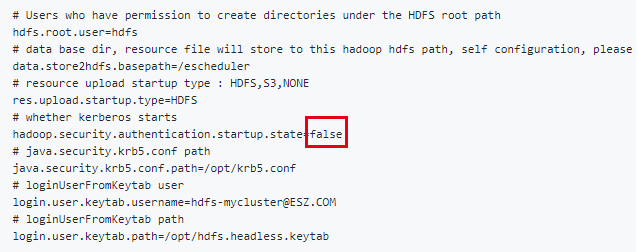
这里应该是true把?
 JunjianS
on 10 Apr 2020
JunjianS
on 10 Apr 2020
@lfyee
这里应该是true把?
Set to false if authentication is not required, otherwise true
 samz406
on 24 Jun 2020
samz406
on 24 Jun 2020
Related issues
 felix-thinkingdata
·
6Comments
felix-thinkingdata
·
6Comments
 boandai
·
4Comments
boandai
·
4Comments
 JinyLeeChina
·
3Comments
JinyLeeChina
·
3Comments
 bingexxx
·
5Comments
bingexxx
·
5Comments
 CalvinKirs
·
6Comments
CalvinKirs
·
6Comments
Most helpful comment
If the dolphinscheduler is already running, if you want to enable HDFS in the resource center;
(如果dolphinscheduler已经在运行,这时候如果要在资源中心开启HDFS功能)
1、Modify configuration file.
(修改如下的配置文件)
conf/common/common.properties ###
Modify the corresponding parameters according to your own cluster environment. Both api-server and worker-server services need to be configured, modified, and restarted. Since the system is already running, it will not help us create the root and tenant directories, so we need to manually create the root and tenant-related directories.
(根据自己集群环境修改对应的参数,api-server和worker-server两类服务都需要做配置,修改并重启服务,由于系统已经在运行,因此无法帮助我们创建根目录和租户目录,因此我们需要手动创建与根目录和租户相关的目录)
E.g
deploy user: dolphinscheduler
data.store2hdfs.basepath:/escheduler
tenant user:tim
conf/common/hadoop/hadoop.properties
2、Copy File
(复制文件)
Copy core-site.xml, hdfs-site.xml from the Hadoop cluster to the conf directory.Both api-server and worker-server services need to be configured, modified, and restarted
(从Hadoop集群复制core-site.xml、hdfs-site.xml到conf目录下,api-server和worker-server两类服务都需要做配置,修改并重启服务)
After the modification, you can use the HDFS function.(修改完后,就可以使用HDFS功能)