This issue is to follow possible task to enhance Dolibarr look and feel.
Cut and paste of french email (to translate)
[] Replace picto of status with a badge with the text and color in background like in this example
https://adminlte.io/themes/AdminLTE/pages/tables/simple.html (see table Responsive Hover Table). Can be done by changing function getNomUrl().
[] replace icons with fontawesome (like adminlte) or css. Cela peut être fait aussi dans eldy et ne sera plus à faire.
[] alerts in badge in top menu.
[] popup on login with logout. Can be done in eldy.
[] mise en place de menu déroulant (toutefois la tendance, poussé par le mobile first est à mettre les menu dans la barre du haut en déroulant et sous menu déroulant en mode desktop et de ne plus avoir du tout de menu sur la gauche ou droite en mode deskop, pour laisser le max de place aux listes, et surtout permettre un responsive des liste qui peuvent se déplacer de gauche à droite sans bouger tout le reste pout tout type de taille, comme on a quand on utilise eldy en mode smartphone, mais qu'on a pas en mode desktop à cause de ce menu gauche qui complique la vie au css rendant cela non possible en mode desktop tant qu'on a un menu gauche)
[] ajouter plus de widget graphiques
[] remplacer les graph de la lib jgraph par ce qui se fait dans admin LTE (graph en svg il me semble)
[] component to build small lists
[] fil ariane
 eldy
eldy
All 73 comments
+1 for all your ideas
Maybe we can have for Dolibarr a free fontawesome pro licence :-p
 dolibarr95
on 10 Sep 2018
dolibarr95
on 10 Sep 2018
I start with a little one for tabs -> https://github.com/Dolibarr/dolibarr/pull/9512
 atm-john
on 20 Sep 2018
atm-john
on 20 Sep 2018
We plan with @atm-john to create a new modern theme with these improvements, goal is to have a first version for the end of the year
 atm-maxime
on 20 Sep 2018
atm-maxime
on 20 Sep 2018
For information I start a theme test here : https://github.com/atm-john/dolibarr_theme_evolution
atm-john
on 23 Oct 2018
Nice!
Can you please provide a screenshot ?
dolibarr95
on 23 Oct 2018

menu have font awesome
menu hover and active have arrow and border effect

atm-john
on 24 Oct 2018
+1
dolibarr95
on 24 Oct 2018
Good!
You still keep the left menu ?
For me is the thing that is the most not user friendly in Dolibarr
 ksar-ksar
on 24 Oct 2018
ksar-ksar
on 24 Oct 2018
step by step, first improuve visual to make Dolibarr "sexy" without lost accustomed user by adding strong changes.
And in future when left menu will disappear, I think we will need to keep left menu with a fall back option.
I think really important to keep final user in center of ergonomic choices and do not disturb the habit.
atm-john
on 24 Oct 2018
For information I start a theme test here : https://github.com/atm-john/dolibarr_theme_evolution
@atm-john what is still pending in the list of @eldy ?
 laudeco
on 24 Oct 2018
laudeco
on 24 Oct 2018
@atm-john do you make a link directly to fontawesome.com or copy paste the theme folder ?
dolibarr95
on 24 Oct 2018
All :-)
I just start working on it for one day my planning 2 days each 2 week.
Actually just one point is done: menu font awesome icon: but still remain to include in eldy, I currently testing
This point is not really finished yet because I'm working on a solution to allow modules to add svg or font icons without load extra style sheet on each page for each modules.
I currently work on this points too :
- alerts in badge in top menu.
- popup on login with logout. Can be done in eldy.
- Replace picto of status with a badge with the text and color in background
Globally I work to improuve global look and feel an a new theme call evolution, but I use this same theme to testing somme new visual elements of eldy theme too, and after 2 week of tests I make a Pr in eldy theme to include elements common to both themes.
atm-john
on 24 Oct 2018
@dolibarr95 fontawesome is already in Dolibarr from version 6.0.
atm-john
on 24 Oct 2018
@atm-john oups...
/theme/common/fontawesome/css/font-awesome.min.css
dolibarr95
on 24 Oct 2018
@eldy what do you expect when you say ?
[] replace icons with fontawesome (like adminlte) or css. Cela peut être fait aussi dans eldy et ne sera plus à faire.
You would like all icons will change to fontawesome (FA) or just icons from the menu or ...
Another question, how do you see this ? We change the HTML (it means that not only the eldy theme will be impacted).
laudeco
on 24 Oct 2018
remplacer les graph de la lib jgraph par ce qui se fait dans admin LTE
Admin Lte use same version of flot
first step with bars: https://github.com/Dolibarr/dolibarr/pull/9867
Hum my memory is kidding me... someone could tell where I can find line graph in dolibarr ? (not bars but lines)
@laudeco Actualy core modules icon are set by css (show evolution theme)
atm-john
on 24 Oct 2018
I did one step more to font awesome, I migrated to the latest version #9871
laudeco
on 25 Oct 2018
@laudeco For the moment, i was thinking in term of priority to the images used for top menu, but other picto may also be concerned
eldy
on 26 Oct 2018
I just stumbled upon this and thought maybe my local changes might help you with some ideas? In terms of look and feel I changed the styling of tooltips to include fa-icons with an improved visual experience. I chose a black/white and dark grey contrast to encourage staff productivity. We stare at a screen to look for information even though it may be right in front of us. We chose to highlight our mandatory information. I also managed to integrate a copy to clipboard function (using clipboard.js) for text-type extrafields which helps us a lot when copy/paste text for website/customers/price labels. Our business is all around products. The tooltip design was mentioned in the forum. https://www.dolibarr.org/forum/tips-and-tricks/28574-better-tooltips


 aljawaid
on 22 Dec 2018
atm-john
on 22 Feb 2019
aljawaid
on 22 Dec 2018
atm-john
on 22 Feb 2019
for info #10770
atm-john
on 7 Mar 2019
for info : NEW/FIX Theme sidebarr toggle #10780
atm-john
on 8 Mar 2019
for info : #10812 new dropdown login menu
atm-john
on 12 Mar 2019
for info :#10960 for mobile
atm-john
on 4 Apr 2019
@eldy : you remove MAIN_TESTMENUHIDER global conf and it's usable only for mobile, but it's realy interesting to keep this behavior for PC with small screen.
Is it plan ?
atm-john
on 4 Apr 2019
For info : #11026
I working on this :


My branch :
https://github.com/atm-john/dolibarr/tree/new_look_and_feel_title_button
atm-john
on 15 Apr 2019
new hidden conf to use in Dolibarr V10 :
MAIN_STATUS_USES_CSS ► (v10.0+) Change status design using new style
MAIN_USE_NEW_TITLE_BUTTON ► (v10.0+) Use new list buttons design
atm-john
on 18 May 2019
Work in progress : your feedback are welcome :
the curent develop branch : https://github.com/atm-john/dolibarr/tree/develop_new_dashboard
for testing use hidden conf : MAIN_DISPLAY_NEW_OPENED_DASH_BOARD
PC :

TAB :

PHONE :

atm-john
on 2 Aug 2019
un peu de couleurs dans ce monde de brutes ! ;-)
 hregis
on 2 Aug 2019
hregis
on 2 Aug 2019
@atm-john +1
dolibarr95
on 2 Aug 2019
atm-john
on 6 Aug 2019
task in develop or Pull request pending
- [x] Replace picto of status with a badge with the text and color in background like in this example
https://adminlte.io/themes/AdminLTE/pages/tables/simple.html (see table Responsive Hover Table). Can be done by changing function getNomUrl(). - [x] replace icons with fontawesome (like adminlte) or css. Cela peut être fait aussi dans eldy et ne sera plus à faire.
- [x] popup on login with logout. Can be done in eldy.
- [x] remplacer les graph de la lib jgraph par ce qui se fait dans admin LTE (graph en svg il me semble) (or just add colors and config to jplot :-) )
work in progress : some parts are already in Dolibarr
- [ ] alerts in badge in top menu. => css exist, remain to add hooks and tools
- [x] ajouter plus de widget graphiques => #11643
remaining tasks
[ ] mise en place de menu déroulant (toutefois la tendance, poussé par le mobile first est à mettre les menu dans la barre du haut en déroulant et sous menu déroulant en mode desktop et de ne plus avoir du tout de menu sur la gauche ou droite en mode deskop, pour laisser le max de place aux listes, et surtout permettre un responsive des liste qui peuvent se déplacer de gauche à droite sans bouger tout le reste pout tout type de taille, comme on a quand on utilise eldy en mode smartphone, mais qu'on a pas en mode desktop à cause de ce menu gauche qui complique la vie au css rendant cela non possible en mode desktop tant qu'on a un menu gauche)
[ ] component to build small lists
- [ ] fil ariane
atm-john
on 6 Aug 2019
@atm-john about the top menu :
what about if we have a external module with a top menu link?
Is it mandatory to use a font-awesome icon or could we use a png...
Tks
dolibarr95
on 6 Aug 2019
you can use both as you prefer. Actually by default module use png, but you can change this behavior with a little bit of css
atm-john
on 6 Aug 2019
tks!
dolibarr95
on 6 Aug 2019
https://adminlte.io/themes/AdminLTE/pages/tables/simple.html
If Dolibarr could look like the above that would be awesome! @eldy how can we accelerate this?
 ariffidaali
on 8 Aug 2019
ariffidaali
on 8 Aug 2019
Hi
@ariffidaali by help coding 😋
dolibarr95
on 9 Aug 2019
11679 improve task list visualisation :-)
atm-john
on 12 Aug 2019
MAIN_DISPLAY_NEW_OPENED_DASH_BOARD
I have tried adding MAIN_DISPLAY_NEW_OPENED_DASH_BOARD but doesn't appears to work on my side... any other option to setup? I'm using Dolibarr 10.0.1
 maverjk
on 24 Aug 2019
maverjk
on 24 Aug 2019
New dash board is actually in Dolibarr Develop it will be available in Dolibarr 11
atm-john
on 25 Aug 2019
New ticket messaging page design : https://github.com/Dolibarr/dolibarr/pull/11869
atm-john
on 12 Sep 2019
@atm-john Wonderful i love it !!!
dolibarr95
on 13 Sep 2019
Curent pull request for menu #11792
atm-john
on 22 Sep 2019
Curent pull request for dashboard #11945 #11947
atm-john
on 22 Sep 2019
NEW : dropdown bookmark and search : https://github.com/Dolibarr/dolibarr/pull/11986
atm-john
on 29 Sep 2019
niiiiiice !!
dolibarr95
on 30 Sep 2019
I really love what you are doing @atm-john
How about replacing the "page icon" image with the font awesome icon? See image:

Thats something I might have time for.
 cfoellmann
on 30 Sep 2019
cfoellmann
on 30 Sep 2019
11963
dolibarr95
on 30 Sep 2019
11972 Move a lot of icon to fontawesome
 aspangaro
on 30 Sep 2019
aspangaro
on 30 Sep 2019
Thanks @aspangaro for your work!
I have 2 more ideas, maybe it can help:
pull in dependencies like "fontawesome" in via composer,yarn or sth similar
use something like https://github.com/lipis/flag-icon-css to replace the flag icons (i am not sure if svg can work in all places)
cfoellmann
on 30 Sep 2019
@cfoellmann +1 for flag-icon-css.lip.is/
dolibarr95
on 30 Sep 2019
@cfoellmann : I think replacing bitmap with svg as long as we can is a good thing : new high resolutions screens are coming...
I don't know if dolibarr uses dependencies with composer...
atm-john
on 30 Sep 2019
Thanks @aspangaro for your work!
I have 2 more ideas, maybe it can help:
- pull in dependencies like "fontawesome" in via composer,yarn or sth similar
- use something like https://github.com/lipis/flag-icon-css to replace the flag icons (i am not sure if svg can work in all places)
you for me we should use yarn for the front end libraries.
laudeco
on 30 Sep 2019
I think that the best approach is to maintain the full framework as light as possible. Starting to integrate other libraries or stuff like that just to render some pictures not is the best approach, a good css3 + svg and png can achieve any results.
maverjk
on 1 Oct 2019
@maverjk as you can see there is not much manpower behind this project.
Maintaining everything when proper libraries are around is just nonsense.
cfoellmann
on 1 Oct 2019
@cfoellmann I check, Dolibarr don't use dependencies with composer or ... (I am reassured)
I understand your point of view but the strength of Dolibarr is its stability over the new versions.
As @maverjk says, it is best to avoid overloading the existing with external libraries because I think become dependent on dependencies isn't a good long term strategic: I don't want to wake up one morning and find out that there is an urgent need to find a spare libraries because the deposit has disappeared or otherwise.
atm-john
on 2 Oct 2019
I don't agree with your analysis.
Composer makes everything much easier. With composer, you can also fix the version of the library. Even like that the day you want to upgrade the library it's easy: composer update MyLibrary.
For the not maintained packages, no worries. Composer has also one command to check that. As @cfoellmann said there is not much manpower on this project. Why should we then reinvent the wheel? Why should we lose time by maintaining code while someone else can do that?
Another advantage of composer is the easy way of loading classes. We don't need to include them manually anymore. The auto-include of composer does the job. No worries about is that class already loaded? Should I include it in this file or not.
I thought since a long time to fix the composer which is not used today as @atm-john said. By fixing that I mean:
- Use composer, be sure it won't change your habits.
- Write the README on how to use it
laudeco
on 3 Oct 2019
nicely said @laudeco
@atm-john There are packages fetched via composer. SEE htdocs/includes/ and the config in the composer.json in the root directory.
Also dolibarr modules can be installed in htdocs/custom/ via composer. That is what we do in our deployment.
cfoellmann
on 3 Oct 2019
@cfoellmann thank for the info ;-)
atm-john
on 3 Oct 2019
You are welcome @cfoellmann. But for the composer, yes we have one configured on Dolibarr but we don't use it for anything. The libraries are manually updated and modified if I remember correctly what @eldy said to me couple of months/years ago.
So your solution to put into htdocs/custom is maybe a good solution. But I wouldn't go for that either since the folder _custom_ is used for something else already. Again If I don't mistake. So my idea was to add one _/vendor_ folder.
Cheers
L.
laudeco
on 3 Oct 2019
The includes folder is the vendor folder. It just needs to be used.
My usage of the custom folder is not what you think.
We set up the „external“ dolibarr module in custom via composer.
cfoellmann
on 3 Oct 2019
I really think dolibarr needs more automation and tools to help get thinks done with the small amount of contributors.
It is an open „open source“ project so most great tools are free.
Stuff like scruitinizer ci, Travis, and the likes.
Especially refactoring of functionality and the (very bad) Code Style can be improved nicely and securely with the help of scrutinizer ci or something like it
cfoellmann
on 3 Oct 2019
Totally agree could you do a pr with the way how you use composer at your side please? If you don't want to do that on the main project you can do that on my fork if you want. Because code is sometimes more verbose than text ;-).
But we have th exact same vision!
@eldy and all the others did an amazing work with Dolibarr also, we cannot say the opposite!. PHP has involved, dolibarr should also imho
laudeco
on 3 Oct 2019
using composer for modules has nothing to do with the main project.
It is "just" http://composer.github.io/installers/ you can use to do it.
let me try writing some example up soon
cfoellmann
on 3 Oct 2019
I know those installers.
Could you push your code on my fork then?
laudeco
on 3 Oct 2019
@laudeco it has nothing to do with dolibarr. you need to make a composer project and use it fetch dolibarr + the modules you want.
BUT it is not easy since no module in the wild supports it natively. We only fetch internal repos at the moment.
I will try to find the time and set some example up as soon as possible
cfoellmann
on 3 Oct 2019
Okey I thought your modules are _public_ ;-)
But I thought you have to add the dependency in the composer of the project isn't it ?
laudeco
on 3 Oct 2019
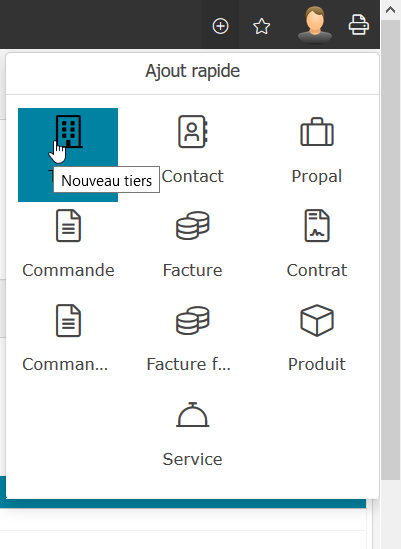
I have created a dropdown menu to create fastly an element from everywhere you are. It's in Easya, I propose to integrate it in Dolibarr or not ?
aspangaro
on 5 May 2020
cool; is there a hook inside so external modules can add their own elments ?
 altatof
on 5 May 2020
altatof
on 5 May 2020
cool; is there a hook inside so external modules can add their own elments ?
That's the plan. I need to come up with a little name for the hook.
aspangaro
on 5 May 2020
John is already working on a new "autopopup mega menu" (to remove the left part of menu). Hooks to add its own entries ill be part of this; like having the quick "Add item xxx" so a dedicated feature for this will probably be in conflict with this work, so i think it is better to wait the mega button before deciding to have this or not (the need is yes, but the implementation may be already addressed. We will see).
eldy
on 5 May 2020
For information : https://github.com/Dolibarr/dolibarr/pull/13609
I like the @aspangaro drop down it's a good feature and can be complementary with the @dreggy 's mega dropdown menu.
@aspangaro 's dropdown will fix top rigth menu space problems for external modules who add a lot of top right elements.
@eldy , yes at the end the @aspangaro 's short create button will be a duplicate functionality but this can make a good transition and feature for future with good UX evolution possibilities.
atm-john
on 5 May 2020
Thanks all for your return.
I proposed the PR : https://github.com/Dolibarr/dolibarr/pull/13823
Shortcut : ctrl + shift + L
The hook is printQuickAddBlock
aspangaro
on 5 May 2020
Related issues
 gnovaro
·
5Comments
gnovaro
·
5Comments
 low5
·
4Comments
low5
·
4Comments
 OrenSavichWS
·
3Comments
OrenSavichWS
·
3Comments
 TobiasSekan
·
5Comments
TobiasSekan
·
5Comments
 defrance
·
3Comments
defrance
·
3Comments
Most helpful comment
I have created a dropdown menu to create fastly an element from everywhere you are. It's in Easya, I propose to integrate it in Dolibarr or not ?