Dokka: dev-0.11.0 version doesn't work for android projects
Describe the bug
I got suggestion on this issue: https://github.com/Kotlin/dokka/issues/999 to try using dev-0.11.0 version for adding new output format. However I cannot make it work for my Android project.
* What went wrong:
A problem occurred evaluating project ':my_local_project'.
> Failed to apply plugin [id 'com.android.internal.version-check']
   > Could not create plugin of type 'VersionCheckPlugin'.
      > com.google.common.collect.Lists.newArrayListWithCapacity(I)Ljava/util/ArrayList;
...
Caused by: java.lang.NoClassDefFoundError: Could not initialize class com.android.build.gradle.internal.plugins.VersionCheckPlugin
        at org.gradle.internal.instantiation.generator.AsmBackedClassGenerator$InvokeConstructorStrategy.newInstance(AsmBackedClassGenerator.java:1969)
Expected behaviour
Dokka is generating output for android projects.
To Reproduce
Checkout and publish dev-0.11.0 to maven local.
Run simple ./gradlew clean dokka for android project who uses android gradle plugin.
Dokka configuration
Dependencies:
    dependencies {
        classpath 'com.android.tools.build:gradle:4.0.0'
        classpath "org.jetbrains.kotlin:kotlin-compiler:1.4-M2"
        classpath "org.jetbrains.kotlin:kotlin-gradle-plugin:1.4-M2"
        classpath "org.jetbrains.dokka:dokka-gradle-plugin:0.11.0-SNAPSHOT"
}
module/build.gradle
apply plugin: 'org.jetbrains.dokka'

dokka {
    outputFormat = 'html'
    outputDirectory = "$buildDir/dokka"
}
Installation
- Operating system: macOS
- Build tool: Gradle v6.5
- Dokka version: dev-0.11.0
Additional context
I needed to add classpath "org.jetbrains.kotlin:kotlin-compiler:1.4-M2" to solve other issue during compile:
> Could not resolve all artifacts for configuration ':classpath'.
   > Could not find org.jetbrains.kotlin:kotlin-compiler:1.4-M2-eap-70.
 martinkocjan-tomtom
All 13 comments
Wich exact revision did you use to reproduce this issue?
 sellmair
on 2 Jul 2020
sellmair
on 2 Jul 2020
@sellmair thanks for the response.
At the time of writting it was cf2e842d. I have just pulled latest changes (894fba74) and still have the same issue.
martinkocjan-tomtom
on 3 Jul 2020
Would it be possible to send a sample project?
This issue should be fixed in 894fba74 and we even got integration tests for this now: #1056
sellmair
on 3 Jul 2020
@sellmair unfortunately I cannot send you my project, because it is proprietary software.
But I cloned some example projects from the web and I get the same issue.
For example, if you clone this project: https://github.com/contentful/the-example-app.kotlin and apply next changes, you will reproduce the same issue:
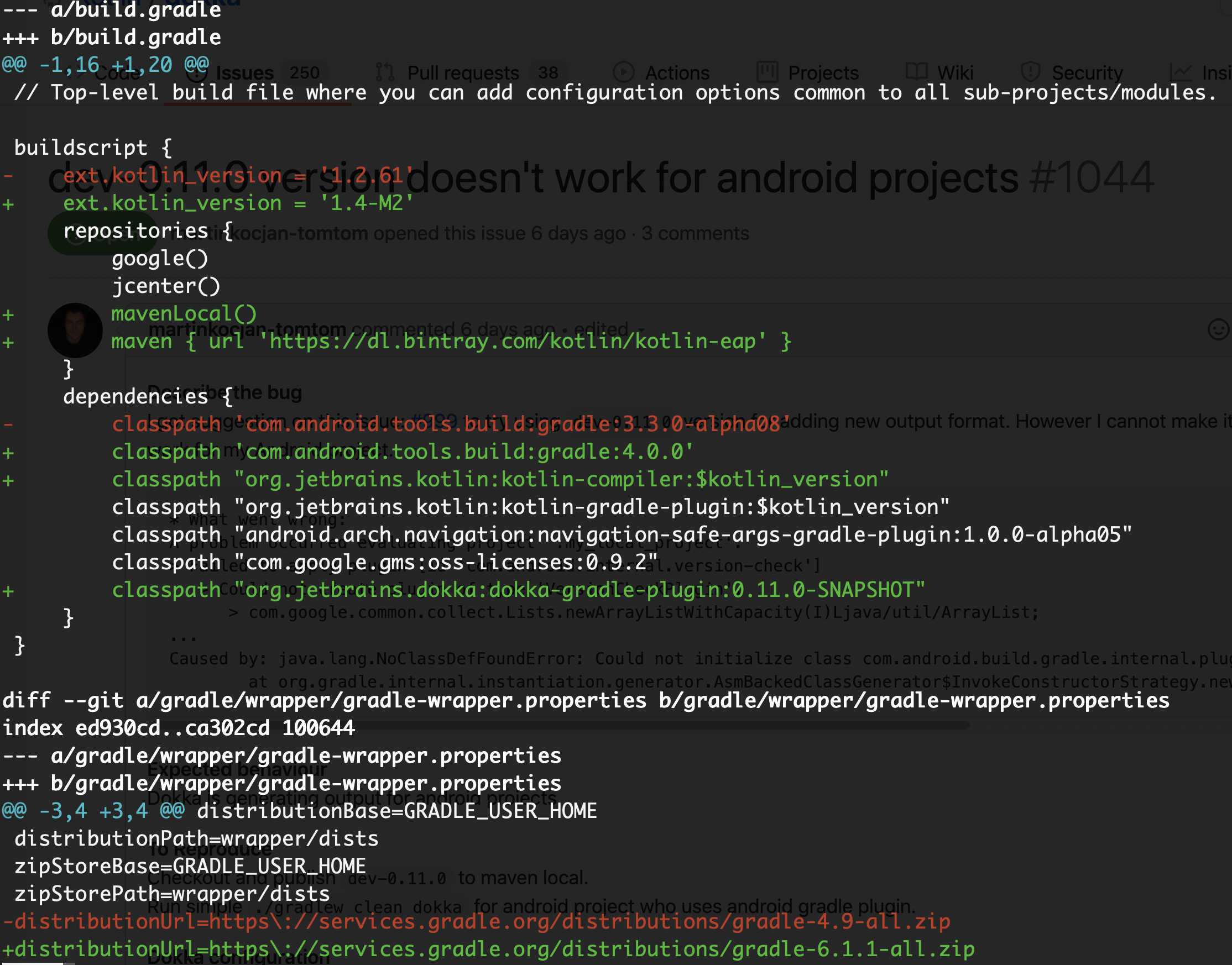

Just run: ./gradlew clean dokka
martinkocjan-tomtom
on 6 Jul 2020
I tested the current dev branch with the sample project you provided and it seems to work fine for me:

I noticed, that you also need to update gradle to at leat 6.1.1 and the error message because of the incompatibility looks also very similar to your original issue.
* What went wrong:
A problem occurred evaluating project ':app'.
> Failed to apply plugin [id 'com.android.internal.version-check']
   > Minimum supported Gradle version is 6.1.1. Current version is 4.9.
Tested with AGP: 3.3.0-alpha08 and 4.0.0 ✅
sellmair
on 6 Jul 2020
If you still encounter this issue, feel free to contact me directly on slack! https://kotlinlang.slack.com/team/UF3V7CF4M
sellmair
on 6 Jul 2020
Oh! True that!
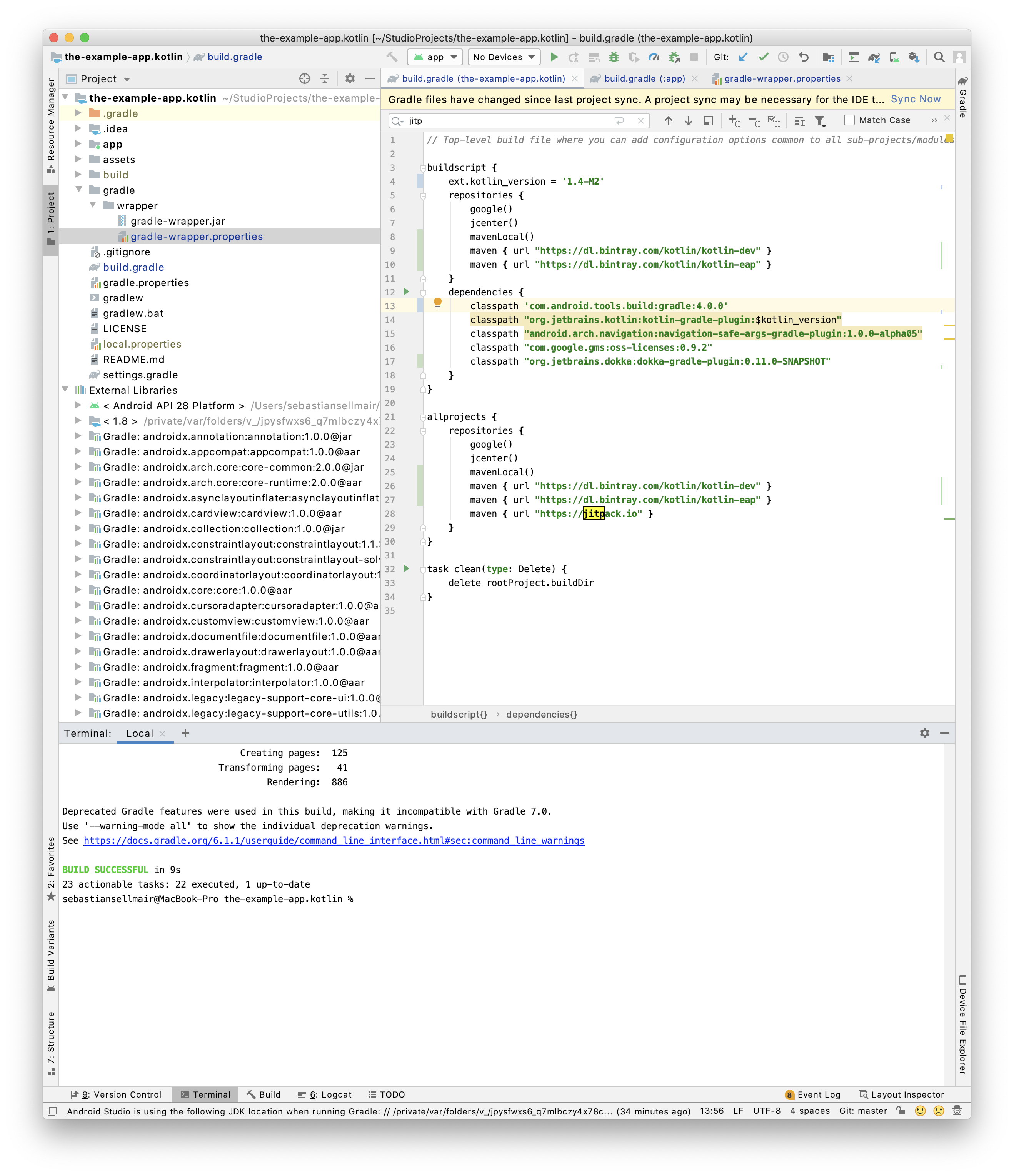
Yes, I used AGP 4.0.0. Maybe there is something going on in your maven local? 🤔
Can you delete dokka from maven local by hand, publish and try again? I really think there is something strange. You could also try to run the integration tests inside #1056 with ./gradlew integrationTest
sellmair
on 6 Jul 2020
Just for the protocol! Here is a screenshot with 4.0.0:
sellmair
on 6 Jul 2020
@sellmair thanks for the quick response.
My previous comment was deleted accidentally, sorry.
I will tests it now :)
martinkocjan-tomtom
on 6 Jul 2020
@sellmair I resolved the issue finally.
I saw that you added both:
        maven { url 'https://dl.bintray.com/kotlin/kotlin-eap' }
        maven { url 'https://dl.bintray.com/kotlin/kotlin-dev' }
in the buildscript {...} and allprojects {repositories {...}}, which is required to avoid issues. Also I removed: classpath "org.jetbrains.kotlin:kotlin-compiler:$kotlin_version" because that dependency is solved with the lines above.
@sellmair thank you very much for the support, you can close this issue/ticket.
Note: It would be nice if your team could put these dependencies in some README file, so people know in the future.
martinkocjan-tomtom
on 6 Jul 2020
I have to thank you very much for all the input! We will definitely try to improve clarity on this regard and this issue was very helpful for that! So to summarise (for others clicking on this issue): Adding the kotlin-compiler artifact to the buildscripts classpath causes issues, because this artifact bundles classes from guava that went through stripping by proguard. This will then cause issues with other plugins (like the Android gradle plugin). This was also the reason for #1008, in order to avoid this.
Thanks again to @martinkocjan-tomtom for all the input 👍
sellmair
on 6 Jul 2020
It is also worth noting that the additional build script repositories won't be necessary after the stable release
 kamildoleglo
on 6 Jul 2020
kamildoleglo
on 6 Jul 2020
Related issues
 simonbasle
·
4Comments
simonbasle
·
4Comments
 rbares
·
4Comments
rbares
·
4Comments
 gabrielittner
·
3Comments
gabrielittner
·
3Comments
 AlekseyPotapov
·
5Comments
AlekseyPotapov
·
5Comments
 fschoellhammer
·
4Comments
fschoellhammer
·
4Comments