dokkaRuntime dependency is not updated (Gradle)
Describe the bug
I have started extending Dokka with the custom format. If I want to use custom Dokka fat jar, I need to specify:
```
dependencies {
dokkaRuntime...
}
If you setup it in first run everything works fine, your new format will be used and seen when you run `dokka` gradle task:
<img width="333" alt="Screen Shot 2020-06-22 at 11 59 51 PM" src="https://user-images.githubusercontent.com/67002047/85339482-88452f00-b4e4-11ea-984e-fced547f27b8.png">

The problem happens in 2 cases:
- if you want to change/update `dokkaRuntime` dependency (e.g. to use some other jar version)
- if you never had dependency (you used default settings and formats) and you want now to include `dokkaRuntime` dependency (or opposite case, you had the `dokkaRuntime` dependency, you want to remove it and switch to the default settings).

The issue is that when you do first run, Dokka determines which `dokkaRuntime` need to use, and whatever you do after that it won't change first dependency resolution.
Only thing which solves the problem is completely cleaning the gradle caches (`$HOME/.gradle/caches` and `.gradle` folder in your project root ).
Which is bad solution and very annoying for development, because you always download all project dependencies.

**Expected behaviour**
When the gradle dependency block is updated new dependencies are taken in consideration.
I would expect the same behaviour for `dokkaRuntime`.

**To Reproduce**
1. Setup Dokka default config and do the first run
buildscript {
repositories {
jcenter()
}
dependencies {
classpath "org.jetbrains.dokka:dokka-gradle-plugin:0.10.1"
}
}
repositories {
jcenter()
}
apply plugin: 'org.jetbrains.dokka'
dokka {
outputFormat = 'html'
outputDirectory = "$buildDir/dokka"
}
2. Add `dokkaRuntime` dependency with your new format.
For example:
dependencies {
dokkaRuntime files("/Users/martin/repos/github/dokka-xml-formatter/build/libs/dokka-xml-formatter-0.0.16-all.jar")
```
Note: you can also add dependency in the first step and just try to use different version.
Installation
- Operating system: macOS
- Build tool: Gradle v6.1.1
- Dokka version: 0.10.1
 martinkocjan-tomtom
All 11 comments
Thanks for reporting that issue. Could you check whether or not you still have issues with our current dev-0.11.0 branch?
 sellmair
on 24 Jun 2020
sellmair
on 24 Jun 2020
@sellmair can I refer to your dev-0.11.0 branch on similar way?
Something like:
classpath "org.jetbrains.dokka:dokka-gradle-plugin:dev-0.11.0"
I would probably need that approach because this is specifically combination of the gradle plugin and external Dokka fat jar added as dokkaRuntime dependency.
I can do probably some workarounds but that would not be the same case.
martinkocjan-tomtom
on 24 Jun 2020
I'm not sure this is dokka's problem, it looks like Gradle caching. Instead of cleaning Gradle's caches could you please try stopping the daemons (./gradlew --stop)?
Also please bear in mind that we plan to have a new dokka release shortly with internal architecture completely changed so I'd advise creating your format basing on the dev-0.11.0 branch. The dokka fatjar has also been dropped there completely in favor of plugin resolution.
You can use the branch version with classpath "org.jetbrains.dokka:dokka-gradle-plugin:0.11.0-SNAPSHOT" after running ./gradlew publishToMavenLocal
 kamildoleglo
on 24 Jun 2020
kamildoleglo
on 24 Jun 2020
@kamildoleglo thank you for the advice, ./gradlew --stop solves the problem. Just for curiosity, I am wondering why it works for other dependencies in the block and not for this one? :(
Apart of that, thank you very much for the info about internal architecture changes, it will save a lot of time for me...
Regarding the new infrastructure and adding new output format, is there any example how I can do that? I mean if the approach by using Dokka fat jar changed, what are the new steps for me to add format? Or maybe from that perspective it is the same just the plugin version is changed on other side?
martinkocjan-tomtom
on 25 Jun 2020
No idea TBH, maybe there is some option that we can set to change this behaviour, but it's not common to change versions often, so we didn't event thought about it.
There should be a file called "Developer's guide to dokka" in the dev-0.11.0 branch which should be a good start
kamildoleglo
on 25 Jun 2020
There should be a file called "Developer's guide to dokka" in the
dev-0.11.0branch which should be a good start
@kamildoleglo I am sorry but I cannot find the file:

Can you please just send me a link or path to it?
https://github.com/Kotlin/dokka/tree/dev-0.11.0
martinkocjan-tomtom
on 25 Jun 2020
My bad, that was the PR's name. Here it is: https://github.com/Kotlin/dokka/blob/dev-0.11.0/plugins/developer_guide.md
kamildoleglo
on 25 Jun 2020
My bad, that was the PR's name. Here it is: https://github.com/Kotlin/dokka/blob/dev-0.11.0/plugins/developer_guide.md
@kamildoleglo I went through the documentation and as I see, there is no more option to use custom Dokka fat far (dokkaRunTime dependency) for formats extension. Now it is everything done via plugin, using extension points:
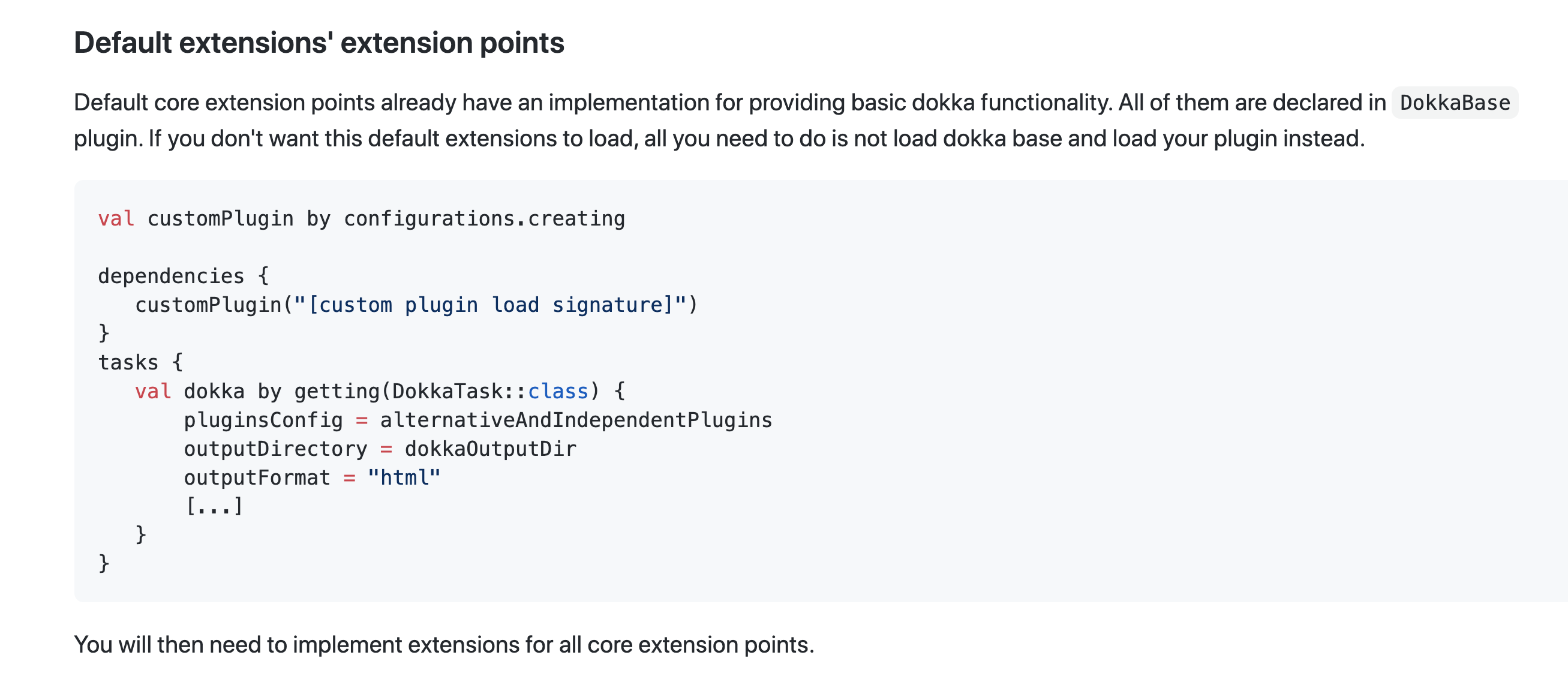
Can you please confirm this, just to be sure that I understood correctly?
Also I noticed that you now have xml plugin. Is it mean that you added xml output format to the new version?
https://github.com/Kotlin/dokka/tree/dev-0.11.0/plugins/xml
Note:
I cannot make it the new version (dev-0.11.0) to work locally on my Android project and I opened https://github.com/Kotlin/dokka/issues/1044.
martinkocjan-tomtom
on 29 Jun 2020
@kamildoleglo I am sorry for bothering you again, can you please check my comments above so I know what are next steps for me, in the sense of extending Dokka with XML format as an output.
One small addition to the previous comment, regarding XML plugin question which exists in Dokka repo, I am getting:
* What went wrong:
Execution failed for task ':nextinstructionpanel:dokka'.
> ExtensionPoint: org.jetbrains.dokka.CoreExtensions/renderer was expected to have exactly one extension registered, but none was found.
Looks like partially done, just wondering is it plan to be finished soon, or I shouldn't wait for it and start with my own XML output plugin?
martinkocjan-tomtom
on 6 Jul 2020
Hi, sorry for the delay in my responses.
Can you please confirm this, just to be sure that I understood correctly?
Yes, everything is now done with plugins, fatjar has been removed entirely
Is it mean that you added xml output format to the new version?
Unfortunately not, this is in fact a leftover that was parsing some Android XML files in order to create links to them in the documentation. I'm not sure if it works now, we should probably remove it.
If you want to create an XML output format please go ahead! If you have any questions about it you can ask me directly here or in Kotlin Slack
kamildoleglo
on 8 Jul 2020
@kamildoleglo thank you!
martinkocjan-tomtom
on 8 Jul 2020
Related issues
 gabrielittner
·
3Comments
martinkocjan-tomtom
·
6Comments
gabrielittner
·
3Comments
martinkocjan-tomtom
·
6Comments
 mvysny
·
5Comments
mvysny
·
5Comments
 xit0c
·
4Comments
xit0c
·
4Comments
 juergenzimmermann
·
3Comments
juergenzimmermann
·
3Comments