Docz: How to get syntax highlighting to work?
Question
I have just migrated my docz to V2 and the syntax highlighting (outside Playground) is no longer working (it was working earlier in V1). Currently running V2.1.1, was V1.3.2.
Description
As Above. I don't really understand what's going on with prism (the document does not seem to make it clear).
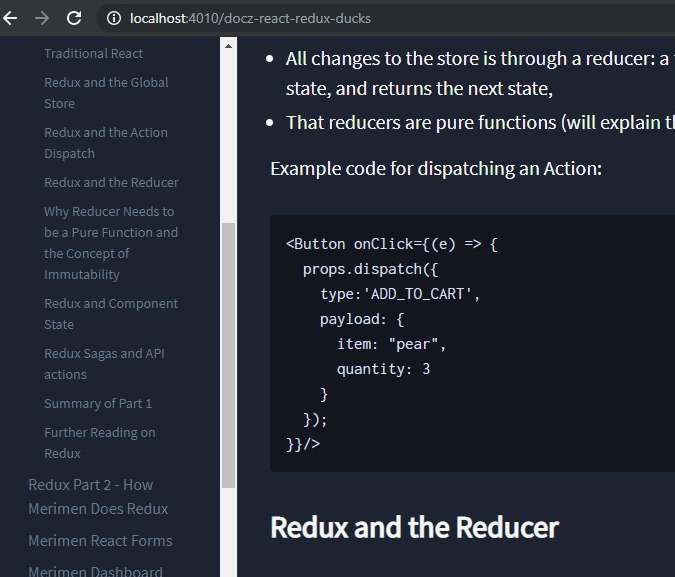
Give more information about your doubt
I am using docz with default themes.
My doczrc.js is simple:
export default {

themeConfig: {
  mode: 'dark',
},
  files: '**/*.{md,markdown,mdx}',
  ignore: ['README.md'],
  title: 'Merimen Docs',
  menu: [
    'Introduction',
    'Getting Started',
    { name:'React', menu:['Getting Started','Learning React','Folder Layout','Merimen Routes','Redux Part 1 - Introducing Redux','Redux Part 2 - How Merimen Does Redux','Merimen React Forms', 'Merimen Dashboard','Writing Components','Bootstrap, Styling & CSS'] },
    'NodeJS API Endpoints',
    'Quick Links',
    'About Merimen Docs'
  ]
}
 andrwo
All 9 comments
Hello @andrwo,
Syntax highlighting should work out of the box.
Could you copy the raw markdown you used here, so we can try to reproduce ?
 rakannimer
on 30 Nov 2019
rakannimer
on 30 Nov 2019
Hi @rakannimer , thanks for getting back. I found the issue, previously it seems to autodetect Javascript, but now I need to put the script type prompt. It is working now, thanks!
andrwo
on 30 Nov 2019
Hi @andrwo, could you please share the snippet you used for syntax highlight. I am running into the same issue and still not clear how to fix it.
 pavanpodila
on 10 Dec 2019
pavanpodila
on 10 Dec 2019
Hi @pavanpodila , you need to add the script type hint after the ```, it no longer auto-detects. In my case it is jsx. You can get the full list here: https://prismjs.com/#languages-list
My mdx now looks like this (previously I omitted the jsx):
````
Example code for dispatching an Action:
<Button onClick={(e) => {
  props.dispatch({
    type:'ADD_TO_CART',
    payload: {
      item: "pear",
      quantity: 3
    }
  });
}}/>
````
andrwo
on 12 Dec 2019
Thanks @andrwo I have done that already. In my case, I am trying to highlight Dart code, which I'm doing like so:
```dart
However the code isn't getting highlighted. Not sure what is wrong here. Are all the languages injected by Prism or should I be doing it explicitly somewhere in the configuration?
pavanpodila
on 12 Dec 2019
Hmm you are right it doesn't seem to work outside of JS/React types.
Then I came across this issue, perhaps you can chime in to request them to prioritize this:
andrwo
on 12 Dec 2019
Hey @pavanpodila and @andrwo,
I think @pavanpodila is facing a different problem with prism not being able to understand and highlight dart by default.
To get more language syntax highlighting support in your code blocks I suggest you use the excellent gatsby-remark-vscode which makes it easy to add more languages if for some reason it's not supported by default.
Check out https://github.com/doczjs/docz/tree/master/examples/with-gatsby-remark-vscode for a complete example.
rakannimer
on 13 Dec 2019
Awesome, will give that a shot @rakannimer. From the looks of it, this seems promising and should be the default way of rendering code blocks!
/cc @pedronauck
pavanpodila
on 13 Dec 2019
[it] should be the default way of rendering code blocks
Yeah I agree, I'm just hesitant to do it at the moment because it will cause a style mismatch between playground code and markdown code blocks.
But it's definitely being considered 👍
rakannimer
on 13 Dec 2019
Related issues
 capaj
·
3Comments
capaj
·
3Comments
 fenbka
·
3Comments
fenbka
·
3Comments
 mquandalle
·
3Comments
mquandalle
·
3Comments
 YardWill
·
3Comments
YardWill
·
3Comments
 brunolemos
·
3Comments
brunolemos
·
3Comments