Docz: Cannot find named export component to import in mdx file
Bug Report
Docz version: 1.0.4
Related issue: https://github.com/pedronauck/docz/issues/215
I'm trying to integrate docz in a project. In mdx file I import a component:
import { Playground, Props } from 'docz';
import { Test } from './Test';

<Playground>
  <Test />
</Playground>
Component's file locates in the same directory as mdx file and is very basic:
import React from 'react';
import styled from 'styled-components';

const Button = styled.button`
  background: #2cc1ed;
  color: #fff;
  border: 1px solid #1d99bd;
  border-radius: 2px;
  padding: 10px;
  width: 100%;
  outline: none;
  font-size: 16px;
`;

export const Test = () => (
  <div>
    <Button>Hello</Button>
  </div>
);
Then I run docz yarn docz dev. What happens next is:
1) Right before the actual building, it throws an error 2 times:
There was an error loading your config:

SyntaxError: /Users/as24/Sources/my/docz-error/.babelrc: Unexpected token ] in JSON at position 54
    at JSON.parse (<anonymous>)
    at Object.readFileSync (/Users/as24/Sources/my/docz-error/node_modules/jsonfile/index.js:63:17)
    at loadFile (/Users/as24/Sources/my/docz-error/node_modules/load-cfg/dist/index.js:26:23)
    at Object.load (/Users/as24/Sources/my/docz-error/node_modules/load-cfg/dist/index.js:45:29)
    at getBabelConfig (/Users/as24/Sources/my/docz-error/node_modules/docz-core/dist/index.js:1048:34)
    at Bundler.config (/Users/as24/Sources/my/docz-error/node_modules/docz-core/dist/index.js:1171:29)
    at Bundler.mountConfig (/Users/as24/Sources/my/docz-error/node_modules/docz-core/dist/index.js:721:39)
    at dev (/Users/as24/Sources/my/docz-error/node_modules/docz-core/dist/index.js:1830:43)
    at <anonymous>
    at process._tickCallback (internal/process/next_tick.js:188:7)
There was an error loading your config:

SyntaxError: /Users/as24/Sources/my/docz-error/.babelrc: Unexpected token ] in JSON at position 54
    at JSON.parse (<anonymous>)
    at Object.readFileSync (/Users/as24/Sources/my/docz-error/node_modules/jsonfile/index.js:63:17)
    at loadFile (/Users/as24/Sources/my/docz-error/node_modules/load-cfg/dist/index.js:26:23)
    at Object.load (/Users/as24/Sources/my/docz-error/node_modules/load-cfg/dist/index.js:45:29)
    at getBabelConfig (/Users/as24/Sources/my/docz-error/node_modules/docz-core/dist/index.js:1048:34)
    at Bundler.config (/Users/as24/Sources/my/docz-error/node_modules/docz-core/dist/index.js:1172:29)
    at <anonymous>
    at process._tickCallback (internal/process/next_tick.js:188:7)
But babel config seems pretty valid to me:
{
  "presets": [
    [
      "@babel/preset-env",
    ],
    "@babel/preset-react",
    "@babel/preset-typescript"
  ],
  "plugins": [
    "@babel/plugin-proposal-class-properties"
  ],
}
- Then, docz runs the build which seems to be successful.
- After that, two warnings get displayed:
 warning  in ./src/components/Test/Test.mdx

"export 'Test' was not found in './Test'

 warning  in ./src/components/Test/Test.mdx

"export 'Test' was not found in './Test'
I feel like the fact that it's 2 warning and 2 errors means latter relates to former somehow.
If I go the app, this is how it looks:
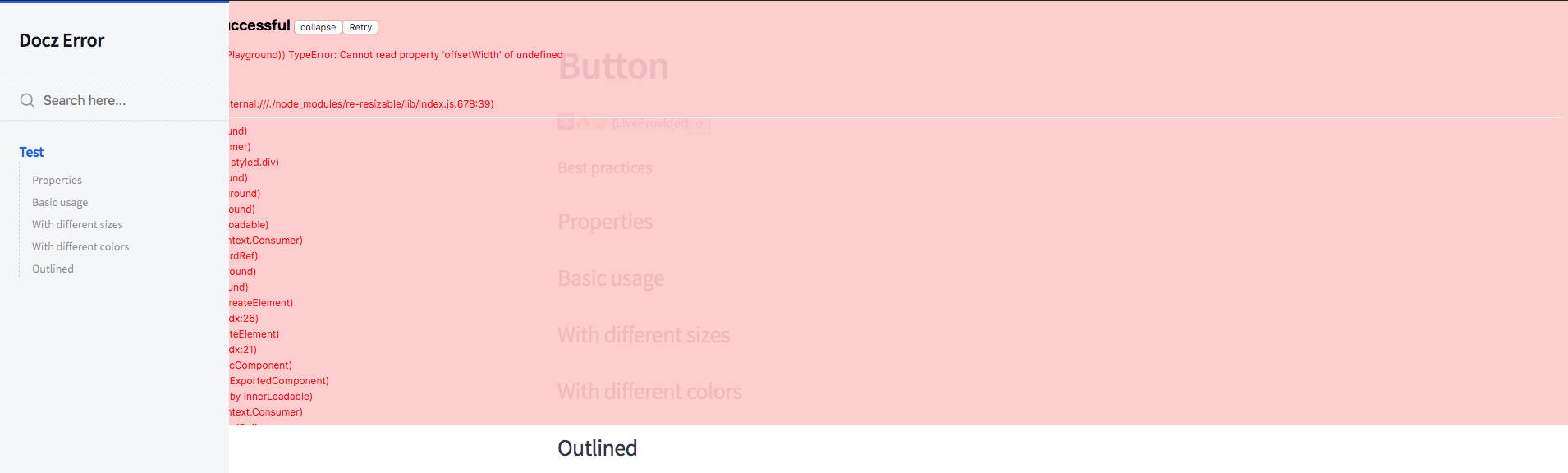
If I use default export/import no warnings get shown, although unexpected token errors are still there. If go to the app, component page is blank, then freezes and crashes eventually.
To Reproduce
- Clone this repo https://github.com/AntonSerous/docz-error and cd in folder
- yarn && yarn start (or npm i && npm start)
- ???
- Profit
Expected behavior
I expect to see my test component displayed in docz app when running.
Environment
- OS: macOS 10.14.4
- Node/npm version: 8.11.3/6.4.1
- Yarn: 1.12.3
Sorry I'm not following the bug template exactly, just feel the way I describe it makes it easier to read/understand.
Please help 🙏🙏🙏
 AntonSerous
All 6 comments
In your repo you export Test both as named and default export. Could that cause problems? Does it work when you import Test as default? (import Test from './Test')
 draperunner
on 2 May 2019
draperunner
on 2 May 2019
@draperunner
Could that cause problems?
Doesn't seem so, removing default export makes no difference, unfortunately.
Does it work when you import Test as default?
I tried, and this is the result:
If I use default export/import no warnings get shown, although
unexpected tokenerrors are still there. If go to the app, component page is blank, then freezes and crashes eventually.
AntonSerous
on 2 May 2019
I am now pretty sure the problem is your trailing commas (line 4 and 11) in your .babelrc. Proper JSON does not allow them. Run it through https://jsonlint.com/ or something to validate.
draperunner
on 2 May 2019
@draperunner Thank you very much, great finding! I fixed .babelrc and those Unexpected token ] in JSON at position 54 errors disappeared.
Unfortunately, it doesn't fix
 warning  in ./src/components/Test/Test.mdx

"export 'Test' was not found in './Test'
issues 😞😞😞
AntonSerous
on 2 May 2019
Add a doczrc.js file with typescript: true, and you're good to go.
// doczrc.js
export default {
  typescript: true
}
https://github.com/pedronauck/docz/tree/master/examples/typescript
draperunner
on 7 May 2019
@draperunner OMG it worked! Thank you very much, your rock!
I believe it worths mentioning this tiny config in Getting Started guide.
AntonSerous
on 9 May 2019
Related issues
 regrettably
·
3Comments
regrettably
·
3Comments
 merelinguist
·
3Comments
merelinguist
·
3Comments
 wldcordeiro
·
3Comments
wldcordeiro
·
3Comments
 ilyanoskov
·
3Comments
ilyanoskov
·
3Comments
 w0wka91
·
3Comments
w0wka91
·
3Comments