Docz: Props components not working since 1.0.0-rc.8
Bug Report
The Props components don't render props since rc8 (working in rc7).
There is our folders structure:
📂 src
↳ 📂 docs (our documentation with MDX files)
↳ 📂 saagie-ui (our React components)
📄 doczrc.js
// doczrc.js
export default {
  title: 'Saagie Design System',
  description: 'Documentation from the Saagie Design Team',

  src: './src',
  public: './src/docs/public',
  files: '**/*.mdx',
  ignore: ['docs-versions'],
  wrapper: 'src/docs/Wrapper',
  codeSandbox: false,
}
No idea why, we investigate on it. Any idea?
 ivan-dalmet
All 83 comments
https://github.com/pedronauck/docz/issues/776#issuecomment-480807407
@ivan-dalmet are you importing your props for your components? Maybe it's related to this.
ivan-dalmet
on 8 Apr 2019
@rfoel I just reproduced the bug (this time I hope without typo ^^)
The <Props of={Component} /> is not working if we import the React component through another file.
Example
https://github.com/ivan-dalmet/docz-issue-sandbox/tree/master/issue-777
ivan-dalmet
on 8 Apr 2019
Props components also not working when I set typescript as true in doczrc.js config file.
 ronghang
on 9 Apr 2019
ronghang
on 9 Apr 2019
@ivan-dalmet I think this is issue with react-docgen-typescript that related to https://github.com/styleguidist/react-docgen-typescript/issues/176 . Try to export { ButtonKO } from './ButtonKO'; in your index file. Does it help?
 lesha1201
on 9 Apr 2019
lesha1201
on 9 Apr 2019
Is 1.0.0-rc even use react-docgen-typescript? In docz-core v0.13.x I could see the use of react-docgen-typescript-loader, but in v1.0.0-rc.8 source there is no react-docgen-typescript-loader added in the config chain.
v0.13.7 loader.ts
v1.0.0-rc.8 loader.ts
EDIT: NVM, found the ts props loading logic in docz-core/src/utils/docgen/typescript.ts
 panjiesw
on 9 Apr 2019
panjiesw
on 9 Apr 2019
@lesha1201 yeah that's a working workaround!
Thanks!
ivan-dalmet
on 9 Apr 2019
Hello!
I have the same problem. The Props components don't render (
// package.json:
"devDependencies": {
...
"docz": "1.0.0-rc.7",
"docz-core": "1.0.0-rc.7",
}
// doczrc.js
import { css } from 'docz-plugin-css';
const path = require('path');
const poststylus = require('poststylus');
export default {
title: '80lv',
port: 8080,
codeSandbox: false,
hashRouter: true,
dest: 'docs',
// base: './',
// src: './',
plugins: [
css({
preprocessor: 'stylus',
cssmodules: true,
loaderOpts: {
import: [path.resolve('styles/common.styl'), path.resolve('styles/document.styl')],
use: [poststylus([require('autoprefixer')()])],
},
}),
],
};
// index.js
import React from 'react';
import PropTypes from 'prop-types';
import cn from 'classnames';
import styles from './styles.styl';
const Heading = ({ className, children, level, tagName, ...otherProps }) => {
const TagName = tagName ? tagName : `h${level}`;
return (
<TagName
{...otherProps}
className={cn(styles.Heading, className, {
[styles[`Heading_level_${level}`]]: level,
})}>
{children}
</TagName>
);
};
Heading.defaultProps = {
className: '',
level: 2,
tagName: '',
};
Heading.propTypes = {
children: PropTypes.any.isRequired,
className: PropTypes.string,
level: PropTypes.number,
tagName: PropTypes.any,
};
export default Heading;
// Heading.mdx
---
name: Heading
menu: Components
route: /components/heading
---
import { Playground, Props } from "docz";
import Heading from '.';
# Heading
<Playground>
<Heading>
Heading h2
</Heading>
</Playground>
## Properties
<Props of={Heading} />
 pollys2217
on 10 Apr 2019
pollys2217
on 10 Apr 2019
I'm having the same issue and have tried every work around suggested above and others I could think of. I've even directly imported from the component file and not the index and Props do not render.
I've tried many combinations of the following:
- npm vs yarn
- rc.8, rc.7, rc.6
- removing react/react-dom from dependencies in case it clashed (based on other docz issues)
- multiple components exporting styles, defaults vs {Component}.
- Directly importing Component.js vs index.js.
- In Component.js
export const Component = () => {}vsexport default Componentat the bottom.
I have multiple component folders self contained using combinations of the above so that I can test them while changing releases and npm/yarn.
 klappy
on 11 Apr 2019
klappy
on 11 Apr 2019
Finally figured it out! It was an odd combination of removing the peer dependencies that I thought I had to add to make docz/yarn happy, including react, react-dom. I tried to get my package.json to look as close to this file here: https://github.com/ivan-dalmet/docz-issue-sandbox/tree/master/issue-777
klappy
on 11 Apr 2019
The problem is that when using export default object don't contain __filemeta
https://github.com/pedronauck/docz/blob/master/core/docz/src/components/Props.tsx
export const Props: SFC<PropsProps> = ({ of: component }) => {
const components = useComponents()
const { props: stateProps } = React.useContext(doczState.context)
const filename = get('__filemeta.filename', component)
const componentName = component.displayName || component.name
const found =
stateProps &&
stateProps.length > 0 &&
stateProps.find(item => item.key === filename)
const definition =
found && found.value.find((item: any) => item.displayName === componentName)
const props = get('props', definition) || []
if (!props) return null
if (!components.props) return null
return <components.props props={props} getPropType={getPropType} />
}
@pedronauck
pollys2217
on 11 Apr 2019
I have my components:
|- Button
|-- Button.jsx
|-- index.js
docs
|- button.mdx
exported like this:
// Button.jsx
// ...
export default Button
// index.js
export Button from './Button'
And when I import Button in .mdx, <Props /> doesn't render:
import { Button } from 'components/Button'
...
<Props of={Button} /> // doesn't render
However, if I import Button directly from the Button.js file, it works:
import Button from 'components/Button/Button'
...
<Props of={Button} /> // renders
Though it seems like a workaround for this particular case, I still have the same error for some (more complex) components. I haven't found the reason yet, but these components worked great with good old PropsTable (I really miss it btw)
 mlshv
on 11 Apr 2019
mlshv
on 11 Apr 2019
@mlshv +1 for the table. Might be a good idea for docz-theme-default to present Props component as table, like the one in v0.x. But maybe that's how it'll be in the final v1 release?
panjiesw
on 11 Apr 2019
Now that I have PropTypes rendering using the happy path, I'm still finding one use case that I can not get to render.
When leveraging import { withStyles } from '@material-ui/core/styles';, it exports this way: export default withStyles(styles)(Component);.
https://material-ui.com/customization/css-in-js/#withstyles-styles-options-higher-order-component
Is there a way to use my index.js file in the folder to export it in a way that Props will render? My attempts haven't been fruitful just yet.
Workaround:
It's not elegant, but this appears to work:
export const WrappedComponent = withStyles(styles)(Component);
Update for v1.0.0:
This workaround no longer functions and have to maintain using rc.8 for now.
Update for v1.0.4:
The workaround appears to function again and does not appear to function with basic default exports.
klappy
on 11 Apr 2019
Currently at v1.0.0, Props works perfectly for us in dev, but when we build production Props deosn't render anything From what I can tell in this thread most of you have this issue in dev as well, so maybe it's a separate issue
 cupofjoakim
on 12 Apr 2019
cupofjoakim
on 12 Apr 2019
I think I found the source of the problem (at least in my case).
TLDR;
Always use direct import for all documented components.
Theory
The Props component uses __filemeta.filename property of a passed component (source) to get component's prop types.
The list of all components' info (I guess that it gets resolved by findAllExportedComponentDefinitions from react-docgen) is in stateProps variable (source). Every item has a path to the component file, e.g.:

And everything goes normal when we import a component directly:
import Button from 'components/Button/Button'
And crashes when we do it through an index.js file:
import { Button } from 'components/Button'
That's because in the second case we have __filemeta.filename equal to components/Button/index.js. The stateProps doesn't have an item with the corresponding key, so component's info is never found.
Why it doesn't work as expected even when I import component directly in my .mdx
Even when I import ComponentA in my .mdx like this:
// in .mdx
import Button from 'components/Button/Button'
it may not work because it has already been imported in another component through index.js:
// some component that uses Button
import { Button } from 'components/Button'
So the workaround I found is to always use direct import for all my documented components. It doesn't look pretty, but at least it works.
I think that this issue is related to the way react-docgen resolves components. @pedronauck can you provide an idea how it may be possible to import components through index.js files? It was possible in 0.13.7, so maybe it has something to do with react-docgen config.
UPD: @cupofjoakim I have the same problem. Props doesn't display in production build, even if I apply the mentioned workaround. For me, docz became so unstable after migration from 0.13.7. Thinking about migration to styleguidist
mlshv
on 12 Apr 2019
@mlshv I think your problem is related to https://github.com/pedronauck/docz/pull/779 . Try to change filterComponents. Does it help?
lesha1201
on 12 Apr 2019
1.0.0-rc.8
- Docs for props don't show in
dev - If I add or change a comment on a component's props, the hot-reload causes props to render
v1.0.x
- Docs do not show for any components in
devorprodbuilds
It may be worth nothing that each .mdx imports the component it describes from an index.js file in the components folder: import { Button } from './../index.js'. Switching a few files to import { Button } from './../Button.js' does not produce different results.
UPDATE:
Well. This is interesting. I applied some pretty mundane prettier autoformatting, and all of my props are showing again. I'm not 100% sure I know what resolved the issue, but going file by file and applying caused my props to start showing again.
This is the commit, for the curious: https://github.com/OHIF/react-viewerbase/pull/66/commits/c0b0ed230639ce13c69e1003b74a9cb76529a948
It could be a change from CRLF line endings to LF line endings
UPDATE 2:
While the above commit allowed docs to render while I was developing locally, the production build did not render docs. Stopping and restarting the dev build locally removes docs until I modify and save a file. Prop docs are then shown again.
 dannyrb
on 15 Apr 2019
dannyrb
on 15 Apr 2019
UPDATE 2:
While the above commit allowed docs to render while I was developing locally, the production build did not render docs. Stopping and restarting the dev build locally removes docs until I modify and save a file. Prop docs are then shown again.
I'm seeing this same behaviour. Starting without a .docz cache the props are not showing. After formatting the file in VS Code (which doesn't register any changes in git...) the module reloads with props in place.
Is there maybe a difference in how the docs are built when starting the dev-server and when rebuilding a single module?
 madsgodvinjensen
on 16 Apr 2019
madsgodvinjensen
on 16 Apr 2019
I tried commiting the .docz folder to git to be able to diff the changes that happen when saving a file (as per my comment above). It seems that, when running with docz dev and saving a source (.js) file, that particular file is added to the .docz/app/db.json file. Before saving the file, the contents of the json file is only README.mdx files.
This is in version 1.0.1 of docz
Diff screenshot:

madsgodvinjensen
on 16 Apr 2019
I've found a cause of the Props not working on Windows in version 1.0.3. The __filemeta.filename uses backward slashes (windows style) and the stateProps contain forward slashes, making the find-method not find anything.
 evosch
on 16 Apr 2019
evosch
on 16 Apr 2019
@evosch, for what it's worth, my dev machine is Windows, and the CI that deploys our production docs is Linux. Both output a docz site that does not render props.
dannyrb
on 16 Apr 2019
😞
I've experienced some version of this problem throughout all the beta releases of Docz w/ Typescript; sad that it continues to be problematic in v1.0.x.
Environment:
- Docz
v1.0.2 - TypeScript
- Named exports
docz.js
import { css } from 'docz-plugin-css';
export default {
title: 'My project',
typescript: true,
onCreateWebpackChain: (config) => {
if (config.resolve.alias.set) {
config.resolve.alias.set('~/components', path.join(__dirname, 'src', 'components'));
}
},
plugins: [
css({
preprocessor: 'sass',
cssmodules: true,
loaderOpts: {
includePaths: [
path.resolve(__dirname, 'src', 'scss')
]
},
}),
],
}
Button/index.mdx
import { Props, Playground } from 'docz';
import { Button, ButtonComponent } from './'
# Button
## Props
<Props of={Button} />
## Sizes
Button/index.tsx
export interface ButtonProps {
size?: 'regular' | 'small' | 'inline';
children?: React.ReactNode;
className?: string;
}
class Button extends React.PureComponent<ButtonProps> {
render() {
// ...
}
}
export { Button };
⚠️ Props fail to render

🙏 Prayers out to @pedronauck. Perhaps the typescript example needs to be more robust? Solutions suggested by the community seem to always check:
- Typescript?
- Are you using named exports?
- Has the exported component been exported by
index.tsxorComponentName.tsx? - Is the exported component enhanced by a higher-order component?
 drewlustro
on 18 Apr 2019
drewlustro
on 18 Apr 2019
I'm having the same issue with props not displaying. I'm running on docz 1.0.4.
The interesting thing is if I touch the file that mdx file is importing, then it rebuilds and the props show up. They are never there on the initial load.
At first I thought I'd just write a script that touches all my js files, but that doesn't seem work. It seems I need to do that one at a time.

PS.
- not using typescript
- I am currently using named imports directly from the file that I am importing
- The component is exported by an index.js file, but I am importing it directly
- The component is not enhanced by an HOC
eg
export const UiDataTable = () => {}
import { UiDataTable } from './ui-data-table'
 dusty
on 18 Apr 2019
dusty
on 18 Apr 2019
None of the above config combinations help to render Props component at 1.0.4. Not windows nor macos
 yyynnn
on 21 Apr 2019
yyynnn
on 21 Apr 2019
I'm using 1.04 (latest version) of docz with typescript and I found a workaround for this,
edit .docz/cache/propsParser.json and paste you components's corresponding json as this:
{
...
"src/components/button/index.tsx": {
"props": []
}
...
}
the key of the json object is the path to your components, then edit your components props: e.g: add/edit a comment of your component's props. and The props table will show
 crazyxhz
on 24 Apr 2019
crazyxhz
on 24 Apr 2019
Any updates for this? @ejuo's PR might solve it but I haven't checked it out myself
cupofjoakim
on 29 Apr 2019
Had a similar issue, what worked for me was adding react-docgen version 4.1.0 to my project.
 Hilaker
on 29 Apr 2019
Hilaker
on 29 Apr 2019
@Hilaker your solution didn't work for me.
 rohmanhm
on 30 Apr 2019
rohmanhm
on 30 Apr 2019
One thing I noticed in my own code that may offer a clue to Props not rendering in production is that the filename that comes from __filemeta.filename has a path to my src folder and the paths that make up the keys in stateProps were pointing to a build folder so nothing was ever found in this line stateProps.find(item => item.key === filename);
Code below comes from lines 110–115 of core/docz/src/components/Props.tsx
const filename = get('__filemeta.filename', component)
const componentName = component.displayName || component.name
const found =
stateProps &&
stateProps.length > 0 &&
stateProps.find(item => item.key === filename)
I'm not sure what needs to change in order to fix this but hopefully it offers some insight.
 dallinskinner
on 30 Apr 2019
dallinskinner
on 30 Apr 2019
Just updated to 1.1.0, looks like this includes a PR that attempted to resolve this issue. I'm still not getting any props to render :( TS enabled, direct imports, no HOC, the works.
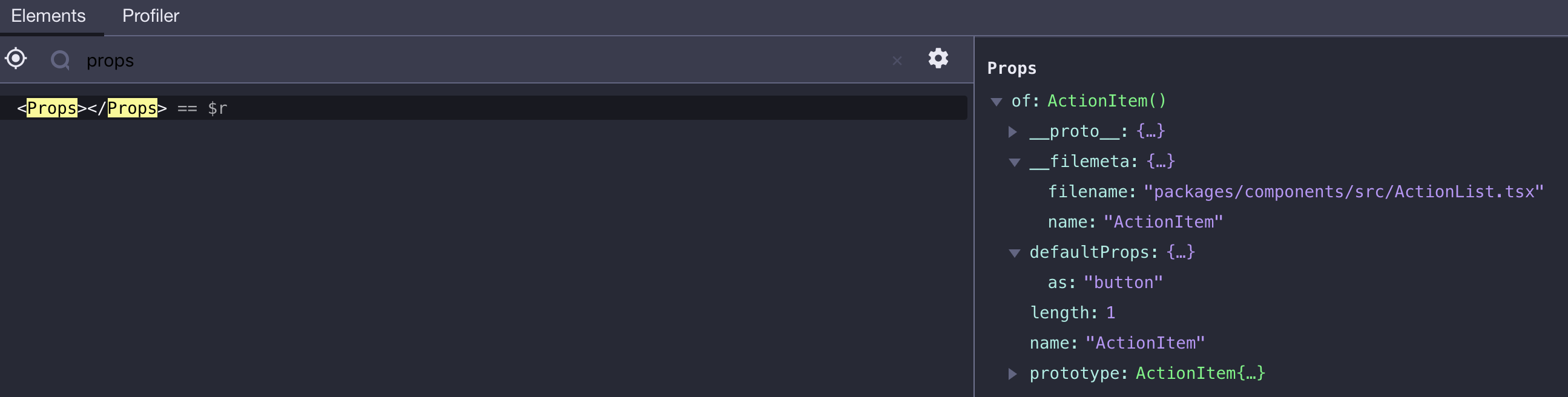
 JackCuthbert
on 2 May 2019
JackCuthbert
on 2 May 2019
@JackCuthbert, what you recieve in stateProps?
 ejuo
on 2 May 2019
ejuo
on 2 May 2019
@ejuo I'm not sure what you mean. The of prop is the only one that's added to the <Props> component. This component in the screenshot has no state either, here's another one that doesn't work with it's source that I can share:
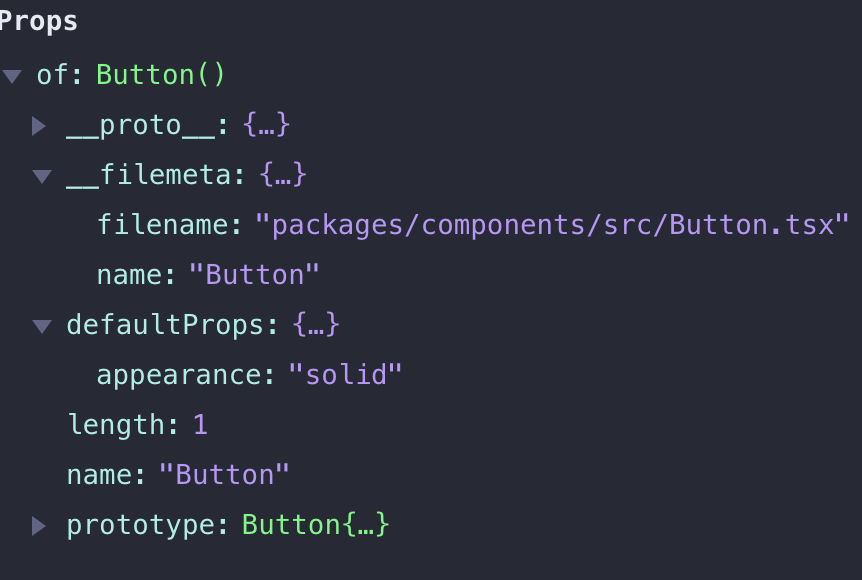
export const Button: React.FunctionComponent<OwnProps> = (props) => {
// ...
}
I've been 👀 -ing this issue as well. I had hoped #836 and the v1.1.0 release would fix this issue, but it did not for me. I have a branch w/ Netlify preview that's upgraded to the latest packages where you can see the issue persists:
https://github.com/OHIF/react-viewerbase/pull/68
Thanks for your PR's on this @ejuo. Hoping #849 does the trick ^_^
dannyrb
on 2 May 2019
@dannyrb, I checked your library with the fix (#849) notUseSpecifiers: true. It's working. I also noticed that not all components are named for the pattern /\/[A-Z]\w*\.(js|jsx|ts|tsx) (#779), you will need to define filterComponents in your doczrc.js.
ejuo
on 2 May 2019
I'm using v1.1.0 if you use it with the functional component it won't display the properties, but if you use class component then it worked.
My environment:
- [email protected]
- Typescript
rohmanhm
on 2 May 2019
I'm using v1.1.0 if you use it with the functional component it won't display the properties, but if you use class component then it worked.
Interesting @rohmanhm. I'm also defining my components as functional ones. Are these just broken wholesale in docz?
drewlustro
on 2 May 2019
Mine are functional too.
It only works for me when I edit a file after docz:dev is running and it rebuilds. Never on the initial load.
dusty
on 3 May 2019
@JackCuthbert, @rohmanhm, @drewlustro, @dusty Could you share repository with the issue reproduced?
ejuo
on 3 May 2019
Fixed in 1.1.0 for me.
edit: actually, sometimes yes, sometimes no
 martpie
on 3 May 2019
martpie
on 3 May 2019
Not fixed in 1.1.0 for me. Just touching the file on dev build the props appears, but when building again for production, it doesn't.
 dapx
on 3 May 2019
dapx
on 3 May 2019
Not fixed in 1.1.0. In dev mode, most of can fix with edit the component file(such as add React.memo, save then props appears, after that even go back the file, the props still exist), but in build mode it doesn't work.
 GFwer
on 5 May 2019
GFwer
on 5 May 2019
@ejuo
I extracted out what we were using docz to document and the issue is still occurring. I am not seeing props on the build or during docz:dev unless I touch a file after its up and running.
You can get it here:
dusty
on 5 May 2019
@dusty
Your components not named for the default pattern /\/[A-Z]\w*\.(js|jsx|ts|tsx) (#779), you will need to define filterComponents in your doczrc.js, eg:
...
  filterComponents: (files) =>
    files.filter(filepath => /[w-]*.(js|jsx|ts|tsx)$/.test(filepath))
Thanks @ejuo that worked for me.
dusty
on 6 May 2019
@ejuo I'm unable to share our repository as it's closed source but here's a brand new one with a single component in the style we use that fails to render props both in build and dev.
JackCuthbert
on 7 May 2019
@JackCuthbert
Your problem is similar.
- Your components not named for the default pattern
/\/[A-Z]\w*\.(js|jsx|ts|tsx)(#779), you will need to define filterComponents in yourdoczrc.js, eg:
...
filterComponents: (files) =>
files.filter(filepath => /w*.(js|jsx|ts|tsx)$/.test(filepath))
- And for typescript project
tsconfig.jsonrequired.
ejuo
on 7 May 2019
It seems that our problems have been with the above filter as well. Our components are mostly structured in folders like src/components/Table/index.js. The index.js file is lower case and doesn't match the default pattern found here https://github.com/pedronauck/docz/blob/e3f62731813e0ef491812e920a8233e5e224c2d7/core/docz-core/src/config/docz.ts#L24
But it seems that index.js/index.ts etc. is a pretty common file name that docz might want to support by default?
madsgodvinjensen
on 7 May 2019
I don't use upper case file names. Why is this insisting that I need to?
 christopherjbaker
on 7 May 2019
christopherjbaker
on 7 May 2019
It seems that our problems have been with the above filter as well. Our components are mostly structured in folders like
src/components/Table/index.js. The index.js file is lower case and doesn't match the default pattern found hereBut it seems that
index.js/index.tsetc. is a pretty common file name that docz might want to support by default?
Oh my god are you serious? This is extraordinarily silly given how common ComponentName/index.tsx is.
Thank you for highlighting.
drewlustro
on 7 May 2019
@ejuo That's the ticket, I needed both a different filterComponents config (even though I thought my components were fine) and a tsconfig at the root (in our project it wasn't). Thanks!
JackCuthbert
on 8 May 2019
Why not accept both (first letter lower and first letter upper case)? Why it's filtered by default?
dapx
on 8 May 2019
Bumping docz, docz-core, and docz-theme-default to v1.2.0, using the new configuration setting: notUseSpecifiers: true resolved my issue. Thanks for all of your help, @ejuo!!!
dannyrb
on 9 May 2019
From what I understand, the regex can be simplified to:
/\w*.(?:j|tsx?)$/.test(filepath)
 gabrielizaias
on 9 May 2019
gabrielizaias
on 9 May 2019
is is confirmed that adding:
notUseSpecifiers: true,
filterComponents: files => files.filter(filepath => /w*.(js|jsx|ts|tsx)$/.test(filepath)),
to the docz config allows props to be generated for ts projects? it's not working for me.
code here: https://github.com/madou/yubaba/pull/110
edit: clearing .docz folder and then re-running produces the error:
● Docz █████████████████████████ building (11%) 16/18 modules 2 active
node_modules/node-libs-browser/node_modules/events/events.js
⚠ warning Any cache was found with your props definitions
⚠ warning We'll parse your components to get props from them
⚠ warning Depending on your components, this could take while...
✖ fatal Failed to process data server
✖ error TypeError: Cannot read property 'properties' of undefined
at Parser.extractDefaultPropsFromComponent (/Users/madou/projects/yubaba/node_modules/react-docgen-typescript/src/parser.ts:606:68)
at Parser.getComponentInfo (/Users/madou/projects/yubaba/node_modules/react-docgen-typescript/src/parser.ts:255:33)
at /Users/madou/projects/yubaba/node_modules/react-docgen-typescript/src/parser.ts:959:20
at Array.map (<anonymous>)
at /Users/madou/projects/yubaba/node_modules/react-docgen-typescript/src/parser.ts:958:12
at Array.reduce (<anonymous>)
at parseWithProgramProvider (/Users/madou/projects/yubaba/node_modules/react-docgen-typescript/src/parser.ts:947:6)
at Object.parseWithProgramProvider (/Users/madou/projects/yubaba/node_modules/react-docgen-typescript/src/parser.ts:171:14)
at files.map.filepath (/Users/madou/projects/yubaba/node_modules/docz-core/dist/index.js:1816:19)
at Array.map (<anonymous>)
at parseFiles (/Users/madou/projects/yubaba/node_modules/docz-core/dist/index.js:1814:16)
at tsParser (/Users/madou/projects/yubaba/node_modules/docz-core/dist/index.js:1825:16)
at docgen (/Users/madou/projects/yubaba/node_modules/docz-core/dist/index.js:1834:30)
error Command failed with exit code 1.
info Visit https://yarnpkg.com/en/docs/cli/run for documentation about this command.
➜ yubaba git:(docz-1)
will dig into it.
anyone know why defaultProps.initializer might be undefined? if i guard against it in parser.js in react-docgen-typescript i can get props being generated.
edit again:
it was picking up my built type defs! ignoring them fixes the problem. ended up using the regex /([^d]\.tsx?)$/
 madou
on 12 May 2019
madou
on 12 May 2019
Has anyone tested in the linux environment? I have the same problem. Version 1.2.0.
Edit: worked with madou solution
/([^d]\.tsx?)$/
 andrelmlins
on 14 May 2019
andrelmlins
on 14 May 2019
using 1.2.0
add a prop to doczrc.js
// modify the regex to your needs
filterComponents: files => files.filter(filepath => /src\/components\/.*\/*\.(js|jsx|ts|tsx)$/.test(filepath)),
write the regex you want to include your target component
crazyxhz
on 14 May 2019
On v1.2, Props is showing properly with notUseSpecifiers: true and filterComponents: files => files.filter(filepath => /src\/components\/.*\/*\.(js|jsx|ts|tsx)$/.test(filepath)) in doczrc.js, however, it is still not working with typescript :(
 zicodeng
on 16 May 2019
zicodeng
on 16 May 2019
On v1.2.0 Props are working in dev env, but some fail to render at prod.
yyynnn
on 16 May 2019
@yyynnn, probably babel-plugin-export-metadata plugin for some reason not work. For prod component.name shortened.
Could you share repository with the issue reproduced?
ejuo
on 16 May 2019
@ejuo, here you go https://github.com/yyynnn/mtsbankui/blob/master/doczrc.js
gh-pages branch, those Props that show up are wrong
https://yyynnn.github.io/mtsbankui
yyynnn
on 16 May 2019
@yyynnn, my assumption was confirmed. With modifyBabelRc you rewrite original docz config, that disabled babel-plugin-export-metadata plugin.
There is several ways:
- Not use
babel-plugin-export-metadataplugin. Then for each documented component you need to setdisplayNameprop, that must equal component name. - Use concat/spread for your plugins, eg,
plugins: [...babelrc.plugins, '@babel/plugin-syntax-dynamic-import']. - And most simple way for your case, not use
modifyBabelRcin doczrc.js. I seebabel.config.js, will be added to the docz config.
ejuo
on 16 May 2019
@ejuo wow, thanks for such a thorough answer!
It was crucial line in the config to work with older versions, now it works fine without it.
yyynnn
on 17 May 2019
@dusty
Your components not named for the default pattern/\/[A-Z]\w*\.(js|jsx|ts|tsx)(#779), you will need to define filterComponents in yourdoczrc.js, eg:... filterComponents: (files) => files.filter(filepath => /[w-]*.(js|jsx|ts|tsx)$/.test(filepath))
It works, thank you very much! The props components has displayed in my site now.
 Turkyden
on 21 May 2019
Turkyden
on 21 May 2019
Also encountering the same issue with typescript. Logging everything inside the src Props component:

I see that the filename is not matching up, but I'm not sure how to set up the doczrc.js for it to work. Currently using:
//...
typescript: true,
notUseSpecifiers: true,
filterComponents: files =>
files.filter(filepath => /[w-]*.(js|jsx|ts|tsx)$/.test(filepath)),
//...
(I should note I'm using v1.2.0)
 felixakiragreen
on 22 May 2019
felixakiragreen
on 22 May 2019
After adding the options listed in https://github.com/pedronauck/docz/issues/777#issuecomment-491553779 as well as blowing away the .docz folder and rebuilding, the issue was fixed for me. Typescript v3.3.3, Docz v1.2.0
 therebelrobot
on 23 May 2019
therebelrobot
on 23 May 2019
I have similar issue with TypeScript interface when the definition and component are in difference files.
 baoduy
on 23 May 2019
baoduy
on 23 May 2019
Any news on a bugfix?
 LucidityDesign
on 31 May 2019
LucidityDesign
on 31 May 2019
@dusty
Your components not named for the default pattern/\/[A-Z]\w*\.(js|jsx|ts|tsx)(#779), you will need to define filterComponents in yourdoczrc.js, eg:... filterComponents: (files) => files.filter(filepath => /[w-]*.(js|jsx|ts|tsx)$/.test(filepath))
You are my hero. dev and build both working after I added jsx to the filterComponents
 kikorb
on 31 May 2019
kikorb
on 31 May 2019
TypeScript solution:
- You must have
tsconfig.jsonconfigured properly - Add the following to your
doczrc.js
export {
...
notUseSpecifiers: true,
filterComponents: files => files.filter(file => /([^d]\.tsx?)$/.test(file)),
...
}
Remove your .docz before testing it
zicodeng
on 1 Jun 2019
I'm using 1.04 (latest version) of docz with typescript and I found a workaround for this,
edit .docz/cache/propsParser.json and paste you components's corresponding json as this:
{
    ...
    "src/components/button/index.tsx": {
        "props": []
    }
    ...
}
the key of the json object is the path to your components, then edit your components props: e.g: add/edit a comment of your component's props. and The props table will show
I remove .docz file and restart server, just fix it out.don't know why
 YYJay
on 4 Jun 2019
YYJay
on 4 Jun 2019
I had to find another solution:
Working solution
index.mdx
import { ButtonPlain } from './'
index.js
export { default as ButtonPlain } from './ButtonPlain'
ButtonPlain.js
export default class ButtonPlain extends React.Component {
[...]
}
Props not showing
index.mdx
import ButtonPlain from './'
- OR -
import ButtonPlain from './ButtonPlain'
index.js
import ButtonPlain from './ButtonPlain'
export default ButtonPlain
ButtonPlain.js
export default class ButtonPlain extends React.Component {
[...]
}
I've taken a look into this and I believe this issue solely lies within the babel-plugin-export-metadata plugin.
None of my components have the __filemeta that it is supposed to have, So when it tried to get the filename, it can't. Additionally as I don't follow the {componentName}.(jsx|tsx) structure. (My components are structures like <name>/index.tsx)
 LavaToaster
on 26 Jun 2019
LavaToaster
on 26 Jun 2019
@Lavoaster could you elaborate on the issue on the babel-plugin-export-metadata plugin? I'm having a similar issue where props are being rendered in development but not for production
 shermanhui
on 28 Jun 2019
shermanhui
on 28 Jun 2019
I had this issue and after read and try most of the comments here, finally could get it work.
Seems like to see
<Props of={DataContent} />
In your awesome component declare proptypes;
DataContent.propTypes = {
  title: PropTypes.string.isRequired,
  onClick: PropTypes.func,
  style: PropTypes.object,
};
_NOTE: If you declared your propTypes inside your Class as static it will not work..._
 Binomi0
on 8 Jul 2019
Binomi0
on 8 Jul 2019
@Binomi0
_NOTE: If you declared your propTypes inside your Class as static it will not work..._
Damn. I'm trying to document some React Native components. The default RN components use 'static' PropTypes. Is there a work around for this?
 nathsimpson
on 23 Jul 2019
nathsimpson
on 23 Jul 2019
Hello!
I hope this issue is fixed soon, but in the mean time I have a fix for those of us that are using Typescript.
For some reason the Props component looks for the DocGen data in some global state. Not sure what are the rules for populating the data into that state object, but only 1 of my components has the right data there. All others are ignored. Even after using filterComponents.
I noticed that my components have the right data like this: MyComponent.__docgenInfo so I'm not sure why the Props component needs to look for this info on the global state 🤷♂ .
So I created my own component that replaces Props. If you look into the source you'll notice that the only thing that Props do is get the props from this global state, get a Props Table component from the theme, and then pass on the data. We can do the same with the right data:
import { useComponents } from 'docz';

export default function PropsTable(props) {
  const { of: Component } = props;
  const { props: DoczThemePropsTable } = useComponents();
  const componentProps = Component.__docgenInfo.props;

  return <DoczThemePropsTable
    props={componentProps}
    getPropType={getPropType}
  />;
}

// This `getPropType` is more complex on `Docz`, but we can simplify it:
function getPropType(prop) {
  const { flowType } = prop;

  return flowType.raw || flowType.name;
}
Your component should also follow this structure:
export default function MyComponent(props: MyProps) {
  const { name } = props;

  return (
    <h1 className={className}>
      {name}
    </h1>
  );
}

type MyProps = {
  className?: String, // optional prop
  name: String,
};

MyComponent.defaultProps = {
  className: 'my-component',
};
Tried to use interface instead of type, but Docgen does not seem to recognise it.
On your .mdx file just include this component and use it as follows:
import MyComponent from './MyComponent';
import PropsTable from './PropsTable';

<PropsTable of={MyComponent} />
 reneolivo
on 1 Aug 2019
reneolivo
on 1 Aug 2019
👍 Props of component never renders for me; PropsTable isn't in docz either..
 robjac
on 9 Sep 2019
robjac
on 9 Sep 2019
👍 Props of component never renders for me; PropsTable isn't in docz either..
+1
 dyanezr92
on 18 Sep 2019
dyanezr92
on 18 Sep 2019
I really wish we'd get at least some update or even a message like "hey i'm swamped right now, i'll have to get to it later"
docz is quickly becoming more of a hassle than the helpful tool it's marketed as.
also having issues with encapsulating styles. ( how can you have a style/design/component library if all our components are informed by Docz's styles... will dig into resetting the Theme entirely )
robjac
on 18 Sep 2019
Hey,
Please note that this issue is for docz v1.
If you're on docz v2 and this is happening to you than I suggest opening a new issue with your problem and we can help debug it, or check out the examples in the repo.
If you want your issue to be fixed faster make sure to provide a repo with a reproduction of the issue.
If you're on v1, unfortunately, I can't help you as I don't know enough about it and am swamped right now with v2 development !
EDIT: I see @robjac that you also opened an issue https://github.com/doczjs/docz/issues/1091
Moving the discussion for v2 there
 rakannimer
on 18 Sep 2019
rakannimer
on 18 Sep 2019
hi,i check my code lastnight.And find something here.I'm wishing to be helpful.
There is my folders structure:
📂 src
↳ 📂 components (documentation with MDX files)
↳ 📂 button
📄 index.tsx
📄 index.mdx
📄 index.less
📄 index.less.d.ts
📄 doczrc.js
but the components' props do not render
when i change the folders structure like this:
📂 src
↳ 📂 components (documentation with MDX files)
↳ 📂 button
📄 button.tsx
📄 button.mdx
📄 button.less
📄 button.less.d.ts
📄 doczrc.js
,,
and my components render properly right
 JadeDruid
on 26 Sep 2019
JadeDruid
on 26 Sep 2019
This issue has been automatically marked as stale because it has not had recent activity. It will be closed if no further activity occurs. Thank you for your contributions.
![stale[bot] picture](https://avatars3.githubusercontent.com/in/1724?v=4&s=40) stale[bot]
on 25 Nov 2019
stale[bot]
on 25 Nov 2019
TypeScript solution:
- You must have
tsconfig.jsonconfigured properly- Add the following to your
doczrc.jsexport { ... notUseSpecifiers: true, filterComponents: files => files.filter(file => /([^d]\.tsx?)$/.test(file)), ... }Remove your
.doczbefore testing it
Just spent hours battling this to find out that a tsconfig.json is necessary. Thanks a lot!
 josedvq
on 25 Sep 2020
josedvq
on 25 Sep 2020
Related issues
 ssylvia
·
3Comments
ssylvia
·
3Comments
 ilyanoskov
·
3Comments
ilyanoskov
·
3Comments
 YardWill
·
3Comments
YardWill
·
3Comments
 mariusespejo
·
3Comments
mariusespejo
·
3Comments
 kachkaev
·
3Comments
kachkaev
·
3Comments
Most helpful comment
@dusty
Your components not named for the default pattern
/\/[A-Z]\w*\.(js|jsx|ts|tsx)(#779), you will need to define filterComponents in yourdoczrc.js, eg: