Docz: Docz build is not working for 1.0.0-rc.3
Bug Report
The yarn docz:build generates the bundle successfully but it's broken (there are no components on the sidebar).
Describe the bug
I was able to write documentation in dev environment using yarn docz:dev but when I tried to generate a build to host this on a static file server, the rendered didn't have any components.
A clear and concise description of what the bug is.
It looks like this in dev:
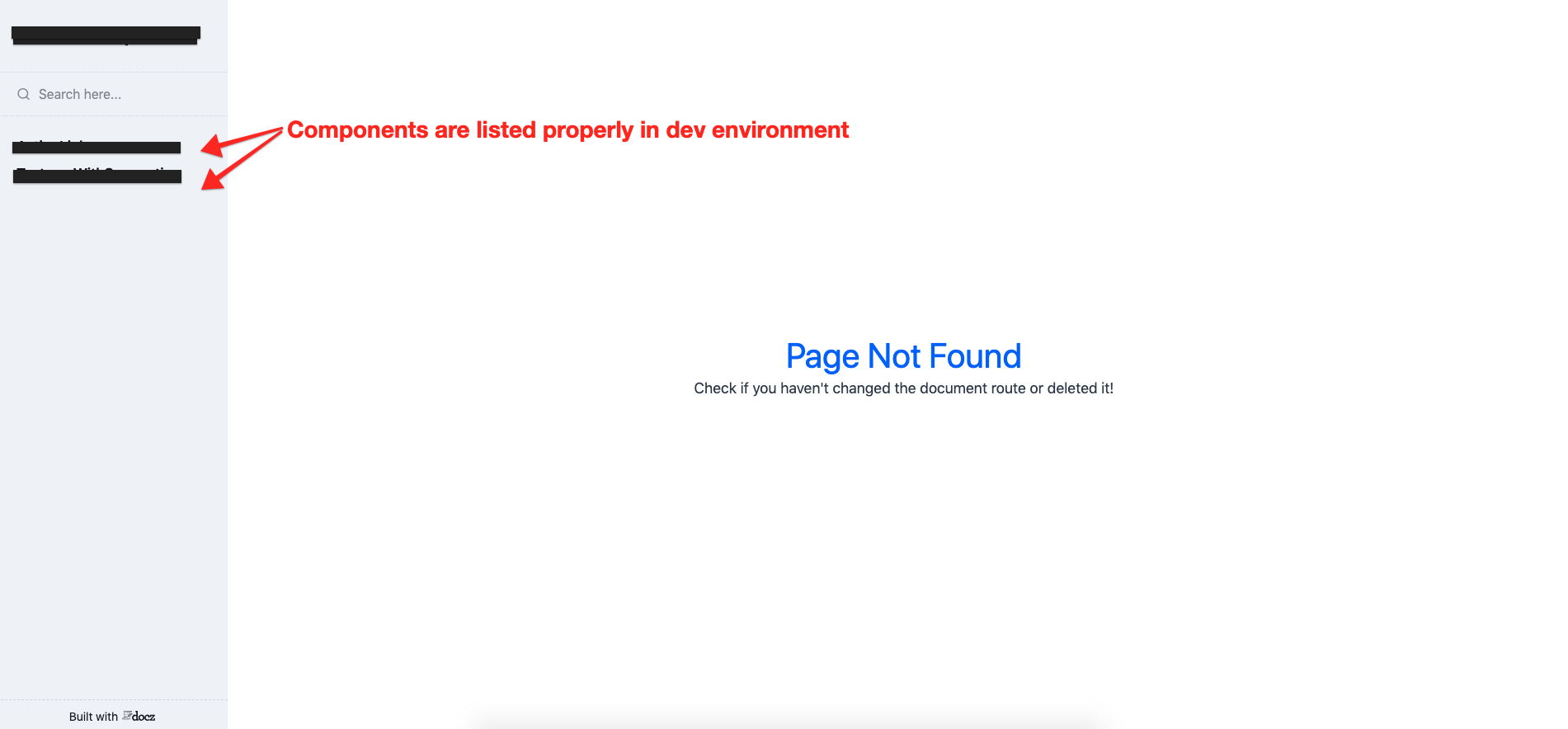
Compared to this (after creating the production build):

To Reproduce
- Write a couple of
.mdxfile(s) - Check if it's working – run
yarn docz:devand see it in the browser - Create production build –
yarn docz:build - Check the generated bundle:
sh
cd .docz/dist
python -m SimpleHTTPServer
In order to allow us to quickly reproduce you issue please include a link to a reproduction repository.
It's internal repo, can't provide a link
Expected behavior
Should generate the bundle similar to dev environment. When I switched the docz version to 0.13.7 the same setup worked fine.
Environment
- OS: OSX 10.14.3
- yarn version: 1.13.0
 mitul45
All 17 comments
Almost same as #710
I made a repo with this problem
https://github.com/ivan-dalmet/docz-issue-sandbox/tree/master/issue-710
 ivan-dalmet
on 27 Mar 2019
ivan-dalmet
on 27 Mar 2019
Folder structure:
.docz
doczrc.js
src
 |--components
        |-- component.jsx
        |-- otherComponent.jsx
docs
 |-- component.mdx
 |-- otherComponent.mdx
Config:
export default {
  codeSandbox: false,
  themeConfig: {
    showPlaygroundEditor: true,
    codemirrorTheme: 'docz-dark'
  },
  modifyBundlerConfig: config => {
    config.module.rules.push({
      test: /\.css$/,
      use: ['style-loader', 'css-loader']
    });

    return config;
  }
};
@mitul45 is it working if you put the docs folder inside the src folder?
ivan-dalmet
on 28 Mar 2019
Nope, having the same issue.
mitul45
on 28 Mar 2019
Experiencing the same issue. Working like a charm in dev, but the built one does not. Looking in the build /static/js/ folder it does seem like it has built the files for the different pages, so the routing in itself seems to be the issue.
 cupofjoakim
on 28 Mar 2019
cupofjoakim
on 28 Mar 2019
I believe this will be resolved after publishing a new version with fix https://github.com/pedronauck/docz/pull/725
 elv1n
on 28 Mar 2019
elv1n
on 28 Mar 2019
@elv1n Can we confirm this?
cupofjoakim
on 28 Mar 2019
@cupofjoakim I had the same problem and while waiting for a new release I published the package with the fix to '@elv1n/docz-core'.
Feel free to install it and check if fix works for you
// fakeDocz.js
#!/usr/bin/env node
require('@elv1n/docz-core').cli()
and run node ./fakeDocz build
elv1n
on 29 Mar 2019
@elv1n Partially worked. Still getting "Page Not Found", but some menu items are atleast rendering. Links to the stuff declared "Menu" in doczrc.js are rendered, but not navigatable. Child pages fetched from a different folder still isn't showing up.
cupofjoakim
on 29 Mar 2019
Hi guys, can you check which version of docz-core are installed? Btw, I'm getting some fixes and today I'll release a new release candidate version.
 pedronauck
on 29 Mar 2019
pedronauck
on 29 Mar 2019
Fixed in the newest release candidate :)
pedronauck
on 31 Mar 2019
Hey @pedronauck, thanks a bunch for solving this so quickly, super nice!
cupofjoakim
on 1 Apr 2019
Thank you for the help, everyone!
mitul45
on 1 Apr 2019
I don't think this issue is resolved.
I just did a fresh rc7 setup and I'm getting a page not found. When using the navigation I end up going to 'http://src-hello-world-hello-world/' moving away from the docz page.
File structure:
| -- .docz
| --  src
       | -- hello-world
             | -- hello-world.mdx
mdx content
---
name: Hello world
---

# Hello world
 michaelw85
on 2 Apr 2019
michaelw85
on 2 Apr 2019
I'm also still getting "Page not found".
cupofjoakim
on 2 Apr 2019
@cupofjoakim I found another issue where someone mentioned adding a route to the meta data for the homepage. I got a basic setup working now after applying this change + #747
---
name: Hello world
route: /
---

# Hello world
yeah routes are broken too in rc7
route: '/some_route' will result in http://some_route
 yyynnn
on 2 Apr 2019
yyynnn
on 2 Apr 2019
Related issues
 hayk94
·
3Comments
hayk94
·
3Comments
 nicholasess
·
3Comments
nicholasess
·
3Comments
 ssylvia
·
3Comments
ssylvia
·
3Comments
 koddr
·
3Comments
koddr
·
3Comments
 regrettably
·
3Comments
regrettably
·
3Comments
Most helpful comment
Hi guys, can you check which version of
docz-coreare installed? Btw, I'm getting some fixes and today I'll release a new release candidate version.