Docz: v1.0.0-rc.* Compiled with errors: Module parse failed: Unexpected token
Bug Report
Describe the bug
When I try to run docz dev I get multiple errors regarding an appropriate loader
✖ Docz
  Compiled with some errors in 29.12s


 ERROR  Failed to compile with 3 errors              12:00:39 PM

 error  in ./node_modules/docz/dist/index.esm.js

Module parse failed: Unexpected token (15:38)
You may need an appropriate loader to handle this file type.
| import { MDXProvider } from '@mdx-js/tag';
|
> const BasePlayground = loadable(() => import('./chunk.esm2.js'));
| const Playground = props => typeof window !== 'undefined' ? (createElement(Suspense, { fallback: null },
|     createElement(BasePlayground, Object.assign({}, props)))) : null;

 @ ./.docz/app/root.jsx 9:0-59 17:2-15 20:19-23 27:25-31
 @ ./.docz/app/index.jsx
 @ multi ./node_modules/react-dev-utils/webpackHotDevClient.js ./.docz/app/index.jsx

 error  in ./node_modules/docz-theme-default/dist/index.esm.js

Module parse failed: Unexpected token (245:30)
You may need an appropriate loader to handle this file type.
| `;
|
> const CodeMirror = lazy(() => import('./chunk.esm2.js'));
| const getLanguage = (children) => {
|     const defaultLanguage = 'jsx';

 @ ./.docz/app/root.jsx 11:0-39 18:29-34
 @ ./.docz/app/index.jsx
 @ multi ./node_modules/react-dev-utils/webpackHotDevClient.js ./.docz/app/index.jsx

 error  in ./.docz/app/imports.js

Module parse failed: Unexpected token (8:11)
You may need an appropriate loader to handle this file type.
| export var imports = {
|   'src/index.mdx': function srcIndexMdx() {
>     return import(
|     /* webpackPrefetch: true, webpackChunkName: "src-index" */
|     'src/index.mdx');

 @ ./.docz/app/root.jsx 12:0-36 28:13-20
 @ ./.docz/app/index.jsx
 @ multi ./node_modules/react-dev-utils/webpackHotDevClient.js ./.docz/app/index.jsx
Environment
- node v10.15.1
- npm v6.8.0
- react v16.8.4
- npm ls webpack
├─┬ [email protected]
│ └─┬ [email protected]
│ └── [email protected]
└─┬ [email protected]
└── [email protected]
Additional context/Screenshots

 davidtaboas
All 35 comments
Having the same issue. Though it was similar to #596, but I couldn't fix it by downgrading webpack
 mlshv
on 22 Mar 2019
mlshv
on 22 Mar 2019
@mlshv Same here!
davidtaboas
on 22 Mar 2019
I'll close this issue in order do #596
 pedronauck
on 22 Mar 2019
pedronauck
on 22 Mar 2019
@pedronauck But #596 doesn't show the same error and the solution is not the same
davidtaboas
on 25 Mar 2019
Having the same issue with rc7
Node v10.15.1
NPM 6.9.0
"react": "^16.8.6",
"react-dom": "^16.8.6",
+-- [email protected]
| `-- [email protected]
| `-- [email protected] deduped
`-- [email protected]
Downgrading webpack using npm i -D [email protected] resolves the issue for me.
 michaelw85
on 2 Apr 2019
michaelw85
on 2 Apr 2019
Having the same issue with rc7. Downgrading my webpack version to 4.28.4 does not solve it.
 JoeCMorgan
on 2 Apr 2019
JoeCMorgan
on 2 Apr 2019
@JoeCMorgan I also tried a clean project using Yarn instead of npm and that seems to work without the downgrade.
michaelw85
on 2 Apr 2019
Just wanted to chime in and say that I'm also having this issue on rc7. The workaround mentioned in #596 (https://github.com/pedronauck/docz/issues/596#issuecomment-475955196) is valid if you're able to use yarn, but I for one can't go that route due to how our packages are built in our CI engine.
 cupofjoakim
on 2 Apr 2019
cupofjoakim
on 2 Apr 2019
Unfortunately I'm still getting the issue with yarn and a clean project:
yarn add docz@next docz-theme-default@next --dev
add the optional scripts to package.json
yarn docz:dev
Still getting the same error.
JoeCMorgan
on 2 Apr 2019
For me, use yarn solves the problem, but it's a temporal solution because I need to use npm.
davidtaboas
on 3 Apr 2019
Yep, it would be great to make this work properly with npm. I had to install the package and its dependencies with yarn otherwise it would not work.
 agonbina
on 4 Apr 2019
agonbina
on 4 Apr 2019
Digging into this, I saw that has a problem related to the way that npm solves dependencies, you can see more details about this here:
https://github.com/webpack/webpack/issues/8656
I'll try to find some solution and release in the next version.
pedronauck
on 5 Apr 2019
I'll pin acorn to the right dependency version on docz, but if you want some solution, try this:
- Keep docz dependencies like that:
"devDependencies": {
"docz": "1.0.0-rc.7",
"docz-core": "1.0.0-rc.7",
"docz-theme-default": "1.0.0-rc.7",
},
It's important to keep absolute version without
^.
- Then, add
[email protected]as a devDependency as well:
$ npm add [email protected] --save-dev
- Finally, make a clean install of your packages
$ rm -rf node_modules package-lock.json && npm install
This could work 👍
pedronauck
on 5 Apr 2019
I'm experiencing this issue. The above fix does not resolve.
"devDependencies": {
"acorn": "6.0.5",
"docz": "1.0.0-rc.8",
"docz-core": "1.0.0-rc.8",
"docz-theme-default": "1.0.0-rc.8",
...
}
I have a single .mdx file:
_/src/index.mdx_
name: Getting Started
route: /
---
# Getting Started
I deleted yarn.lock and node_modules
Clean install.
When I run docz dev, I see identical output to what's mentioned by the top post in this thread.
 dannyrb
on 5 Apr 2019
dannyrb
on 5 Apr 2019
Did you try to downgrade webpack @dannyrb?
pedronauck
on 5 Apr 2019
Cleaning .docz, yarn.lock, package-lock.json, node_modules between attempts:
👍 Works
npm install
npm run docz:dev
👎 Fails
yarn install
yarn run docz:dev
Solution
yarn install
yarn add -D [email protected]
yarn run docz:dev
Thanks for your help, @pedronauck 👍 I know answering questions like this one aren't fun, but I do really, really appreciate your time <3
dannyrb
on 5 Apr 2019
Downgrading webpack or setting acorn to 6.0.5 didn't help
❯ yarn why webpack
yarn why v1.15.2
[1/4] 🤔 Why do we have the module "webpack"...?
[2/4] 🚚 Initialising dependency graph...
warning Resolution field "[email protected]" is incompatible with requested version "[email protected]"
[3/4] 🔍 Finding dependency...
[4/4] 🚡 Calculating file sizes...
=> Found "[email protected]"
info Reasons this module exists
- "react-scripts" depends on it
- Hoisted from "react-scripts#webpack"
- Hoisted from "docz#docz-core#webpack"
info Disk size without dependencies: "2.34MB"
info Disk size with unique dependencies: "7.26MB"
info Disk size with transitive dependencies: "27.41MB"
info Number of shared dependencies: 118
✨ Done in 1.27s.
Do you have an ideas what else can be an issue?
 elv1n
on 5 Apr 2019
elv1n
on 5 Apr 2019
Still broken for me as well, reverted back to version 0.13.7 for now.
JoeCMorgan
on 11 Apr 2019
I'm trying to migrate Docz from v0.13.7 to v1.0.0. My project is in TypeScript, so I have my doczrc.js configured like this:
{
wrapper: "wrapper.tsx",
typescript: true
}
and wrapper.tsx contains this:
import * as React from "react";
import { AppContext } from "./src/AppContext";
import { LanguagePicker } from "./src/LanguagePicker";
let defaultLanguage = "en-us";
const Wrapper: React.FunctionComponent = (props) => {
return (
<AppContext lang={defaultLanguage}>
<div>{props.children}</div>
<div>
<LanguagePicker/>
</div>
</AppContext>
);
};
export default Wrapper;
This setup used to work, but after upgrading to docz v1, I get this error:
Module parse failed: Unexpected token (7:13)
You may need an appropriate loader to handle this file type.
| let defaultLanguage = "en-us";
|
> const Wrapper: React.FunctionComponent = (props) => {
| return (
| <AppContext lang={defaultLanguage}>
 xthilakx
on 13 Apr 2019
xthilakx
on 13 Apr 2019
This issue should not be closed.
 kennyglenn
on 8 May 2019
kennyglenn
on 8 May 2019
Also instead of installing [email protected], you can specify it in resolutions in package.json
"resolutions": {
    "docz/**/webpack": "4.28.4"
}
 sanohin
on 9 May 2019
sanohin
on 9 May 2019
@sanohin Adding above resolution and clean yarn install after that works for me. Thanks
 gokulkrishh
on 13 May 2019
gokulkrishh
on 13 May 2019
TLDR: Try webpack 4.31.0
I was facing this issue with 1.2.0. It took me an entire day, but upgrading all of my babel-related and
webpack packages fixed it for me.
I tried pretty much everything in this thread, related threads, and Webpack issues and none of them worked.
After playing around with different combinations of package versions, I think the one that fixed it for me was upgrading webpack to 4.31.0.
 aarondancer
on 14 May 2019
aarondancer
on 14 May 2019
@sanohin Thanks! It solves for me.
 adrianoresende
on 27 May 2019
adrianoresende
on 27 May 2019
@sanohin Works for me, thanks.
 wangpin34
on 28 May 2019
wangpin34
on 28 May 2019
@sanohin finally a fix that works, thanks a lot.
JoeCMorgan
on 28 May 2019
Also instead of installing
[email protected], you can specify it inresolutionsinpackage.json"resolutions": { "docz/**/webpack": "4.28.4" }
apparently this does not work when using workspaces
 emersonlaurentino
on 28 May 2019
emersonlaurentino
on 28 May 2019
@pedronauck why this is closed?
I'm use CRA and installed [email protected], but after run the script there error ocurred:
Module parse failed: Unexpected token (23:38)
You may need an appropriate loader to handle this file type.
| import { MDXProvider } from '@mdx-js/react';
|
> const BasePlayground = loadable(() => import('./Playground.esm.js'));
| const Playground = props => typeof window !== 'undefined' ? createElement(Suspense, {
|   fallback: null
 marlonmleite
on 4 Jun 2019
marlonmleite
on 4 Jun 2019
+1
 aleksanderd
on 4 Jun 2019
aleksanderd
on 4 Jun 2019
Switching back to Storybook... such a waste of time.
No need to add those comments, the maintainer is doing a great job and does not deserve comments like that.
 jacobjonsson
on 11 Jun 2019
jacobjonsson
on 11 Jun 2019
Also instead of installing
[email protected], you can specify it inresolutionsinpackage.json"resolutions": { "docz/**/webpack": "4.28.4" }
This method only works when doing the following:
- Specify the
resolutionsinpackage.jsonas mentioned above
- yarn:
rm -rf node_modules yarn.json && yarn
or
- yarn:
- npm:
rm -rf node_modules package-lock.json && npm install
 JorgeCeja
on 16 Jun 2019
JorgeCeja
on 16 Jun 2019
Couldn't get it working by any of these methods:
- downgrading to [email protected]
- upgrading to [email protected]
- [email protected] or @4.31.0 in resolutions
What is actually worked:
"acorn": "^6.1.1",
"webpack": "~4.34.0",
rm -rf node_modules package-lock.json && npm i
Also instead of installing
[email protected], you can specify it inresolutionsinpackage.json"resolutions": { "docz/**/webpack": "4.28.4" }
This would only work with yarn. resolutions is not supported by npm.
For npm this might work https://www.npmjs.com/package/npm-force-resolutions
To verify what you have installed and resolved, use:
yarn list webpack
npm list webpack
Still: Does not fix it for me, started with a fresh 1.2.0 and just try to embed a wrapper to provide my styled-components theme
export default {
  src: 'src/components/mdx',
  files: 'docs/**/*.{md,markdown,mdx}',
  wrapper: 'src/docz-wrapper.js'
}
src/docz-wrapper.js
import React from 'react'
import { ThemeProvider } from 'styled-components'
import themeConfig from './utils/styling/theme.config'

export default ({ children }) => (
  <ThemeProvider theme={themeConfig}>{children}</ThemeProvider>
)
Any ideas? Now trying docz@~0.0.0 🤷♂
Update:
Turned out this is not related at all to my issue, my config above is wrong. I exclude the wrapper by setting src so deep down. This works now:
export default {
  files: './docs/**/*.{md,markdown,mdx}',
  wrapper: 'src/docz-wrapper'
}
 axe312ger
on 18 Jun 2019
axe312ger
on 18 Jun 2019
My case is particular. I have a monorepo:
- elements/
- lib/
- docs/
docs depends of lib, so, I use Lerna to handle this dependencies. I have tried all advices written here and the resolutions was the only one that works.
- Use Yarn as package manager: npm can't perform the
resolutionsfield. - Remove
node_modulesand lock file.
Done!
 gugadev
on 20 Jun 2019
gugadev
on 20 Jun 2019
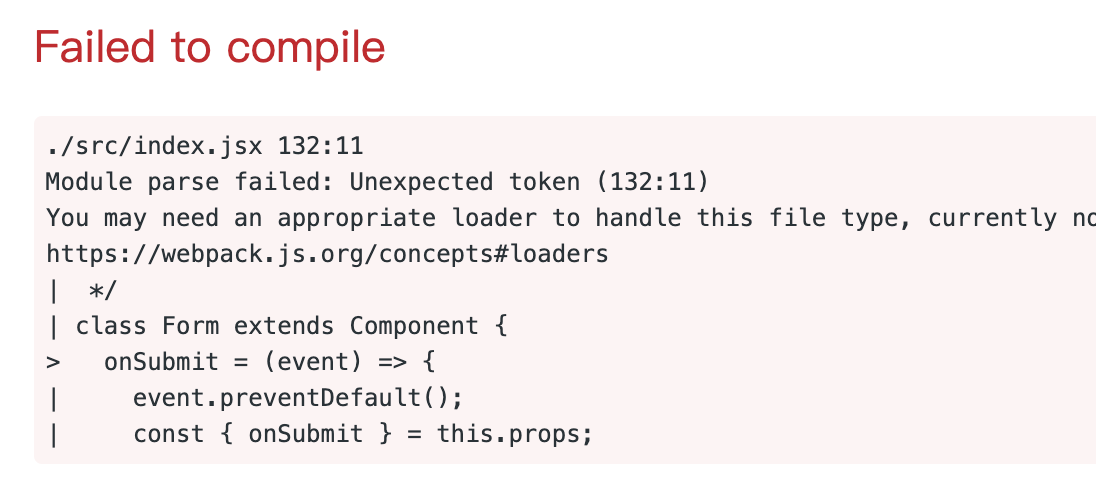
I've tried the solutions above, but no one works, still not solved this problem.
Anyone have a perfect solution? help me...
 nanxiaobei
on 9 Sep 2019
nanxiaobei
on 9 Sep 2019
Related issues
 w0wka91
·
3Comments
w0wka91
·
3Comments
 merelinguist
·
3Comments
merelinguist
·
3Comments
 hayk94
·
3Comments
hayk94
·
3Comments
 brunolemos
·
3Comments
brunolemos
·
3Comments
 YardWill
·
3Comments
YardWill
·
3Comments
Most helpful comment
Also instead of installing
[email protected], you can specify it inresolutionsinpackage.json