Docz: MDXTag Error: "components is not defined"
Bug Report
Describe the bug
When visiting my local docz instance, I am met with the error components is not defined upon navigating (clicking on a sidebar link) to a specific component's view.
I am not quite sure what causes the bug. It seems as though my mdx files are compile to be <MDXTag> components, which accepts a prop components, but the identifier provided doesn't seem to exist in the file. 🤷♂️
To Reproduce
Clone, cd packages/core, npm i, npm run docz:dev.
https://github.com/colshacol/g2-ops-component-library
branch: "v1"
Working directly from the packages/core directory.
Expected behavior
I expect docz to show me the mdx documentation I have written for the specific component.
Environment
macOS High Sierra 10.13.6
node v11.1.0 / v10.8.0
npm v6.2.0 / v6.4.1
// doczrc.js
import { css } from 'docz-plugin-css'

export default {
  src: './src/new_components',
  plugins: [
    css({
      preprocessor: 'postcss',
      cssmodules: false,
      loaderOpts: {
        plugins: [],
      },
    }),
  ],
}
"docz": "^0.12.12",
"docz-plugin-css": "^0.11.0",
(Same error with 0.12.12, 0.12.11, 0.12.10, and 0.12.9.)
Additional context/Screenshots
Screen recording:
https://www.youtube.com/watch?v=XlirTYEnGmg


 colshacol
All 23 comments
Note: Before making this issue, I had cleared my yarn cache, npm cache, deleted and re-installed dependencies many times.
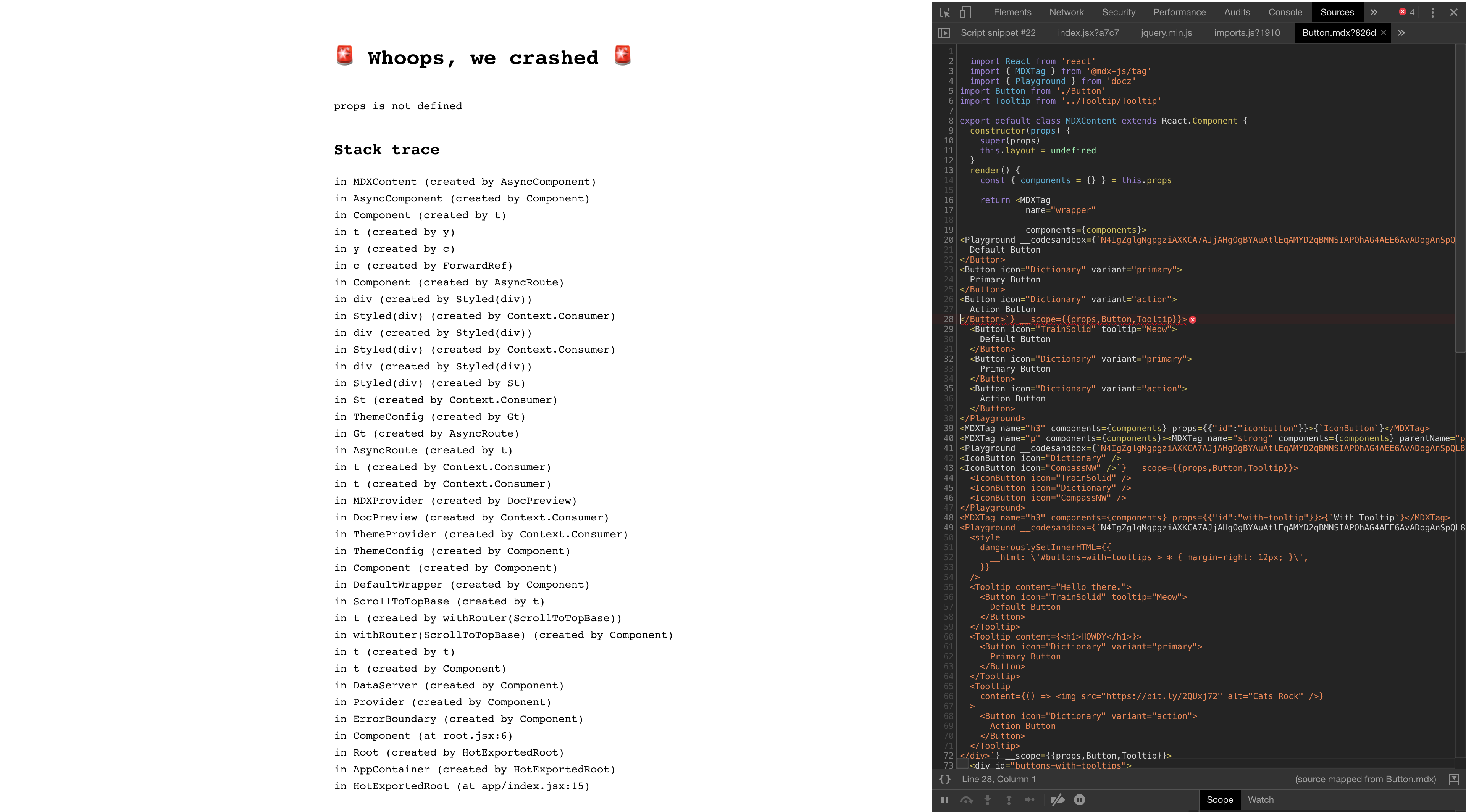
I just gave it a go with yarn, and it seems that it did better, but still fell down. Now the error is props is not defined. Sill in the same place, though.
colshacol
on 21 Nov 2018
HelloWorld seems to be working fine now, though... 🤔
colshacol
on 21 Nov 2018
Same error with the latest version of docz (0.12.12)
props is not defined

Stack trace
in MDXContent (created by AsyncComponent)
in AsyncComponent (created by Component)
in Component (created by t)
in t (created by y)
in y (created by c)
in c (created by ForwardRef)
in Component (created by AsyncRoute)
in div (created by Styled(div))
in Styled(div) (created by Context.Consumer)
in div (created by Styled(div))
in Styled(div) (created by Context.Consumer)
in div (created by Styled(div))
in Styled(div) (created by St)
in St (created by Context.Consumer)
in ThemeConfig (created by Gt)
in Gt (created by AsyncRoute)
in AsyncRoute (created by t)
in t (created by Context.Consumer)
in t (created by Context.Consumer)
in MDXProvider (created by DocPreview)
in DocPreview (created by Context.Consumer)
in ThemeProvider (created by Context.Consumer)
in ThemeConfig (created by Component)
in Component (created by Component)
in ThemeProvider (at Layout.js:52)
in Layout (created by Component)
in ScrollToTopBase (created by t)
in t (created by withRouter(ScrollToTopBase))
in withRouter(ScrollToTopBase) (created by Component)
in t (created by t)
in t (created by Component)
in DataServer (created by Component)
in Provider (created by Component)
in ErrorBoundary (created by Component)
in Component (at root.jsx:8)
in Root (created by HotExportedRoot)
in AppContainer (created by HotExportedRoot)
in HotExportedRoot (at app/index.jsx:15)
 danielbayerlein
on 21 Nov 2018
danielbayerlein
on 21 Nov 2018
I'm getting the same error whenever I use the <Playground /> component.
 KingScooty
on 21 Nov 2018
KingScooty
on 21 Nov 2018
@pedronauck Looks like a critical bug in the current version.
danielbayerlein
on 21 Nov 2018
I'm not getting the same error as the OP, but definitely getting the @danielbayerlein getting. The usage of Playground will always throw an error props is not defined
 idrakimuhamad
on 22 Nov 2018
idrakimuhamad
on 22 Nov 2018
Also getting props is not defined when I use <Playground>.
Looking at the line where the error is thrown:
<Playground __codesandbox={`undefined`} __position={1} __code={`<MyComponent />`} __scope={{props,MyComponent}}>
It seems props should be this.props, judging by its position in the MDXContent component.
 robertpenner
on 22 Nov 2018
robertpenner
on 22 Nov 2018
I think this was the diff responsible (2 days ago in mdx-js):
https://github.com/mdx-js/mdx/commit/c9c2b32c93a1fcffe95ab8a41e6774a6285e5786#diff-b327bc77915c976f12c6d2efb717f068R112
Looks like in the refactoring to a class component, in the render method this.props should have replaced props.
(FWIW that code is in a double-nested template literal; good luck linting that.)
robertpenner
on 22 Nov 2018
same error with props is not defined
 zWingz
on 22 Nov 2018
zWingz
on 22 Nov 2018
OK, it's a issue in mdx-js, see https://github.com/mdx-js/mdx/issues/324
danielbayerlein
on 22 Nov 2018
Apologies for this issue, for the time being I recommend pinning @mdx-js/[email protected], we'll have it fixed in MDX core tomorrow.
 johno
on 22 Nov 2018
johno
on 22 Nov 2018
It could be interesting to match packages version exactly to minimize this sort of issue in the future (currently inside docz/packages/docz-core/package.json, there are carret ranges), what do you think ?
 adbayb
on 22 Nov 2018
adbayb
on 22 Nov 2018
Sorry guys, just now I saw this issue, I'm working right now to fix it :pray:
 pedronauck
on 23 Nov 2018
pedronauck
on 23 Nov 2018
Fixed, will be released in the next version
pedronauck
on 23 Nov 2018
@pedronauck - When?
 berbecki
on 23 Nov 2018
berbecki
on 23 Nov 2018
@berbecki Once the release is created.
danielbayerlein
on 23 Nov 2018
Today @berbecki :)
pedronauck
on 23 Nov 2018
Not sure if 0.16.4 contains the fix for this issue - But I just tried that latest version and it doesn't work. Same error. @pedronauck
 jasdeepsingh
on 23 Nov 2018
jasdeepsingh
on 23 Nov 2018
Fixed on v0.12.13 ✅
pedronauck
on 23 Nov 2018
If bug keeps showing up, try to run yarn dev --debug to invalidate cache or re-install yarn stuff
pedronauck
on 23 Nov 2018
@pedronauck thanks!
 andrevvalle
on 23 Nov 2018
andrevvalle
on 23 Nov 2018
Today @berbecki :)
Thanks for v0.12.13 @pedronauck Works like a charm!
 one-aalam
on 23 Nov 2018
one-aalam
on 23 Nov 2018
yarn [your-command] --debug works for me. But we use npm at work, so I have tried re-installing things and it's not working (of course I cleaned up the cache). Any idea why could it be ?
 enzoferey
on 27 Nov 2018
enzoferey
on 27 Nov 2018
Related issues
 w0wka91
·
3Comments
w0wka91
·
3Comments
 albinekb
·
3Comments
albinekb
·
3Comments
 mquandalle
·
3Comments
mquandalle
·
3Comments
 nicholasess
·
3Comments
nicholasess
·
3Comments
 kachkaev
·
3Comments
kachkaev
·
3Comments
Most helpful comment
Same error with the latest version of
docz(0.12.12)