Docusaurus: DX: show big help message when baseurl problems
💥 Proposal
Not configuring the baseurl properly is the most common Docusaurus error, and lead to site deployments such as:

It's very often asked on issues or Discord why a site does not work after deployment, and the answer is always the same: baseurl.
I suggest that:
- We inline (HTML + JS + CSS) a big error message at the top of the homepage of a docusaurus site
- We recommend to use
baseUrl = document.location.pathname(can be computed from the inlined JS script) - We hide this message in the first remotely-loaded CSS file, as it proves that baseurl setting is correct
This way, the user can figure it out himself.
This should rather be made theme-agnostic, and be in core only.
To test this, run in the monorepo: yarn build:v2 and then yarn serve website and open http://localhost:5000/build/ => should show a broken site.
The idea is to get something like:
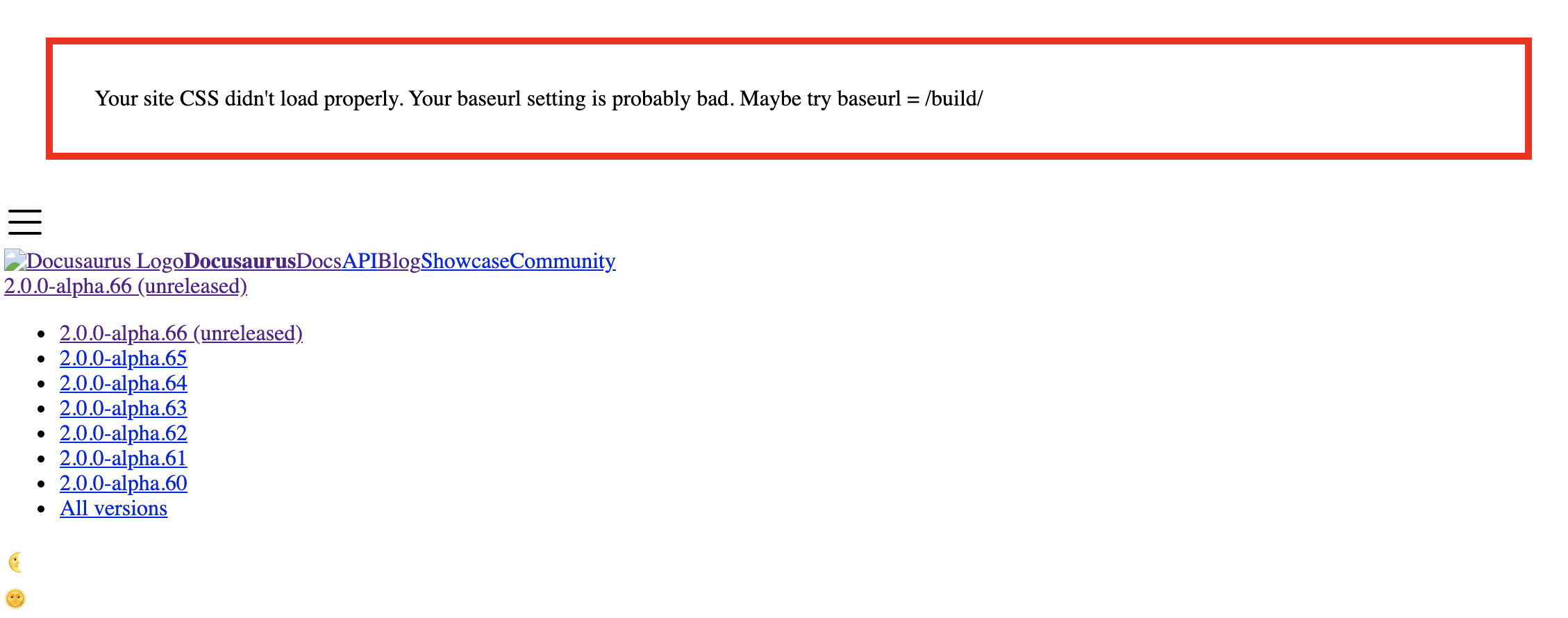
But without any flashing or whatever: if the site works fine, then the user should never see this.
Drawback: if for some weird reasons the baseurl is correct, the HTML loads, but not the CSS (network error for example), the user would still see this error message. That does not seem a big deal to me, as it should be quite rare, and he'll see a broken site anyway...
Edit: here's the final error message merged and a tweet about it: https://twitter.com/sebastienlorber/status/1329360348349083650
 slorber
All 11 comments
@slorber I would love to take a shot at this
Can you please guide me with a starting point?
 jcs98
on 14 Oct 2020
jcs98
on 14 Oct 2020
Sure,
I'm not totally sure where is the best place to add this, but you can try in client/App.tsx of core.
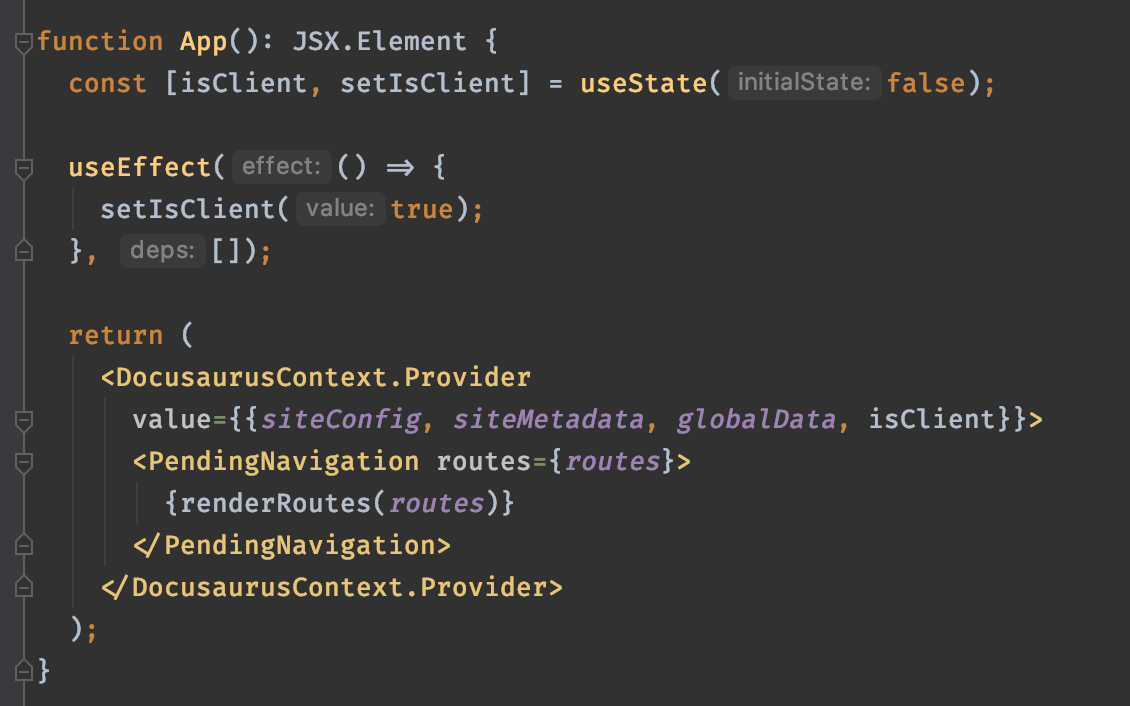
Something like:
import "./hideCSSLoadingWarningMessage.css";

function CSSLoadingWarningMessage() {
  const location = useLocation();
  if (location.pathname === "/") {
    return (
      <div style={{ border: "solid red thick" }}>
        <div>CSS didn't load</div>
        {isClient && (<div>maybe try baseUrl = {document.location.pathname}</div>)}
      </div>
    );
  }
  return null;
}
Maybe it would be better to add it to the SSR template, and not part of the React app, not totally sure. Give it a try and we'll figure out if this is good enough.
slorber
on 14 Oct 2020
Thank you! I will try this :+1:
jcs98
on 14 Oct 2020
This feature is causing CSP rules to fail in production when unsafe-inline is not set. Although this is a nice to have, should we keep this feature only for dev mode and remove it for the production build?
Let me know, if you guys agree with this, I am happy to work on it.
 mpsq
on 23 Nov 2020
mpsq
on 23 Nov 2020
I see
@mpsq most issues happen when users try to deploy to their prod env imho, so I'd rather give you an option to disable this option, but keep it enabled by default, as most users will run without any CSP rules.
What should we do to pass that unsafe-inline rule? just remove the banner with inline style?
slorber
on 23 Nov 2020
Thanks for you super quick answer.
Inline styles are an issue yes, but more importantly, the following snippet:
<script type="text/javascript">
            {`
document.addEventListener('DOMContentLoaded', function () {
  var baseUrlSuggestion = document.getElementById(
    '${BaseUrlSuggestionContainerId}',
  );
  if (baseUrlSuggestion) {
    var actualHomePagePath = window.location.pathname;
    var suggestedBaseUrl = actualHomePagePath.substr(-1) === '/'
        ? actualHomePagePath
        : actualHomePagePath + '/';
    baseUrlSuggestion.innerHTML = suggestedBaseUrl;
  }
});
`}
</script>
Is causing "even more" trouble since it means enabling unsafe-inline for script-src. Although inline styles can be fixed easily, do you believe this script can also be somehow reworked to not be inlined? A flag to disable this feature would also work :).
EDIT:
Given we agree on a solution, I will happily implement it.
mpsq
on 23 Nov 2020
We'll add a flag to disable then.
This inlining is required, because the banner has to be displayed when the js/css assets can't load, so we can't un-inline them 😅
slorber
on 23 Nov 2020
will be fixed by https://github.com/facebook/docusaurus/pull/3802
slorber
on 23 Nov 2020
https://github.com/facebook/docusaurus/releases/tag/v2.0.0-alpha.69
let me know if this works for you
slorber
on 24 Nov 2020
Yes, it is all good now, no more CSP issues :tada:
Thanks Seb!
mpsq
on 24 Nov 2020
great :) 👍
slorber
on 24 Nov 2020
Related issues
 sebqq
·
3Comments
sebqq
·
3Comments
 muuvmuuv
·
3Comments
muuvmuuv
·
3Comments
 azu
·
3Comments
azu
·
3Comments
 itelofilho
·
3Comments
itelofilho
·
3Comments
 lex111
·
3Comments
lex111
·
3Comments