Docusaurus: "navbar.logo.alt" is not allowed to be empty
🐛 Bug Report
When I use an empty string for navbar.logo.alt in my config, I get the following validation error:
"navbar.logo.alt" is not allowed to be empty
However, since the logo in my navbar is redundant with the actual project name next to it, I don't want screen readers to read out anything for the logo - it would just duplicate the project name.
Have you read the Contributing Guidelines on issues?
I did now.
To Reproduce
(Write your steps here:)
- Create a new Docusarus v2 project.
- Set
navbar.logo.altinthemeConfigin docusaurus.config.js to''. - Run
npm start.
Expected behavior
The website to start just fine.
Actual Behavior
You get the following output:
A validation error occured.
The validation system was added recently to Docusaurus as an attempt to avoid user configuration errors.
We may have made some mistakes.
If you think your configuration is valid and should keep working, please open a bug report.

ValidationError: "navbar.logo.alt" is not allowed to be empty
Your Environment
- Docusaurus version used: Alpha 61 of v2
- Environment name and version (e.g. Chrome 78.0.3904.108, Node.js 10.17.0): Node v12.18.2
- Operating system and version (desktop or mobile): Ubuntu 20.04
Reproducible Demo
Just the default generated template, with the alt changed.
 Vinnl
Vinnl
All 5 comments
Hi,

In my opinion it is better that the screen reader reads your alt text vs the image filename
 slorber
on 28 Aug 2020
slorber
on 28 Aug 2020
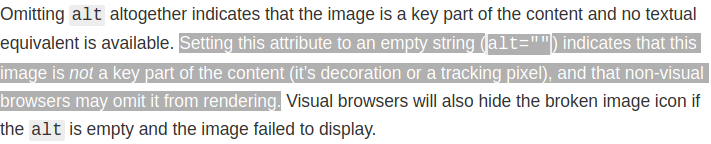
@slorber That is about leaving out the alt attribute altogether :) I want to specify an empty alt tag, i.e. <img src="logo.svg" alt=""/>.
See also https://developer.mozilla.org/en-US/docs/Web/HTML/Element/Img#Attributes
Vinnl
on 28 Aug 2020
I see.
Do you have a link from an authority that claims alt="" is a recommended practice in some cases?
slorber
on 28 Aug 2020
@slorber Just added it to my previous comment! :)
Vinnl
on 28 Aug 2020
thanks, will accept a PR (just need .allow('') in theme validation) or will make one soon
slorber
on 28 Aug 2020
Related issues
 itelofilho
·
3Comments
itelofilho
·
3Comments
 nebrelbug
·
3Comments
nebrelbug
·
3Comments
 azu
·
3Comments
azu
·
3Comments
 MoogyG
·
3Comments
MoogyG
·
3Comments
 muuvmuuv
·
3Comments
muuvmuuv
·
3Comments