Docusaurus: Copy images in `docs` directory into production build
🐛 Bug Report
When a markdown file refers to an image in the current directory, it will render correctly when the dev server is running. However, the production build will not include the image (they are not copied from docs to build).
Have you read the Contributing Guidelines on issues?
Yes
To Reproduce
Add an image to the docs directory and reference it from a markdown file:
My image:

Under the dev server, image1.png will show up. But in a production build it will be a broken link.
Expected behavior
I would expect image1.png to show up at build\docs\image1.png.
Actual Behavior
The image does not appear and the link is broken in the rendered markdown.
Your Environment
Windows 10, running node 14, with docusaurus 2.0.0-alpha.56.
Reproducible Demo
The repo at https://github.com/jbaileyashe/docusaurus-bug demonstrates the problem. The file docs\bug.md refers to an image in that directory (bug.png).
Under the development server (npm run start), the image shows up:

However, the production build will not include bug.png. After npm run build, running serve -s build -l 3000 (which serves those files through a simple webserver), you can see that the image is missing:

I checked in the build directory. Looking in build\docs\bug, there is no bug.png, even though index.html in that directory refers to it.
Ideally, bug.png would get copied to build\docs\bug.
 jbaileyashe
All 17 comments
This is not supported. Only files in the static folder will be transferred over. If you want it included, use the require()/import statements to import the asset which will let the image be processed by webpack and signal to it to bundle it in.
 yangshun
on 18 Jun 2020
yangshun
on 18 Jun 2020
Thanks for the quick reply! If the import/require method was bundled that would be great, or just supporting this in plain Markdown. For now I can use an absolute path and put images in static, but being able to keep images next to their documents would be a lot simpler.
jbaileyashe
on 18 Jun 2020
hi,
This is probably not ideal for this usecase, but you can embed img elements in md/mdx
Can you try with the following?
<img src={require("./image1.png")}/>
 slorber
on 18 Jun 2020
slorber
on 18 Jun 2020
I think there is a plugin or configuration problem. When I try that, I get a compilation error:
./docs/bug.png 1:0
Module parse failed: Unexpected character '�' (1:0)
You may need an appropriate loader to handle this file type, currently no loaders are configured to process this file. See https://webpack.js.org/concepts#loaders
(Source code omitted for this binary file)
 @ ./docs/bug.mdx 1:1088-1108
 @ ./.docusaurus/registry.js
 @ ./node_modules/@docusaurus/core/lib/client/exports/ComponentCreator.js
 @ ./.docusaurus/routes.js
 @ ./node_modules/@docusaurus/core/lib/client/clientEntry.js
 @ multi ./node_modules/react-dev-utils/webpackHotDevClient.js ./node_modules/@docusaurus/core/lib/client/clientEntry.js
If that worked though, it'd be a totally acceptable solution.
jbaileyashe
on 18 Jun 2020
So, a workaround I tested that works with start/build:
Add docusaurusplugin-ideal-image.
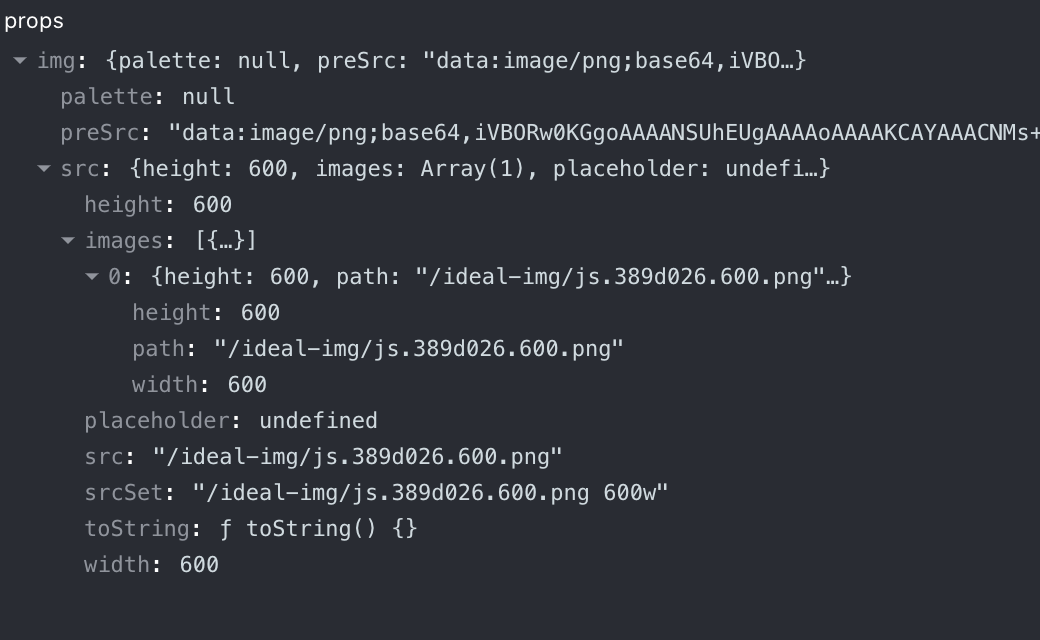
It adds a webpack image loader so that you can require("./image.png") and gives you some json representation of the image. Note: this is a proprietary image format, so you should use it with the IdealImage component, otherwise it won't work. I think it's not a big deal because this comp is optimized (a bit like Gatsby-image).
# some markdown doc

hey this is an **image**:

import Image from '@theme/IdealImage';

<Image img={require("./js.png")}/>
If you are curious, here's the shape of the img prop:
slorber
on 18 Jun 2020
Also works. I'd rather there was something simpler (require) and maybe I can write a plugin that does that.
jbaileyashe
on 18 Jun 2020
Unfortunately I'm not sure it will be easy to make it simpler than a require.
require() is something common in frontend SPAs to tell webpack that a page actually needs a file, and make Webpack move that asset next to the generated html pages.
For now it works only for images, using this ideal images plugin, but I think we can make it work for all kind of assets thanks to webpack's file loader.
It we want to make it work with regular MD image/link syntax, we need a markdown processing step than actually transform the markdown to require calls ;)
You can get some inspiration here: docusaurus/packages/docusaurus-plugin-content-docs/src/markdown/linkify.ts
slorber
on 18 Jun 2020
I wrote a local plugin in the repo above (https://github.com/jbaileyashe/docusaurus-bug) that enables webpack's file-loader plugin, which allows me to use import syntax in an mdx file for referring to images in the local directory.
The plugin to modify webpack's config to use file-loader is implemented in use-file-loader-plugin/plugin.js.
I updated docusaurus.config.js to load the plugin:
module.exports = {
...
  plugins: [path.resolve(__dirname, 'use-file-loader-plugin/plugin.js')]
...
}
This allowed me to import the image into docs/bug.mdx:
import bug from "./bug.png"

Hello! You should see a bug:

<img src={bug} />
This works in both the dev server and the production build. In particular, webpack copies bug.png to build\docs\bug.png, which is pretty much what I wanted.
jbaileyashe
on 18 Jun 2020
Hi @jbaileyashe
Actually you don't even need to create a plugin, you could as well use the file-loader hint in the require/import statement.
Here's an example for supporting a link to a local pdf file:
yarn add file-loader -D
And then:
some markdown

<a href={require("!file-loader!./blog.pdf").default}>Test link</a>
Or:
some markdown

import pdfLink from "!file-loader!./blog.pdf"

<a href={pdfLink}>Test link</a>
I'd rather there was something simpler (require) and maybe I can write a plugin that does that.
Do you think your plugin makes it simpler? What is bothering you, you prefer ES imports to require()?
I think we should add this support to core with requiring a plugin or a !file-loader! webpack hint.
Looked at how Gatsby does it, and it actually supports it but only for some well-defined file extensions (images, videos, pdfs...):
It uses a combination of file loader + url-loader with file-loader fallback
Would you be interrested to contribute this to core @jbaileyashe ?
Otherwise I'll do it
slorber
on 19 Jun 2020
I didn't know that was possible! I don't think I'll have time to make that contribution so please feel free.
Thanks so much for your help!
jbaileyashe
on 19 Jun 2020
Hi,
I'm adding support for default configuration to be able to colocate assets next to md files here: #2994
slorber
on 25 Jun 2020
@slorber - I am so excited to use docusaurus with our project at erxes. MDX support in v2 has been long awaited. What great work so far. I searched and found this issue and as the docs don't seem to be updated yet, may I ask...?
Coming from Gatsby and VuePress - I get that I can place images in my static files folder:
/static
_ /img
__ img1.svg
__ img2.png
__ img3.jpg
__ blog-post-1-1-2020/
___ img4.jpg
It's still awkward to keep the docs mdx in one place and the images that go with them somewhere else.
It's seems with closing https://github.com/facebook/docusaurus/pull/2994 - that we should now be able to do something like this:
/docs
_ /administrator
__ getting-starting.mdx
__ img8.png
__ img9.svg
__ back-up.mdx
And then in the .mdx file
File: .getting-started.mdx
test

What am I missing? As I am not able to get this to work and in VuePress and Gatsby it does. USING MARKDOWN - I have tried everything I can think of and I simply either don't know the syntax or there is something else missing. I can't reference the images from the img folder - using markdown. This this mean I need to use HTML?
Thank you.
 davidkartuzinski
on 4 Jul 2020
davidkartuzinski
on 4 Jul 2020
Hi
I don't see your tests in the comment.
But this feature is in next release, alpha 58 does not have it yet.
As a temp workaround you can add file loader and use it in require statements, like I documented in the PR
slorber
on 4 Jul 2020
@davidkartuzinski the next version will allow like Gatsby to use require statements in MDX
https://deploy-preview-2994--docusaurus-2.netlify.app/docs/next/markdown-features#assets
in the meantime, you can just yarn add file-loader -D and do something like:
<img src={require('!file-loader!./img8.png').default}/>
The Markdown syntax really should be supported as well, like .
Also, relevant issue here: https://github.com/facebook/docusaurus/issues/2850
 adrianmcli
on 11 Jul 2020
adrianmcli
on 11 Jul 2020
opened this new issue => https://github.com/facebook/docusaurus/issues/3057
slorber
on 14 Jul 2020
Hey all, this is feature is now released!
If you like it, don't forget to retweet 😄
https://twitter.com/docusaurus/status/1286715187983048704
slorber
on 24 Jul 2020
Related issues
 sebqq
·
3Comments
sebqq
·
3Comments
 microbouji
·
3Comments
microbouji
·
3Comments
 JoelMarcey
·
3Comments
JoelMarcey
·
3Comments
 cheercroaker
·
3Comments
cheercroaker
·
3Comments
 azu
·
3Comments
azu
·
3Comments