Docusaurus: [v2] Text near code spans illegible with note admonitions in dark mode
🐛 Bug Report
In dark mode, the text surrounding code spans may become illegible, as the code span's background gets mixed with the text color. For instance, the , after breakpoints is almost invisible below:
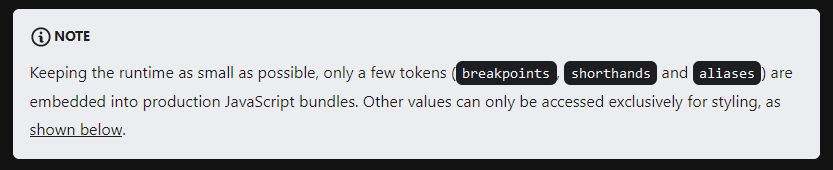
Better results can be achieved by putting spaces near code spans – "( breakpoints , shorthands and aliases )" instead of "(breakpoints, shorthands and aliases)":

However, a true fix would be making the background of code spans admonition-agnostic.
Have you read the Contributing Guidelines on issues?
Yes.
To Reproduce
Create an MDX-based page using the code below and turn on dark mode:
:::note
Keeping the runtime as small as possible, only a few tokens (`breakpoints`, `shorthands` and `aliases`) are embedded into production JavaScript bundles. Other values can only be accessed exclusively for styling, as [shown below](#usage).
:::
Expected behavior
The background color of code spans should depend on the underlying admonition background's color.
Your Environment
- Docusaurus version used: 2.0.0-alpha.50
Reproducible Demo
https://github.com/kripod/glaze/tree/692afe15feed36201ee79c4201a87ff536606953/packages/website
Run yarn develop and then see http://localhost:3000/docs/getting-started#managing-design-tokens.
 kripod
>All comments
After inspecting the code of Infima, I saw in lines 987–993 that secondary alerts are handled specially, causing the trouble described above:
.alert.alert--secondary {
    --ifm-alert-color: --ifm-color-gray-900;
    color: var(--ifm-color-gray-900)
  }
.alert.alert--secondary a {
      color: var(--ifm-color-gray-900);
    }
As a quick fix, I suggest applying the following CSS, making secondary admonitions independent from the active color scheme:
.alert.alert--secondary code {
  background: var(--ifm-color-gray-100);
}
Related issues
 cheercroaker
·
3Comments
cheercroaker
·
3Comments
 omry
·
3Comments
omry
·
3Comments
 itelofilho
·
3Comments
itelofilho
·
3Comments
 endiliey
·
3Comments
endiliey
·
3Comments
 microbouji
·
3Comments
microbouji
·
3Comments
Most helpful comment
After inspecting the code of Infima, I saw in lines 987–993 that secondary alerts are handled specially, causing the trouble described above:
As a quick fix, I suggest applying the following CSS, making secondary admonitions independent from the active color scheme: