Docusaurus: Unable to get example website after `docusaurus-init`
🐛 Bug Report
(A clear and concise description of what the bug is)
Running docusaurus-init command gives only a single file i.e. website/package.json. Example website files are not found.
Have you read the Contributing Guidelines on issues?
(Write your answer here.)
Yes.
To Reproduce
(Write your steps here:)
npm install --global docusaurus-initdocusaurus-init
also tried it using command npx docusaurus-init but results are the same.
Expected behavior
(Write what you thought would happen.)
I expect to get all the demo files after running docusaurus-init command i.e. this directory structure
root-directory
├── docs-examples-from-docusaurus
│ ├── doc1.md
│ ├── doc2.md
│ ├── doc3.md
│ ├── exampledoc4.md
│ └── exampledoc5.md
└── website
├── blog-examples-from-docusaurus
│ ├── 2016-03-11-blog-post.md
│ ├── 2017-04-10-blog-post-two.md
│ ├── 2017-09-25-testing-rss.md
│ ├── 2017-09-26-adding-rss.md
│ └── 2017-10-24-new-version-1.0.0.md
├── core
│ └── Footer.js
├── package.json
├── pages
├── sidebars.json
├── siteConfig.js
└── static
Actual Behavior
(Write what happened. Add screenshots, if applicable.)
I only get a package.json file and all other files are missing
root-directory
└── website
├── package.json
Reproducible Demo
this is what it looks like.
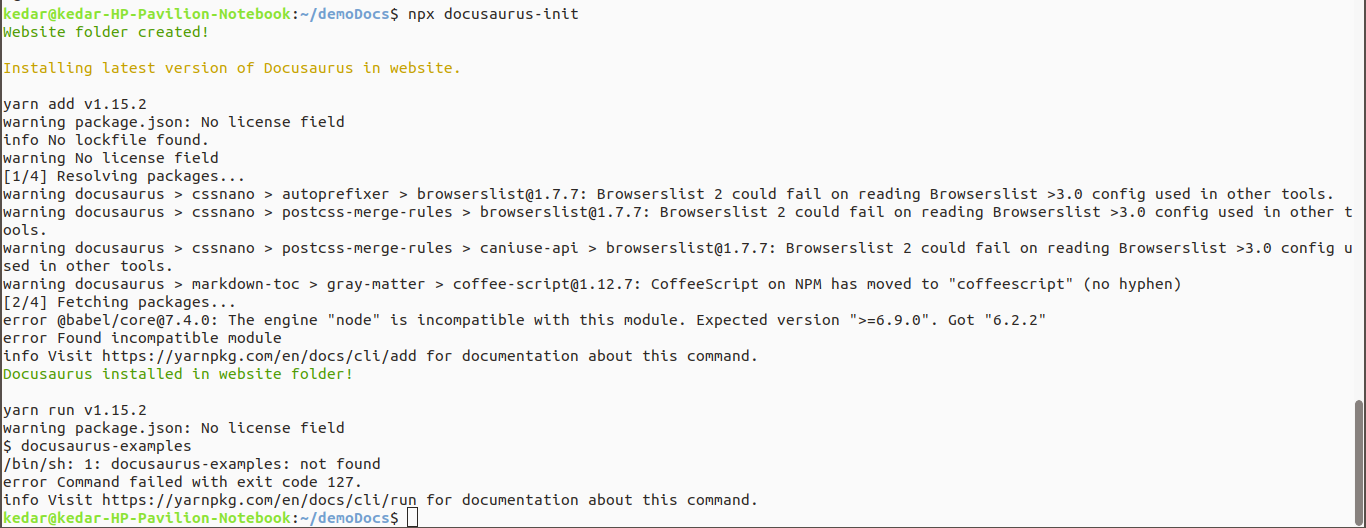
(Paste the link to an example repo, including a siteConfig.js, and exact instructions to reproduce the issue.)
 Kedar-K
All 13 comments
I just tried it and it seems to work. @Kedar-K you seem to have figured out the issue. Mind telling us your fix in case someone runs into the same problem in future?
 yangshun
on 1 Apr 2019
yangshun
on 1 Apr 2019
Sure @yangshun, my node version was 8.2 and as the documentation says
If you don't have Node 8.2+ or if you prefer to install Docusaurus globally, run yarn global add docusaurus-init or npm install --global docusaurus-init. After that, run docusaurus-init.
but when i followed this it didn't work due to some reason. When i updated node, it worked fine.
Kedar-K
on 1 Apr 2019
I am facing something similar to this problem:
$  docusaurus-init
docusaurus-init: command not found

$ npx docusaurus-init
npx: installed 24 in 0.776s
Website folder created!

Installing latest version of Docusaurus in website.

Docusaurus installed in website folder!


 $ ls
website

$  ls website/
package.json
My node version is : 12.2.0 and npm version is 6.9.0.
 xypnox
on 21 May 2019
xypnox
on 21 May 2019
@xypnox do u mind sending a screencast ? We might be able to spot something.
I couldnt reproduce it so I think your screencast will be very helpful for us to investigate this
 endiliey
on 21 May 2019
endiliey
on 21 May 2019
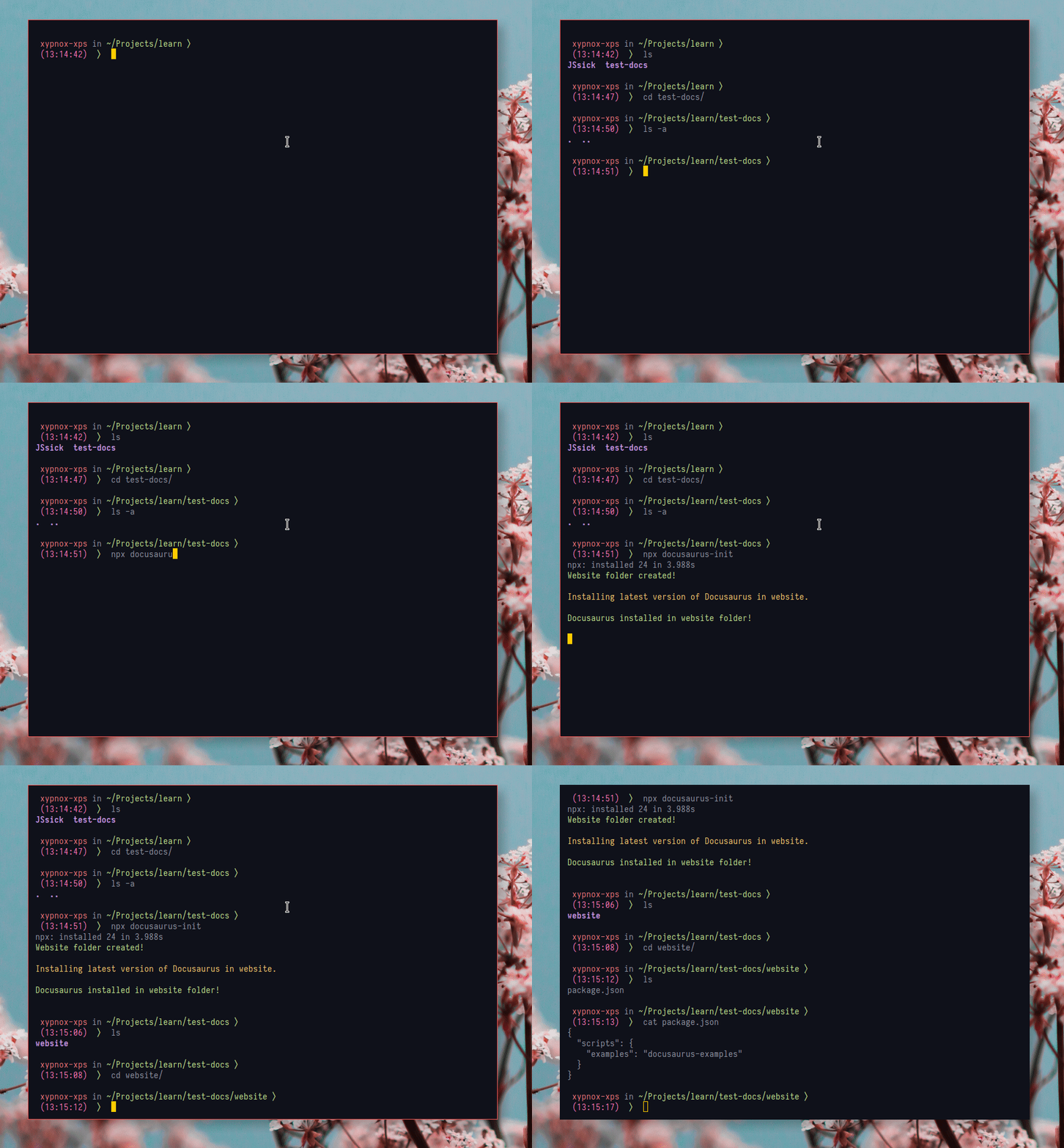
Hi, Here is a gif with my the process of installing using docusaurus-init :
xypnox
on 21 May 2019
In addition to the above, I tried using the sample files I found at https://github.com/caiorasc/docusaurus-sample. I installed using yarn and this site worked correctly. The problem I perceive might be in docusaurus-init
xypnox
on 21 May 2019
@xypnox
Do you mind to let me see the content of package.json ??
Doest docusaurus exist in the package.json as dependency ?
If it exist, you can run npm run examples on the website folder.
If it doesn't, that means this part is failing
https://github.com/facebook/Docusaurus/blob/a45f8cab680b90846c377285847b875250927e87/packages/docusaurus-init-1.x/initialize.js#L47-L51
The problem is somewhere between here:
endiliey
on 21 May 2019
Hi, These are the contents of package.json:
{
  "scripts": {
    "examples": "docusaurus-examples"
  }
}
@xypnox docusaurus is not saved as a dev dependency ?
I suspect a bug on shelljs. The version of shelljs on docusaurus-init was released 2 years ago. #1497 should be able to fix it. We'll release 1.10.0 soon to fix it.
As for you, the work around is to run this command on website
yarn add docusaurus --dev # or npm install docusaurus --save-dev
And then
yarn run examples # or npm run examples
Thanks :+1: , The above commands work and generate the site as expected.
xypnox
on 21 May 2019
I released a new version of docusaurus init. Can you try that out if u dont mind ?
endiliey
on 21 May 2019
Hi I ran the newer version specifically using the command: npx [email protected] Yet it still gives the same results i.e. single package.json file in website directory with same content.
xypnox
on 21 May 2019
I ran into the exact same issue
remiguest@TABLT0327-RemiRousselet doc % docusaurus-init
Website folder created!

Installing latest version of Docusaurus in website.

npm WARN deprecated [email protected]: request has been deprecated, see https://github.com/request/request/issues/3142
npm ERR! Response timeout while trying to fetch https://registry.npmjs.org/@babel%2fplugin-proposal-class-properties (over 30000ms)

npm ERR! A complete log of this run can be found in:
npm ERR!     /Users/remiguest/.npm/_logs/2020-05-08T04_40_29_689Z-debug.log
Docusaurus installed in website folder!


> @ examples /Users/remiguest/dev/river_pod/doc/website
> docusaurus-examples

sh: docusaurus-examples: command not found
npm ERR! code ELIFECYCLE
npm ERR! syscall spawn
npm ERR! file sh
npm ERR! errno ENOENT
npm ERR! @ examples: `docusaurus-examples`
npm ERR! spawn ENOENT
npm ERR!
npm ERR! Failed at the @ examples script.
npm ERR! This is probably not a problem with npm. There is likely additional logging output above.
npm WARN Local package.json exists, but node_modules missing, did you mean to install?

npm ERR! A complete log of this run can be found in:
npm ERR!     /Users/remiguest/.npm/_logs/2020-05-08T04_42_17_563Z-debug.log
Which generates the same package.json as @xypnox
FWIW I'm on an account without admin rights, and with a slow bandwidth.
Doing:
npm i docusaurus -D
npm run examples
did the trick
 rrousselGit
on 8 May 2020
rrousselGit
on 8 May 2020
Related issues
 itelofilho
·
3Comments
itelofilho
·
3Comments
 NikitaIT
·
3Comments
NikitaIT
·
3Comments
 muuvmuuv
·
3Comments
muuvmuuv
·
3Comments
 ericnakagawa
·
3Comments
ericnakagawa
·
3Comments
 microbouji
·
3Comments
microbouji
·
3Comments
Most helpful comment
@xypnox docusaurus is not saved as a dev dependency ?
I suspect a bug on shelljs. The version of shelljs on docusaurus-init was released 2 years ago. #1497 should be able to fix it. We'll release 1.10.0 soon to fix it.
As for you, the work around is to run this command on website
And then