Docusaurus: Error on development when changing baseUrl
Is this a bug report?
Yes
Have you read the Contributing Guidelines on issues?
Yes
Environment
Node: 8.9.1
Docusaurus: 1.1.1
(Docusaurus version via npm outdated docusaurus or yarn outdated docusaurus, OS, Node, npm, yarn)
Steps to Reproduce
I followed the step on setting your landing page: Docs landing Page. Which works well. However, the problem is when you change your baseUrl for deployment:
const siteConfig = {
  title: '<Project title>' /* title for your website */,
  tagline: '<Project tagline>',
  url: 'https://<org>.github.io' /* your website url */,
  baseUrl: '/<project>/' /* base url for your project */,
  // For github.io type URLs, you would set the url and baseUrl like:
  //   url: 'https://facebook.github.io',
  //   baseUrl: '/test-site/',
It works on build, but when I try to yarn start it gives me an error:

If I put back the baseUrl: '/' it will work.
Workaround: make baseUrl: '/' when updating the doc and put back the baseUrl: '/project/' url when done.
Expected Behavior
It should redirect to my doc page as expected without switching baseUrl for development and production
 joshuaalpuerto
All 22 comments
@joshuaalpuerto: hi, do you have a repo we can clone to reproduce the issue?
 endiliey
on 25 May 2018
endiliey
on 25 May 2018
@endiliey
Sorry didn't provide a repro. Here is the repro, hope this help.
https://github.com/joshuaalpuerto/repro-docusaurus
Cheers!
joshuaalpuerto
on 25 May 2018
If someone can guide me. I would like to contribute :)
joshuaalpuerto
on 25 May 2018
yarn start or npm start basically use Express to serve the files.
You can check
https://github.com/facebook/Docusaurus/blob/master/lib/server/server.js
endiliey
on 25 May 2018
Thanks! I will take a look on this.
joshuaalpuerto
on 25 May 2018
hi @joshuaalpuerto, did you manage to resolve the issue ?
Sorry for the delayed response. I just got the chance to look on this.
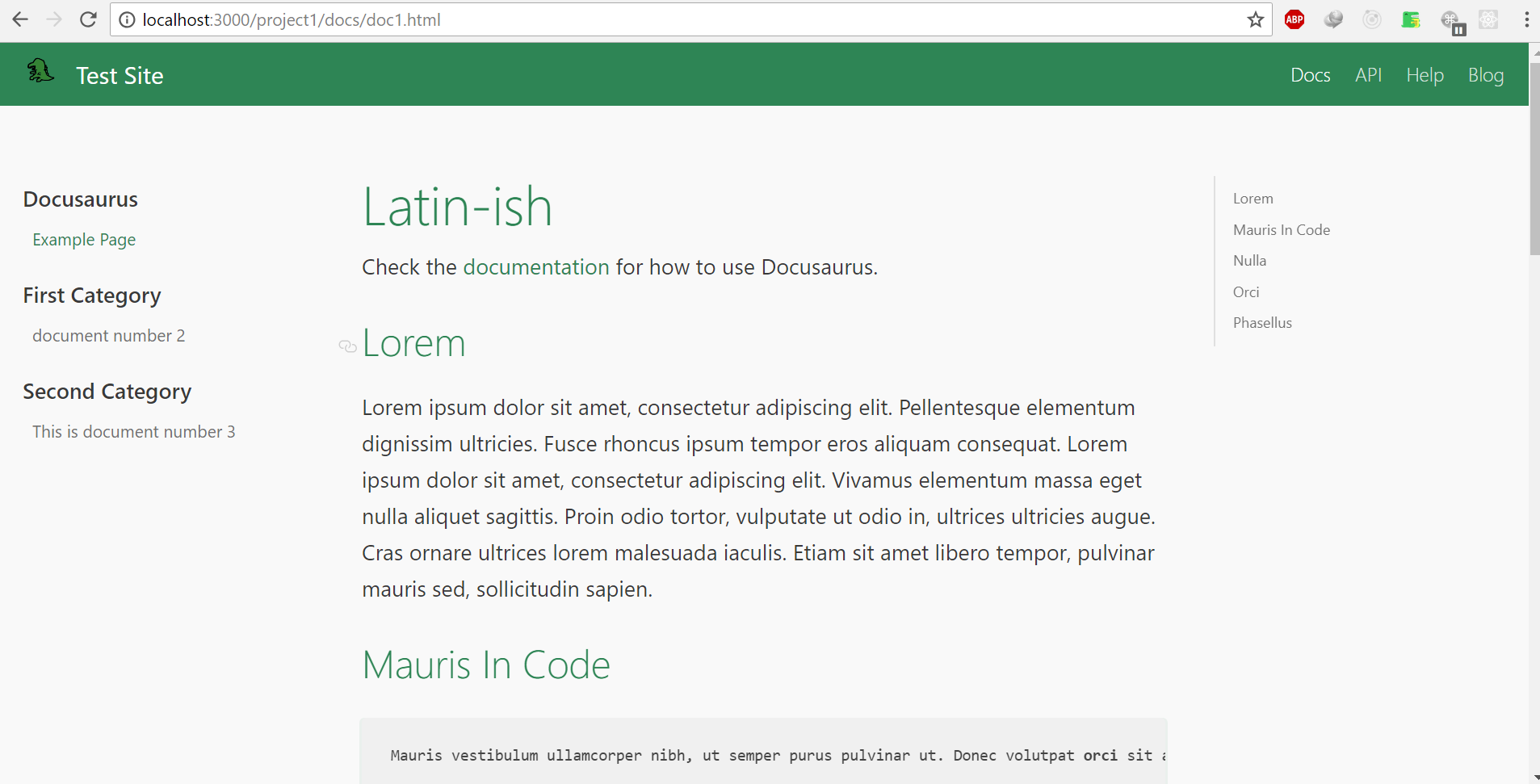
When you change your baseUrl to /project1/, this means that instead of localhost:3000, you should be able to access it at localhost:3000/project1
endiliey
on 26 May 2018
@endiliey No worries! I was able to take a look at it yesterday for a limited time. But you are correct, it is accessible by adding the baseUrl. But shouldn't be automatic when redirecting to to the docs page as per documentation. Perhaps the baseUrl should be automatically added. What do you think?
joshuaalpuerto
on 26 May 2018
I'm not the official maintainer of this repo, but that might be a good idea. It's quite simple as well.
Quick implementation:
const siteConfig = require(CWD + '/siteConfig.js')
const host = `http://localhost:${port}${siteConfig.baseUrl}`;
instead of
endiliey
on 26 May 2018
I will try this later and let you know! Thanks for your help!
joshuaalpuerto
on 26 May 2018
@endiliey the code works
siteConfig.js
 const siteConfig = {
    ...
    baseUrl: '/project1/',
    ...
}
Then you have to change the redirect code from HTML as per docs:
From:
<!DOCTYPE HTML>
<html lang="en-US">
  <head>
    <meta charset="UTF-8">
    <meta http-equiv="refresh" content="0; url=docs/id-of-doc-to-land-on.html">
    <script type="text/javascript">
      window.location.href = 'docs/id-of-doc-to-land-on.html';
    </script>
    <title>Your Site Title Here</title>
  </head>
  <body>
    If you are not redirected automatically, follow this <a href="docs/id-of-doc-to-land-on.html">link</a>.
  </body>
</html>
To:
<!DOCTYPE HTML>
<html lang="en-US">
  <head>
    <meta charset="UTF-8">
    <meta http-equiv="refresh" content="0; url=/project1/docs/id-of-doc-to-land-on.html">
    <script type="text/javascript">
      window.location.href = '/project1/docs/id-of-doc-to-land-on.html';
    </script>
    <title>Your Site Title Here</title>
  </head>
  <body>
    If you are not redirected automatically, follow this <a href="/project1/docs/id-of-doc-to-land-on.html">link</a>.
  </body>
</html>
Guess we can close this now
endiliey
on 28 May 2018
[UPDATE]
Now the issue is when you type in http://localhost:3000 you will not be redirected. Unless you type in the host and the baseUrl altogether http://localhost:3000/project1.
joshuaalpuerto
on 28 May 2018
I think that's the right behavior. If you are using non default / as baseUrl, e.g: /project1/ then you should not access it without baseUrl or even manually type it.
Edit: it is very possible though to modify the server routing from localhost:3000 to the one with baseUrl (e.g: localhost:3000/project1) but I'm not sure if it's really that useful :)
endiliey
on 28 May 2018
that's what I actually meant when I said it should be automatic. Hmm, shouldn't it be base on your baseUrl?
joshuaalpuerto
on 28 May 2018
If you think improvement can be done & want to contribute, Feel free to submit a PR for it 😄 .
Adding this for your reference on where to modify
https://github.com/facebook/Docusaurus/blob/b7be85843af2a07ead183dd8a467ebcf83e9a3e3/lib/server/server.js#L530-L533
endiliey
on 28 May 2018
Thanks! Im actually checking the server.js now. Then I'll get back once I figure this out. 😄
joshuaalpuerto
on 28 May 2018
Hi @endiliey,
I was able to make changes on server.js
Adding baseUrl:
app.get(/\/[^\.]*\/?$/, (req, res) => {
     const siteConfig = require(CWD + '/siteConfig.js')
    let slash = req.path.toString().endsWith('/') ? '' : '/';
    const url = 'http://localhost:' + port + siteConfig.baseUrl + req.path + slash + 'index.html'
    request.get(
      url,
       ...
You can actually check my repro. I point the docusaurus package to my forked repo. Implement changes needed and it works. You can type in http://localhost:3000 and it will auto redirect to the baseUrl you change. Please let me know if this is something that I can PR. 😃
Cheers!
joshuaalpuerto
on 28 May 2018
@joshuaalpuerto
I don't own this repo but I believe that this repo is PR Friendly 👍
Feel free to submit one. No PR is too small if it's useful.
I can give some advice though, that changes in your code might introduce a bug. What if my req.path is baseUrl/xxxx ? will it become baseUrl/baseUrl/xxx ? . Try testing the changes on Docusaurus with many test cases :)
endiliey
on 28 May 2018
You're correct. I was able to test only my use-case. I will keep on checking then. Thanks!
joshuaalpuerto
on 28 May 2018
Hi @joshuaalpuerto, any progress on this?
endiliey
on 1 Jun 2018
Hello @endiliey, I'm trying to understand the inner workings of the routes but I got busy this past days. However, I was able to try using /project1/subproject/ for baseUrl and it seems working just fine.
joshuaalpuerto
on 2 Jun 2018
Alright @joshuaalpuerto . I'm closing this issue for now as it seems it's been working for you. Feel free to submit a PR on the improved redirect when you have the time.
endiliey
on 2 Jun 2018
Related issues
 philipmjohnson
·
3Comments
philipmjohnson
·
3Comments
 awibox
·
3Comments
awibox
·
3Comments
 rickyvetter
·
3Comments
rickyvetter
·
3Comments
 ericnakagawa
·
3Comments
ericnakagawa
·
3Comments
 JoelMarcey
·
3Comments
JoelMarcey
·
3Comments
Most helpful comment
hi @joshuaalpuerto, did you manage to resolve the issue ?
Sorry for the delayed response. I just got the chance to look on this.
When you change your
baseUrlto/project1/, this means that instead oflocalhost:3000, you should be able to access it atlocalhost:3000/project1