Docusaurus: Content type of the sitemap.xml is missing
Should be: application/xml
 lipis
lipis
All 22 comments
@s-pace from Algolia also reported sitemap.xml is not compliant with https://www.sitemaps.org/protocol.html
See https://github.com/algolia/docsearch-configs/pull/312#issuecomment-364871456
 Glavin001
on 1 Mar 2018
Glavin001
on 1 Mar 2018
Let me try to fix this
 rizafahmi
on 11 Apr 2018
rizafahmi
on 11 Apr 2018
@rizafahmi It's yours!
I've added an "issue-claimed" label so that others will know not to start work on the issue. If you change your mind about the issue, no worries! Just let me know so that I can remove the label and free it up for someone else to claim.
I'll check in with you periodically so that we can keep the task updated with the progress.
 yangshun
on 11 Apr 2018
yangshun
on 11 Apr 2018
Thanks @yangshun !
rizafahmi
on 11 Apr 2018
Hi @lipis can you please confirm that the content-type is not application/xml?
I tried it with curl & httpie, it's already application/xml.
http http://localhost:3000/sitemap.xml -h
HTTP/1.1 200 OK
Connection: keep-alive
Content-Length: 3060
Content-Type: application/xml; charset=utf-8
Date: Sun, 15 Apr 2018 14:48:38 GMT
ETag: W/"bf4-xyO2OFprLzDPuBKeUuyaw33D+Fk"
X-Powered-By: Express
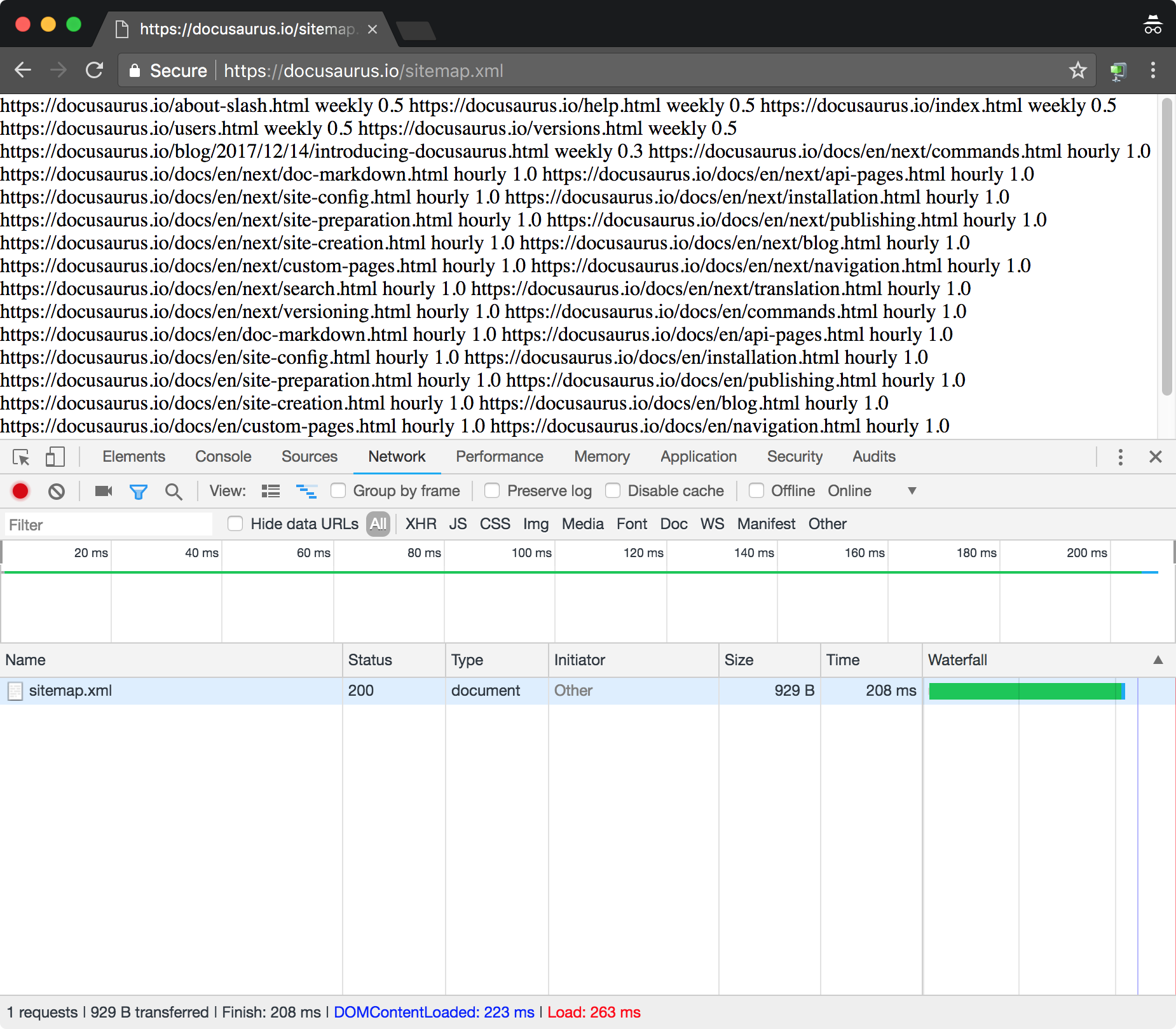
Type: Document
And it renders it wrong in the browser..
Compare the two in the browser:
lipis
on 15 Apr 2018
So we use a third party npm library for the sitemap. https://github.com/ekalinin/sitemap.js (or https://www.npmjs.com/package/sitemap).
https://github.com/facebook/Docusaurus/blob/master/lib/server/sitemap.js#L96 is where we set it. Maybe we are missing some options?
I do notice we are doing <url><loc>... if you view the source (view-source:https://docusaurus.io/sitemap.xml)
instead of
<sitemap><loc>...
 JoelMarcey
on 16 Apr 2018
JoelMarcey
on 16 Apr 2018
👋 @JoelMarcey ,
Thanks for the details.
One of the main point is to be compliant with the official standard. Definitely possible with the npm package.
Happy to help if needed.
Cheers
 s-pace
on 16 Apr 2018
s-pace
on 16 Apr 2018
@lipis both docusaurus and google was document on my side.

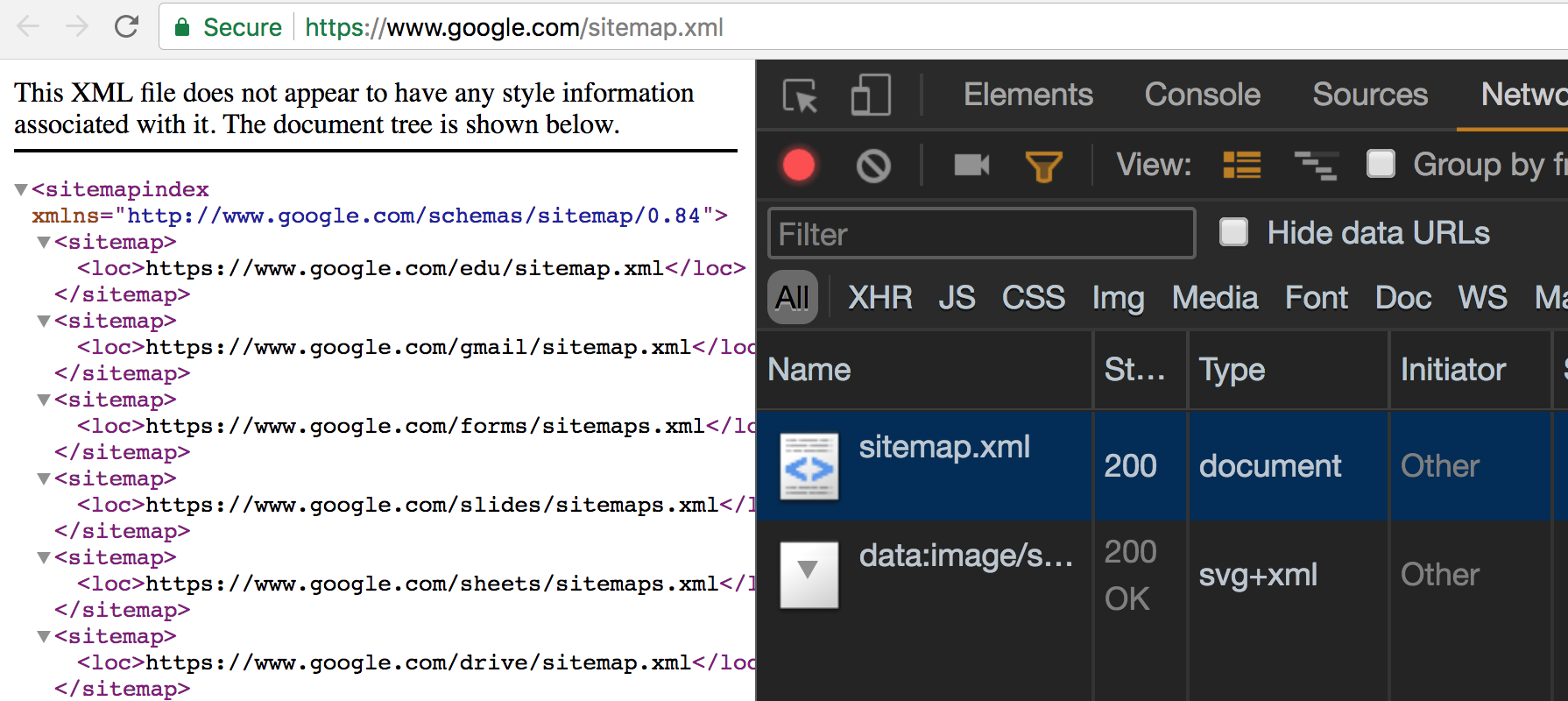
But you're right about wrong rendering part. I'll check it out.
rizafahmi
on 16 Apr 2018
@rizafahmi My bad.. check the Response Headers. The content-type is missing.

lipis
on 16 Apr 2018
ah. i see. Thanks for the clarification @lipis
rizafahmi
on 16 Apr 2018
Sorry @lipis to bother you again. There is actually content-type on the response headers.
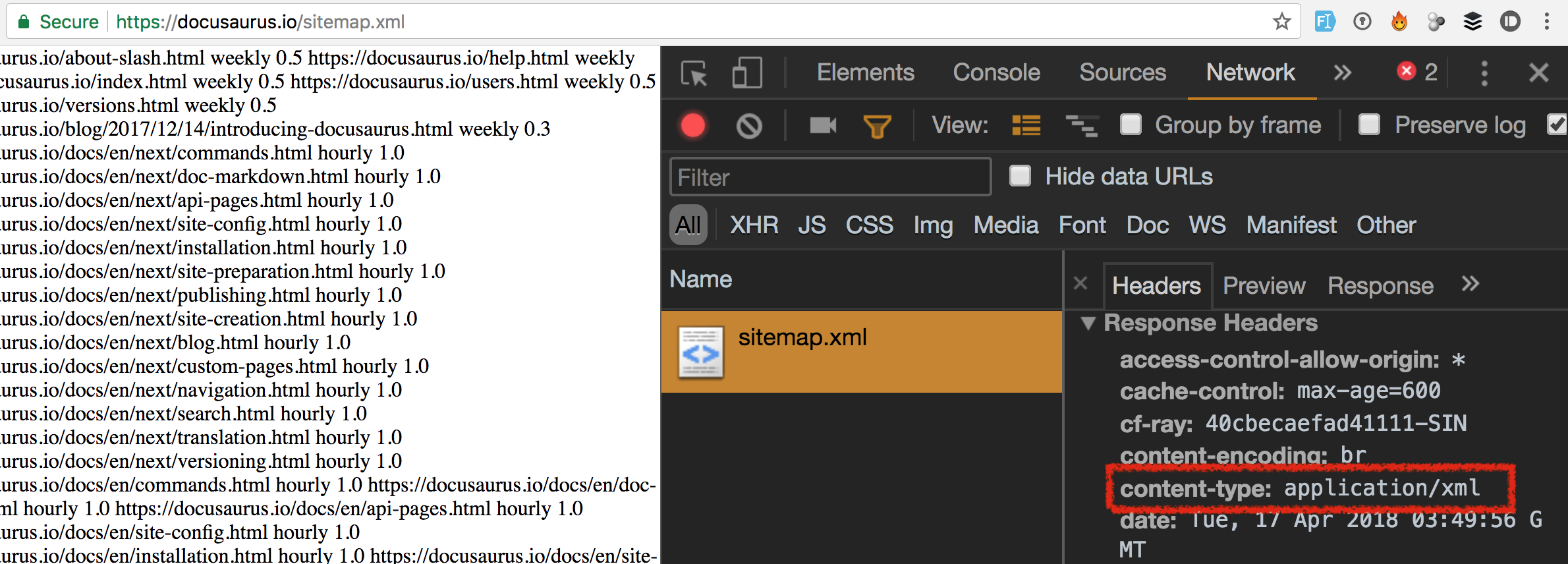
I did validate the sitemap over https://validator.w3.org and https://www.xml-sitemaps.com/validate-xml-sitemap.html and all says valid.
Tried to look up the code as well, seems nothing wrong with the code. To be precise, I don't know if there something wrong with the code.
I also tried to use sitemap package with plain express app and it's produce the same thing.
rizafahmi
on 17 Apr 2018
@s-pace Thanks for chiming in here. Hope all is well. Given what @rizafahmi says in the comment just above, do you think we what we have is already good and we do not need to make any changes?
JoelMarcey
on 17 Apr 2018
Not sure.. when I'm checking with cURL it's there.. but not in my Chrome :(
So something is "wrong" and the best indicator is that it's not rendered as XML but as text.. not the most important thing in the world.. but still :)
lipis
on 17 Apr 2018
:wave: @JoelMarcey My pleasure, hope you are doing well too.
@rizafahmi Happy to try it with our tool. Could you provide me a testing link? 🙏
s-pace
on 17 Apr 2018
@s-pace This is the link that is being debated whether is wrong or correct? https://docusaurus.io/sitemap.xml
This is a link that is assumed correct - https://www.google.com/sitemap.xml
JoelMarcey
on 17 Apr 2018
@JoelMarcey
Works 💯. I have made an example:
- Copy the following CSS/JS snippets and add them to your page
<!-- at the end of the HEAD -->
<link rel="stylesheet" href="https://cdn.jsdelivr.net/npm/docsearch.js@2/dist/cdn/docsearch.min.css" />

<!-- at the end of the BODY -->
<script type="text/javascript" src="https://cdn.jsdelivr.net/npm/docsearch.js@2/dist/cdn/docsearch.min.js"></script>
<script type="text/javascript"> docsearch({
  apiKey: '46899d51aa254ffb4fd068f3ae64ed40',
  indexName: 'docusaurus_demo',
  inputSelector: '### REPLACE ME ####',
  algoliaOptions: { 'facetFilters': ["lang:$LANG", "version:$VERSION", "tags:$TAGS"] },
  debug: false // Set debug to true if you want to inspect the dropdown
});
</script>
Add a search input in your page if you don't have any yet. Then update the inputSelector value in JS snippet to a CSS selector that targets your search input field.
Replace
$LANGwith the lang you want to search on.
The list of possible lang is hardcoded in the config.
So as of today you have:enReplace
$VERSIONwith the version you want to search on.
The list of possible version is hardcoded in the config.
So as of today you have:latest,nextReplace $TAGS with the tags you want to search on.
The list of possible tags is hardcoded in the config.
So as of today you have:blogFor example if you want to refine the search to the lang "en" and the version "latest" and the tags "blog" just specify:
'facetFilters': ["lang:en", "version:latest", "tags:blog"]
- Optionally customize the look and feel by following the DocSearch documentation
- You can also check your configuration in our github repo.
We'd also be happy to get your feedback and thoughts about DocSearch - so we can continue to improve it.
Have a nice day :)
s-pace
on 17 Apr 2018
@s-pace Thank you! 👍 I commented on the docsearch commit you made that I think you changed the wrong config file. Let me know if that was the case. If so, we can fix that 😄
In the case of Docusaurus, we probably only need to add the algoliaOptions field since we already have the search box, etc. Does that seem right?
JoelMarcey
on 18 Apr 2018
@JoelMarcey
Exactly! I use this index in order to show you how it would looks like. Let me know if I can merge it to the original one.
s-pace
on 18 Apr 2018
Thanks @s-pace - I commented on the config changes over at https://github.com/algolia/docsearch-configs/commit/db60b72c31f58a08b6ad07ce8277d7d363baf161 with a couple of questions. Assuming those are good, then I think we can merge it.
JoelMarcey
on 27 Apr 2018
Our sitemap is actually correct.

The XML Viewer in chrome is wrong when we include alternate languages page on the sitemap.
Refer to https://github.com/ekalinin/sitemap.js/issues/37
I tried https://www.w3schools.com/xml/xml_validator.asp & it's actually valid.
If we really want to get that beautiful XML Viewer, removing the alternate languages will do so

Edit: Closing this
 endiliey
on 4 Jun 2018
endiliey
on 4 Jun 2018
Hello i am facing same issue for xml. please check below link and help me to solve it
 storemey01
on 7 Apr 2019
storemey01
on 7 Apr 2019
Related issues
 philipmjohnson
·
3Comments
philipmjohnson
·
3Comments
 cheercroaker
·
3Comments
cheercroaker
·
3Comments
 azu
·
3Comments
azu
·
3Comments
 ericnakagawa
·
3Comments
ericnakagawa
·
3Comments
 omry
·
3Comments
omry
·
3Comments