Documentserver: If the text is bold when printing, the printed version will be much thicker than the page display font
Do you want to request a feature or report a bug?
- feature
- bug
What is the current behavior?
- onlyoffice does not support document grids. Does this feature support it later?
- If the text is bold when printing, the printed version will be much thicker than the page display font
DocumentServer version:
5.4.2
Operating System:
Win10
Browser version:
Chrome 79.0.3945.130
 nobt854
All 5 comments
Hello, @nobt854.
Sorry we didn’t answer for a long time.
onlyoffice does not support document grids. Does this feature support it later?
We got no ETA for gridlines. This is issue 45580 in our private issue tracker.
If the text is bold when printing, the printed version will be much thicker than the page display font
Does the problem reproduce in version 5.5.3? What font are you using? Can you attach a screenshot and PDF file to demonstrate the problem?
 Rita-Bubnova
on 10 Jun 2020
Rita-Bubnova
on 10 Jun 2020
I can reproduce the bold font printing issue on 5.5.3. It became obvious with the DCH Bassischrift font
as you can see it obviously depends on the font: it's only a subtle difference for Arial in bold, but a huge difference for the DCH Basisschrift (Swiss primary school font):
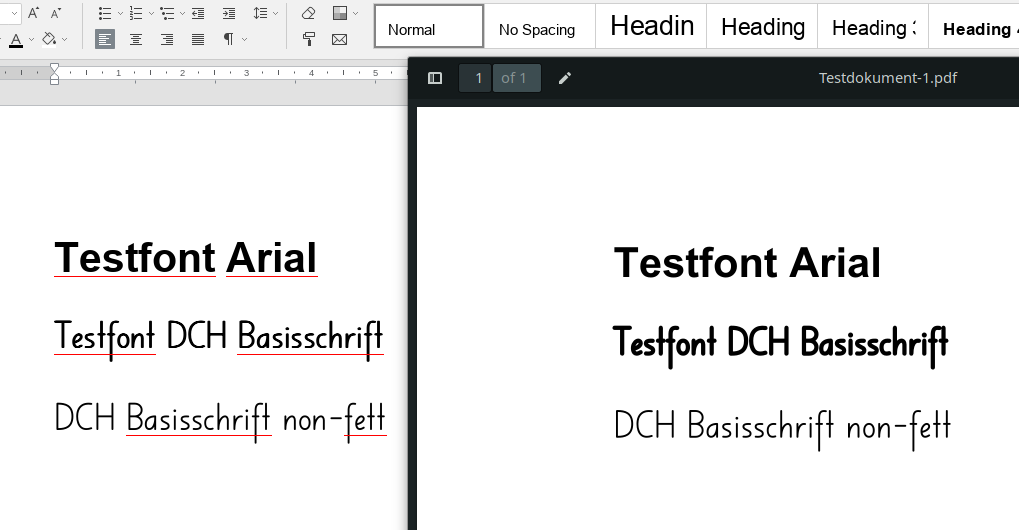
the PDF Onlyoffice generates for printing purposes for reference: Testdokument-1.pdf
 violoncelloCH
on 10 Jun 2020
violoncelloCH
on 10 Jun 2020
I reproduced the problem using the "DCHBasisschrift" font.
This problem is related to our method of displaying font without Bold in font file, but Bold was applied to them.
We hope to resolve this problem in future and I created a new issue 45587 in our private issue track. But currently it's not high priority issue for us.
Rita-Bubnova
on 11 Jun 2020
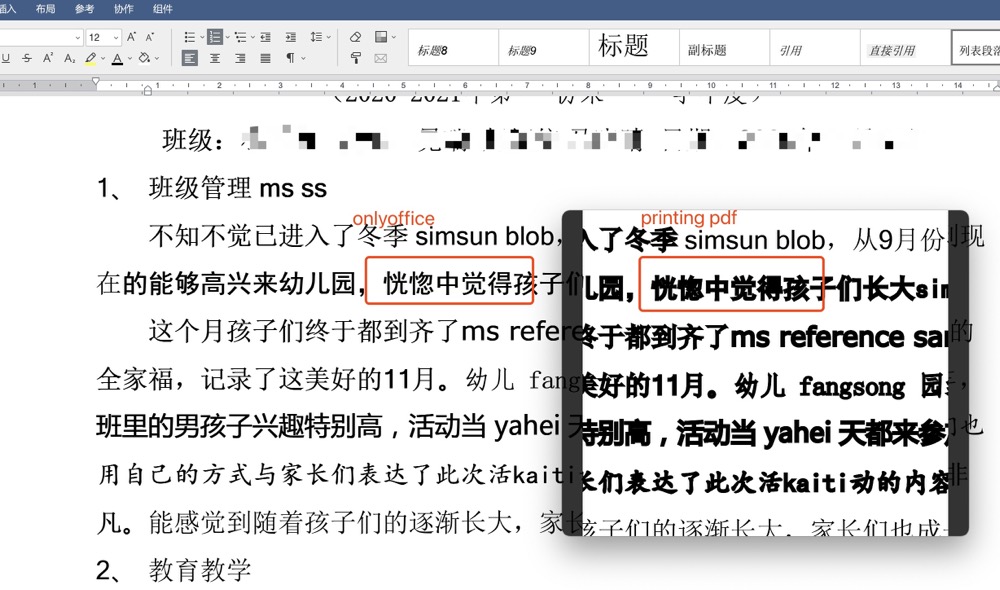
Chinese is more serious, please solve it as soon as possible, thank you
 bigbencat
on 10 Dec 2020
bigbencat
on 10 Dec 2020
Chinese is more serious, please solve it as soon as possible, thank you
bigbencat
on 10 Dec 2020
Related issues
 saitam1
·
4Comments
saitam1
·
4Comments
 plinss
·
5Comments
plinss
·
5Comments
 decentral1se
·
5Comments
decentral1se
·
5Comments
 elpito
·
5Comments
elpito
·
5Comments
 jcklpe
·
9Comments
jcklpe
·
9Comments