Documentserver: Solved: Shared editing (collaboration) does not work
I am using latewst version of Document server with Nextcloud. Another Nextcloud user told me a similar story, so I guess this is a bug:
While single user editing works like a charm, shared editing (collaboration) does not work. Once another user opens the document and start editing, changes are not saved anymore. Also, one can’t see the changes from the other user in real-time.
 steve-s-71
All 17 comments
Once another user opens the document and start editing, changes are not saved anymore. Also, one can’t see the changes from the other user in real-time.
Please note that fast co-editing mode should be used by all users to display the changes in real-time.
Otherwise you just should click on "save" button to show your changes to other users
If it doesn't help let us know, I am sure that the solution can be found.
 ibnpetr
on 28 Jun 2017
ibnpetr
on 28 Jun 2017
Hi Alex,
I just quickly tried Strict mode. That seems to work much more stable, basically it works as you describe.
But not so the Fast mode. Mostly not, but sometimes it shows the first 2 or 3 characters what the other user has typed, but then there is no more update. Occasionally the is also an error prompt saying "Connection is lost, you can still view...".
Just to avoid any doubt, the Nextcloud server is otherwise not having any trouble or performance issue. Document Server is installed on the same machine (I got it installed running this script: https://github.com/nextcloud/vm/blob/master/apps/onlyoffice.sh
Stefan
steve-s-71
on 28 Jun 2017
cc @LinneyS
 trofim24
on 8 Sep 2017
trofim24
on 8 Sep 2017
Hello @steve-s-71,
The cause of the problem is that the entered URL addresses are invalid. Could you please specify the addresses where you NextCloud installed and where Document Server, and send us the screenshot of the settings in administrator section of NextCloud.
 alexanderonlyoffice
on 11 Sep 2017
alexanderonlyoffice
on 11 Sep 2017
Added https://github.com/nextcloud/vm/pull/363 to fix websocket proxying error.
 agolybev
on 13 Sep 2017
agolybev
on 13 Sep 2017
Hello @steve-s-71 ,
Please try to change port 9091 in the line 230 to port 9090. Follow the link. The port 9091 is not being listened by the Document Server, because Apache Proxy Service is already set up for port 443.
Enter also internal addresses of the Document Server and NextCloud in the field. Leave "Secret Key" field blank. Please check if the address * is accessible from the Document Server and the if the address * is accessible from NextCloud. If not, you need to enter accessible addresses.
alexanderonlyoffice
on 13 Sep 2017
Hello @alexanderonlyoffice
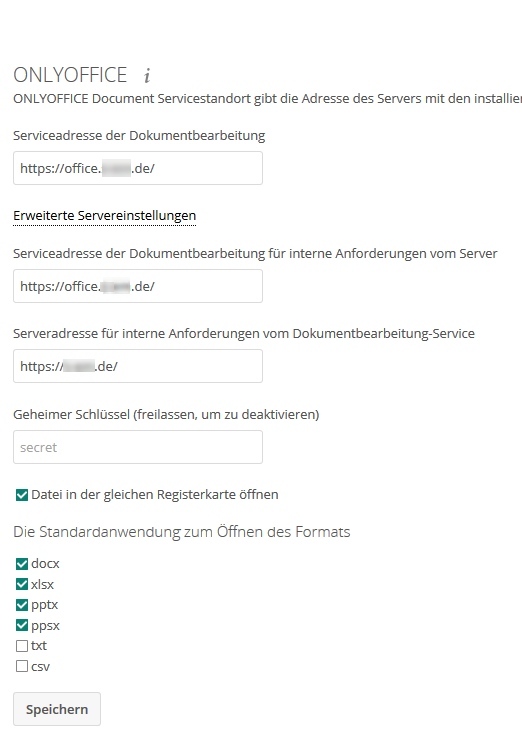
I have changed the port in the script, then executed the script as root and modified the config so that it looks as in the new screenshot below.
Unfortunately the issue is same: Mostly not, but sometimes it shows the first 2 or 3 characters what the other user has typed, but then there is no more update.
If any port or configuration issue, I am wonder why it is able to show the first 2 or 3 characters sometimes?
steve-s-71
on 13 Sep 2017
I posted to support about this before, and they asked me to change to this instead. Collabora actually works out of the box, but OnlyOffice seems more complex to run out of the box. What my intention was (and still is) is to make it as secure as possible. according to Lukas (security at Nextcloud) we don't want to use a insecure connection.
I'm the VM dev, btw.
 enoch85
on 13 Sep 2017
enoch85
on 13 Sep 2017
Hello @steve-s-71
According to the results of the tests, the problem is that websockets are not being proxied. It should be stated in your apache config. Please send the apache config, so we can check it.
alexanderonlyoffice
on 14 Sep 2017
Hi Daniel @enoch85
I believe there are multiple apache config files, depending on PHP version and maybe other aspects. Please can you say what is the correct path to the relevant apache config file when using “your” VM?
steve-s-71
on 14 Sep 2017
Hello @steve-s-71
I removed the addresses. We need the config created by the script you used. Unfortunately, we haven't tested that script.
alexanderonlyoffice
on 14 Sep 2017
@steve-s-71
apache config file when using “your” VM?
Yes, it's the VHOST in sites-enabled.
enoch85
on 14 Sep 2017
Hi @alexanderonlyoffice
Pointing me to the Apache config was actually a very good hint. I recognized that the port changes made in onlyoffice.sh have not madr it into the apache config.
What I found was even from an older version of the script, that was recent in the time when I installed the VM
What I found was this:
ProxyPass / http://127.0.0.3:9090/
ProxyPassMatch "/(.*)/websocket"  wss://127.0.0.3:9091/$1/websocket
After modifying the apache config to this:
ProxyPassMatch (.*)(\/websocket)$ "ws://127.0.0.3:9090/$1$2"
ProxyPass / "http://127.0.0.3:9090/"
ProxyPassReverse / "http://127.0.0.3:9090/"
shared editing (collaboration) works like a charm. Thank you for your help, you made my day.
The only remaining point is the security concern @enoch85 mentioned above.
What impact on security do I need to expect when changing port from ws://127.0.0.3:9091/$1$2
to ws://127.0.0.3:9090/$1$2 ?
steve-s-71
on 14 Sep 2017
What I'm talking about is using a secure websocket, wss.
enoch85
on 15 Sep 2017
I've merged the fix by @agolybev so this shouldn't be an issue anymore.
@alexanderonlyoffice Please test the script. I got login info to your official site from Tanya and I will write a blog post when I get some time left over. I want to make sure everything is in order before I do.
enoch85
on 15 Sep 2017
Hello @steve-s-71,
you are already using the secured connection to your server, that's why you don't need _wss_ inside the server.
@enoch85, we will perform a basic testing of the script, but we can't guarantee that it will possess all the variants of possible issues.
alexanderonlyoffice
on 15 Sep 2017
Got it. Thank you @alexanderonlyoffice and @enoch85
steve-s-71
on 15 Sep 2017
Related issues
 RuslanGabbasov
·
9Comments
RuslanGabbasov
·
9Comments
 dmitrydrynov
·
4Comments
dmitrydrynov
·
4Comments
 onny
·
3Comments
onny
·
3Comments
 cpot
·
8Comments
cpot
·
8Comments
 poVoq
·
5Comments
poVoq
·
5Comments
Most helpful comment
Hello @steve-s-71,
you are already using the secured connection to your server, that's why you don't need _wss_ inside the server.
@enoch85, we will perform a basic testing of the script, but we can't guarantee that it will possess all the variants of possible issues.