Docs: ? Remove .NET Core install docs for EOL distros ? (improve experience)
https://github.com/dotnet/runtime/issues/34043
https://github.com/dotnet/release/issues/331 (private repo)
@NikolaMilosavljevic @dleeapho
Document Details
⚠ Do not edit this section. It is required for docs.microsoft.com ➟ GitHub issue linking.
- ID: 172f0b88-61f2-d631-478f-e88af9be1f7d
- Version Independent ID: c610685f-57a2-048d-8dfa-146e19943434
- Content: Install .NET Core on Ubuntu 19.04 package manager - .NET Core
- Content Source: docs/core/install/linux-package-manager-ubuntu-1904.md
- Product: dotnet-core
- GitHub Login: @Thraka
- Microsoft Alias: adegeo
 dagood
All 8 comments
After an email chain, we're deciding to do the following regarding the distros to preserve information for those who need it:
- Add an overview article for all of the distros. This will be the landing page for linux package managers. This page only ever lists the current supported versions.
- Add an "Archived" TOC level that groups all distros that are EOL.
- The main TOC will only include active distros.
- The archived package managers will have a header indicating the last supported version at the time of archival and that the distro is EOL and no longer supported.
 Thraka
on 27 Apr 2020
Thraka
on 27 Apr 2020
It might be interesting to compare that vs. the Ubuntu EOL page: https://endoflife.software/operating-systems/linux/ubuntu
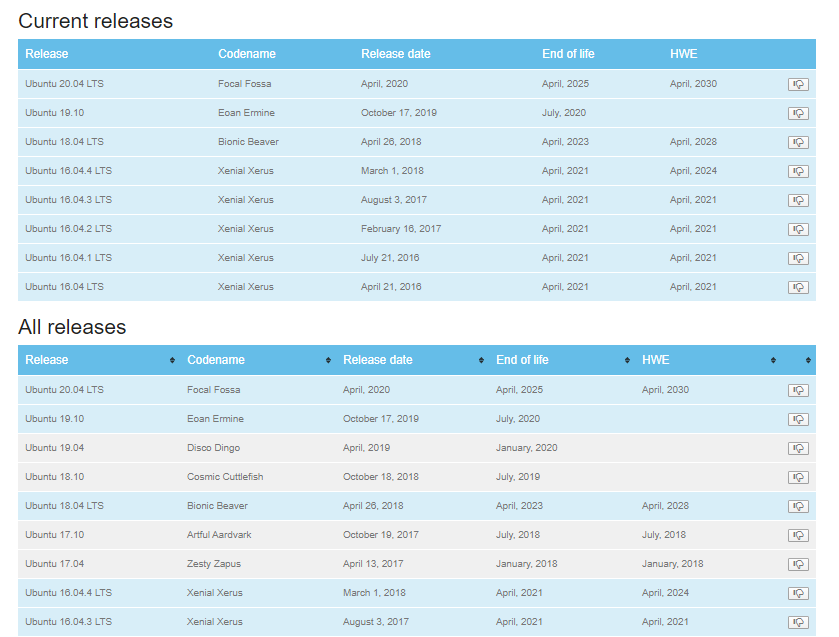
A difference from the plan above is that they have "Current releases" and "_All_ releases", rather than "Current" and "_Archived_". Perhaps this is useful to figure out what the next-lowest supported distro is, so when you run an EOL distro intentionally, you can figure out what's most likely to be compatible. (I don't know if this is realistic, or worth changing the plan for--and maybe it doesn't make sense in a TOC context, anyway.)
dagood
on 27 Apr 2020
@dagood TOC wise, we can't really do that. What about "Unsupported EOL"? Or perhaps some variation on that?
Thraka
on 28 Apr 2020
I have no objection to "Archived" or "Unsupported EOL" (well, I guess the latter might be a little on the wordy side), not really concerned about the label clarity. I'm just wondering if it'd make sense to show supported versions inline with EOL versions to make migration easier--but if it's impossible, doesn't seem like the end of the world.
dagood
on 28 Apr 2020
We can't do any coloring or anything like that. We COULD use ✔️ and ❌ though
Thraka
on 28 Apr 2020
@dagood @rbhanda @leecow Some further thoughts on this.
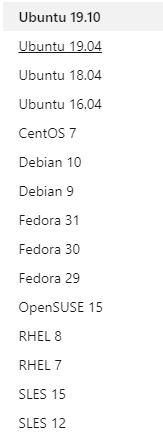
In addition to my suggestions above, what about combining individual articles into distro family articles? This way you just go to SLES or Ubuntu when you want instructions for that specific distro.
We might be able to do a nice switcher, tab, pane on the top to then break it down by specific version of the distro.
This is what it currently looks like. It's big, and may be getting bigger as time goes on.
Thraka
on 1 May 2020
That sounds good to me. The challenge there will be making sure people notice the version selector well enough--not sure if 1 click vs. 2 clicks will change this a _whole_ lot, but something to consider.
(Getting it wrong for RPMs is likely to block the install because we usually need to publish a unique one per distro-version to get the dependencies lined up. For Debian packages, it won't block the install, but if the feed goes out of support they might end up insecure in the future. (E.g. they use Ubuntu 20.04 (LTS) and use the 20.10 feed, they'll eventually be on a supported distro but attached to a repository that won't get any more updates.))
dagood
on 1 May 2020
Getting it wrong for RPMs is likely to block the install because we usually need to publish a unique one per distro-version to get the dependencies lined up.
The current Fedora repo file for the Microsoft repo looks like this:
[packages-microsoft-com-prod]
name=packages-microsoft-com-prod
baseurl=https://packages.microsoft.com/fedora/31/prod/
enabled=1
gpgcheck=1
gpgkey=https://packages.microsoft.com/keys/microsoft.asc
These repo files can use some variables, like $releasever to make them more generic:
[packages-microsoft-com-prod]
name=packages-microsoft-com-prod
baseurl=https://packages.microsoft.com/fedora/$releasever/prod/
enabled=1
gpgcheck=1
gpgkey=https://packages.microsoft.com/keys/microsoft.asc
That might help fix this "I selected the wrong version of the Distro" for RPM-repositories.
Edit: Also, this should behave better on upgrades from one version of the distro to the next.
 omajid
on 1 May 2020
omajid
on 1 May 2020
Related issues
 LJ9999
·
3Comments
LJ9999
·
3Comments
 sime3000
·
3Comments
sime3000
·
3Comments
 sebagomez
·
3Comments
sebagomez
·
3Comments
 Eilon
·
3Comments
Eilon
·
3Comments
 Manoj-Prabhakaran
·
3Comments
Manoj-Prabhakaran
·
3Comments
Most helpful comment
@dagood @rbhanda @leecow Some further thoughts on this.
In addition to my suggestions above, what about combining individual articles into distro family articles? This way you just go to SLES or Ubuntu when you want instructions for that specific distro.
We might be able to do a nice switcher, tab, pane on the top to then break it down by specific version of the distro.
This is what it currently looks like. It's big, and may be getting bigger as time goes on.