On this page https://docs.microsoft.com/en-us/dotnet/core/install/linux-package-manager-ubuntu-1910
It's only mention the 19.10, There has to be a page for 20.04.
If you replace the 19.10 with 20.04 the path will still not work.
[Edit by gewarren to add doc details.]
Document Details
⚠ Do not edit this section. It is required for docs.microsoft.com ➟ GitHub issue linking.
- ID: b5cbe58d-ad05-60fd-47d7-0d9ccfeecde4
- Version Independent ID: c9773e9b-dbc1-cb7b-b303-287cf8bd354c
- Content: Install .NET Core on Ubuntu 19.10 package manager - .NET Core
- Content Source: docs/core/install/linux-package-manager-ubuntu-1910.md
- Product: dotnet-core
- GitHub Login: @Thraka
- Microsoft Alias: adegeo
 anirugu
All 20 comments
Ping @rbhanda what is the story with 20.04?
 Thraka
on 7 Apr 2020
Thraka
on 7 Apr 2020
Ping @rbhanda what is the story with 20.04?
As per the last update, this should get updated by 23rd April 2020.
 rbhanda
on 7 Apr 2020
rbhanda
on 7 Apr 2020
Thanks! I'll add it to our milestone
Thraka
on 8 Apr 2020
https://github.com/dotnet/core/issues/4360
phillip-haydon commented 19 minutes ago
I used the 18.04 source on 20.04 with the help from this tweet:
https://twitter.com/sinclairinat0r/status/1237201767198273536
wget http://mirrors.edge.kernel.org/ubuntu/pool/main/i/icu/libicu63_63.2-2_amd64.deb
sudo dpkg -i libicu63_63.2-2_amd64.deb
Then installed .NET Core normally.
 thx1766
on 24 Apr 2020
thx1766
on 24 Apr 2020
Well, it's 29th april and still not update. Is there that much of a difference between 19.04 and 20.04?
 iBolski
on 30 Apr 2020
iBolski
on 30 Apr 2020
Just as an FYI, if you download the tar ball yourself and follow the instructions on how to install it manually (which is really easy anyways and most Linux/UNIX geeks like me prefer it this way sometimes for more control), you don't have to worry about the mirrors, etc.
What I do is extract the tar ball into a folder in my home folder, naming it to the version of the SDK (in case I want to flip back and forth between 2 and 3 possibly). I then create a link in my home folder to point to the current version I want to use (such as ln -s ../dotnet3.1 ./dotnet).
I then update .bashrc to fix my path as such:
export $DOTNET_ROOT=$HOME/dotnet
export PATH=$PATH:$DOTNET_ROOT
Then, if I want to switch between versions, I just update the soft link so that the ./dotnet link points to whatever version of the SDK I want to use.
Same goes for Visual Studio Code. I just download the tar ball, install it into $HOME/code, update my path to so that $HOME/code is in it and I can launch code from any folder at the command line.
Of course, I can't add the Code launcher to my dock without doing the machinations of create the desktop files, etc. But it works (somewhat). What I notice if I create the desktop launcher or install it via a software installer, I can't compile. I get the following strange error:
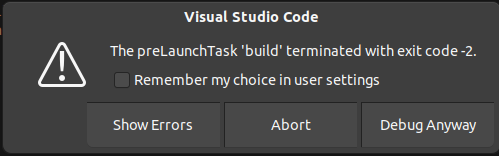
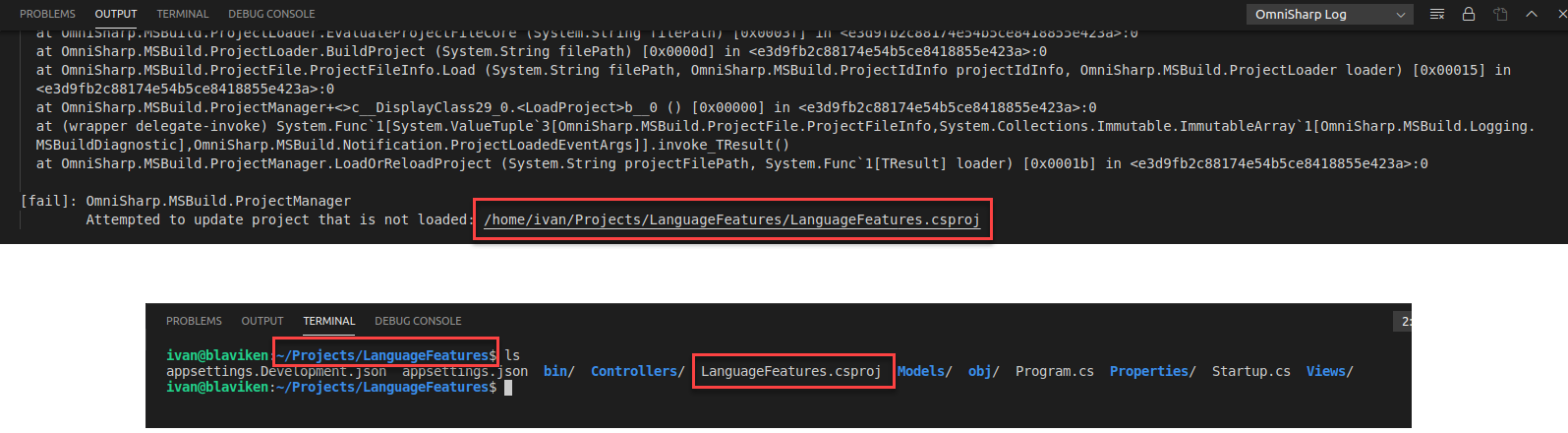
Not sure what that is all about. The only way I can this work is is to open a command terminal, navigate to the folder where my project resides, then launch Visual Studio Code with the "code ." command. Then it will compile and work.
Still, to be able to write .NET code in a Linux environment is great!
iBolski
on 30 Apr 2020
@iBolski I can see that I have posted 20.04 link was initially 404. Now it's pointing to a file. I hope everything will work as expected.
anirugu
on 30 Apr 2020
phillip-haydon commented 19 minutes ago
wget http://mirrors.edge.kernel.org/ubuntu/pool/main/i/icu/libicu63_63.2-2_amd64.deb
sudo dpkg -i libicu63_63.2-2_amd64.debThen installed .NET Core normally.
I did this, but the dotnet packages still weren't there.
[EDIT] O wait - they weren't there after sudo apt update, but a while later they did appear, out of the blue. Weird, but great!
 Biep
on 3 May 2020
Biep
on 3 May 2020
Seems the repo is here but not the dotnet-sdk package yet
$ docker run --rm -it ubuntu:20.04
[docker]$  apt update -y
[docker]$  apt install -y wget
[docker]$  wget https://packages.microsoft.com/config/ubuntu/20.04/packages-microsoft-prod.deb -O packages-microsoft-prod.deb
[docker]$  dpkg -i packages-microsoft-prod.deb
[docker]$  apt update -y
[docker]$  apt search dotnet-sdk
Sorting... Done
Full Text Search... Done
 Mizux
on 4 May 2020
Mizux
on 4 May 2020
Still can not install on Ubuntu 20.04 😰
 ghost
on 9 May 2020
ghost
on 9 May 2020
The Ubuntu update will be available on 5/12
rbhanda
on 9 May 2020
with a ref it's better: https://github.com/dotnet/core/issues/4360#issuecomment-623521485
Mizux
on 9 May 2020
Waiting ...
 smjltd
on 11 May 2020
smjltd
on 11 May 2020
Waiting on 20.04 too! So excited! 😃
 vthg2themax
on 12 May 2020
vthg2themax
on 12 May 2020
i have tried 19.10 on ubuntu 20.04 and no luck. its 5/12 and still no update =..(
 dmedina0217
on 12 May 2020
dmedina0217
on 12 May 2020
@dmedina0217 please take a look at dotnet/core#4360 once this blocking task is done then the doc should follow IMHO...
Mizux
on 12 May 2020
@Mizux thank you for the reply and i hope that fix is what gets the release pushed out
dmedina0217
on 12 May 2020
Finally, I can install dotnet-sdk from ubuntu 20.04 repo!
 har07
on 13 May 2020
har07
on 13 May 2020
yeah it worked
smjltd
on 13 May 2020
oh yeah it works!
since the above isnt updated, and anyone is interested, all you would have to do is copy below and you'll be good.
wget https://packages.microsoft.com/config/ubuntu/20.04/packages-microsoft-prod.deb -O packages-microsoft-prod.deb
sudo dpkg -i packages-microsoft-prod.deb
sudo apt-get update
sudo apt-get install apt-transport-https
sudo apt-get update
sudo apt-get install dotnet-sdk-3.1
sudo apt-get update
sudo apt-get install apt-transport-https
sudo apt-get update
sudo apt-get install aspnetcore-runtime-3.1
sudo apt-get update
sudo apt-get install apt-transport-https
sudo apt-get update
sudo apt-get install dotnet-runtime-3.1
dmedina0217
on 13 May 2020
Related issues
 svick
·
3Comments
svick
·
3Comments
 tswett
·
3Comments
tswett
·
3Comments
 sdmaclea
·
3Comments
sdmaclea
·
3Comments
 ite-klass
·
3Comments
ite-klass
·
3Comments
 JagathPrasad
·
3Comments
JagathPrasad
·
3Comments
Most helpful comment
https://github.com/dotnet/core/issues/4360
phillip-haydon commented 19 minutes ago
I used the 18.04 source on 20.04 with the help from this tweet:
https://twitter.com/sinclairinat0r/status/1237201767198273536
wget http://mirrors.edge.kernel.org/ubuntu/pool/main/i/icu/libicu63_63.2-2_amd64.deb
sudo dpkg -i libicu63_63.2-2_amd64.deb
Then installed .NET Core normally.