Docs: CLI code snippet language tag consistency
All 7 comments
I remember this was discussed in some PR, and @mairaw suggested to use dotnetcli when the snippet contains only .NET Core CLI commands. My suggestion for the first example is to have:
Change directory to the src/App console project: (then code snippet with console identifier) and run the project passing Hello World as arguments: (then code snippet with dotnetcli)
So, the description is splitted and each command has its own identifier. Same can be done to the second example. Thoughts ?
 Youssef1313
on 30 Dec 2019
Youssef1313
on 30 Dec 2019
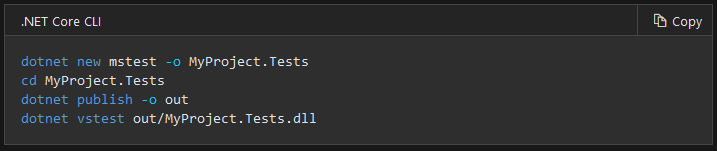
The "cd" command gets highlighted correctly even if it's not a dotnetcli command, so I think dotnetcli is suitable more than console or bash in the case of mixed commands.
@gewarren, Can I work on a PR that unify the usage of dotnetcli where possible ? or you'd like to wait for @mairaw ?
A question not related to this issue, but related to highlighting.
Do you know if this is the repository of the library used for highlighting in docs.microsoft.com ?
Youssef1313
on 1 Jan 2020
The "cd" command gets highlighted correctly even if it's not a dotnetcli command, so I think dotnetcli is suitable more than console or bash in the case of mixed commands.
Do you mean "even if it is a dotnetcli command"?
I'm in favor of labeling them all dotnetcli, so I think it's fine to create a PR, and we can wait for Maira's approval before merging it.
Do you know if this is the repository of the library used for highlighting in docs.microsoft.com?
I'm not sure, but I will ask.
 gewarren
on 2 Jan 2020
gewarren
on 2 Jan 2020
In the ASP.NET Core docs, we use the dotnetcli dev lang any time a .NET Core CLI command appears in a snippet. It's nice to have the syntax highlighting for a tool we own.
 scottaddie
on 2 Jan 2020
scottaddie
on 2 Jan 2020
Do you mean "even if it _is_ a dotnetcli command"?
No, I meant that "cd" is a generic command, not a dotnetcli specific one. But it gets highlighted correctly. That's why I suggested to use dotnetcli in the case of "mixed" commands.
I'll open a PR soon.
Youssef1313
on 2 Jan 2020
I'm in agreement with what @Youssef1313 stated above.
scottaddie
on 2 Jan 2020
Do you know if this is the repository of the library used for highlighting in docs.microsoft.com ?
Received an official answer of YES it is.
gewarren
on 2 Jan 2020
Related issues
 LJ9999
·
3Comments
LJ9999
·
3Comments
 mekomlusa
·
3Comments
mekomlusa
·
3Comments
 svick
·
3Comments
svick
·
3Comments
 gmatv
·
3Comments
gmatv
·
3Comments
 Manoj-Prabhakaran
·
3Comments
Manoj-Prabhakaran
·
3Comments