Docs: Windows Add/Remove Programs dialog box does not display all installed SDK versions
The comment below was Machine translated
@mshobohm commented on Thu Nov 14 2019
With dotnet --list-sdks I get some old SDKs that I do not get displayed in the "Windows Add / Remove Programs dialog box". Consequently, they can probably only be deleted by deleting in the Explorer, I hope that is residue-free. The site could write something about this topic.
Dokumentdetails
⚠ Bearbeiten Sie diesen Abschnitt nicht. Er ist für die Verknüpfung von docs.microsoft.com zum GitHub-Artikel erforderlich.
- ID: b4ca18b0-5533-f5b9-2eb4-9853a4fa61ed
- Version Independent ID: a12b8b5c-a3af-d1c5-a27c-39e9d390dff2
- Content: Entfernen von .NET Core Runtime und SDK - .NET Core
- Content Source: docs/core/versions/remove-runtime-sdk-versions.md
- Product: dotnet-core
- GitHub Login: @BillWagner
- Microsoft Alias: wiwagn
@srvbpigh commented on Fri Nov 15 2019
Hello, @mshobohm
Thank you for your feedback.
We are actively reviewing your comments and will get back to you soon.
Kind regards,
Microsoft DOCS International Team
 CeciAc
All 4 comments
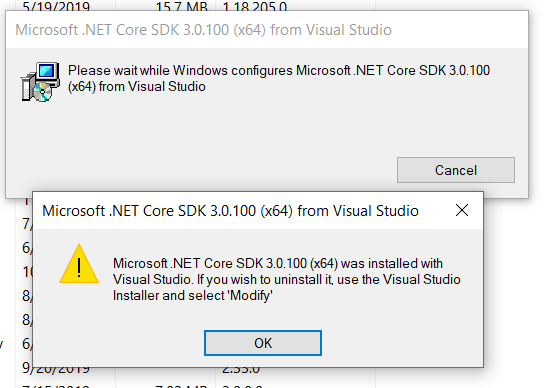
The preceding is correct. Additionally, for the preview SDK versions it lists that VS installed, you get the following message
 Rick-Anderson
on 7 Dec 2019
Rick-Anderson
on 7 Dec 2019
cc @livarcocc and @johnbeisner
Rick-Anderson
on 7 Dec 2019
try reinstall the old version and then uninstall again.
 yeahe83
on 11 Dec 2019
yeahe83
on 11 Dec 2019
Meanwhile I did a cure by renaming the c:\Program files\dotnet folder (3,7 GB) and installing only the latest SDK. My computer didnt explode, so I think these "irregular SDK versions" can safely be deleted in the explorer. Perhaps one time we could have "dotnet --install-sdk" and "dotnet --remove-sdk" harmonizing the download/installation/update on all operating systems, also for the runtime.
 mshobohm
on 11 Dec 2019
mshobohm
on 11 Dec 2019
Related issues
 gmatv
·
3Comments
gmatv
·
3Comments
 Eilon
·
3Comments
Eilon
·
3Comments
 svick
·
3Comments
svick
·
3Comments
 mekomlusa
·
3Comments
mekomlusa
·
3Comments
 Manoj-Prabhakaran
·
3Comments
Manoj-Prabhakaran
·
3Comments
Most helpful comment
Meanwhile I did a cure by renaming the c:\Program files\dotnet folder (3,7 GB) and installing only the latest SDK. My computer didnt explode, so I think these "irregular SDK versions" can safely be deleted in the explorer. Perhaps one time we could have "dotnet --install-sdk" and "dotnet --remove-sdk" harmonizing the download/installation/update on all operating systems, also for the runtime.