This webpage clearly says that these are "interactive lessons that you can run in your browser". There is no mention of Visual Studio. When you start the hello world tutorial, nowhere does it tell you to open Visual Studio.
So pretend you are on step 1 of the hello world tutorial. The very first instruction at the top of the page makes it sound like you need to type something into an interactive window of THE BROWSER.
"Run the following code in the interactive window. To do that, type the following code block in the interactive window and click the Run button:"
You need to alter the instructions to include a mention of Visual Studio.
Document Details
⚠ Do not edit this section. It is required for docs.microsoft.com ➟ GitHub issue linking.
- ID: a62fb2fc-295c-d837-7d89-0835702a75d9
- Version Independent ID: f57c1676-b294-bce7-6b71-e4939371e8bb
- Content: C# Tutorials
- Content Source: docs/csharp/tutorials/index.md
- Product: dotnet-csharp
- GitHub Login: @BillWagner
- Microsoft Alias: wiwagn
 IamThePeter
All 7 comments
I was able to do step 1 of the hello world tutorial in Microsoft Edge just fine. No need to open Visual Studio for that.
The web page has a panel labelled "Try the code in your browser", and a green button "Enter focus mode". Did you try clicking it?
 KalleOlaviNiemitalo
on 11 Jul 2019
KalleOlaviNiemitalo
on 11 Jul 2019
Correct @KalleOlaviNiemitalo
@IamThePeter These are indeed intended to run in the browser. Here is what my browser looks like on the first step, the box on the right stating that you can "try it in your browser"
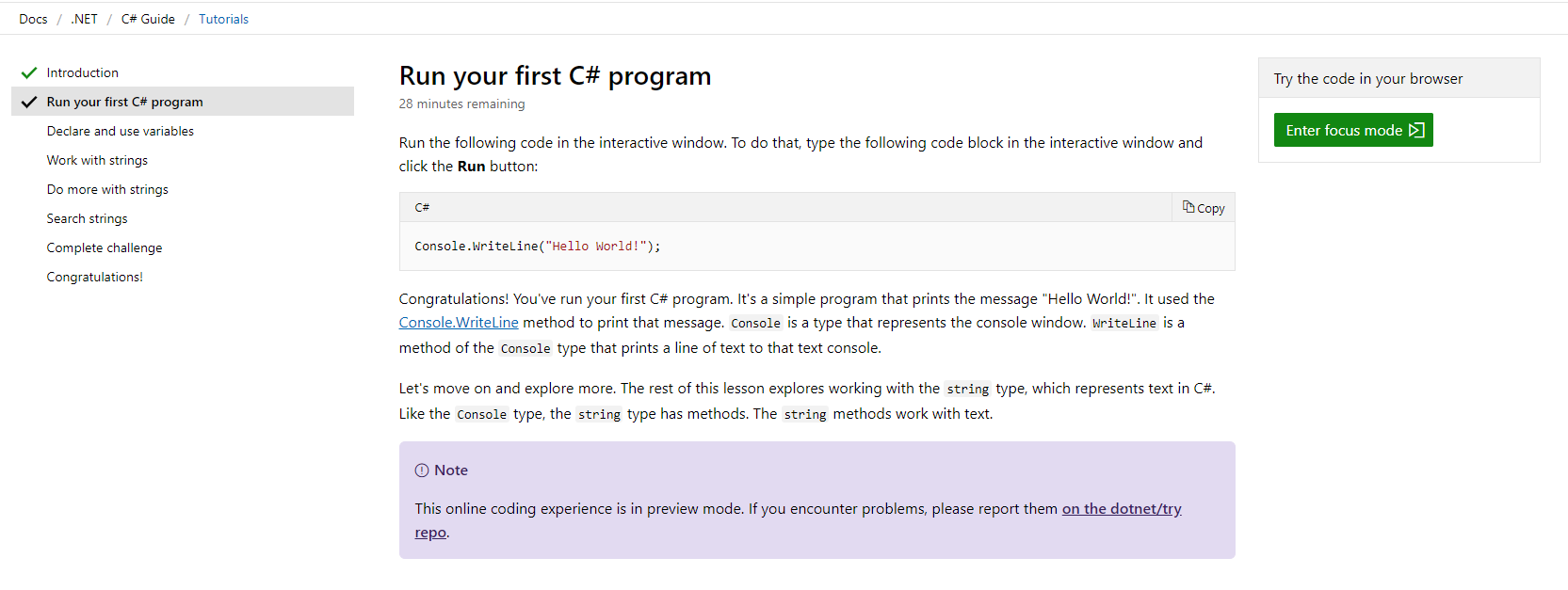
I'm going to close this issue. If there is a problem with that box appearing, there is a link at the bottom of that page that points you to the code repo for issues related to the interactive stuff.
 Thraka
on 12 Jul 2019
Thraka
on 12 Jul 2019
Hey all,
Just wanted to chime in. Although you closed the issue, there is still a problem with the disconnect between what the first line of that tutorial is asking a new person to do and the label of Enter focus mode. What is focus mode? Why do I need to enter it?
I would recommend simply relabeling the button to Enter interactive window, with that small change it is very clear that this button is what was referenced in the instructions. I was confused as well and just assumed I should click the button and see what happens.
The tutorials content is nice and I really appreciate the in-browser editor. These docs are usually well written and easy to follow, which is nice when pointing others to new framework/tech. Thanks for all you people do!
 JustinD85
on 8 Aug 2019
JustinD85
on 8 Aug 2019
Hi @JustinD85 thank you for commenting here. Having a second person validate what @IamThePeter experienced, helps. I'll let @BillWagner decide how he wants to proceed. But I see a few things that could help
When you first enter the tutorial, it should default to the interactive pane being open and ready to run. I really don't understand why we should require a user to click another link just to start the tutorial that they already arrived at.
The "Enter focus mode" is indeed confusing and I think the questions you posed about it are good.
As @IamThePeter thought, perhaps we can include a line that says these steps work in the Interactive Window in Visual Studio or in the Interactive Window in the Browser via the Try project.
Thraka
on 9 Aug 2019
Would like to second " IamThePeter " and " JustinD85 " on the confusing language re the "interactive window"/"focus mode". I came to this page with >zero< coding experience/background (ostensibly the precise target demo for this tutorial). Per the directions, I spun my wheels for quite some time looking in vain for something (anything!) labeled "interactive window" or a clickable 'button' anywhere on the page labeled 'RUN', and grew increasingly exasperated with my inability to follow such seemingly simple instructions. Please change the instructions to match the button, or change the button text to match instructions - either approach solves the problem. I did eventually click on the "focus mode", not because I thought it was in any way related to the mysterious "interactive window" or that it might magically make the fabled "RUN" button appear, but because I thought the "focused" version of the page might be interesting. Please make this change to prevent future fellow newbs from encountering the same frustration I did and simply abandoning the tutorial before figuring it out.
 WAARHEID
on 22 Aug 2019
WAARHEID
on 22 Aug 2019
@WAARHEID Sorry about that. I'm continuing to forward this info on. Thank you for the feedback.
Thraka
on 24 Aug 2019
Whoops didn't mean to hit that CLOSE button.
Thraka
on 24 Aug 2019
Related issues
 Manoj-Prabhakaran
·
3Comments
Manoj-Prabhakaran
·
3Comments
 sdmaclea
·
3Comments
sdmaclea
·
3Comments
 ike86
·
3Comments
ike86
·
3Comments
 mekomlusa
·
3Comments
mekomlusa
·
3Comments
 LJ9999
·
3Comments
LJ9999
·
3Comments
Most helpful comment
Hey all,
Just wanted to chime in. Although you closed the issue, there is still a problem with the disconnect between what the first line of that tutorial is asking a new person to do and the label of
Enter focus mode. What is focus mode? Why do I need to enter it?I would recommend simply relabeling the button to
Enter interactive window, with that small change it is very clear that this button is what was referenced in the instructions. I was confused as well and just assumed I should click the button and see what happens.The tutorials content is nice and I really appreciate the in-browser editor. These docs are usually well written and easy to follow, which is nice when pointing others to new framework/tech. Thanks for all you people do!