Please update this page to include Dotnet Core 2.1, 2.2 and 3.0 as well as .Net Framework 4.7.x. There are people making bad assumptions based on it.
Document Details
⚠ Do not edit this section. It is required for docs.microsoft.com ➟ GitHub issue linking.
- ID: 9eb8b774-c6f0-8235-6964-15219baf2ea7
- Version Independent ID: 6819a4a7-7527-d8c7-e132-767f7344e00e
- Content: .NET Standard
- Content Source: docs/standard/net-standard.md
- Product: dotnet
- Technology: dotnet-standard
- GitHub Login: @mairaw
- Microsoft Alias: mairaw
 sharpninja
All 19 comments
Hello.
What assumptions are people making? The table is focused on the .net standard version and the intro to the table states that the versions listed are the minimum required.
 Thraka
on 23 Apr 2019
Thraka
on 23 Apr 2019
Hello.
What assumptions are people making? The table is focused on the .net standard version and the intro to the table states that the versions listed are the minimum required.
How do I get to the table. The source file for the page links to net-standard-table.md which is not located in the repository.
sharpninja
on 23 Apr 2019
@sharpninja The source for that page is in this repository. (GitHub version of the page does not understand the link, which is why it's 404.)
 svick
on 23 Apr 2019
svick
on 23 Apr 2019
Since people still seem to be confused by the table, maybe it would make sense to add an explicit explanation before the table? Something along the lines of:
If a newer version of a platform is not listed in the table, it means it supports the same version of .NET Standard as the last listed version of that platform.
svick
on 23 Apr 2019
See if that helps: https://github.com/dotnet/docs/pull/11991
I'm also trying to think of a way where we could do the opposite of what this table does and would allow you to select what you wanna target and it would tell you what .NET Standard versions it supports. Not sure if I have many capabilities with the features we have on docs. Let me experiment.
 mairaw
on 23 Apr 2019
mairaw
on 23 Apr 2019
I'm testing a few different options here:
https://github.com/dotnet/docs/blob/ns-experiment/docs/standard/net-standard.md
What do you think of adding a table like this to that article? (using range or listing versions individually is an option; just wanted to test some things out)
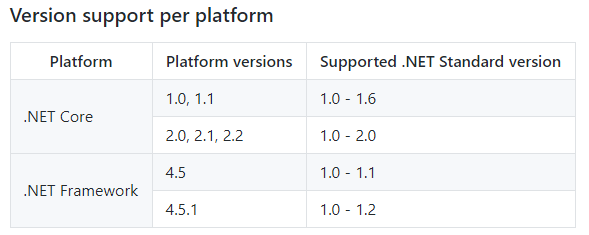
Tagging @pkulikov since you commented on my PR as well
/cc @terrajobst
mairaw
on 24 Apr 2019
I was working with @rowanmiller to a get an interactive table hosted on dot.net. There is a design proposal we'll be reviewing soon.
 terrajobst
on 24 Apr 2019
terrajobst
on 24 Apr 2019
@mairaw I think such an additional table would be of great help. Listing version is essential, I think. That makes it easier to understand.
One remark, though. Should .NET Core section contain two rows: .NET Core 1.0 and 1.1 don't support .NET Standard 2.0, but only .NET Standard 1.6
 pkulikov
on 24 Apr 2019
pkulikov
on 24 Apr 2019
@mairaw What about using this as a test for pivot zones?
Thraka
on 24 Apr 2019
Yes, I know you are @terrajobst. But I thought it would be similar to the one you have in https://immo.landwerth.net/netstandard-versions/# which is different than I'm proposing here.
Or would you also allow to select a TFM and then tell me which .NET Standard versions are supported?
Good catch @pkulikov. I _think_ I fixed my table above.
@Thraka not in this case. You wanna see all versions and platforms together to choose the one that makes the most sense if you're multi-targeting, creating a .NET Standard library, etc.
mairaw
on 25 Apr 2019
We just published the first version of the interactive table to https://dotnet.microsoft.com/platform/dotnet-standard
We landed on a design that is a little different from https://immo.landwerth.net/netstandard-versions/#, trying to make it clearer what the table is conveying. It might help with the confusion being discussed here?
 rowanmiller
on 14 May 2019
rowanmiller
on 14 May 2019
I've updated the link in the standard repo to point to the new table. I've also submitted https://github.com/dotnet/docs/pull/12354 to update the official docs.
terrajobst
on 14 May 2019
Awesome guys! So what do folks think? Would you still like to see a static version on our docs or can we consider this issue resolved?
mairaw
on 14 May 2019
@mairaw That looks fantastic!
sharpninja
on 23 May 2019
Awesome guys! So what do folks think? Would you still like to see a static version on our docs or can we consider this issue resolved?
I'd say resolved 😛
terrajobst
on 24 May 2019
I don't have a screen reader handy, so this might already been taken care of in the new design but I wanted to raise it just in case - because the new design uses JavaScript to apply an image using CSS (label-danger or label-success) there is a strong possibility that a user with a screen reader won't get any of the additional details - meaning that they will just hear the numbers without any additional context.
Not sure if all of Docs (or associated sites that articles on Docs link to) needs to follow the Microsoft public web guidelines for accessibility, but figured I would point it out.
 JimInWA
on 25 Jun 2019
JimInWA
on 25 Jun 2019
@JimInWA you are correct - we'll get this fixed.
rowanmiller
on 25 Jun 2019
@JimInWA just confirming that this is now fixed. We added additional "is supported"/"is not supported" text that is only rendered for screen readers.
rowanmiller
on 26 Jun 2019
Looks like this can be closed now.
terrajobst
on 23 Aug 2019
Related issues
 ike86
·
3Comments
svick
·
3Comments
ike86
·
3Comments
svick
·
3Comments
 LJ9999
·
3Comments
LJ9999
·
3Comments
 ite-klass
·
3Comments
ite-klass
·
3Comments
 sebagomez
·
3Comments
sebagomez
·
3Comments