Docs: Why do I need to select a runtime for Framework Dependent Deployment?
The document says that, in Why create a framework-dependent deployment? section
You don't have to define the target operating systems that your .NET Core app will run on in advance. Because .NET Core uses a common PE file format for executables and libraries regardless of operating system, .NET Core can execute your app regardless of the underlying operating system.
I'm building a simple Console application with .NET Core 2.0. I'm using Visual Studio Community Edition 2017 v15.7.5.
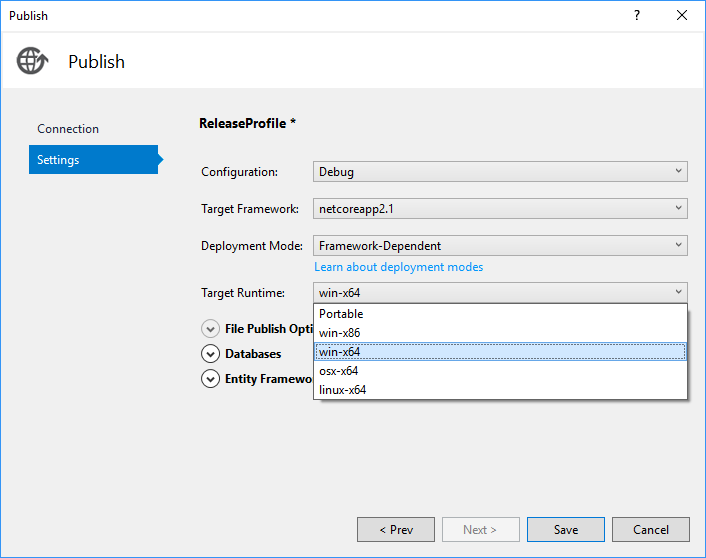
When I try to _Publish_ my app as a _"Framework Dependent" deployment_, the publish wizard still makes me choose a specific _Target Runtime_ e.g. win10-x64, ubuntu.16.10-x64 etc.
Why is this? As per the above documentation, the Framework Dependent Deployment should be independent of target platform.
Also, when I compare the published folders, I see some files are different, e.g.
- MyProject.deps.json - which is still fine, as the difference is basically the runtime
- System.Security.Principal.Windows.dll - this is a framework library, shouldn't it be the same for both Windows & Linux (Ubuntu), or did I miss something?
Document Details
⚠ Do not edit this section. It is required for docs.microsoft.com ➟ GitHub issue linking.
- ID: 06a17d5d-5f6e-d6bc-324b-af411a42ccb8
- Version Independent ID: f58588d7-70f6-aa32-5c6d-ac3e7d72d87c
- Content: .NET Core Application Deployment
- Content Source: docs/core/deploying/index.md
- Product: dotnet-core
- GitHub Login: @rpetrusha
- Microsoft Alias: ronpet
 ghost
ghost
All 8 comments
@leecow can you answer this?
 Rick-Anderson
on 28 Aug 2018
Rick-Anderson
on 28 Aug 2018
@chakrabar, I can't reproduce this behavior. Can you check your *.csproj file to make certain that it doesn't define any runtimes? In terms of assembly differences, they're to be expected when implementations vary by underlying platform or wrap calls to platform APIs.
 rpetrusha
on 30 Aug 2018
rpetrusha
on 30 Aug 2018
@rpetrusha I checked with another project (lost the last one) and yes, it does publish as FDD with "Portable" option. I'm assuming the csproj was different or I missed something else, my bad.
But, on the other hand, there are still options to choose specific runtime IDs as well. Again, if I choose a specific runtime ID (e.g. win-x64) over Portable, the number of files and the total size of binaries - both increases considerably. Why so?
Same question again, since it is a FDD, ideally the same set of binaries should work, right? The platform specific binaries should be picked up from the installed framework. No? Then why does the files differ in published directory?
ghost
on 11 Sep 2018
I wonder why too. When I select win-x64 with FDD it builds an .exe, what exe is that and what it does exactly? Also, when I select win-x64 I get 2 folders, one is publish and one is win-x64. The publish one contains everything(including the exe and all the dependencies) and win-x64 one just a few files and an exe. Those deployment types are confusing and need more explanation.
After publish those folders are created:

So publish operation writes to these 2 folders but only publish contains everything including the contents of win-x64
- Is this intended to be able to choose runtime with FDD? If so, what is the use case and what is the role of the exe file?
- What is the purpose of the second folder?
 bugproof
on 14 Sep 2018
bugproof
on 14 Sep 2018
It definitely needs more explanation. When I want to deploy to a specific platform (let's say win-x64), I basically have three options
- FDD as Portable
- FDD as win-x64
- SCD as win-x64
When I publish my not-so-big ASP.NET Core 2.0 application with the above options, the total file size of generated binaries are 10 MB, 40 MB & 100 MB respectively. What exactly is the difference?
While I understand option 1 and option 3 (at least theoretically), what does option 2 do?
ghost
on 20 Sep 2018
I wanted to follow up on this since I'm here editing this article for the 2.2 release.
I can't seem to replicate this behavior. For 2.1 (2.0 also I believe) on the CLI if you specify the target-runtime, you automatically get an SCD. If you do not specify the target-runtime, you automatically get the FDD. I have a feeling that Visual Studio is either building both and putting them in different folders (though the latest version I tried with (15.8.8) wouldn't do that).
 Thraka
on 30 Nov 2018
Thraka
on 30 Nov 2018
By default, target runtime is x86. So if I need to run it on a 64 bit system, do I have to change it to x64?
I have published and when I try to run, it keeps giving HTTP Error 502.5 Process Failure error
 mcp111
on 8 Nov 2019
mcp111
on 8 Nov 2019
@mcp111
The runtime is not x86 by default. I'm unsure what error you're getting nor what your project is all about :) I suggest you open a new issue. However, please keep in mind that this repo is about the documentation and sometimes it's better to ask for help stackoverflow or a developer community.
Thraka
on 8 Nov 2019
Related issues
 skylerberg
·
3Comments
skylerberg
·
3Comments
 mekomlusa
·
3Comments
mekomlusa
·
3Comments
 sdmaclea
·
3Comments
sdmaclea
·
3Comments
 stanuku
·
3Comments
stanuku
·
3Comments
 ygoe
·
3Comments
ygoe
·
3Comments
Most helpful comment
It definitely needs more explanation. When I want to deploy to a specific platform (let's say
win-x64), I basically have three optionsWhen I publish my not-so-big ASP.NET Core 2.0 application with the above options, the total file size of generated binaries are 10 MB, 40 MB & 100 MB respectively. What exactly is the difference?
While I understand option 1 and option 3 (at least theoretically), what does option 2 do?