Docs: MsBuild or Command Line Integration, CI and Publish
Can I publish WCF service library project with auto generated *.svc and web.config files that integrated CI pipeline. (VSTS, TFS, Task or Command Line).
Document Details
⚠ Do not edit this section. It is required for docs.microsoft.com ➟ GitHub issue linking.
- ID: 74770e0d-c48a-8355-8e73-c8afb968a7ac
- Version Independent ID: 686d2fa7-335b-8fb7-0c44-85231d49a4d8
- Content: WCF Service Publishing
- Content Source: docs/framework/wcf/wcf-service-publishing.md
- Product: dotnet-framework
- GitHub Login: @dotnet-bot
- Microsoft Alias: dotnetcontent
 gencebay
All 6 comments
@zhenlan is this something you or someone from your team can help answer?
 mairaw
on 13 Jun 2018
mairaw
on 13 Jun 2018
@gencebay is your question about whether you can publish a WCF application as part of CI instead of inside Visual Studio? Are you thinking about publishing to IIS? If yes for both questions, publishing of WCF applications is very similar to publishing ASP.NET applications, so you should be able to use tools for publishing ASP.NET applications, for example, web deploy.
cc @Lxiamail
 zhenlan
on 13 Jun 2018
zhenlan
on 13 Jun 2018
Yes. Publish a WCF application is very similar to publishing ASP.NET applications if you create all .svc and web.config file manually and include them to the project as content (Build Action). I'm looking for a way auto generate these files (.svc and web.config) during CI build from WCF Service Library codebase like Visual Studio -> Publish can do.
Steps:
- Create Wcf Library Project
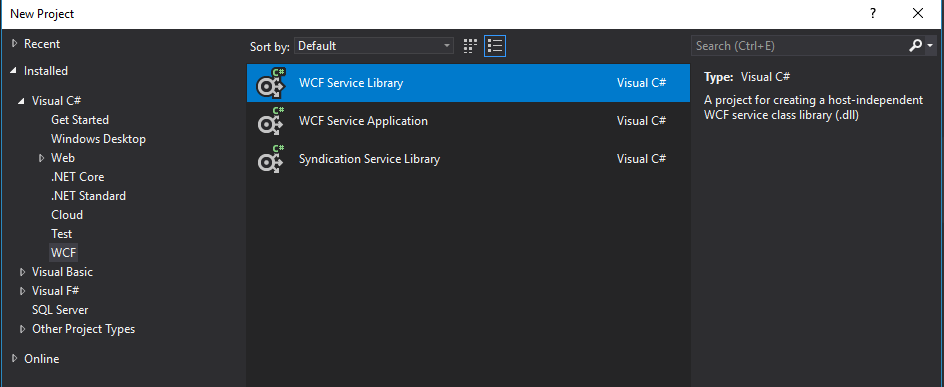
Visual Studio Publish

Compare Publish Folder and Project Files

As shown above "CustomService.svc" and web.config files are generated after publish. I'm using this method when I add a new service or update web.config files then copy and paste these files manually to the project. Only this way I could use WPPCopyWebApplication (web publishing pipeline) with CI pipeline and msbuild.
Thanks.
gencebay
on 13 Jun 2018
@dasetser Can you take a look?
 Lxiamail
on 13 Jun 2018
Lxiamail
on 13 Jun 2018
I am also having this issue, can manually publish from visual studio but not from the CLI, how to integrate the publish into azure pipelines?
 theCorb1nator
on 25 Jan 2019
theCorb1nator
on 25 Jan 2019
We don't currently support this functionality for the WCF Service Library projects. Your options for this would be to either use a WCF Service Application project (which includes these in the project and has more advanced publishing support), or create a custom MSBuild task to do this generation for you.
 dasetser
on 31 Jan 2019
dasetser
on 31 Jan 2019
Related issues
 ygoe
·
3Comments
ygoe
·
3Comments
 ite-klass
·
3Comments
ite-klass
·
3Comments
 gmatv
·
3Comments
gmatv
·
3Comments
 Eilon
·
3Comments
Eilon
·
3Comments
 JagathPrasad
·
3Comments
JagathPrasad
·
3Comments
Most helpful comment
We don't currently support this functionality for the WCF Service Library projects. Your options for this would be to either use a WCF Service Application project (which includes these in the project and has more advanced publishing support), or create a custom MSBuild task to do this generation for you.