Docs: Documenting .NET Core MSBuild targets and properties/CSPROJ
This has been coming up more and more as we go. There have been numerous requests for help on Slack chat, several on SO, and a question on the Standup: https://youtu.be/c9Ub4uwjlbo?list=PL0M0zPgJ3HSftTAAHttA3JQU4vOjXFquF&t=3677.
@mairaw mentioned to me on Slack that props and targets perhaps are best explained as part of a topic that addresses .NET Core-specific csproj generally ... not so much just "targets and properties" disconnected from the project file.
Current info can be found in the tutorials and topics such as A mapping between project.json and csproj properties, Additions to the csproj format for .NET Core, and Packages, Metapackages and Frameworks. What's been happening quite a bit I think is that devs end up digging around in ...
https://github.com/dotnet/sdk/tree/master/src/Tasks/Microsoft.NET.Build.Tasks/targets
... to find useful/helpful props and targets. I think we all agree that that's not a good UE.
This issue addresses the need to have a clearly-visible topic for the project file that isn't migration-based, perhaps with a companion reference topic on only targets and properties in a tables format. Those could pertain to sdk, websdk, or both; but I suggest getting the websdk bits covered somewhere clearly visible in addition to merely covering the sdk ones.
cc/ @dasMulli ... Who has helped hundreds of devs with props/targets for .NET Core. I hope he'll make some observations for this issue.
 guardrex
All 51 comments
Related to this topic we should provide guidance for how to configure client side builds (npm, grunt, gulp tasks) for CI builds.
 BillWagner
on 17 Jul 2017
BillWagner
on 17 Jul 2017
There are likely at least two distinct concerns here:
- Things to use for configuring properties and items that the SDK / build targets will understand.
e.g. things likeCopyLocalLockFileAssemblies,RuntimeFrameworkVersion. - Things available in custom targets and when they will be available (=> knowing what to put in
AfterTargets/DependsOnTargets).
e.g.OutputPath,DocumentationFileetc.
This might also include common items and which target generates them.. for example, knowing that depending onResolvePackageDependenciesForBuildenables accessing@(PackageDefinitions)and@(PackageDependencies)items, which allowed me to create a reverse dependency list.
 dasMulli
on 31 Jul 2017
dasMulli
on 31 Jul 2017
As part of this, the documentation for BaseIntermediateOutputPath needs to indicate that it must not be set in the body of a <Project Sdk="Microsoft.NET.Sdk">. See https://github.com/dotnet/sdk/issues/1518#issuecomment-324638682
 nguerrera
on 31 Aug 2017
nguerrera
on 31 Aug 2017
Cross ref (might be good to include something on \
guardrex
on 13 Sep 2017
Please include information about breaking changes affecting project files after migration from the "old style". Hit the breaking change described at https://github.com/dotnet/project-system/blob/master/docs/configurations.md over the weekend and didn't find that page 'til @natemcmaster told me about it. Need something better than tribal knowledge here…
 dougbu
on 23 Oct 2017
dougbu
on 23 Oct 2017
Please also document _all_ properties that have special meaning for the compiler etc.
I was bitten by setting an Instrument property, which apparently triggers the use of an undocumented C# compiler option (at least it's not listed here).
I'm not sure it makes sense to impact the user namespace like that; such flags could/should be named something like CscInstrument/C#.Instrument/Csc:Instrument.
 Zastai
on 12 Jan 2018
Zastai
on 12 Jan 2018
From @proog:
"The csproj reference topic lists the two main SDKs that can be specified in the Sdk attribute of a
While it does have a vague mention of the SDK being a "set of tasks and targets," it does not explain which, and perhaps more importantly does not explain what the consequences of choosing one over the other is.
In my opinion it would be helpful to have a paragraph dedicated to choosing the right SDK, or a reference to a more in-depth explanation of their differences."
 mairaw
on 22 Jan 2018
mairaw
on 22 Jan 2018
ad SDKs: I guess this is about web vs non-web Sdk= project elements.
People editing the csproj by hand seem to get bitten by the different globs in these two since they have different globs for things like json files..
is there a structure proposal yet? single page or a "customize your build" node?
Topics that have come up across repos and stack overflow a lot and would potentially be useful in docs:
- How do I set X for more projects? > Link to https://docs.microsoft.com/en-us/visualstudio/msbuild/customize-your-build#use-case-multi-level-merging for
Directory.Build.props
- maybe example for setting
<VersionPrefix>,<Author>,<LangVersion>etc. for a solution.
- maybe example for setting
- PDB-related settings and how it affects VS.
- How do I include or exclude files in/from the publish output?
- Show
<None Update="**/my_pattern/**" CopyToOutputDirectory="PreserveNewest" CopyToPublishDirectory="PreserveNewest" />- https://stackoverflow.com/questions/44374074/copy-files-to-output-directory-using-csproj-dotnetcore/44378406#44378406 - Note that
CopyToPublishDirectoryis an addition to the SDK-based projects. - Note that
PreserveNewestshould be preferred overAlwayssince latter to be able to build incrementally (-> build time). - Explain that web projects may
Contentinstead ofNonefor certain paths and patterns. - currently this is everything in
wwwroot\**,.jsonand.configfiles. - Show how to use
LinkBaseto include content from outside the project folder in a different subdirectory. - e.g.
<Content Include="../shared-configs/**" LinkBase="config/" CopyToOutputDirectory="PreserveNewest" CopyToPublishDirectory="PreserveNewest" />
- Show
- How to set runtime options in the csproj file (-> runtimeconfig.json)
- e.g. server GC mode, globalization invariant mode
- How to specify the build target directory/directories
AppendTargetFrameworkToOutputPathis useful for single-TFM projects for ppl converting from netfx to netstandard but don't want additional subdirectories inbin/[Configuration]to not break existing tooling.- Redirect output via
OutputPath- there have been discussions aboutOutDirvsOutputPath BaseOutputPathto movebin\somewhere else entirely- Show workarounds for redirecting
obj\to somewhere else. This needs some more hacks sinceBaseIntermediateOutputPathneeds to be set before(!) the imported SDK props so ideally in anDirectory.Build.propsfile or using the explicit SDK import syntax instead of the project-levelSdkattrbute. - Maybe have an example of how to have two csproj file in the same directory for sharing source - e.g. https://github.com/SabotageAndi/NewCSProj/tree/master/MultipleProjecsInSameFolder
- Show how to use before and after build targets to execute msbuild tasks or scripts via
<Exec>.
- Highlight that build events (PreBuildEvent / PostBuildEvent) are deprecated and should no longer be used, esp. not in sdk-style csproj files since nearly all important properties will be captured in an unfinished/wrong state.
- VS 15.3+ using new project system now emits targets using
<Exec>when using the project property dialogs for pre-/postbuild events. - Show an alternative for
$(SolutionDir)usingDirectory.Build.propsin the .sln directory since this is only set when building a solution file or through visual studio, but not during Restore (=> settingBaseIntermediateOutputPathbased on$(SolutionDir)just doesn't work in most scenarios) - Show examples for pre / post build targets for multi-targeting builds with differences:
- Run once - "outer build"
- Run for each TFM - "inner build"
- Set startup command line arguments for launching in VS or
dotnet run
RunWorkingDirectory/RunArguments/StartupArguments
- "How do I get all the NuGet dll files into the output directory for my 10 year old reflection logic?"
CopyLocalLockFileAssemblies- Show how to use
DependencyContextAPIs instead
- How do I reference individual DLL files?
maybe cc @SabotageAndi for additional suggestions
dasMulli
on 15 Mar 2018
From feedbacks via other channels: Incremental builds are only sparsely documented. I strongly agree since I recently needed to look at msbuild source code for an edge case that wasn't documented (this SO question).
But I guess this is more VS docs than .NET docs or does anyone want to see a "good example" of an incrementally buildable target? (I can't think of a good example use case off the top of my head)
dasMulli
on 15 Mar 2018
Missed DefaultItemExcludes (and DefaultItemExcludesInProjectFolder) which would be a good fit for https://github.com/dotnet/docs/blob/master/docs/core/tools/csproj.md which already has EnableDefaultItems and EnableDefaultCompileItems. Thanks to @DanielTheCoder for reminding me!
There are some more details on the various switches for default globs. There is also a VS issue for compile items once the glob is turned off: https://github.com/dotnet/sdk/issues/1562 / https://github.com/dotnet/sdk/issues/1157
dasMulli
on 15 Mar 2018
$SourceLink and @EmbeddedSource, to control pdb contents perhaps also deserve a mention?
And this is definitely VS rather than msbuild, but it would be good to get a clear idea of what is and is not done when VS determines a project is up to date. It seems to (re)copy the binaries from obj to bin, apparently without going through msbuild at all - but that erases any changes made by an assembly post-processor as part of the normal build. It would be good to know if this can be hooked in any way, other than disabling the fast uptodate check entirely.
Zastai
on 15 Mar 2018
@johnkors mentioned IsTransformWebConfigDisabled.
Maybe some more interesting things turn up in the web publish targets.
ad web targets: Been asked about automatic TypeScript compilation a few times which can also be disabled in csproj so VS doesn't do it automatically.
dasMulli
on 15 Mar 2018
As a user on SO just re-iterated a few hours ago, it isn't properly documented in one place how to work the Item syntax - Build Actions, Include/Update/Remove, Exclude.
https://stackoverflow.com/questions/49302063/reference-for-msbuild-itemgroup-content
Also, Update isn't supported in targets. It works but will update all(!) items, a Condition is needed to filter. Update="…" in targets is considered a metadata syntactically but isn't added to the item in msbuild because of its special logic. The bug in msbuild is that it didn't produce a proper error and can't do so now because even core .NET targets have used the Update syntax in targets without realizing this (though no harm done since it was only <Foo Update="@(Foo)" … />).
dasMulli
on 15 Mar 2018
Here's another one that just popped up on the radar. It isn't available yet, but it will be ... https://github.com/aspnet/Docs/issues/5599#issuecomment-373808943
guardrex
on 16 Mar 2018
Since I'm already very deep into this, I'd volunteer to work on this
dasMulli
on 18 Mar 2018
Thanks @dasMulli Let us know if we can help
BillWagner
on 18 Mar 2018
@dasMulli Suggestion: Float your outline here when you have it. I'd like to see how you plan to structure the sections/content.
guardrex
on 18 Mar 2018
i could probably review this kind of stuff if you need a reviewer on it
 gulbanana
on 20 Mar 2018
gulbanana
on 20 Mar 2018
Awesome! Contributions and reviews are super appreciated. @dasMulli let us know if you have any questions and feel free to ping me offline. We can start a WIP PR to get the basic outline defined and go from there.
mairaw
on 22 Mar 2018
Another scenario to cover: how to reference DLLs in your csproj
https://medium.com/@tonerdo/referencing-a-net-dll-directly-using-the-net-core-toolchain-16f0af46a4dc
via @tonerdo
mairaw
on 28 Mar 2018
DLL references have a few odd behaviours.. one of them is Reference vs ReferencePath behavior which got a bit more complicated with the introduction of the build-using-reference-assemblies feature. Then RAR also uses None/Content items as inputs to look for things. But I guess that is probably better done in VS docs..
dasMulli
on 28 Mar 2018
@dasMulli just a thought, if referencing dlls is documented in the VS docs, doesn't it make it slightly harder for Mac and Linux devs to find. Granted it's not a very common scenario but if they ever run into it I'm guessing the csproj documentation will be the first place they'll look.
 tonerdo
on 28 Mar 2018
tonerdo
on 28 Mar 2018
Yes I agree the basic scenario needs to be in in there, already amended the list above.
dasMulli
on 28 Mar 2018
See PR #5571 for two new files where the <LangVersion> element is documented.
Edit by GW to add direct link: https://docs.microsoft.com/en-us/dotnet/csharp/language-reference/configure-language-version#edit-the-project-file
BillWagner
on 24 May 2018
having so much silliness with trying to get an external directory and all of its files copied - is there any reason this wouldn't work?
<ItemGroup>
        <MyWwwRootFiles Include="..\wwwroot\**\*"/>
    </ItemGroup>

<Target Name="CopyWWW">
        <Copy
            SourceFiles="@(MyWwwRootFiles)"
            DestinationFiles="@(MyWwwRootFiles->'$(PublishDir)\%(RecursiveDir)%(Filename)%(Extension)')'"
        />
    </Target>
 nowherenearithaca
on 21 Jun 2018
nowherenearithaca
on 21 Jun 2018
@nowherenearithaca Are you not setting the SDK to Web? ...
<Project Sdk="Microsoft.NET.Sdk.Web">
The files will be moved ✨ auto-magicially ✨ for you on publish.
guardrex
on 21 Jun 2018
hi @guardrex yes - it seems to be there - note that this is a csproj file created with dotnet migrate
<Project Sdk="Microsoft.NET.Sdk.Web">
nowherenearithaca
on 21 Jun 2018
... and when you do a dotnet publish, you're not getting your wwwroot assets published? Check the publish folder.
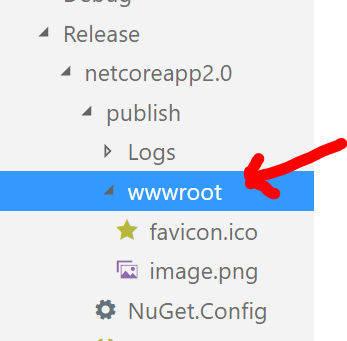
guardrex
on 21 Jun 2018
sorry - using dotnet cli (with visual studio code) - not visual studio
nowherenearithaca
on 21 Jun 2018
@nowherenearithaca try
<ItemGroup>
  <Content Include="..\wwwroot\**\*"
    LinkBase="wwwroot\"
    CopyToPublishDirectory="PreserveNewest" />
</ItemGroup>
@dasMulli With that SDK, why not ...
guardrex
on 21 Jun 2018
@dasMulli thx - closer - it copied the files but did not seem to preserve the directory structure
nowherenearithaca
on 21 Jun 2018
Every item will need a Link metadata or else the AssignTargetPath of msbuild will not be able to determine a target path to copy it to (= ""outside of the project cone"").
The 2.0 SDK introduced LinkBase to help set a sensible Link metadata for items created through globbing. It's just a shortcut for Link="wwwroot\%(RecursiveDir)%(Filename)%(Extension)".
dasMulli
on 21 Jun 2018
@dasMulli that seemed to do it! yes, I'm using 1.1 atm. whew.
nowherenearithaca
on 21 Jun 2018
@nowherenearithaca it works on a sample I just created to validate:
testextthings.zip
Please create a minimal sample if it doesn't work.
Also make sure you are using a 2.0+ SDK, even if you are developing for older runtime versions of .net core.
dasMulli
on 21 Jun 2018
Unfortunately, I won't be able to get to this one this sprint as I was planning. I'll need to wrap up MSDN migrations before I can focus on this work.
mairaw
on 19 Jul 2018
As per https://stackoverflow.com/questions/54195709/understanding-net-core-csproj-actions?noredirect=1#comment95221591_54195709, I'm super keen to understand many things about None, Content, Folder, how globs interact, why "None Remove" is needed (or added by VS at least). Hope you don't mind this as a bump.
Edit: maybe in the meantime, someone could explain at least "None", "Folder", why None Remove=... is needed before a Content Include=... is, and why a <Folder Include="Frontend\Content"> with <CopyToOutputDirectory>Always</CopyToOutputDirectory> does nothing,?
 kierenj
on 17 Jan 2019
kierenj
on 17 Jan 2019
@guardrex is there an updated link available for https://github.com/dotnet/sdk/tree/master/src/Tasks/Microsoft.NET.Build.Tasks/build ? I think it's /targets? In which case, I'm still lost on the Folder action :)
kierenj
on 17 Jan 2019
Idk where the contents of the prior file landed ... it was just an example of where devs were looking for examples on how to customize build/publish behaviors. Similar situation with the web publishing targets/props, where devs sometimes go in and look at the source to learn or to find out how to customize some aspect of how their app is published. https://github.com/aspnet/websdk/tree/master/src/Publish/Targets/netstandard1.0
guardrex
on 17 Jan 2019
<None Remove="…" />https://stackoverflow.com/questions/49784191/what-does-none-remove-mean-in-csproj/49785443#49785443
maybe also see https://stackoverflow.com/questions/52434690/what-are-the-differences-between-microsoft-net-sdk-and-microsoft-net-sdk-web/52456313#52456313
TL;DR you'd have both a None and a Content item for a file if you don't remove from the None collection. That isn't a problem per-se but VS has an easier time showing you the right things in the solution explorer and property window. If you have a single file listed as None, Content and EmbeddedFile then you may confuse IDEs (VS, Rider, VS/Mac) that try to reason about how you want the files to be configured in your project.
<Folder>just shows a node in VS' solution explorer. Just to get you a point to right click > add file.wwwrootis a classic example for ASP.NET Core applications but if you use the VS' Add>New Folder feature or delete all of the files in a folder, it will add a<Folder>node to keep it in the solution explorer.
TheFolderitems aren't used during the build. Copying items is determined based on the metadata specified on known item types (None,Content,...) and not based onFolderitems in the filesystem hierarchy.…/buildyes it's in…/targetsnow because GitHub excludesbuildfolders from indexing and these.propsand.targetsfile contents wouldn't show up in searches or the "t" quick file switcher.
dasMulli
on 19 Jan 2019
I've moved this to the backlog but it continues to be a high-priority for me to get to this work item.
mairaw
on 23 Jan 2019
As discussed on Twitter: with MSBuild 16.0 the MSBuildAllProjects property no longer needs to have each project file appended to it manually.
This property is intended for up-to-date checks, so having all project files in it ensures changes to any file trigger rebuilds correctly.
Before MSBuild 16.0 project files would add something like this:
<MSBuildAllProjects>$(MSBuildAllProjects);$(MSBuildThisFileFullPath)</MSBuildAllProjects>
MSBuild 16.0 no longer requires manually updating this property. Instead, it identifies the most recently modified project file during evaluation and prepends its path to MSBuildAllProjects automatically.
Project files that appen to this property will continue to work as they did before, however there is a slight performance gain to be had by reduing the size of this property.
For reference, see:
- https://github.com/Microsoft/msbuild/pull/3605 (the relevant change in MSBuild)
- https://github.com/Microsoft/msbuild/issues/1299
- https://github.com/dotnet/sdk/pull/2853 (removing
MSBuildAllProjectsfrom SDK projects) - https://github.com/dotnet/project-system/issues/3744 (discussing the perf impact of large property values in VS)
 drewnoakes
on 23 Jan 2019
drewnoakes
on 23 Jan 2019
I propose a name change to project OR msbuild-project instead of csproj since it also covers vbproj, fsproj!
 Nirmal4G
on 23 Jul 2019
Nirmal4G
on 23 Jul 2019
I know. I think that has been proposed other times, however, this is not the place to do that :) that would be in the code repo, not the documentation repo 😄
 Thraka
on 24 Jul 2019
Thraka
on 24 Jul 2019
I was talking about this -> docs.ms/dotnet/core/tools/csproj
Then again, having a unified extension won't hurt either. I lean towards .proj or .vsproj or .msproj!
I saw the discussion, said it would require changes to the Solution File and the Project System Loader (GUIDs).
Nirmal4G
on 24 Jul 2019
oh yes. The plan is to redo that article completely with a new direction as it's currently presented as "additions to the csproj" and we still have stuff that talks about project.json stuff too.
Thraka
on 24 Jul 2019
Assigning this to @gewarren. Feel free to break this task into smaller issues if it helps or schedule a meeting for us to go over the details.
mairaw
on 6 Jan 2020
As of Jan 2020, I own MSBuild docs, so I will be looking at similar issues in the coming weeks. @gewarren
 ghogen
on 24 Jan 2020
ghogen
on 24 Jan 2020
Add info about the degree to which the .NET Core SDK supports existing project files (not SDK style).
 gewarren
on 25 Apr 2020
gewarren
on 25 Apr 2020
Add info about the degree to which the .NET Core SDK supports existing project files (not SDK style).
I believe the communication from the SDK/CLI team over the years was along the lines of "not officially supported, it may work for you and only you".
Would be good to have that _somewhere_ as some GH issues have been raised in the past, especially during 1.0-2.0 time (not sure if there were many recently).
dasMulli
on 27 Apr 2020
I've created manageable chunk issues to track the remaining work on https://docs.microsoft.com/en-us/dotnet/core/project-sdk/msbuild-props. Closing this one out.
gewarren
on 1 May 2020
Related issues
 JagathPrasad
·
3Comments
JagathPrasad
·
3Comments
 stjepan
·
3Comments
stjepan
·
3Comments
 stanuku
·
3Comments
stanuku
·
3Comments
 sebagomez
·
3Comments
sebagomez
·
3Comments
 garfbradaz
·
3Comments
garfbradaz
·
3Comments
Most helpful comment
ad SDKs: I guess this is about web vs non-web
Sdk=project elements.People editing the csproj by hand seem to get bitten by the different globs in these two since they have different globs for things like json files..
is there a structure proposal yet? single page or a "customize your build" node?
Topics that have come up across repos and stack overflow a lot and would potentially be useful in docs:
Directory.Build.props<VersionPrefix>,<Author>,<LangVersion>etc. for a solution.<None Update="**/my_pattern/**" CopyToOutputDirectory="PreserveNewest" CopyToPublishDirectory="PreserveNewest" />- https://stackoverflow.com/questions/44374074/copy-files-to-output-directory-using-csproj-dotnetcore/44378406#44378406CopyToPublishDirectoryis an addition to the SDK-based projects.PreserveNewestshould be preferred overAlwayssince latter to be able to build incrementally (-> build time).Contentinstead ofNonefor certain paths and patterns.wwwroot\**,.jsonand.configfiles.LinkBaseto include content from outside the project folder in a different subdirectory.<Content Include="../shared-configs/**" LinkBase="config/" CopyToOutputDirectory="PreserveNewest" CopyToPublishDirectory="PreserveNewest" />AppendTargetFrameworkToOutputPathis useful for single-TFM projects for ppl converting from netfx to netstandard but don't want additional subdirectories inbin/[Configuration]to not break existing tooling.OutputPath- there have been discussions aboutOutDirvsOutputPathBaseOutputPathto movebin\somewhere else entirelyobj\to somewhere else. This needs some more hacks sinceBaseIntermediateOutputPathneeds to be set before(!) the imported SDK props so ideally in anDirectory.Build.propsfile or using the explicit SDK import syntax instead of the project-levelSdkattrbute.<Exec>.<Exec>when using the project property dialogs for pre-/postbuild events.$(SolutionDir)usingDirectory.Build.propsin the .sln directory since this is only set when building a solution file or through visual studio, but not during Restore (=> settingBaseIntermediateOutputPathbased on$(SolutionDir)just doesn't work in most scenarios)dotnet runRunWorkingDirectory/RunArguments/StartupArgumentsCopyLocalLockFileAssembliesDependencyContextAPIs insteadmaybe cc @SabotageAndi for additional suggestions