Docs-website: [Umbrella Issue] auto generated index pages for URLs match navigation structure
Overview
This ☂️ accounts for several different issues that all relate back to the same problem the UX challenges we have from implementing a decoupled nav to URL approach. That approach was sound and the right decision, but we are seeing some UX issues that should be addressed to help the expeirence of viewing and navigating documentation.
TL:DR sort navigation hierarchy and auto generated page hierarchy in the same order
Example Problems
Original pricing/user mgmt stuff: https://docs.newrelic.com/docs/accounts/original-accounts-billing/. As you can see, that is a very messed up view of that section. Ideally we'd be able to link to a category to say stuff like 'For information on original pricing and user management, see ..." but we can't do that. We do actually link to these views in the docs so that is a broken experience currently.
AWS integrations category: https://docs.newrelic.com/docs/integrations/amazon-integrations/. As you can see, the order is messed up in there. Ideally we'd like to be able to link to this entire category, to say things like 'For information on AWS integrations, see ...."
NerdGraph category: https://docs.newrelic.com/docs/apis/nerdgraph/.
Open source telemetry integration list: https://docs.newrelic.com/docs/integrations/open-source-telemetry-integrations/. The 'Get started' is second in list.
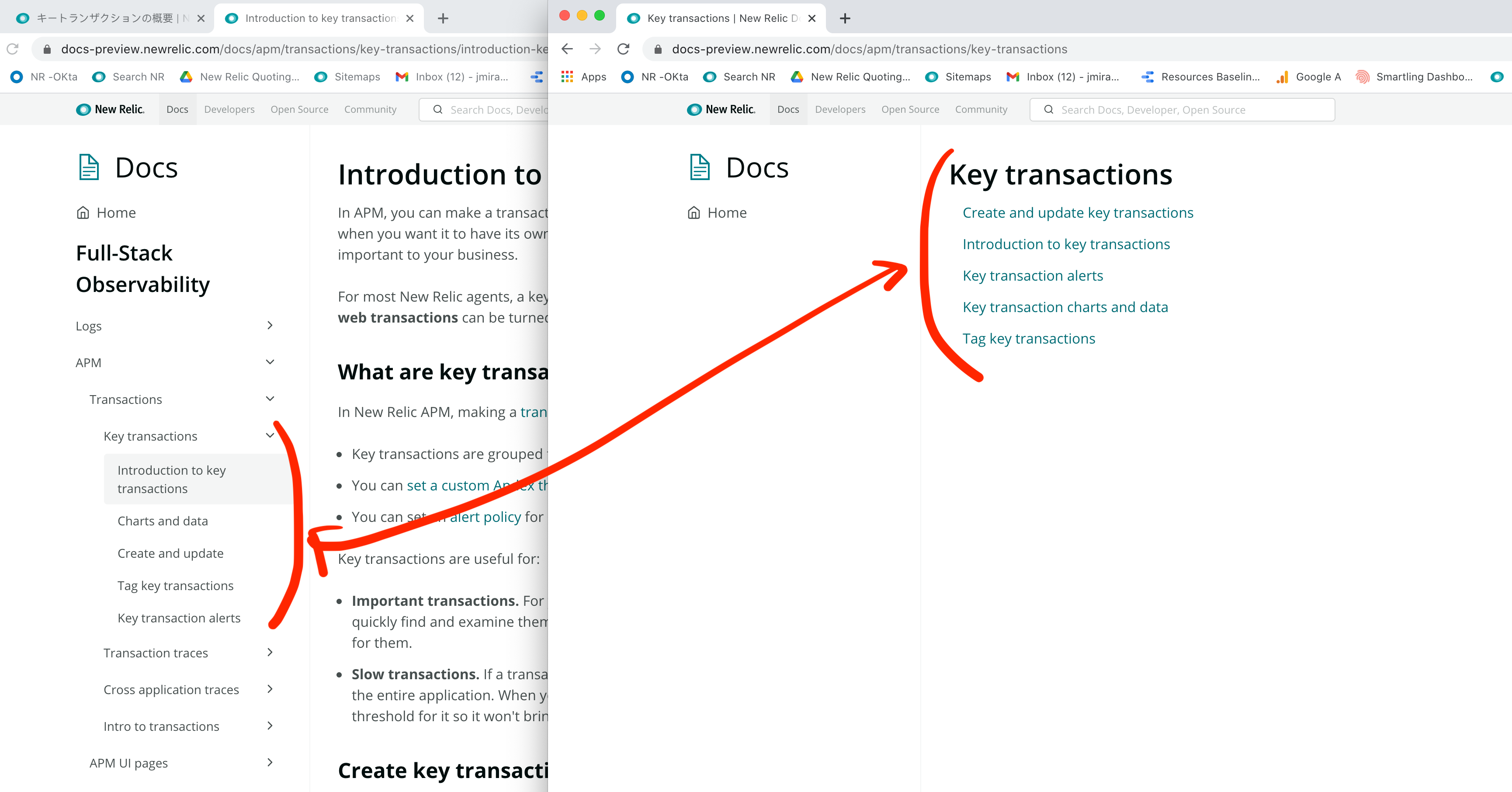
The dynamic menu for Key transactions does not show the same wording of items nor are they in the same sequence as they are on the page's left nav.
This makes navigation quite confusing.
Related issues Acceptance Criteria
NOTE Some of the below issues may be resolved when finish this work, so we can test these bugs out and closed that are fixed.
- #1584 (capitalization inconsistencies) - FIXED
- #801 ? (missing words) - FIXED
- #1571 (JP taxonomy list pages don't link to JP content) - FIXED
Acceptance Criteria
- [x] All index pages will be ordered by section and by navigation order.
- [x] If an page exists outside the navigation we'd sort that at the bottom of the section alphabetically.
- [x] For index pages that have no navigation, like AWS integration sort in alphabetical order.
- [ ] Document how this works in the Style Guide - hand off to @austin-schaefer / @paperclypse on updating the Style Guide.
 jmiraNR
All 17 comments
I wanted to post a few bits of information about this particular behavior. This one is actually fairly tricky to solve, even though from the surface, it looks like it should be easy.
What's happening behind the scenes?
To understand why you're seeing what you're seeing, it's helpful to understand how this page is generated and why.
These pages are generated by a local Gatsby plugin that analyzes all of the pages available in the site (anything in src/pages or src/content/*.mdx). From the list of those URLs, we then analyze each one and create new URLs for every path segment in those URLs. To given an example of this process, let's say we have the following 3 (hypothetical) authored pages:
/docs/apm/intro/docs/apm/intro/more-information/docs/apm/agent/getting-started
Given the above information, we'd take each of these URLs and generate new URLs for each path segment. That leaves us with:
/docs/docs/apm/docs/apm/intro/docs/apm/agent
We analyze these URLs, in conjunction with the original authored URLs, and determine which of these URLs do not already have an authored page. We see that /docs/apm/intro already has an authored page. That means we need to create the following 3 pages:
/docs/docs/apm/docs/apm/agent
By generating these pages, it means a user could visit a URL at any path segment to see some content. In the case of the authored pages, they get the authored content. In the case of our "auto generated page", they see the auto generated content that we put in there.
Let's talk about the navigation
Before we talk about the content we put on those auto generated pages, let's talk about how the navigation works. The nav is generated from .yml files in the src/nav folder. Each file is treated as a separate top-level nav item. In fact, the title for the root node in each of those .yml files is what you see in the sidebar for the root nav. Once a user visits a page, we then find the nav that contains a link for the current page, and return that entire structure. This is what you see presented in the sidebar.
One important thing to note about the nav is that the URL and the nav items are decoupled. While we may bucket several pages under the same URL prefix, there is nothing preventing us from having 2 nav items with the same URL prefix across different navs. By decoupling the URL from the nav structure, it gives us a ton of flexibility to rearrange the nav how we see fit, without needing to update the URL to do so.
So what do I mean by 2 nav items with the same URL prefix?
Let's say we have 2 (hypothetical) URLs:
/docs/apm/getting-started/docs/apm/agent/getting-started
And the following 2 (hypothetical) nav files:
src/nav/agents.yml<-- contains/docs/apm/agent/getting-startedsrc/nav/apm.yml<-- contains/docs/apm/getting-started
While these 2 pages share a URL prefix (/docs/apm), these nav items live in separate navs. The key here is that when a user visits a page, we take the current page URL and try to match it with a nav item in one of the nav files so that we can show that structure.
What content goes in that auto generated page?
Now with that covered, lets talk about how we generate content for the auto generated pages. At this point, we know 3 things:
1) The auto generated pages are created by analyzing the authored pages and generating a page at every path segment that does not already have a URL
2) Given a URL, we determine which nav to show based on whether we find a match in one of the nav files.
3) The URL and the navs are decoupled
When a user visits an auto generated page, we go through the same exercise: Try and find a nav for the current URL and return it. Since there is no nav item in any of the navs for auto generated pages, this means we really only have 1 piece of information to go off of: the URL.
At this point, in order to show something, we analyze all of the pages available with the auto generated page URL prefix. So if you're looking at the /docs/apm auto generated page, we try and find all authored pages that have the /docs/apm URL prefix. In our example, this would give us the following links:
/docs/apm/intro/more-information/docs/apm/agent/getting-started
From here, we pull the title for each page and render that as a link on this page. The title of the auto generated page is really just a sentence case name from the URL. So if your URL is /key-information, the title on the page would show as Key information.
As you can see, because the nav and the URL is coupled, this presents an enormous challenge of trying to map what to display on this page with what is on the page. For now we've chosen to only show pages with that path prefix.
This is the reason you see the results you do. It does look strange that you'd get to an auto generated page with (mostly) similar links, but they'd be out of order and either include/not include links from the nav. Matching a nav becomes difficult because we have no URL for the auto generated page in the nav.
Solutions
I'm not entirely sure how best to go about fixing this.
Some ideas:
Match all navs that contain sub links
We could choose to analyze all URLs that start with the URL prefix, and match the nav they sit in to display on the page. This would at least show an accurate representation of the nav that the link sits in. The downside here is that this could explode the page a bit if there are links with a similar URL prefix in multiple navs.
Only create auto generated pages for URLs that have a matching nav item
Currently we have quite a few nav items that only act as toggles for a set of grouped links. One possibility would be to add a path to these. From here, we could analyze all of the links in navs that do not have an authored page and auto generate the page. Because we would now have a path to match against, we can easily pull the nav for that auto generated page.
* ??? *
I'm open to other ideas. Like I said, this is a pretty tricky problem and would love other solutions. To be completely frank, I've not really ever seen this kind of behavior on any site I've used (generating a page for every URL segment on a site is very unique to the docs site). I'm a little bummed people rely on it so much. I'd love to get rid of it as has lots of opportunities for problems, but I understand that is a very hard ask. Such is the way with developing features like these: it makes it hard to move away from 😂
I'd love to hear other ideas on how best to tackle this. Hopefully this helps understand why this works the way it does!
 jerelmiller
on 29 Jan 2021
jerelmiller
on 29 Jan 2021
@jerelmiller Option 2 sounds legit to me.
And for the rest of the explaination it was AMAZING. Can we include this in our site documentation? It's SUPER useful especially to explain how things work to new contributors.
Perhaps we update the component guide and point users to the theme for all standard components and add a section explaining how all this works. I'm happy to do that if you agree.
 jpvajda
on 29 Jan 2021
jpvajda
on 29 Jan 2021
We all agreed to backlog this to after GA, option 2 seems like the better option, also removing estimate as we should re-estimate when we actually implement
Only create auto generated pages for URLs that have a matching nav item
jpvajda
on 16 Feb 2021
Wanted to describe some of the impacts of this not working for docs site. In short, we often want to link to whole categories, not just docs, to allow people to peruse the docs in that category and choose what they want. So IMO this is a pretty bad experience.
Here are some examples of categories that we currently link to in docs but that are broken:
- Original pricing/user mgmt stuff: https://docs.newrelic.com/docs/accounts/original-accounts-billing/. As you can see, that is a very messed up view of that section. Ideally we'd be able to link to a category to say stuff like 'For information on original pricing and user management, see ..." but we can't do that. We do actually link to these views in the docs so that is a broken experience currently.
- AWS integrations category: https://docs.newrelic.com/docs/integrations/amazon-integrations/. As you can see, the order is messed up in there. Ideally we'd like to be able to link to this entire category, to say things like 'For information on AWS integrations, see ...."
- NerdGraph category: https://docs.newrelic.com/docs/apis/nerdgraph/.
- Open source telemetry integration list: https://docs.newrelic.com/docs/integrations/open-source-telemetry-integrations/. The 'Get started' is second in list.
I could keep going but you get the idea. Pointing to categories of docs is very important.
 zuluecho9
on 16 Mar 2021
zuluecho9
on 16 Mar 2021
@zuluecho9 totally agree with you there! Sounds like you're also an advocate for option 2 above 😄. As long as we have a nav entry for a particular auto generated page, it makes it MUCH easier for us to create a page with the appropriate links since we can key off of that nav section to create the page. This is the same way the table of contents pages work for landing pages. We'd essentially just mimic that functionality.
In case you haven't read it, I'd encourage you to check out this comment above to understand the technical reasons behind the way it works right now.
jerelmiller
on 16 Mar 2021
@jpvajda Do you have a sense for how we would like to enable people to order these pages? What would the ideal user flow look like to move a link in these big lists around?
 zstix
on 9 Apr 2021
zstix
on 9 Apr 2021
One potential solution we could look at is using the navigation as a way to inform the order. It wouldn't be a perfect solution as it is possible for the nav to include pages from other areas and it may not include all pages. That said, it might be a "step in the right direction" rather than just relying on an alphabetical sort order.
zstix
on 9 Apr 2021
I like that idea @zstix / cc @austin-schaefer for input here...
jpvajda
on 9 Apr 2021
I think using the nav order would help tremendously @zstix —probably would fix around 90% of the sort issues.
 austin-schaefer
on 9 Apr 2021
austin-schaefer
on 9 Apr 2021
I went through and checked the related issues link in this ticketed and validated they are resolved, I also filed this ticket for the follow up work based on our decisions to release what was finished in #1844
jpvajda
on 27 Apr 2021
@zstix @jpvajda I might be misunderstanding scope of this issue but from what I see, the issue isn't solved. When I go to https://docs.newrelic.com/docs/accounts/, for example, the structure of docs are not what they are in the sidebar.
zuluecho9
on 27 Apr 2021
@zuluecho9 we have a follow up issue to resolve some of the more cases involved with the navigation and auto generated pages. #2007
The link you provided just shows an empty Nav with an index page of URLS. What exactly are you expecting here, and is the case not covered in #2007?
jpvajda
on 27 Apr 2021
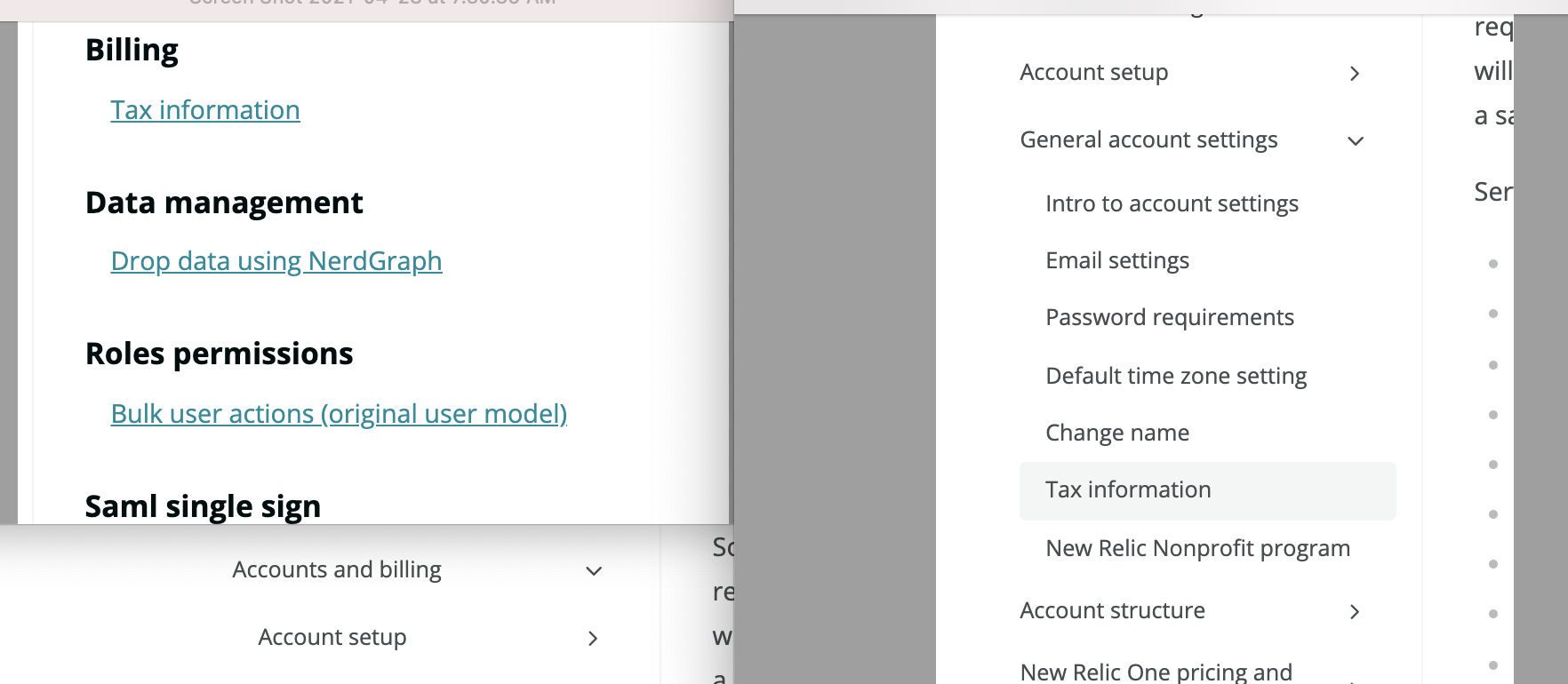
@jpvajda i maybe misunderstood the issue this was tackling. I'm talking about the list of URLs on that page not matching the nav structure. So basically: the docs it displays are not in the categories set in the nav structure. I've attached an image so you can see what I mean; in this example the Billing doc appears by itself in a category (related to old original URL structure I think) but in the nav file and sidebar it's in a larger category. And this is true for many views and it's very bad experience because these category views are sometimes prominently available via google search and we link to those views and such.
zuluecho9
on 28 Apr 2021
@zuluecho9 The link you provided has no navigation though, that's why I'm a little confused, we can hop on a quick call to discuss if you like 🤙 but I still think what you are describing is something we'd be looking at in the follow up issue i referenced.
I might be misunderstanding scope of this issue but from what I see, the issue isn't solved. When I go to https://docs.newrelic.com/docs/accounts/, for example, the structure of docs are not what they are in the sidebar.
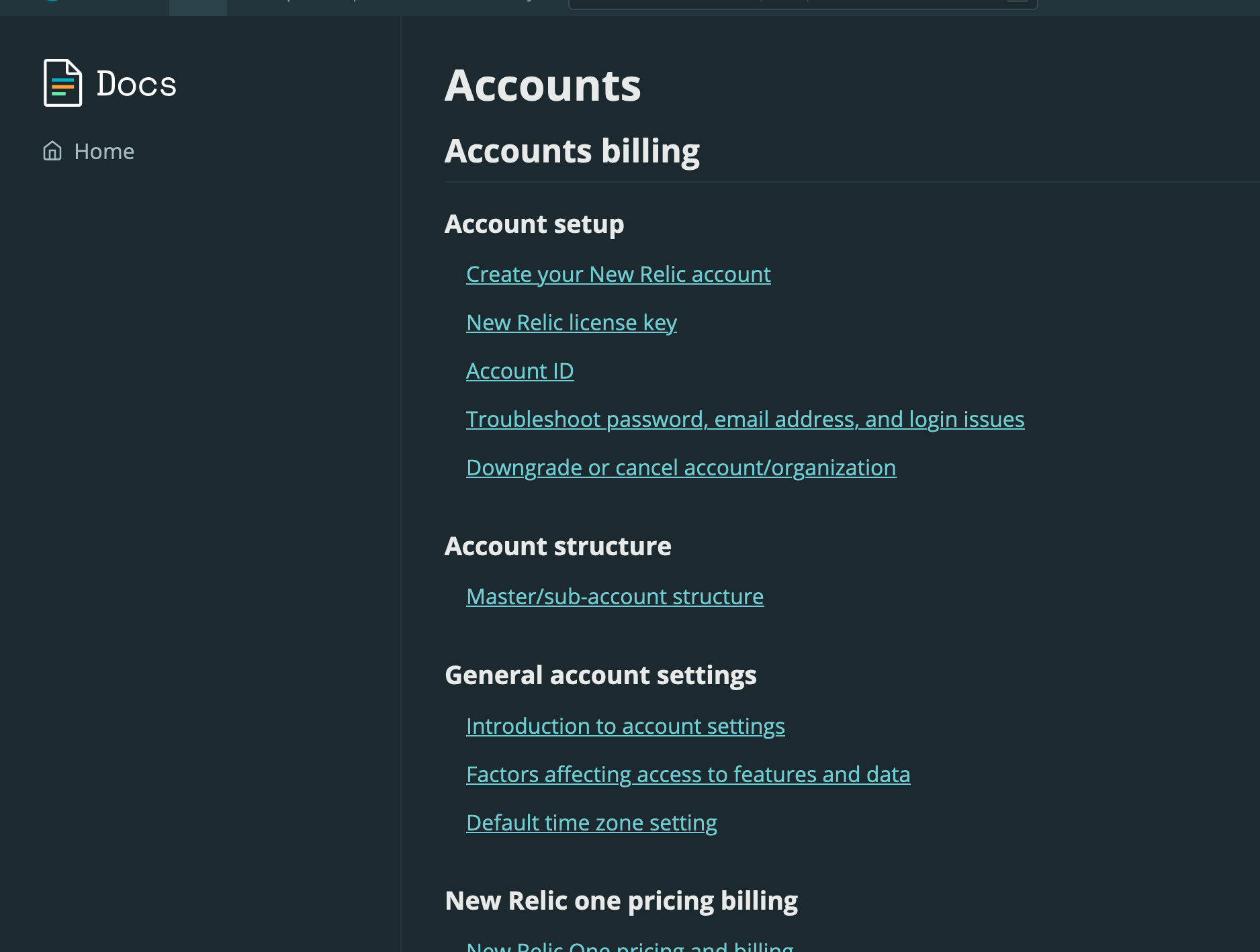
This is what I see on that link:
jpvajda
on 29 Apr 2021
@jpvajda Yes, there is no sidebar. I'm talking about the order of the docs listed in the middle of the page; the image you took above, and the first image I used in my screen shot above. They do not match the nav order. So I guess this is a separate issue. I guess I was mistaken as I thought this was a known issue but maybe not. It's a very bad experience.
zuluecho9
on 29 Apr 2021
@zuluecho9 let's discuss.. it's a rather complex problem so I want to ensure we can get your input but also discuss some of these other nuances you are seeing. I'll find some time on your 📆 cc @zstix
jpvajda
on 29 Apr 2021
This is a good example. Compare this page:
and what you see in the sidebar on these pages:
The intro section is not first, it's purely alphabetical.
austin-schaefer
on 30 Apr 2021
Related issues
zstix
·
5Comments
jpvajda
·
7Comments
jpvajda
·
3Comments
jpvajda
·
3Comments
zstix
·
10Comments
Most helpful comment
I think using the nav order would help tremendously @zstix —probably would fix around 90% of the sort issues.