Dockertools: DockerComposeBuildArguments MSBuild property not working
Hello,
This has been reported in #104 back in 2018, but there has been no action on it.
This code in ...Microsoft.Docker.SdktoolsMicrosoft.Docker.dll (Version=2.2.13.1) is wrong. Here is the code from the DockerComposeClient class.
public Task<string> BuildAsync(IEnumerable<string> services, DockerComposeFileSet composeFileSet, bool noCache, DockerDevelopmentMode dockerDevelopmentMode, IDockerLogger logger, string dockerComposeBuildArguments, CancellationToken cancellationToken)
{
  string options = this.BuildDockerComposeOptions(composeFileSet, dockerDevelopmentMode, logger);
  string commandWithArguments = "build" + (noCache ? " --no-cache" : "") + (services != null ? " " + string.Join(" ", services) : "");
 if (!string.IsNullOrWhiteSpace(dockerComposeBuildArguments))
    commandWithArguments = commandWithArguments + " " + dockerComposeBuildArguments;
  return this.ExecuteAsync(options, commandWithArguments, logger, cancellationToken);
}
In the code above, the arguments are added AFTER the [SERVICES] when the docs (https://docs.docker.com/compose/reference/build/) specify that any/all options or arguments should added before the [SERVICES].
This doc (https://docs.microsoft.com/en-us/visualstudio/containers/docker-compose-properties?view=vs-2019#docker-compose-msbuild-properties) says that adding a DockerComposeBuildArguments should work, but it does not and I get a build error.
<DockerComposeBuildArguments>--build-arg configuration="$(Configuration)"</DockerComposeBuildArguments>
C:\Program Files (x86)\Microsoft Visual Studio\2019\Professional\MSBuild\Sdks\Microsoft.Docker.Sdk\build\Microsoft.VisualStudio.Docker.Compose.targets(491,5): error DT1001: No such service: --build-arg


md5-6d70af01ce6e0fec6ee0c1cce0e3c6be


ARG configuration
...
COPY bin/$configuration/ .
Thanks.
 philipwolfe
All 11 comments
Hi @philipwolfe,
Thank you for reporting this bug, we have identified this to be a bug with the tooling and it is added to our backlog.
We will let you know when the fix is available.
 pratiksanglikar
on 9 Dec 2020
pratiksanglikar
on 9 Dec 2020
A fix for this bug has been internally implemented. We will let you know when it is available for download.
pratiksanglikar
on 11 Dec 2020
@philipwolfe i think you can workaround this by using the docker-compose build args like:
    build:
      context: .
      dockerfile: YourProject/Dockerfile
      args:
        - configuration=Debug
and you can create multiple docker-compose files to set a configuration for each.
Maybe this can help until the fix is released.
 jvitor83
on 12 Dec 2020
jvitor83
on 12 Dec 2020
Although @jvitor83 workaround might work for build arguments, issue is with other commands too - for example "up". You can not use replicas feature of docker compose if you're not using --compatibility arg and using it after the command does not work.
 dziedrius
on 14 Jan 2021
dziedrius
on 14 Jan 2021
@jvitor83 I actually arrived here because my docker-compose.yml build args aren't working. They work fine outside of visual studio.
 derekgreer
on 23 Feb 2021
derekgreer
on 23 Feb 2021
@jvitor83 The fix is available to download in the latest preview release here.
We will let you know when it becomes available to download in the stable release channel.
pratiksanglikar
on 23 Feb 2021
when the docs (https://docs.docker.com/compose/reference/build/) specify that any/all options or arguments should added before the [SERVICES].
@philipwolfe Just curious, I clicked on the link and can't find the referred verbiage regarding arguments being added.
Here is all I see:
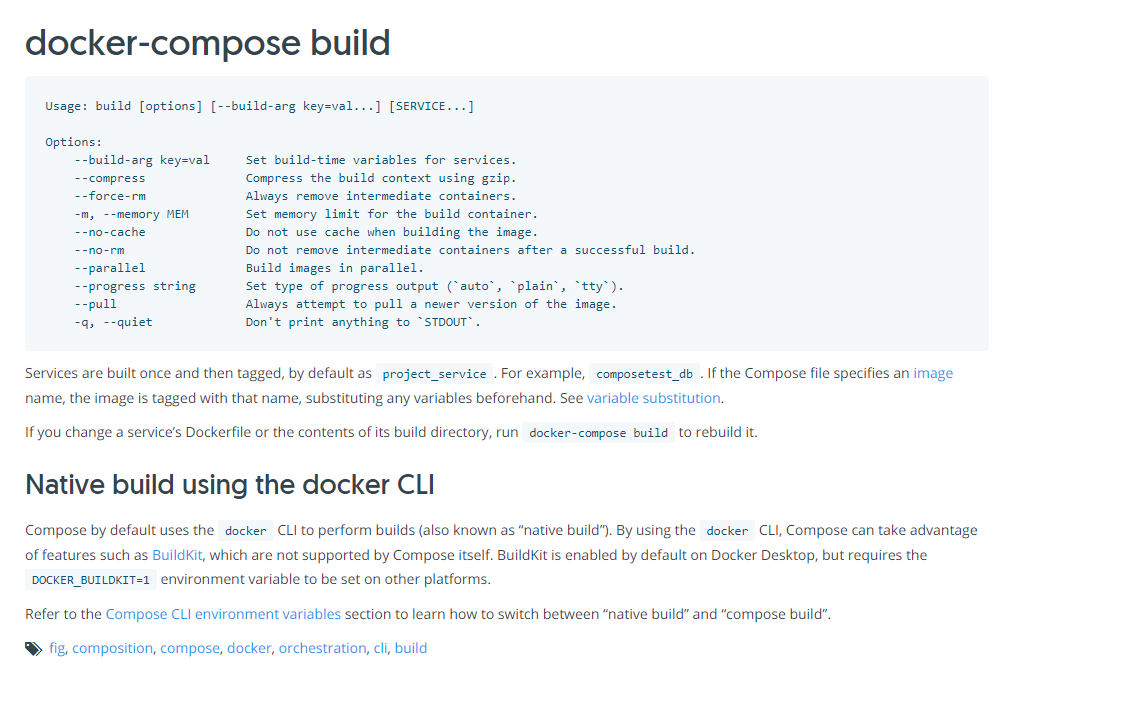
Can you provide a link to where this documentation is?
derekgreer
on 23 Feb 2021
@pratiksanglikar It's unclear from this thread given @dziedrius's comment that using build args might work as a work-around.
Would this bug have caused issues with build args specified in docker-compose.yml to not be set properly?
derekgreer
on 23 Feb 2021
@derekgreer ,
There is no specific verbiage to indicate that.
If you look at the order in the line - Usage: build [options] [--build-arg key=val...] [SERVICE...]
--build-args key=val... comes before [SERVICE...]
pratiksanglikar
on 23 Feb 2021
@pratiksanglikar It sounds like you're answering my first question to @philipwolfe, unless I'm mistaken.
I'm trying to determine if the issue I'm facing with docker-compose.yml not correctly transferring build args to my Dockerfile is related to this bug or whether I should open a new issue.
derekgreer
on 23 Feb 2021
@derekgreer Please open a new issue for that.
pratiksanglikar
on 23 Feb 2021
Related issues
 ericwj
·
8Comments
ericwj
·
8Comments
 belchevgb
·
7Comments
belchevgb
·
7Comments
 pbering
·
3Comments
pbering
·
3Comments
 tj-cappelletti
·
4Comments
tj-cappelletti
·
4Comments
 mhamri
·
3Comments
mhamri
·
3Comments
Most helpful comment
A fix for this bug has been internally implemented. We will let you know when it is available for download.