Dockertools: PrepareForLaunch failed with docker preview
I have docker desktop edge version which uses WSL 2 to run docker.
I can run containers and docker-compose projects from the terminal.
but when I use visual studio to run a docker-compose project, I have this error:
Severity    Code    Description Project File    Line    Suppression State   Suppression State
Error   MSB4018 The "PrepareForLaunch" task failed unexpectedly.
Microsoft.VisualStudio.Containers.Tools.Common.ContainerToolsException: An unexpected error occurred while executing 'C:\Program Files\Docker\Docker\DockerCli.exe' command
   at System.Runtime.CompilerServices.TaskAwaiter.ThrowForNonSuccess(Task task)
   at System.Runtime.CompilerServices.TaskAwaiter.HandleNonSuccessAndDebuggerNotification(Task task)
   at Microsoft.Docker.Prerequisites.DockerForWindowsDriveSharingPrerequisite.<EvaluateAsync>d__2.MoveNext()
--- End of stack trace from previous location where exception was thrown ---
   at System.Runtime.CompilerServices.TaskAwaiter.ThrowForNonSuccess(Task task)
   at System.Runtime.CompilerServices.TaskAwaiter.HandleNonSuccessAndDebuggerNotification(Task task)
   at Microsoft.Docker.Prerequisites.DockerCompositePrerequisite.<EvaluateAsync>d__2.MoveNext()
--- End of stack trace from previous location where exception was thrown ---
   at System.Runtime.CompilerServices.TaskAwaiter.ThrowForNonSuccess(Task task)
   at System.Runtime.CompilerServices.TaskAwaiter.HandleNonSuccessAndDebuggerNotification(Task task)
   at Microsoft.Docker.BuildTasks.DockerBuildTask.<EvaluateBuildPrerequisitesAsync>d__30.MoveNext()
--- End of stack trace from previous location where exception was thrown ---
   at System.Runtime.CompilerServices.TaskAwaiter.ThrowForNonSuccess(Task task)
   at System.Runtime.CompilerServices.TaskAwaiter.HandleNonSuccessAndDebuggerNotification(Task task)
   at Microsoft.Docker.BuildTasks.DockerBuildTask.<ExecuteAsync>d__28.MoveNext()
--- End of stack trace from previous location where exception was thrown ---
   at System.Runtime.CompilerServices.TaskAwaiter.ThrowForNonSuccess(Task task)
   at System.Runtime.CompilerServices.TaskAwaiter.HandleNonSuccessAndDebuggerNotification(Task task)
   at Microsoft.Docker.BuildTasks.DockerBuildTask.Execute()
   at Microsoft.Build.BackEnd.TaskExecutionHost.Microsoft.Build.BackEnd.ITaskExecutionHost.Execute()
   at Microsoft.Build.BackEnd.TaskBuilder.<ExecuteInstantiatedTask>d__26.MoveNext()
Error code: DT1003
Severity: Error
Command line: C:\Program Files\Docker\Docker\DockerCli.exe -SharedDrives
Command exit code: 1
Command output:
Command error:
    docker-compose  D:\Program Files (x86)\Microsoft Visual Studio\2019\Enterprise\MSBuild\Sdks\Microsoft.Docker.Sdk\build\Microsoft.VisualStudio.Docker.Compose.targets    386
i've tested with visual studio stable and enterprise versions, and I have the same error.
About Docker Desktop
Engine: 19.03.5
Compose: 1.25.0-rc4
the experimental WSL 2 based engine is enabled
 obeyda
All 11 comments
I am unable to reproduce this error locally. Can you provide the details in the output window? Specifically I suspect there is more information in the "Container Tools" and "Build" panes
 NCarlsonMSFT
on 21 Nov 2019
NCarlsonMSFT
on 21 Nov 2019
the Container Tools pane is empty, as for the Build pane, I have this at the end:
<<building all docker-compose images successfully>>

<.path.>\Microsoft.VisualStudio.Docker.Compose.targets(386,5): error MSB4018: The "PrepareForLaunch" task failed unexpectedly.
<.path.>\Microsoft.VisualStudio.Docker.Compose.targets(386,5): error MSB4018: Microsoft.VisualStudio.Containers.Tools.Common.ContainerToolsException: An unexpected error occurred while executing 'C:\Program Files\Docker\Docker\DockerCli.exe' command
<.path.>\Microsoft.VisualStudio.Docker.Compose.targets(386,5): error MSB4018:    at System.Runtime.CompilerServices.TaskAwaiter.ThrowForNonSuccess(Task task)
<.path.>\Microsoft.VisualStudio.Docker.Compose.targets(386,5): error MSB4018:    at System.Runtime.CompilerServices.TaskAwaiter.HandleNonSuccessAndDebuggerNotification(Task task)
<.path.>\Microsoft.VisualStudio.Docker.Compose.targets(386,5): error MSB4018:    at Microsoft.Docker.Prerequisites.DockerForWindowsDriveSharingPrerequisite.<EvaluateAsync>d__2.MoveNext()
<.path.>\Microsoft.VisualStudio.Docker.Compose.targets(386,5): error MSB4018: --- End of stack trace from previous location where exception was thrown ---
<.path.>\Microsoft.VisualStudio.Docker.Compose.targets(386,5): error MSB4018:    at System.Runtime.CompilerServices.TaskAwaiter.ThrowForNonSuccess(Task task)
<.path.>\Microsoft.VisualStudio.Docker.Compose.targets(386,5): error MSB4018:    at System.Runtime.CompilerServices.TaskAwaiter.HandleNonSuccessAndDebuggerNotification(Task task)
<.path.>\Microsoft.VisualStudio.Docker.Compose.targets(386,5): error MSB4018:    at Microsoft.Docker.Prerequisites.DockerCompositePrerequisite.<EvaluateAsync>d__2.MoveNext()
<.path.>\Microsoft.VisualStudio.Docker.Compose.targets(386,5): error MSB4018: --- End of stack trace from previous location where exception was thrown ---
<.path.>\Microsoft.VisualStudio.Docker.Compose.targets(386,5): error MSB4018:    at System.Runtime.CompilerServices.TaskAwaiter.ThrowForNonSuccess(Task task)
<.path.>\Microsoft.VisualStudio.Docker.Compose.targets(386,5): error MSB4018:    at System.Runtime.CompilerServices.TaskAwaiter.HandleNonSuccessAndDebuggerNotification(Task task)
<.path.>\Microsoft.VisualStudio.Docker.Compose.targets(386,5): error MSB4018:    at Microsoft.Docker.BuildTasks.DockerBuildTask.<EvaluateBuildPrerequisitesAsync>d__30.MoveNext()
<.path.>\Microsoft.VisualStudio.Docker.Compose.targets(386,5): error MSB4018: --- End of stack trace from previous location where exception was thrown ---
<.path.>\Microsoft.VisualStudio.Docker.Compose.targets(386,5): error MSB4018:    at System.Runtime.CompilerServices.TaskAwaiter.ThrowForNonSuccess(Task task)
<.path.>\Microsoft.VisualStudio.Docker.Compose.targets(386,5): error MSB4018:    at System.Runtime.CompilerServices.TaskAwaiter.HandleNonSuccessAndDebuggerNotification(Task task)
<.path.>\Microsoft.VisualStudio.Docker.Compose.targets(386,5): error MSB4018:    at Microsoft.Docker.BuildTasks.DockerBuildTask.<ExecuteAsync>d__28.MoveNext()
<.path.>\Microsoft.VisualStudio.Docker.Compose.targets(386,5): error MSB4018: --- End of stack trace from previous location where exception was thrown ---
<.path.>\Microsoft.VisualStudio.Docker.Compose.targets(386,5): error MSB4018:    at System.Runtime.CompilerServices.TaskAwaiter.ThrowForNonSuccess(Task task)
<.path.>\Microsoft.VisualStudio.Docker.Compose.targets(386,5): error MSB4018:    at System.Runtime.CompilerServices.TaskAwaiter.HandleNonSuccessAndDebuggerNotification(Task task)
<.path.>\Microsoft.VisualStudio.Docker.Compose.targets(386,5): error MSB4018:    at Microsoft.Docker.BuildTasks.DockerBuildTask.Execute()
<.path.>\Microsoft.VisualStudio.Docker.Compose.targets(386,5): error MSB4018:    at Microsoft.Build.BackEnd.TaskExecutionHost.Microsoft.Build.BackEnd.ITaskExecutionHost.Execute()
<.path.>\Microsoft.VisualStudio.Docker.Compose.targets(386,5): error MSB4018:    at Microsoft.Build.BackEnd.TaskBuilder.<ExecuteInstantiatedTask>d__26.MoveNext()
<.path.>\Microsoft.VisualStudio.Docker.Compose.targets(386,5): error MSB4018: Error code: DT1003
<.path.>\Microsoft.VisualStudio.Docker.Compose.targets(386,5): error MSB4018: Severity: Error
<.path.>\Microsoft.VisualStudio.Docker.Compose.targets(386,5): error MSB4018: Command line: C:\Program Files\Docker\Docker\DockerCli.exe -SharedDrives
<.path.>\Microsoft.VisualStudio.Docker.Compose.targets(386,5): error MSB4018: Command exit code: 1
<.path.>\Microsoft.VisualStudio.Docker.Compose.targets(386,5): error MSB4018: Command output:
<.path.>\Microsoft.VisualStudio.Docker.Compose.targets(386,5): error MSB4018: Command error:
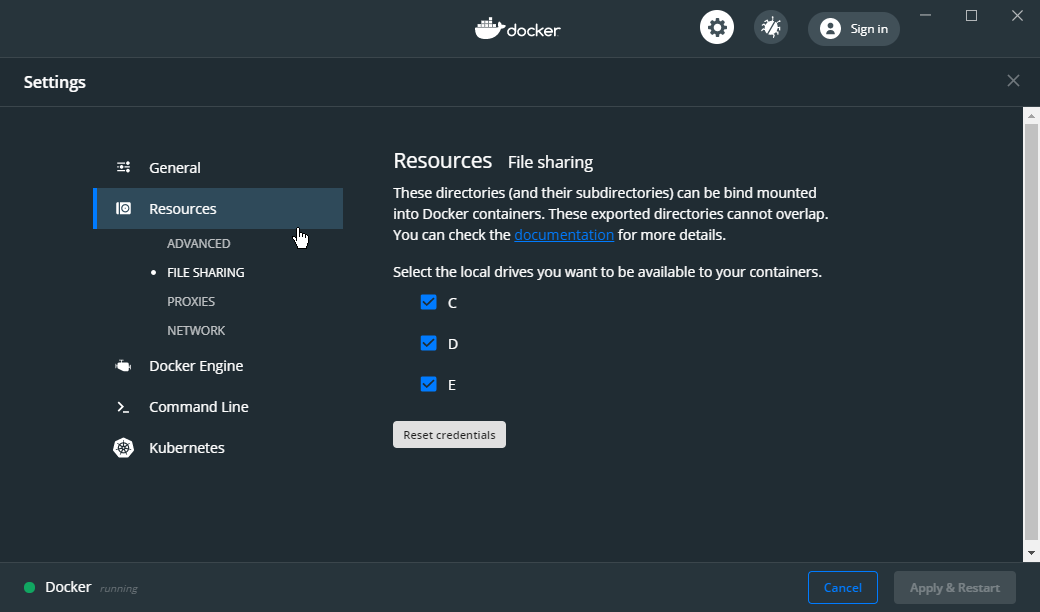
I have the local drives shared:
obeyda
on 22 Nov 2019
That output is very strange b/c on build DockerCli.exe -SharedDrives should only be run on a failure to try and determine why there was a failure.
What happens if you run "C:\Program Files\Docker\Docker\DockerCli.exe -SharedDrives" from the command line? If there is no output you can run echo %errorlevel% to get the error code.
Your settings screenshot is also confusing as the File Sharing node should not be visible when you're using WSL2. What does your general tab look like? To use WSL2 it should look like:

NCarlsonMSFT
on 23 Nov 2019
that was my mistake, i did a reset for docker and wsl2 was disabled, but i had the same error, i'll update the issue title to reflect that.
when i run DockerCli.exe -SharedDrives the output is empty
when i run echo %errorlevel% after that the output is 1
i have the latest update of windows (preview fast ring) visual studio (tested with both preview and stable), and docker (preview)
obeyda
on 23 Nov 2019
So I installed docker desktop stable release and the docker-compose project works without errors.
then I installed docker-desktop edge release, didn't activate WLS2 feature, shared all the drives, but I had the same issue with visual studio and the same output from DockerCli.exe -SharedDrives (1)
output of docker version for the edge release
 Version:           19.03.5
 API version:       1.40
 Go version:        go1.12.12
 Git commit:        633a0ea
 Built:             Wed Nov 13 07:22:37 2019
 OS/Arch:           windows/amd64
 Experimental:      true

Server: Docker Engine - Community
 Engine:
  Version:          19.03.5
  API version:      1.40 (minimum version 1.12)
  Go version:       go1.12.12
  Git commit:       633a0ea
  Built:            Wed Nov 13 07:29:19 2019
  OS/Arch:          linux/amd64
  Experimental:     true
 containerd:
  Version:          v1.2.10
  GitCommit:        b34a5c8af56e510852c35414db4c1f4fa6172339
 runc:
  Version:          1.0.0-rc8+dev
  GitCommit:        3e425f80a8c931f88e6d94a8c831b9d5aa481657
 docker-init:
  Version:          0.18.0
  GitCommit:        fec3683
I'm using the same version, and I also see the exit code 1 from DockerCli.exe -SharedDrives (which I'm investigating how to handle correctly). But on my WSL2 test machine it doesn't stop me from F5ing unless there is a different error first. Only then do the diagnostics kick in to try and check if drive sharing could have been to blame. You're sure there isn't any other indication of an issue?
NCarlsonMSFT
on 26 Nov 2019
I am also having this issue. I recently updated Docker Desktop to the latest stable version 2.2.0.0 (42247) as well as updated Visual Studio 2019 to it's latest stable version 16.4.3, and I get this error.
I have also found that a lot of my containerized apps using docker-compose orchestration no longer start. I get this in the Debug Output:
Did you mean to run dotnet SDK commands? Please install dotnet SDK from:
  https://go.microsoft.com/fwlink/?LinkID=798306&clcid=0x409
The target process exited without raising a CoreCLR started event. Ensure that the target process is configured to use .NET Core. This may be expected if the target process did not run on .NET Core.
The program 'dotnet' has exited with code 145 (0x91).
Here's some more details:
I do not have the experimental WSL 2 based engine enabled. I don't even have the pre-requisite Win 10 build to try it on. I have my C drive shared. Everything else is set to the Docker Desktop default settings.
I have tried reinstalling Docker Desktop, as well as Visual Studio.
Running DockerCli.exe -SharedDrives returns no output. And %errorlevel% is 1.
dotnet --info
.NET Core SDK (reflecting any global.json):
 Version:   3.1.101
 Commit:    b377529961

Runtime Environment:
 OS Name:     Windows
 OS Version:  10.0.18362
 OS Platform: Windows
 RID:         win10-x64
 Base Path:   C:\Program Files\dotnet\sdk\3.1.101\

Host (useful for support):
  Version: 3.1.1
  Commit:  a1388f194c

.NET Core SDKs installed:
  2.1.801 [C:\Program Files\dotnet\sdk]
  2.2.401 [C:\Program Files\dotnet\sdk]
  3.1.101 [C:\Program Files\dotnet\sdk]

.NET Core runtimes installed:
  Microsoft.AspNetCore.All 2.1.12 [C:\Program Files\dotnet\shared\Microsoft.AspNetCore.All]
  Microsoft.AspNetCore.All 2.1.15 [C:\Program Files\dotnet\shared\Microsoft.AspNetCore.All]
  Microsoft.AspNetCore.All 2.2.6 [C:\Program Files\dotnet\shared\Microsoft.AspNetCore.All]
  Microsoft.AspNetCore.All 2.2.8 [C:\Program Files\dotnet\shared\Microsoft.AspNetCore.All]
  Microsoft.AspNetCore.App 2.1.12 [C:\Program Files\dotnet\shared\Microsoft.AspNetCore.App]
  Microsoft.AspNetCore.App 2.1.15 [C:\Program Files\dotnet\shared\Microsoft.AspNetCore.App]
  Microsoft.AspNetCore.App 2.2.6 [C:\Program Files\dotnet\shared\Microsoft.AspNetCore.App]
  Microsoft.AspNetCore.App 2.2.8 [C:\Program Files\dotnet\shared\Microsoft.AspNetCore.App]
  Microsoft.AspNetCore.App 3.0.2 [C:\Program Files\dotnet\shared\Microsoft.AspNetCore.App]
  Microsoft.AspNetCore.App 3.1.1 [C:\Program Files\dotnet\shared\Microsoft.AspNetCore.App]
  Microsoft.NETCore.App 2.1.12 [C:\Program Files\dotnet\shared\Microsoft.NETCore.App]
  Microsoft.NETCore.App 2.1.15 [C:\Program Files\dotnet\shared\Microsoft.NETCore.App]
  Microsoft.NETCore.App 2.2.6 [C:\Program Files\dotnet\shared\Microsoft.NETCore.App]
  Microsoft.NETCore.App 2.2.8 [C:\Program Files\dotnet\shared\Microsoft.NETCore.App]
  Microsoft.NETCore.App 3.0.2 [C:\Program Files\dotnet\shared\Microsoft.NETCore.App]
  Microsoft.NETCore.App 3.1.1 [C:\Program Files\dotnet\shared\Microsoft.NETCore.App]
  Microsoft.WindowsDesktop.App 3.0.2 [C:\Program Files\dotnet\shared\Microsoft.WindowsDesktop.App]
  Microsoft.WindowsDesktop.App 3.1.1 [C:\Program Files\dotnet\shared\Microsoft.WindowsDesktop.App]
docker version
Client: Docker Engine - Community
 Version:           19.03.5
 API version:       1.40
 Go version:        go1.12.12
 Git commit:        633a0ea
 Built:             Wed Nov 13 07:22:37 2019
 OS/Arch:           windows/amd64
 Experimental:      false

Server: Docker Engine - Community
 Engine:
  Version:          19.03.5
  API version:      1.40 (minimum version 1.12)
  Go version:       go1.12.12
  Git commit:       633a0ea
  Built:            Wed Nov 13 07:29:19 2019
  OS/Arch:          linux/amd64
  Experimental:     false
 containerd:
  Version:          v1.2.10
  GitCommit:        b34a5c8af56e510852c35414db4c1f4fa6172339
 runc:
  Version:          1.0.0-rc8+dev
  GitCommit:        3e425f80a8c931f88e6d94a8c831b9d5aa481657
 docker-init:
  Version:          0.18.0
  GitCommit:        fec3683
Visual Studio Info
Microsoft Visual Studio Enterprise 2019
Version 16.4.3
VisualStudio.16.Release/16.4.3+29709.97
Microsoft .NET Framework
Version 4.8.03752

Installed Version: Enterprise

ADL Tools Service Provider   1.0
This package contains services used by Data Lake tools

ASP.NET and Web Tools 2019   16.4.457.38025
ASP.NET and Web Tools 2019

ASP.NET Web Frameworks and Tools 2019   16.4.457.38025
For additional information, visit https://www.asp.net/

Azure App Service Tools v3.0.0   16.4.457.38025
Azure App Service Tools v3.0.0

Azure Data Lake Node   1.0
This package contains the Data Lake integration nodes for Server Explorer.

Azure Data Lake Tools for Visual Studio   2.4.1000.0
Microsoft Azure Data Lake Tools for Visual Studio

Azure Functions and Web Jobs Tools   16.4.457.38025
Azure Functions and Web Jobs Tools

Azure Stream Analytics Tools for Visual Studio   2.4.1000.0
Microsoft Azure Stream Analytics Tools for Visual Studio

C# Tools   3.4.1-beta4-19610-02+c4e5d138903b899477649a17f197abd2bcb22f9e
C# components used in the IDE. Depending on your project type and settings, a different version of the compiler may be used.

Common Azure Tools   1.10
Provides common services for use by Azure Mobile Services and Microsoft Azure Tools.

Cookiecutter   16.4.19310.1
Provides tools for finding, instantiating and customizing templates in cookiecutter format.

Fabric.DiagnosticEvents   1.0
Fabric Diagnostic Events

IntelliCode Extension   1.0
IntelliCode Visual Studio Extension Detailed Info

Microsoft Azure HDInsight Azure Node   2.4.1000.0
HDInsight Node under Azure Node

Microsoft Azure Hive Query Language Service   2.4.1000.0
Language service for Hive query

Microsoft Azure Service Fabric Tools for Visual Studio   16.0
Microsoft Azure Service Fabric Tools for Visual Studio

Microsoft Azure Stream Analytics Language Service   2.4.1000.0
Language service for Azure Stream Analytics

Microsoft Azure Stream Analytics Node   1.0
Azure Stream Analytics Node under Azure Node

Microsoft Azure Tools   2.9
Microsoft Azure Tools for Microsoft Visual Studio 2019 - v2.9.21016.1

Microsoft Continuous Delivery Tools for Visual Studio   0.4
Simplifying the configuration of Azure DevOps pipelines from within the Visual Studio IDE.

Microsoft JVM Debugger   1.0
Provides support for connecting the Visual Studio debugger to JDWP compatible Java Virtual Machines

Microsoft Library Manager   2.0.87+gbb515bf382
Install client-side libraries easily to any web project

Microsoft MI-Based Debugger   1.0
Provides support for connecting Visual Studio to MI compatible debuggers

Microsoft Visual Studio Tools for Containers   1.1
Develop, run, validate your ASP.NET Core applications in the target environment. F5 your application directly into a container with debugging, or CTRL + F5 to edit & refresh your app without having to rebuild the container.

Node.js Tools   1.5.11023.1 Commit Hash:579896f0984848d17d080c8a1c3ddff98d5ba96f
Adds support for developing and debugging Node.js apps in Visual Studio

NuGet Package Manager   5.4.0
NuGet Package Manager in Visual Studio. For more information about NuGet, visit https://docs.nuget.org/

ProjectServicesPackage Extension   1.0
ProjectServicesPackage Visual Studio Extension Detailed Info

Python   16.4.19310.1
Provides IntelliSense, projects, templates, debugging, interactive windows, and other support for Python developers.

Python - Conda support   16.4.19310.1
Conda support for Python projects.

Python - Django support   16.4.19310.1
Provides templates and integration for the Django web framework.

Python - IronPython support   16.4.19310.1
Provides templates and integration for IronPython-based projects.

Python - Profiling support   16.4.19310.1
Profiling support for Python projects.

Snapshot Debugging Extension   1.0
Snapshot Debugging Visual Studio Extension Detailed Info

SQL Server Data Tools   16.0.61912.09160
Microsoft SQL Server Data Tools

ToolWindowHostedEditor   1.0
Hosting json editor into a tool window

TypeScript Tools   16.0.11031.2001
TypeScript Tools for Microsoft Visual Studio

Visual Basic Tools   3.4.1-beta4-19610-02+c4e5d138903b899477649a17f197abd2bcb22f9e
Visual Basic components used in the IDE. Depending on your project type and settings, a different version of the compiler may be used.

Visual F# Tools 10.4 for F# 4.6   16.4.0-beta.19556.5+e7597deb7042710a7142bdccabd6f92b0840d354
Microsoft Visual F# Tools 10.4 for F# 4.6

Visual Studio Code Debug Adapter Host Package   1.0
Interop layer for hosting Visual Studio Code debug adapters in Visual Studio

Visual Studio Container Tools Extensions (Preview)   1.0
View, manage, and diagnose containers within Visual Studio.

Visual Studio Tools for Containers   1.0
Visual Studio Tools for Containers

Visual Studio Tools for Kubernetes   1.0
Visual Studio Tools for Kubernetes
Windows specifications
Edition: Windows 10 Pro
Version: 1903
Build: 18362.592
 mikesigs
on 25 Jan 2020
mikesigs
on 25 Jan 2020
I just downgraded to Docker 2.1.0.5 and the issue went away. I kept the latest Visual Studio though.
mikesigs
on 25 Jan 2020
Having the same issue with Docker 2.2 and VS 16.4.3. I guess I'll downgrade to 2.1.0.5 for now.
 cjbush
on 27 Jan 2020
cjbush
on 27 Jan 2020
@mikesigs @cjbush There was a change in how file sharing is implemented in Docker 2.2 (See Release Notes for details) which has unfortunately causes our check for issues with File Sharing to always fail on this version.
The VS tools do work with version 2.2, but any time there is an issue, we will try and automatically diagnose it. Unfortunately this check will now always fail and report bad information. However, this will only happen when something is not working. If you go and look through the logs in the Build, Debug or Container Tools panes you should be able to find more information on the issue that triggered automatic diagnostics.
For instance @mikesigs the error message in the Debug pane you reported is the real issue, and sadly a bit of a catch all (which is why we try run our various checks to give clearer guidance). The two most common causes are:
- You need to update your dotnet image (Unless you disabled it, this should happen every time you open the project)
- Your dll could not be found in the container
This is generally
i. An issue in file sharing (Try unsharing and resharing the drive)
ii. If you've customized your projects output path, we may have a bug in how the volumes are mapped (no good general guidance, but happy to debug further with you if needed)
We are working on updating this check so that it will no longer cause this confusion on the new version.
NCarlsonMSFT
on 27 Jan 2020
Just installed 2.2.0.3 and everything works again :) Thanks @NCarlsonMSFT
cjbush
on 11 Feb 2020
Related issues
 tanaka-takayoshi
·
5Comments
tanaka-takayoshi
·
5Comments
 SWarnberg
·
3Comments
SWarnberg
·
3Comments
 christiansparre
·
5Comments
christiansparre
·
5Comments
 ericwj
·
8Comments
ericwj
·
8Comments
 FWest98
·
5Comments
FWest98
·
5Comments
Most helpful comment
Just installed 2.2.0.3 and everything works again :) Thanks @NCarlsonMSFT