Dockertools: Failed to launch debug adapter
Since upgrading to the newest version of Visual Studio 2017, I cannot run newly created .Net Core projects with docker support. I get the following error on two separate machines:

Unfortunately there is no additional information in the output window. Just the successful build:
1>------ Build started: Project: RedLockTest, Configuration: Debug Any CPU ------
1>docker exec -i 636da0c6267465c3e44406680208387935d1b68df7d08472b9d372fe2d6993af /bin/bash -c "if PID=$(pidof -x dotnet); then kill $PID; fi"
1>RedLockTest -> C:\Users\<myuser>\source\test\RedLockTest\RedLockTest\bin\Debug\netcoreapp2.1\RedLockTest.dll
========== Build: 1 succeeded, 0 failed, 0 up-to-date, 0 skipped ==========
Visual Studio 2017 Version: 15.8.1
Docker Version: 18.06.0-ce-win72 (19098)
 Krimsar
All 18 comments
After a few tries I got the message that docker drive sharing is supposedly not enabled. I disabled and re-enabled it and, after a rebuild, the project seems to be working fine now.
Krimsar
on 23 Aug 2018
I'm having this exact same error too. I didn't get the message about drive sharing however and I still can't run the project
 Rocinante89
on 23 Aug 2018
Rocinante89
on 23 Aug 2018
@Krimsar, is there any more information available in the Output Window under the Debug section?

 bwateratmsft
on 23 Aug 2018
bwateratmsft
on 23 Aug 2018
@Rocinante89 I think I only got the message when I started VS as Administrator. Maybe that helps?
@bwateratmsft Unfortunately there wasn't. There was no "Debug" in the "Show output from" drop down. Only "Build", "Build Order" and "Package Manager"
After disabling and re-enabling C under docker drive shares, I can now create and run new docker api projects without admin.
Krimsar
on 23 Aug 2018
@Krimsar If you see the issue reoccur please let us know. So far I haven't been able to reproduce it on this side.
bwateratmsft
on 23 Aug 2018
Had the same problem after previously working fine during the same VS session. Restarting VS didn't correct the problem.
I was running VS in Admin mode, restarted without Admin mode and the issue came right.
 aaronmorgan
on 11 Sep 2018
aaronmorgan
on 11 Sep 2018
In my case I believe it was because I am using the alpine image of aspnetcore and that isn't supported by debugging as of yet
Rocinante89
on 11 Sep 2018
My Windows password had changed, but the Docker drive mapping hadn't. Just unticked the shared drive in settings, applied and reticked. It asked me to re-enter my password. Restart Docker and Visual Studio and the issue resolved.
 cjekin
on 11 Sep 2018
cjekin
on 11 Sep 2018
I was able to repro this as I changed my password yesterday. I can confirm that resetting drive sharing, restarting both Docker and VS resolved it for me as well.
 dbreshears
on 11 Sep 2018
dbreshears
on 11 Sep 2018
After restarting VS, Docker (checking and unchecking shared drives) and Windows multiple times this did not work for me.
I was receiving some HRESULT error in VS, after the above prompt.
I then deleted the vsdbg folder (which is used as a volume), then received a new error in VS saying that docker did not have permissions to use a shared drive, then redid the drive sharing and it worked.
 quasipolynomial
on 9 Nov 2018
quasipolynomial
on 9 Nov 2018
- Restarted VS
- Restarted Docker
- Restarted Windows
- Re-installed Docker
- Deleted and re-cloned solution
Deleting vsdbg folder worked for me
docker 18.09.2 build 6247962
visual studio 2019 16.1.6
 ildoc
on 10 Jul 2019
ildoc
on 10 Jul 2019
I faced this problem after getting the latest update for Window 10.
Deleting vsdbg folder also worked for me, without steps in the previous comment.
- docker desktop Version 2.0.0.3 (31259)
- vs2019 16.1.6
 FlorinskiyDI
on 10 Jul 2019
FlorinskiyDI
on 10 Jul 2019
Why was this closed? One person repo'd the issue and it was because they changed their password. Well, that is not the reason for the other people nor the person who open the issue from what I can tell.
I too am using Docker for Windows with Linux containers and I get this issue several times a week and all I do is Restart Docker and it works. No unsharing resharing or anything.
There seems to be an issue with Visual Studio and how it talks to Docker that gets out of whack and requires Docker to be restarted without any changes. At least on "my box" that is. However looking at how other people resolved it sans the guy who changed his password, they all seem to involve a restarting of docker as the last step after making changes I would suggest that the restart of docker is all the is required in most cases.
 CreepyGnome
on 10 Jul 2019
CreepyGnome
on 10 Jul 2019
any update on this? I'm getting the error on vs 16.6.0 and docker desktop 2.3.0.2, engine 19.03.8 with wsl2 backend and restarting docker or removing vsdbg doesn't seem to work
 ahmadalli
on 27 May 2020
ahmadalli
on 27 May 2020
I had the same problem with a simple Blazor Webassembly app seemingly related to remote debugging in Chrome though not sure. Only fix I could find was delete and reclone from repos. Visual Studio v. 16.6.1
 pilsdumps
on 4 Jun 2020
pilsdumps
on 4 Jun 2020
Having the same issue v16.6.2 - tried a reinstall of VS and still having the issue. The same Blazor solution is working fine in VS 16 Preview. So it seems to be a VS issue. And ideas? This happening for Edge(chormium) and Chrome.
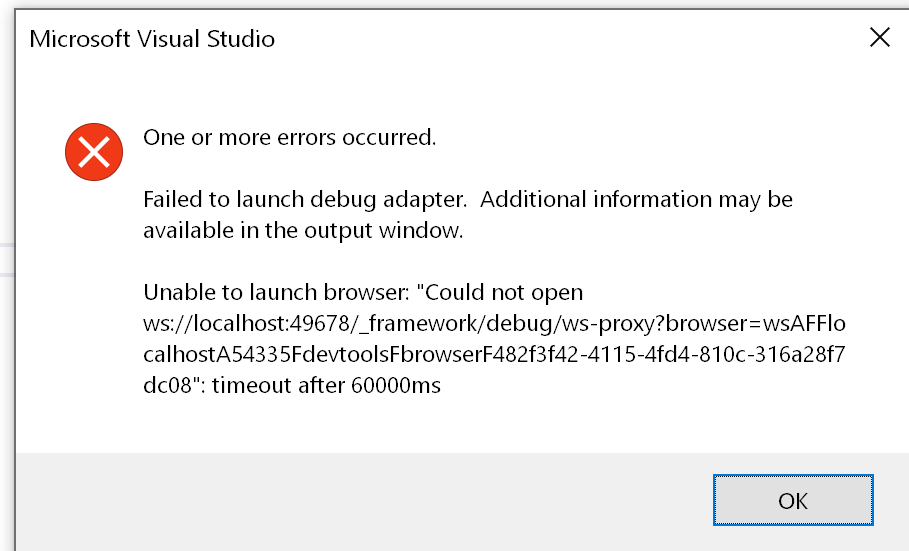
 idscom
on 11 Jun 2020
idscom
on 11 Jun 2020
In my case this caused by a setting for debugging the client browser (which loads the url for the page)
/project/config/debuggerConfiguration-c0c-guid-Stuff-8dc5.json
{"chromiumDebuggerPort":59715}
Renaming that file causes a new one to be created with new and correct high port number
To reproduce just hit the power switch, so things are messed up and stale.
I do this all the time to make my day more fun.
 xela-trawets
on 16 Jun 2020
xela-trawets
on 16 Jun 2020
In my case this caused by a setting for debugging the client browser (which loads the url for the page)
/project/config/debuggerConfiguration-c0c-guid-Stuff-8dc5.json
{"chromiumDebuggerPort":59715}Renaming that file causes a new one to be created with new and correct high port number
To reproduce just hit the power switch, so things are messed up and stale.
I do this all the time to make my day more fun.
it works for me, thnks
 jacgandres
on 15 Jul 2020
jacgandres
on 15 Jul 2020
Related issues
 eiximenis
·
6Comments
eiximenis
·
6Comments
 pbering
·
3Comments
pbering
·
3Comments
 belchevgb
·
7Comments
belchevgb
·
7Comments
 steveoh
·
4Comments
steveoh
·
4Comments
 mhamri
·
3Comments
mhamri
·
3Comments
Most helpful comment
After restarting VS, Docker (checking and unchecking shared drives) and Windows multiple times this did not work for me.
I was receiving some HRESULT error in VS, after the above prompt.
I then deleted the vsdbg folder (which is used as a volume), then received a new error in VS saying that docker did not have permissions to use a shared drive, then redid the drive sharing and it worked.