Dockertools: How can I pass additional arguments to my application?
I have a .net core 2.0 console application that expects an argument. This works fine from docker and docker-compose, but fails when debugging because of the way the com.microsoft.visualstudio.debuggee.arguments label is generated.
Is there a mechanism for specifying arguments that I've missed? Perhaps using launchSettings.json or something in the override.yml?
Thanks!
 jcgillespie
All 10 comments
This issue is being closed as an inactive issue. If you wish to keep it active, please re-open with any additional context for our consideration, we are happy to take a look!
 bwateratmsft
on 12 Sep 2018
bwateratmsft
on 12 Sep 2018
Hi,
I have the same question:
How do you pass commandline arguments to the application that is run inside the docker container?
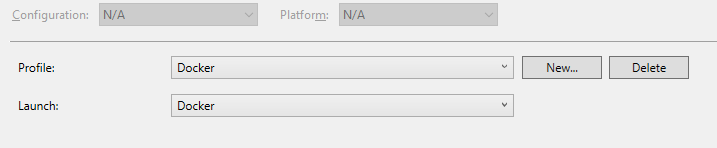
1) I've tried to use the Project Panel, but the "Docker" Profile is missing the "Application arguments":
2) I've worked around the shortcomings in the dialog by edited launchSettings.json itself and added "commandLIneArgs"
{
  "profiles": {
   ...
    "Docker": {
      "commandName": "Docker",
      "commandLineArgs": "--help"
    }
  }
}
3) I've edited the autogenerated Dockerfile by adding CMD statement
CMD ["--help"]
4) I've edited the autogenerated Dockerfile by editing the ENTRYPOINT statement:
ENTRYPOINT ["dotnet", "Application.dll", "--help"]
But None of the above worked!
I cannot figure out what blackmagic is required to get even this basic thing working.
So my questions are basically:
Where do I need to put the commandline arguments?
Or why did you close the first question to begin with? I don't see any counter question or what was unclear.
Take care,
Martin
 8
on 2 May 2019
8
on 2 May 2019
The ENTRYPOINT directive will work for containers built in Release mode. For Debug, we are adding support in the upcoming VS2019 16.1 version. It will also require the NuGet package Microsoft.VisualStudio.Azure.Containers.Tools.Targets version 1.7.4 or greater. Using these, you can specify an MSBuild property in the project file, DockerDebuggeeArguments. Example here: https://github.com/microsoft/DockerTools/issues/62#issuecomment-511542428
bwateratmsft
on 2 May 2019
Just stumbled on this after asking this on SO.
When I add something like this to my project file:
<DockerDebuggeeArguments>-a -v</DockerDebuggeeArguments>
The console app fails to debug at all with the following message:
-------------------------------------------------------------------
You may only use the Microsoft .NET Core Debugger (vsdbg) with
Visual Studio Code, Visual Studio or Visual Studio for Mac software
to help you develop and test your applications.
-------------------------------------------------------------------
Did you mean to run dotnet SDK commands? Please install dotnet SDK from:
  https://go.microsoft.com/fwlink/?LinkID=798306&clcid=0x409
The target process exited without raising a CoreCLR started event. Ensure that the target process is configured to use .NET Core. This may be expected if the target process did not run on .NET Core.
The program 'dotnet' has exited with code 145 (0x91).
I have Microsoft .NET Core SDK 2.2.301 (x64) installed.
If I exclude the DockerDebuggeeArguments value, I can debug in Docker, but no command line arguments are passed in.
Any ideas?
 collinbarrett
on 15 Jul 2019
collinbarrett
on 15 Jul 2019
@collinbarrett, I've identified a bug in our code preventing this scenario from working as intended. I've identified some possible workarounds:
- If you're using Linux containers, try setting the following MSBuild properties, to pass in "-a -v" to your application:
<DockerDebuggeeArguments>--additionalProbingPath /root/.nuget/fallbackpackages2 --additionalProbingPath /root/.nuget/fallbackpackages "bin/$(Configuration)/$(TargetFramework)/$(AssemblyName).dll" -a -v</DockerDebuggeeArguments>
<DockerDebuggeeProgram>/usr/bin/dotnet</DockerDebuggeeProgram>
- For Windows containers:
<DockerDebuggeeArguments>--additionalProbingPath c:\.nuget\fallbackpackages2 --additionalProbingPath c:\.nuget\fallbackpackages "bin\$(Configuration)\$(TargetFramework)\$(AssemblyName).dll" -a -v</DockerDebuggeeArguments>
<DockerDebuggeeProgram>C:\Program Files\dotnet\dotnet</DockerDebuggeeProgram>
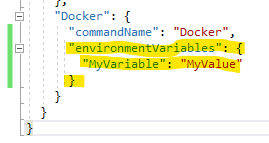
- For either Windows or Linux containers, if it's an option, you can change your code to use environment variables instead of command-line arguments:
bwateratmsft
on 15 Jul 2019
Thanks. Just tried option 1. I get the following:
-------------------------------------------------------------------
You may only use the Microsoft .NET Core Debugger (vsdbg) with
Visual Studio Code, Visual Studio or Visual Studio for Mac software
to help you develop and test your applications.
-------------------------------------------------------------------
realpath(): Invalid argument
realpath(): Invalid argument
realpath(): Invalid argument
realpath(): Invalid argument
Error:
  An assembly specified in the application dependencies manifest (FilterLists.Agent.deps.json) was not found:
    package: 'CommandLineParser', version: '2.5.0'
    path: 'lib/netstandard2.0/CommandLine.dll'
The target process exited without raising a CoreCLR started event. Ensure that the target process is configured to use .NET Core. This may be expected if the target process did not run on .NET Core.
The program 'dotnet' has exited with code 140 (0x8c).
...it can't seem to find a nuget package's .dll . Maybe an issue with one of those paths?
collinbarrett
on 15 Jul 2019
@collinbarrett I originally missed the NuGet probing paths; I've added them into the original comment. Can you try with that?
bwateratmsft
on 15 Jul 2019
That works. Thanks!
collinbarrett
on 15 Jul 2019
Did not work for me. :( I try to pass -e "MyVar1" -e "MyVar1" to inject local operating system env variables. But nothing is added on docker run.
 SteffenMangold
on 31 Mar 2020
SteffenMangold
on 31 Mar 2020
@SteffenMangold You need DockerfileRunArguments not DockerDebuggeeArguments
See https://docs.microsoft.com/en-us/visualstudio/containers/container-msbuild-properties for details on each property
Also the launchSettings environmentVariables are supported for changing the environment of just the service if that is all you need.
 NCarlsonMSFT
on 1 Apr 2020
NCarlsonMSFT
on 1 Apr 2020
Related issues
 SWarnberg
·
3Comments
SWarnberg
·
3Comments
 belchevgb
·
7Comments
belchevgb
·
7Comments
 kdlslyv
·
3Comments
kdlslyv
·
3Comments
 tj-cappelletti
·
4Comments
tj-cappelletti
·
4Comments
 eiximenis
·
6Comments
eiximenis
·
6Comments
Most helpful comment
Hi,
I have the same question:
How do you pass commandline arguments to the application that is run inside the docker container?
1) I've tried to use the Project Panel, but the "Docker" Profile is missing the "Application arguments":

2) I've worked around the shortcomings in the dialog by edited launchSettings.json itself and added "commandLIneArgs"
3) I've edited the autogenerated Dockerfile by adding CMD statement
CMD ["--help"]
4) I've edited the autogenerated Dockerfile by editing the ENTRYPOINT statement:
ENTRYPOINT ["dotnet", "Application.dll", "--help"]
But None of the above worked!
I cannot figure out what blackmagic is required to get even this basic thing working.
So my questions are basically:
Where do I need to put the commandline arguments?
Or why did you close the first question to begin with? I don't see any counter question or what was unclear.
Take care,
Martin