Dockertools: Executed command on run from VS 2017
Currently there is no way of knowing, which command is executed in container when we do Start from Visual Studio using Docker. Entrypoint on development container is set to tail -f /dev/null but there is no way of knowing which command is executed to run an app.
When everything works, it's fine and great, but sometimes start of application fails and there is no way of knowing what went wrong.
Example of output in case of error:
Did you mean to run dotnet SDK commands? Please install dotnet SDK from:
  http://go.microsoft.com/fwlink/?LinkID=798306&clcid=0x409
The program '' has exited with code 145 (0x91).
Error by itself does not provide enough information. Plus the above link is very useless.
It would be very useful if we could see what command is actual exectued and the option to change it.
 libsamek
All 12 comments
Agreed. And it would be nice to have optional pre-run command which would be useful if your app has to wait for other containers to start.
 dejvid-smth
on 19 Jun 2017
dejvid-smth
on 19 Jun 2017
This issue is being closed as an inactive issue. If you wish to keep it active, please re-open with any additional context for our consideration, we are happy to take a look!
 bwateratmsft
on 12 Sep 2018
bwateratmsft
on 12 Sep 2018
What additional information do you need ? The problem still stands and is relevant. This issue should not be closed.
dejvid-smth
on 13 Sep 2018
@dejvid-smth You are correct, this issue is still relevant so I am reopening it. Thank you!
bwateratmsft
on 13 Sep 2018
+1. Very low feedback from docker tools for Visual Studio. This should be given more attention (the whole project actually) due to the fact this will be used more and more.
 brunobertechini
on 16 Mar 2019
brunobertechini
on 16 Mar 2019
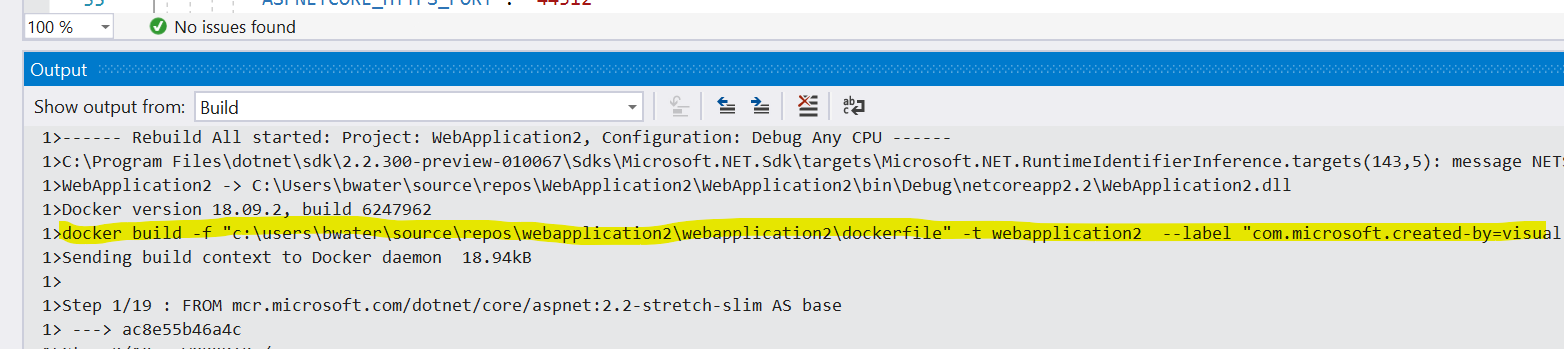
Thanks @brunobertechini for you feedback. My name is Mike Morton and I have recently taken over as PM for the Visual Studio container tools. I just checked VS2017 (15.9.8) and noticed when I F5 to start debugging an ASP.NET web app or Console app (both .NET core and full Fx) that we do output the command used to start the container. Are you not seeing this message in the Output window? Specifically, you should see it in the Build pane of the Output window.
 BigMorty
on 19 Mar 2019
BigMorty
on 19 Mar 2019
@BigMorty
I tried building a docker image by right-clicking a dockerfile inside VS. That command was not shown in output window, but I'm fairly sure I have seen it before?
I'm documenting my user experience for this as I learn. I wouldn't want to clutter this post with the potential issues I have found and would really prefer to email someone who might be interested in this.
 JRC86
on 15 May 2019
JRC86
on 15 May 2019
@JRC86 Are you looking in the "Build" output window? I see the build command here when I right-click > Build Docker Image:
bwateratmsft
on 15 May 2019
@bwateratmsft
That line and the next one are not shown for me. This one has an image already and a container.
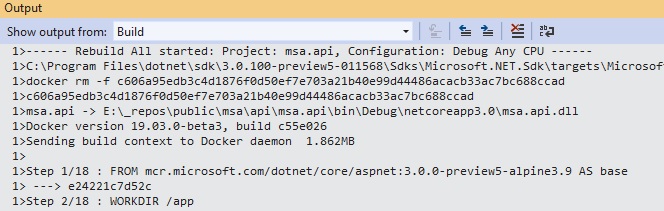
The following screen shows building a docker image without actually running the initial build that runs when switching profile to Docker.
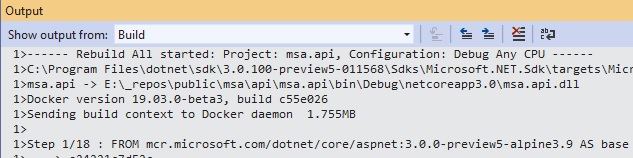
Both builds failed, meaning the command is displayed in an error message. Is this by design?
I read my notes and found that the command is not visible whenever there is an error on build.
I'm going to do some more testing.
JRC86
on 15 May 2019
@JRC86 What version of the Microsoft.VisualStudio.Azure.Containers.Tools.Targets package does your project reference? I tested with the latest (1.7.8), I suppose older versions maybe did not output the build command used.
bwateratmsft
on 15 May 2019
@bwateratmsft
Version 1.4.10.
I updated to 1.7.8 and You are right, it works. the build command is now shown.
JRC86
on 15 May 2019
Great to hear @JRC86! Thanks @bwateratmsft for helping solve this!
BigMorty
on 15 May 2019
Related issues
 hodgsopg
·
7Comments
hodgsopg
·
7Comments
 pbering
·
3Comments
pbering
·
3Comments
 MichaelSimons
·
4Comments
MichaelSimons
·
4Comments
 SWarnberg
·
3Comments
SWarnberg
·
3Comments
 kdlslyv
·
3Comments
kdlslyv
·
3Comments
Most helpful comment
What additional information do you need ? The problem still stands and is relevant. This issue should not be closed.