Docker4drupal: Question: run-tests.sh inside “php”
Hi,
Is there any chance to run php core/scripts/run-tests.sh --all inside the php container? Running the (simple)tests requires direct access to the database and the http UI as well. Connecting the MariaDB works fine, but specifying the --url gives me a hard time.
Thanks,
Janos
 aries1980
All 15 comments
What is the problem with direct access to MariaDB?
 PavelPrischepa
on 21 Mar 2017
PavelPrischepa
on 21 Mar 2017
@PavelPrischepa: Nothing. But the problem is rather accessing http://drupal.docker.localhost from the php container so the SimpleTest units can connect to it when necessary.
aries1980
on 21 Mar 2017
docker-compose run -w /var/www/html/web php php core/scripts/run-tests.sh
?
 RobLoach
on 29 Mar 2017
RobLoach
on 29 Mar 2017
I'm facing the same issue actually when trying to test a PHPUnit testscript which is using theBrowserTestBase. PHP is trying to access http://drupal.docker.localhost which results in some cURL errors;
1)

 Drupal\Tests\file\Functional\FileFieldAnonymousSubmissionTest::testAnonymousNode
GuzzleHttp\Exception\ConnectException: cURL error 6: Couldn't resolve host 'drupal.docker.localhost' (see http://curl.haxx.se/libcurl/c/libcurl-errors.html)

/var/www/html/vendor/guzzlehttp/guzzle/src/Handler/CurlFactory.php:186
/var/www/html/vendor/guzzlehttp/guzzle/src/Handler/CurlFactory.php:150
/var/www/html/vendor/guzzlehttp/guzzle/src/Handler/CurlFactory.php:103
/var/www/html/vendor/guzzlehttp/guzzle/src/Handler/CurlHandler.php:43
/var/www/html/vendor/guzzlehttp/guzzle/src/Handler/Proxy.php:28
/var/www/html/vendor/guzzlehttp/guzzle/src/Handler/Proxy.php:51
/var/www/html/core/tests/Drupal/Tests/BrowserTestBase.php:342
/var/www/html/core/lib/Drupal/Core/Test/HttpClientMiddleware/TestHttpClientMiddleware.php:31
/var/www/html/vendor/guzzlehttp/guzzle/src/PrepareBodyMiddleware.php:42
/var/www/html/vendor/guzzlehttp/guzzle/src/Middleware.php:36
/var/www/html/vendor/guzzlehttp/guzzle/src/RedirectMiddleware.php:52
/var/www/html/vendor/guzzlehttp/guzzle/src/Middleware.php:59
/var/www/html/vendor/guzzlehttp/guzzle/src/HandlerStack.php:67
/var/www/html/vendor/guzzlehttp/guzzle/src/Client.php:275
/var/www/html/vendor/guzzlehttp/guzzle/src/Client.php:123
/var/www/html/vendor/guzzlehttp/guzzle/src/Client.php:129
/var/www/html/vendor/fabpot/goutte/Goutte/Client.php:155
/var/www/html/vendor/symfony/browser-kit/Client.php:315
/var/www/html/vendor/behat/mink-browserkit-driver/src/BrowserKitDriver.php:144
/var/www/html/vendor/behat/mink/src/Session.php:148
/var/www/html/core/tests/Drupal/Tests/BrowserTestBase.php:292
/var/www/html/core/tests/Drupal/Tests/BrowserTestBase.php:432
/var/www/html/core/modules/file/tests/src/Functional/FileFieldTestBase.php:31
/var/www/html/core/modules/file/tests/src/Functional/FileFieldAnonymousSubmissionTest.php:20
 legovaer
on 24 Apr 2017
legovaer
on 24 Apr 2017
Well I found a solution and this is not an issue. For anyone who is interested to get this setup working for PHPUnit, you only have to do one little thing;
- Inside your drupal/core directory, copy the file
phpunit.xml.distand rename it tophpunit.xml - Open that file and make sure that you update
SIMPLETEST_BASE_URLtohttp://nginx - In order to make sure that your DB connection is working as well, update
SIMPLETEST_DBtomysql://drupal:drupal@mariadb/drupal
Here is a dump of my phpunit.xml file.
legovaer
on 24 Apr 2017
Thanks, @legovaer. Added instructions to the docs http://docs.docker4drupal.org/en/latest/containers/php/#phpunit
 csandanov
on 25 Apr 2017
csandanov
on 25 Apr 2017
Updated URL in case someone else is looking for this:
https://docker4drupal.readthedocs.io/en/latest/containers/php/#phpunit
 scotteuser
on 12 Aug 2017
scotteuser
on 12 Aug 2017
@scotteuser @csandanov
The documentation links are down. Is this information if some other place?
 GDrupal
on 27 Feb 2018
GDrupal
on 27 Feb 2018
Hmmm, it looks like they've migrated their docs. In the meantime if it helps, this is what I've got in my docker-compose.yml
  phantomjs:
    image: wernight/phantomjs:2
    volumes_from:
      - php
    links:
      - nginx
    entrypoint: phantomjs
    command: "--ssl-protocol=any --ignore-ssl-errors=true /var/www/html/vendor/jcalderonzumba/gastonjs/src/Client/main.js 8510 1024 768"
And in the nginx > environment section of the docker-compose I add SIMPLETEST_BASE_URL: http://nginx
Then I can essentially follow these steps to run a test:
````
ssh into php container
docker-compose exec php sh
Switch to the www-data user.
su - www-data
Navigate to the drupal root dir.
cd /var/www/html/web
List available tests filtered by keyword.
php ./core/scripts/run-tests.sh --url http://nginx --php "/usr/local/bin/php" --list | grep "WorkflowUiTest"
Execute a particular test from the results above. Add --browser to get a link to view results in a browser. For instance
php ./core/scripts/run-tests.sh --url http://nginx --verbose --color --php "/usr/local/bin/php" --class "DrupalTests\workflows\Functional\WorkflowUiTest"
````
scotteuser
on 27 Feb 2018
Thanks! @scotteuser
Trying to give it a try... I'm having a diff issue, since my codebase enforce https running the test I get:
GuzzleHttp\Exception\ConnectException: cURL error 7: Failed to connect to
nginx port 443: Connection refused (see
http://curl.haxx.se/libcurl/c/libcurl-errors.html)
Then if I try to run from the php container command line:
curl -I https://nginx/
curl: (7) Failed to connect to nginx port 443: Connection refused
Seems that testin in a https context it's quite difficult.
GDrupal
on 27 Feb 2018
Hmmm I don't have it infront of me at the moment but that does sound familiar. I can't remember if I got around it perhaps by adding something to the /etc/hosts file in one of the containers. I'll try to have a look later this week and get back to you.
scotteuser
on 28 Feb 2018
thanks! Let me know, I will continue my struggling and I will post here if I find a solution.
GDrupal
on 28 Feb 2018
When I check my setup I also can't run the test on something that requires https unfortunately. Perhaps you can look at whether the Dropwhale setup works with SSL and use that bit from docker hub (potentially extending it):
Otherwise perhaps someone from Wodby might chime in and suggest.
Best of luck!
scotteuser
on 28 Feb 2018
Restored phpunit instructions https://wodby.com/docs/stacks/drupal/containers/#phpunit
csandanov
on 6 Mar 2018
Just a quick note to say that if you don't wish to mess with your team's repo phpunit.xml, it may be more appropriate (and equally effective) to include the SIMPLETEST_BASE_URL as an environment variable.
In commandline, prepend the phpunit command with all your env var assignments, separated by space:
vendor/bin/phpunit -c ./web/core ./web/modules/custom --teamcity
becomes:
SIMPLETEST_BASE_URL=http://nginx vendor/bin/phpunit -c ./web/core ./web/modules/custom --teamcity
In an IDE like PhpStorm, set the Environment Variables option in the test config like:
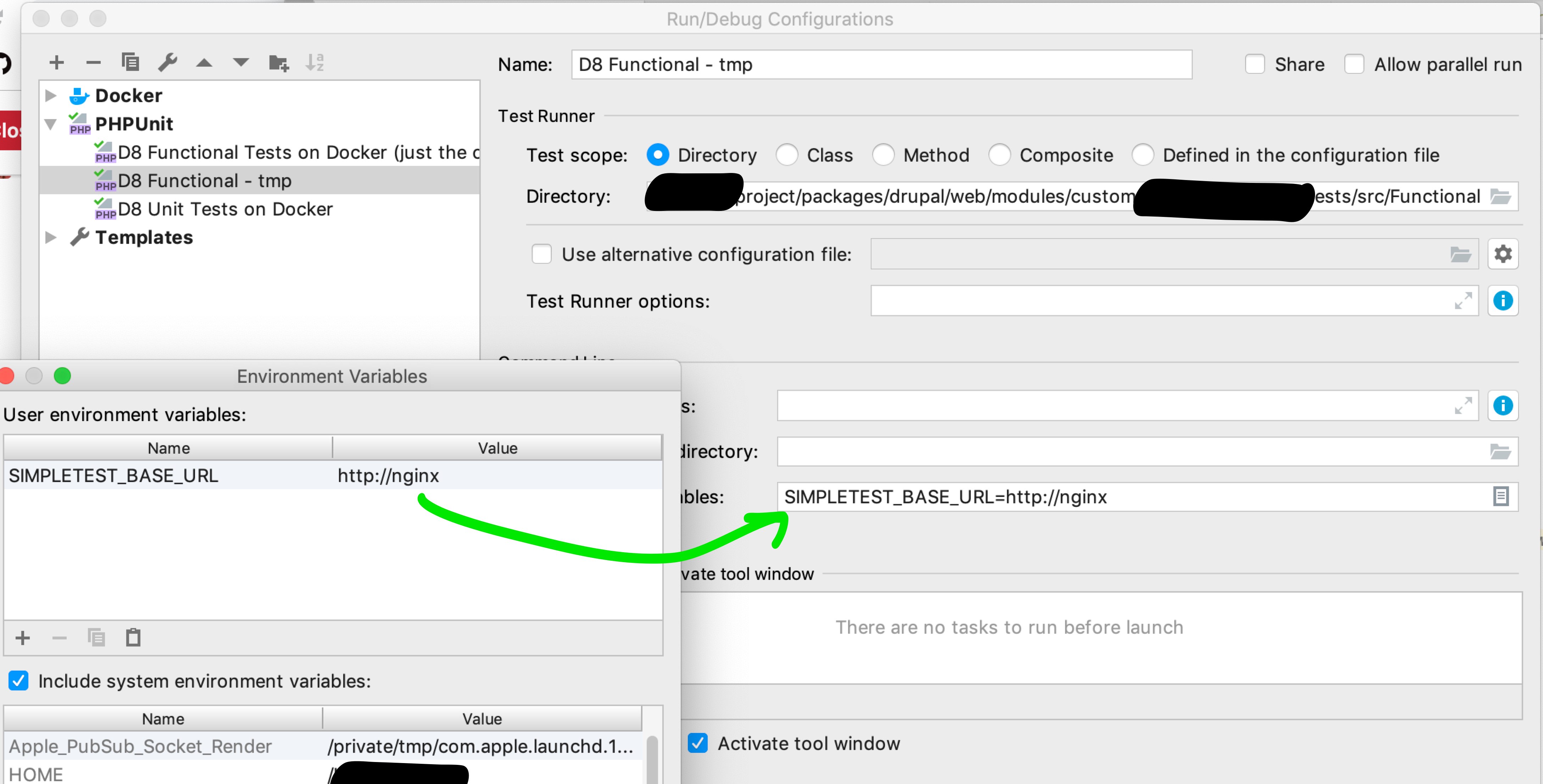
Note that for Functional tests, you'll _also_ need to add a reference to the db container like SIMPLETEST_DB=mysql://drupal:drupal@mysql/drupal. (or try substituting mysql for mariadb as in official wodby wiki docs)
Thanks for y'all's help here! I had been struggling with this for a long time.
 broniusfatv
on 5 Apr 2019
broniusfatv
on 5 Apr 2019
Related issues
 dcre
·
6Comments
dcre
·
6Comments
 jayjaydluffy
·
5Comments
jayjaydluffy
·
5Comments
 VladSavitsky
·
6Comments
VladSavitsky
·
6Comments
 LordFransie
·
3Comments
LordFransie
·
3Comments
 webdobe
·
5Comments
webdobe
·
5Comments
Most helpful comment
Well I found a solution and this is not an issue. For anyone who is interested to get this setup working for PHPUnit, you only have to do one little thing;
phpunit.xml.distand rename it tophpunit.xmlSIMPLETEST_BASE_URLtohttp://nginxSIMPLETEST_DBtomysql://drupal:drupal@mariadb/drupalHere is a dump of my
phpunit.xmlfile.