Hi,
I am new to nextcloud and docker but managed to get it configured (bear-bones) using the docker-compse.yml method and simply running docker-compose up -d.
I am trying to enable Cron background jobs but it says "Something seems wrong" so I assume I need to set the config in my docker-compose.yml?
Also, can someone help me setup SSL? I am already using port 443 so can I use a different port to get it working and setting up the certificates?
I am using docker on my Mac mini running OS X Server.
Here is my docker compose:
version: '2'

volumes:
  nextcloud:
  db:

services:
  db:
    image: mariadb
    restart: always
    volumes:
      - db:/var/lib/mysql
    environment:
      - MYSQL_ROOT_PASSWORD=password
      - MYSQL_PASSWORD=password
      - MYSQL_DATABASE=nextcloud
      - MYSQL_USER=nextcloud

  app:
    image: nextcloud
    ports:
      - 8282:80
    links:
      - db
    volumes:
      - nextcloud:/var/www/html
    restart: always
Thanks
 K-MTG
K-MTG
All 9 comments
The easiest and most convenient way to run nc via ssl is putting it behind a reverse proxy, which does ssl termination. There's an example of this in here: https://github.com/nextcloud/docker/blob/master/.examples/docker-compose/with-nginx-proxy/mariadb-cron-redis/fpm/docker-compose.yml
If you're already using port 443 you're probably best of putting that service behind the proxy as well.
Regarding the cron there are different approaches how to do this in docker. One is included in the linked example. Others can be found by searching the issues here.
 schliflo
on 16 Aug 2018
schliflo
on 16 Aug 2018
Appreciate the reply. I will try running this example. I am running web services in OS X Server (including profile manager) so it seems that I will have to use a different port for 80/443. Can I simply change it to 8282 and 433 in the docker-compose example you linked?
Thanks
K-MTG
on 16 Aug 2018
TIL people use OS X for servers... 😄
I honestly don't know if changing ports will work. Most likely Let's Encrypt companion will break.
schliflo
on 16 Aug 2018
So I ran this compose: https://github.com/nextcloud/docker/tree/master/.examples/docker-compose/with-nginx-proxy/mariadb-cron-redis/apache
Cron is working! But I am unable to get SSL to work. I get a 503 Service Temporarily Unavailable. What is the VIRTUAL_HOST & LETSENCRYPT_HOST suppose to be in the docker-compose?
Thanks
K-MTG
on 16 Aug 2018
Here is my docker-compose - I am also using ports 8282 for HTTP and 30443 for HTTPS (currently using OS X server on 80 and 443):
version: '3'

services:
  db:
    image: mariadb
    command: --transaction-isolation=READ-COMMITTED --binlog-format=ROW
    restart: always
    volumes:
      - db:/var/lib/mysql
    environment:
      - MYSQL_ROOT_PASSWORD=passowrd
    env_file:
      - db.env

  redis:
    image: redis
    restart: always

  app:
    build: ./app
    restart: always
    volumes:
      - nextcloud:/var/www/html
    environment:
      - VIRTUAL_HOST=nc.example.com
      - LETSENCRYPT_HOST=nc.example.com
      - [email protected]
      - MYSQL_HOST=db
    env_file:
      - db.env
    depends_on:
      - db
      - redis
    networks:
      - proxy-tier
      - default

  cron:
    build: ./app
    restart: always
    volumes:
      - nextcloud:/var/www/html
    entrypoint: /cron.sh
    depends_on:
      - db
      - redis

  proxy:
    build: ./proxy
    restart: always
    ports:
      - 8282:80
      - 30443:443
    labels:
      com.github.jrcs.letsencrypt_nginx_proxy_companion.nginx_proxy: "true"
    volumes:
      - certs:/etc/nginx/certs:ro
      - vhost.d:/etc/nginx/vhost.d
      - html:/usr/share/nginx/html
      - /var/run/docker.sock:/tmp/docker.sock:ro
    networks:
      - proxy-tier

  letsencrypt-companion:
    image: jrcs/letsencrypt-nginx-proxy-companion
    restart: always
    volumes:
      - certs:/etc/nginx/certs
      - vhost.d:/etc/nginx/vhost.d
      - html:/usr/share/nginx/html
      - /var/run/docker.sock:/var/run/docker.sock:ro
    networks:
      - proxy-tier
    depends_on:
      - proxy

volumes:
  db:
  nextcloud:
  certs:
  vhost.d:
  html:

networks:
  proxy-tier:
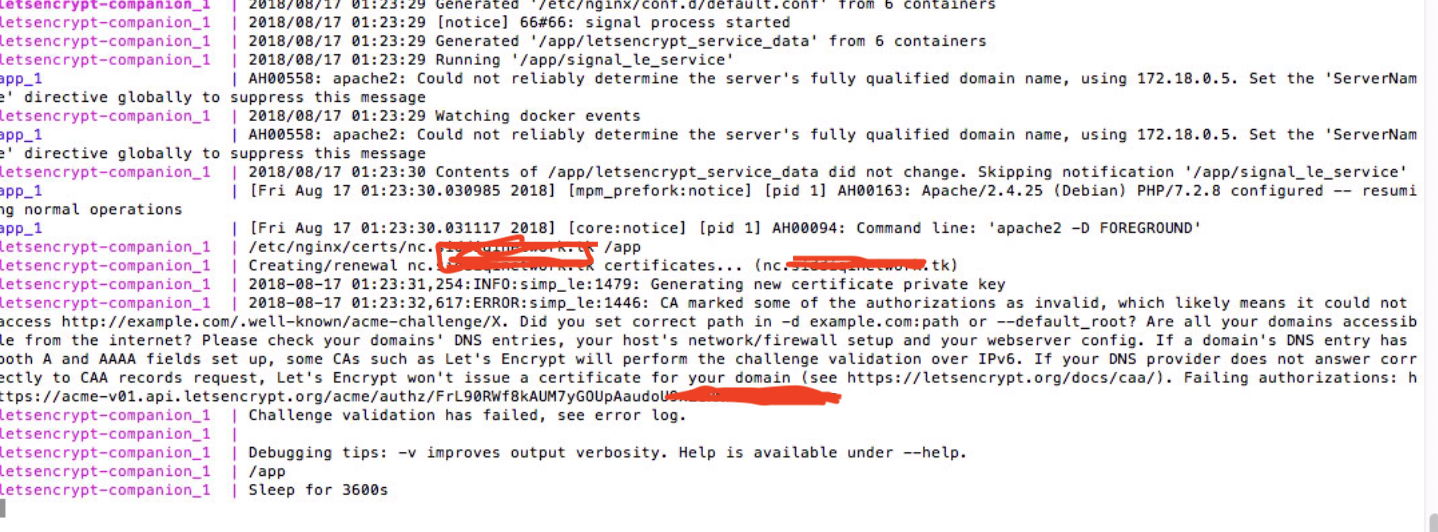
Here is what I get when I run the compose.
K-MTG
on 17 Aug 2018
What is the VIRTUAL_HOST & LETSENCRYPT_HOST suppose to be in the docker-compose?
VIRTUAL_HOST is a setting for the proxy to specify the domain/hostname for the service. Docs are here: https://github.com/jwilder/nginx-proxy
LETSENCRYPT_HOST tells the letsencrypt-nginx-proxy-companion container to go an get a SSL cert for the specified domain: https://github.com/JrCs/docker-letsencrypt-nginx-proxy-companion
-> These should therefore be identical in your case.
Assuming you run this from a home server you have to setup DNS and port forwarding accordingly for the domain you want to use.
But I think the main issue are the ports you are using: according to https://community.letsencrypt.org/t/support-for-ports-other-than-80-and-443/3419 LE cannot issue/validate certs for hosts with ports other than 80 and 443. If you want to have everything running automatically, you'll need to use host ports 80 and 443 for the proxy - there's no other option as far as I can see.
schliflo
on 17 Aug 2018
I am using OS X server so I am not sure if it is possible for me to use a different port. If I turn off OS X server...get the certificate...and turn it back on and change the ports. Would that work?
K-MTG
on 18 Aug 2018
That could work once, but certainly not for automated renewal (LE certs are only valid for 90 days AFAIK)
schliflo
on 18 Aug 2018
Assuming that this have been answered.
 J0WI
on 14 Jun 2019
J0WI
on 14 Jun 2019
Related issues
 tanja84dk
·
3Comments
tanja84dk
·
3Comments
 mahnunchik
·
3Comments
mahnunchik
·
3Comments
 aanno
·
3Comments
aanno
·
3Comments
 SQGE
·
3Comments
SQGE
·
3Comments
 pierreozoux
·
3Comments
pierreozoux
·
3Comments
Most helpful comment
TIL people use OS X for servers... 😄
I honestly don't know if changing ports will work. Most likely Let's Encrypt companion will break.