Please implement support for docker secrets. Especially for setting the admin password and the db password, as to be able to use versioning software for our stacks and compose files.
 dotslashme
All 12 comments
You can find some examples into the docker secrets documentation
services:
db:
image: mysql:latest
volumes:
- db_data:/var/lib/mysql
environment:
MYSQL_ROOT_PASSWORD_FILE: /run/secrets/db_root_password
MYSQL_PASSWORD_FILE: /run/secrets/db_password
secrets:
- db_root_password
- db_password
 mr-bolle
on 8 Jul 2018
mr-bolle
on 8 Jul 2018
I propably wasn't clear enough. The environment variables you are talking about are for the database container. I'm referring to the environment variables for the nextcloud container, that will allow you to pre-populate the database connection that the nextcloud container will use on startup:
    POSTGRES_DB Name of the database using postgres.
    POSTGRES_USER Username for the database using postgres.
    POSTGRES_PASSWORD Password for the database user using postgres.
    POSTGRES_HOST Hostname of the database server using postgres.
Setting these parameters work like a charm, but exposes the database password in my stack and as such cannot be committed into any versioning software.
In order to properly support docker secrets, the team should either support the following environment variables being values as well as file pointers:
- MYSQL_PASSWORD
- POSTGRES_PASSWORD
- NEXTCLOUD_ADMIN_PASSWORD
Or, they can also implement support for additional variables that will handle files instead of values:
- MYSQL_PASSWORD_FILE
- POSTGRES_PASSWORD_FILE
- NEXTCLOUD_ADMIN_PASSWORD_FILE
dotslashme
on 9 Jul 2018
You can always use a seperate file that contains this values. Please refer to the examples:
db.env:
POSTGRES_DB=nextcloud
POSTGRES_USER=admin
POSTGRES_PASSWORD=abcdefg
POSTGRES_HOST=db
docker-compose.yml:
...
services:
  db:
    image: postgres
    restart: always
    volumes:
      - db:/var/lib/postgresql/data
    env_file:
      - db.env

  app:
    image: nextcloud:apache
    restart: always
    volumes:
      - nextcloud:/var/www/html
    environment:
      - VIRTUAL_HOST=
      - LETSENCRYPT_HOST=
      - LETSENCRYPT_EMAIL=
      - POSTGRES_HOST=db
    env_file:
      - db.env
    depends_on:
      - db
    networks:
      - proxy-tier
      - default
Just add db.env to your .gitignore and you should be fine.
 SnowMB
on 9 Jul 2018
SnowMB
on 9 Jul 2018
@SnowMB, what you are suggesting is to move the practice of insecurely storing a password in the docker-compose.yml file to insecurely storing a password in a db.env file. This helps with version control and file clutter, that is all. To the docker container, it makes no difference; in both techniques, all container processes (privileged or otherwise) get to see everything, including your password(s). (Privileged users on the host get to see them, too.)
One article I think is informative is https://diogomonica.com/2017/03/27/why-you-shouldnt-use-env-variables-for-secret-data/ (I'm sure there are other good ones, too). To paraphrase, some reasons ENV is bad:
- all child processes can read all env vars of the parent (unless the parent modifies them, not a common practice);
- debugging info often provides a dump of envvars, which will now include sensitive information; and
- if you have multiple engineers/admins, you do not "need" all of them to know all of the relevant passwords; by using
ENVyou explicitly give them everything whether they should have it or not (the link author refers to this as "tribal knowledge"). Withdocker secret, I believe that once it is defined it can only be changed or deleted, not viewed. Try:echo "quux" | docker secret create my-secret -, and verify withdocker secret lsanddocker secret inspect my-secret.
and my personal experience, since I've made this mistake and had to try doing git-history-editing (not recommended):
- if your
docker-compose.ymlfile is version-controlled, accidentallycommiting the password is a problem; this is mitigated by your suggestion to usedb.envand.gitignore
Secrets do not (if I understand them right) completely prevent mis-use. For instance, anything that has root access on the host or within the container will be able to read the passwords, given they know where to go for them (and /run/secrets/ is not obscure). Frankly, I can't think of a better system short of requiring the sysadmin type the password(s) every time the container is used ... not something I'd attempt to suggest.
 r2evans
on 18 Sep 2018
r2evans
on 18 Sep 2018
Hi, now i adjust this example and add the docker secret for the mariadb container. If you create docker secret you don't need the db.env anymore.
there you can find the docker-compose example
- create the secrets for the mariadb
echo 'secretMySQL_RootPassword' | docker secret create nextcloud_mysql_root_password -
echo 'MySQL_RootPassword' | docker secret create nextcloud_mysql_password -
echo 'db-nextcloud' | docker secret create nextcloud_mysql_database -
echo 'nextcloud' | docker secret create nextcloud_mysql_user -
- adjust the service 'db' and add the docker secret
  db:
    image: mariadb
    command: --transaction-isolation=READ-COMMITTED --binlog-format=ROW
    restart: always
    volumes:
      - db:/var/lib/mysql
    environment:
      - MYSQL_ROOT_PASSWORD_FILE=/run/secrets/nextcloud_mysql_root_password
      - MYSQL_DATABASE_FILE=/run/secrets/nextcloud_mysql_database
      - MYSQL_USER_FILE=/run/secrets/nextcloud_mysql_user
      - MYSQL_PASSWORD_FILE=/run/secrets/nextcloud_mysql_password
    secrets:
      - nextcloud_mysql_root_password
      - nextcloud_mysql_database
      - nextcloud_mysql_password
      - nextcloud_mysql_user

# .... other Services

secrets:
  nextcloud_mysql_root_password:
    external: true
  nextcloud_mysql_database:
    external: true
  nextcloud_mysql_password:
    external: true
  nextcloud_mysql_user:
    external: true
- run the docker-compose.yml and deploy this into the stack mode
docker stack deploy --compose-file=docker-compose.yml secret_nextcloud
mr-bolle
on 31 Oct 2018
With Database service all clear: both MySQL (MariaDB) and PostgreSQL support _FILE approach.
What about Nextcloud service itself?
.env file is not a solution when deploying stack (i.e. to Swarm).
 kyberorg
on 17 Dec 2018
kyberorg
on 17 Dec 2018
Yes, this is also possible, i adjust the compose example. And the Readme to create the Nextcloud Admin User password with docker secrets.
mr-bolle
on 23 Dec 2018
@mr-bolle , how are you able to support NEXTCLOUD_ADMIN_PASSWORD_FILE in your fork? I looked through the commits and did not see anything explicitly translating that envvar (I apologize if I missed it), and having just confirmed using nextcloud:14-apache that it doesn't work there.
I'd much rather use the stock image than rely on a forked repo (esp since yours is already 50 commits behind). In fact, I'm already migrating from a different image of nextcloud (sameersbn/docker-nextcloud) for two reasons: (1) sameersbn appears to have effectively stopped updating it, and (2) I would much prefer go with a "library" version released by the original devs, for principle if nothing else (but often for update-lag, verifiability, etc).
r2evans
on 30 Dec 2018
@r2evans this enviroment is alredy available into the nextcloud image nextcloud/docker environment
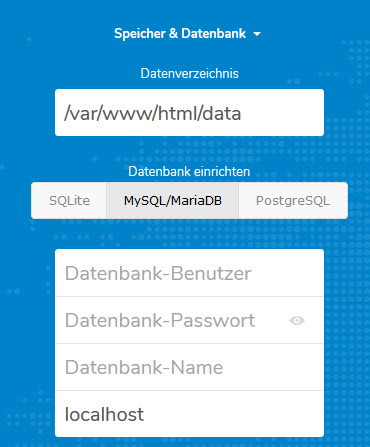
If you set any values, they will not be asked in the install page on first run. With a complete configuration by using all variables for your database type, you can additionally configure your Nextcloud instance by setting admin user and password (only works if you set both):
NEXTCLOUD_ADMIN_USER Name of the Nextcloud admin user.
NEXTCLOUD_ADMIN_PASSWORD Password for the Nextcloud admin user.
When I'm done implementing docker secrets for nextcloud, I'll submit the changes as a pull request.
edit: now i reconise that the current image, can't handle the auto-configuration enviroments over docker secrets. If i can find some time i would follow the pull request from @ekho #560
mr-bolle
on 30 Dec 2018
@tilosp would you agree reverting #284 and #733 to get this fixed or should we try to make #729 POSIX compatible?
_Edit: by "reverting #284" I mean readding the bash dependency._
 J0WI
on 5 May 2019
J0WI
on 5 May 2019
Fixed by #560
J0WI
on 31 Mar 2020
Unfortunately this seems to be broken again...

When built with this docker-compose . yaml it still asks for database configuration. If built with an inline password on the other hand, it works like intended.
---
version: '3.3'

services:
  nextcloud-db:
    image: mariadb
    container_name: nextcloud-db
    command: --transaction-isolation=READ-COMMITTED --log-bin=ROW
    networks:
        - nextcloud-db
    restart: always
    environment:
        MYSQL_ROOT_PASSWORD_FILE: /run/secrets/mysql_root_password
        MYSQL_PASSWORD_FILE: /run/secrets/mysql_user_password
      #  MYSQL_PASSWORD: 345Test
        MYSQL_DATABASE: nextcloud
        MYSQL_USER: nextcloud
        MYSQL_INITDB_SKIP_TZINFO: 1
    secrets:
      - mysql_root_password
      - mysql_user_password
 --truncated--

  nextcloud-app:
    image: nextcloud
    container_name: nextcloud-app
    restart: always
    depends_on:
      - nextcloud-db
    environment:
        MYSQL_HOST: nextcloud-db
        MYSQL_USER: nextcloud
        MYSQL_DATABASE: nextcloud
        MYSQL_PASSWORD_FILE: /run/secrets/mysql_user_password
       # MYSQL_PASSWORD: 345Test
    secrets:
      - mysql_user_password
 --truncated--

secrets:
  mysql_root_password:
    file: /opt/docker/secrets/mysql_root_password
  mysql_user_password:
    file: /opt/docker/secrets/mysql_user_password`
 KnallbertLp
on 10 Jun 2020
KnallbertLp
on 10 Jun 2020
Related issues
 nthack
·
3Comments
nthack
·
3Comments
 mahnunchik
·
3Comments
mahnunchik
·
3Comments
 alexbarnhill
·
3Comments
alexbarnhill
·
3Comments
 pierreozoux
·
3Comments
pierreozoux
·
3Comments
 pr4xx
·
4Comments
pr4xx
·
4Comments
Most helpful comment
@SnowMB, what you are suggesting is to move the practice of insecurely storing a password in the
docker-compose.ymlfile to insecurely storing a password in adb.envfile. This helps with version control and file clutter, that is all. To the docker container, it makes no difference; in both techniques, all container processes (privileged or otherwise) get to see everything, including your password(s). (Privileged users on the host get to see them, too.)One article I think is informative is https://diogomonica.com/2017/03/27/why-you-shouldnt-use-env-variables-for-secret-data/ (I'm sure there are other good ones, too). To paraphrase, some reasons
ENVis bad:ENVyou explicitly give them everything whether they should have it or not (the link author refers to this as "tribal knowledge"). Withdocker secret, I believe that once it is defined it can only be changed or deleted, not viewed. Try:echo "quux" | docker secret create my-secret -, and verify withdocker secret lsanddocker secret inspect my-secret.and my personal experience, since I've made this mistake and had to try doing
git-history-editing (not recommended):docker-compose.ymlfile is version-controlled, accidentallycommiting the password is a problem; this is mitigated by your suggestion to usedb.envand.gitignoreSecrets do not (if I understand them right) completely prevent mis-use. For instance, anything that has root access on the host or within the container will be able to read the passwords, given they know where to go for them (and
/run/secrets/is not obscure). Frankly, I can't think of a better system short of requiring the sysadmin type the password(s) every time the container is used ... not something I'd attempt to suggest.