Docker: touch: cannot touch ‘/var/jenkins_home/copy_reference_file.log’: Permission denied
I have the same issue like this : https://github.com/jenkinsci/docker/issues/177
$ docker run -ti -p 8080:8080 -p 50000:50000 -v /opt/jenkins:/var/jenkins_home jenkins
touch: cannot touch ‘/var/jenkins_home/copy_reference_file.log’: Permission denied
Can not write to /var/jenkins_home/copy_reference_file.log. Wrong volume permissions?
Any idea ?
 mmaryo
All 17 comments
as mentioned there you need to figure out your volume mapping permissions
ie.
sudo chown -R 1000:1000 /opt/jenkins
 carlossg
on 22 May 2017
carlossg
on 22 May 2017
it works thanks :)
mmaryo
on 22 May 2017
it works for me , thanks!
 egbertzeng
on 13 Sep 2017
egbertzeng
on 13 Sep 2017
works for me, thanks
 Padhh
on 27 Sep 2017
Padhh
on 27 Sep 2017
docker run -it --rm --name jenkins -p 8090:8080 -p 50 000:50000 -v /home/docker/jenkins:/var/jenkins_home csanchez/jenkins-kubernetes
after running this command and checking in the browser with http://ip:8090 it is asking for password after installing of jenkins.
As password is shown in terminal i entered and it asking to install plugins in which kubernetes plugin not available and screen stuck there not moving forward
any suggestions on this
 harigitgub
on 24 Oct 2017
harigitgub
on 24 Oct 2017
I am still getting permission issues-
> ~] # ll -nd /home/jenkins/jenkin_home/
> drwxrwxr-x. 2 1000 1000 6 Dec  8 15:57 /home/jenkins/jenkin_home/
>
> ~]# docker run -it  --rm -p 8080:8080 -p 50000:50000 -v /home/jenkins/jenkin_home:/var/jenkins_home jenkins/jenkins:lts
> touch: cannot touch '/var/jenkins_home/copy_reference_file.log': Permission denied
> Can not write to /var/jenkins_home/copy_reference_file.log. Wrong volume permissions?
 deepforu47
on 8 Dec 2017
deepforu47
on 8 Dec 2017
What is your UID of jenkins user inside docker container? Is it also 1000?
 fasolens
on 2 Jan 2018
fasolens
on 2 Jan 2018
You solved my problem, very good, thank you
 junxinzhang
on 9 May 2018
junxinzhang
on 9 May 2018
UPDATE 2019-10-11: I've since written a dedicated blog entry on this below:
https://batmat.net/2018/09/07/how-to-run-and-upgrade-jenkins-using-the-official-docker-image/
Side note for future people passing by: the original question/issue also comes from a usage that is generally strongly discouraged, i.e. using the often so-called _bind mounts_.
More precisions are given on https://docs.docker.com/storage/bind-mounts/, but basically using a mapping from the container to the host often leads (as you noticed) to all variations of permissions issues.
The strong recommendation, by the Docker community in general, and also by us on Jenkins side, is to use a volume instead.
More concretely, the command to run can simply be adjusted to:
docker run -ti -p 8080:8080 -p 50000:50000 -v jenkins-data:/var/jenkins_home jenkins
This command will create a named volume called jenkins-data where your Jenkins home will be stored. And you will not hit those weird permissions anymore.
docker volume ls
DRIVER              VOLUME NAME
local               jenkins-data
Showing how to access the data to do whatever you want, check or run a backup:
Example mounting the volume in read-only:
docker run -ti -v jenkins-data:/var/jenkins_home:ro debian bash
root@9e8f2c20ca2a:/# ls /var/jenkins_home/
config.xml                     jenkins.CLI.xml                      nodes                     updates
copy_reference_file.log        jenkins.install.UpgradeWizard.state  plugins                   userContent
hudson.model.UpdateCenter.xml  jobs                                 secret.key                users
identity.key.enc               logs                                 secret.key.not-so-secret  war
init.groovy.d                  nodeMonitors.xml                     secrets
root@9e8f2c20ca2a:/#
 batmat
on 9 May 2018
batmat
on 9 May 2018
@batmat bind mounts are typically used to ease development since changes are synced, and I'm not sure that volumes help in that regard unless you're somehow getting inside the container or volume or using nfs or something...?
 jcrben
on 20 Jul 2018
jcrben
on 20 Jul 2018
@jcrben I strongly doubt people here are all developing on Jenkins. I can totally be wrong, but I would think people are just trying to get a Jenkins server up running as a Docker container. Hence these people should just not look for anything else than a volume.
Bind mounts _can_ be used to do things, but though they look easy at first sight, they are not. Using bind mounts correctly requires a very clear understanding of the Docker and Linux permission model, so that one can pass the right --user, or change permissions on the host (urgh, do not do that IMO).
In other words, if you do know exactly what those caveats are, you would not land here asking for a (quick) solution.
The only reasonable solution for non-Docker experts is to use volumes, is what I'm saying. Using bind-mounts without a deep understanding of those is going to be very painful.
batmat
on 20 Jul 2018
I'd be interested in reading material on all these best practices if you have one handy. I stumbled thru this and I'm not entirely sure how I fixed it. My disorganized notes are at https://gitlab.com/jcrben-staples/knowledge/blob/master/programming/devops_scaling/docker_permissions_mac.md
While I'm not developing on jenkins, I use bind mounts to ease the automation setup - for example, with https://github.com/jenkinsci/configuration-as-code-plugin I can bind mount jenkins.yaml and there's a button to reload it.
jcrben
on 20 Jul 2018
why we need to change ownership permissions
 s530665
on 24 Jan 2019
s530665
on 24 Jan 2019
as mentioned there you need to figure out your volume mapping permissions
ie.sudo chown -R 1000:1000 /opt/jenkins
good!
 pdsuwwz
on 17 Feb 2020
pdsuwwz
on 17 Feb 2020
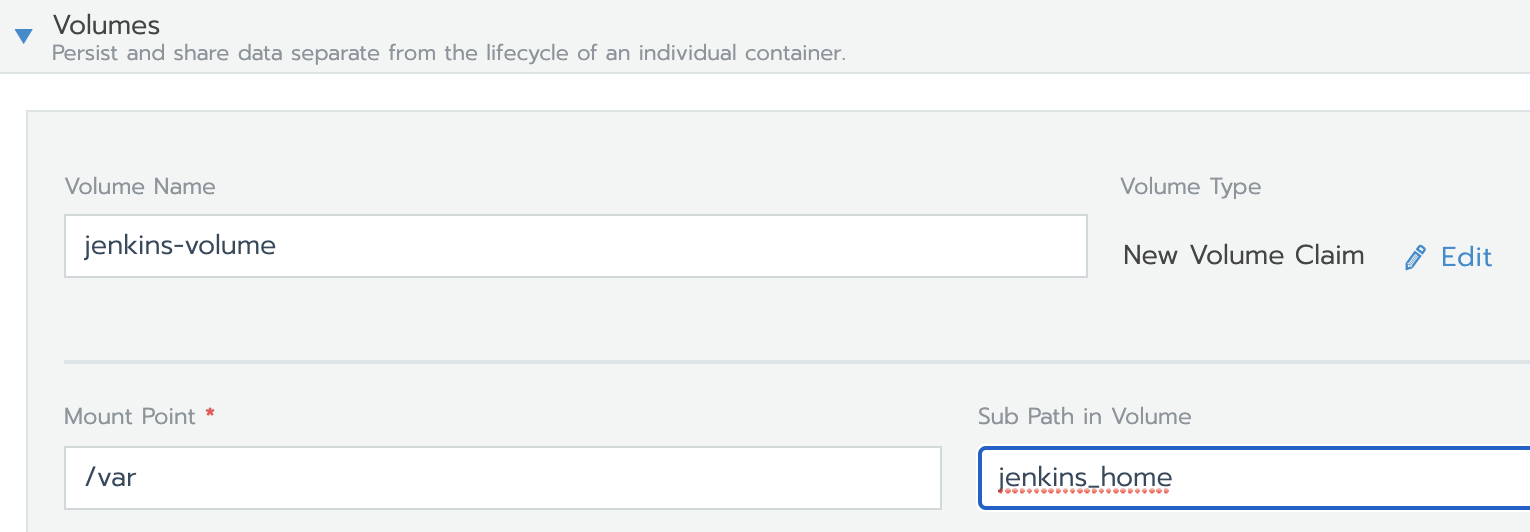
To fix easily this permission issue with volume in Kubernetes : just define jenkins_home as subPath !
volumeMounts:
        - mountPath: /var
          name: jenkins-volume
          subPath: jenkins_home
My _jenkins_ pod now works fine with Rancher & Longhorn. As default storage class, it has provisoned automatically the volume and I didn't have to write it myself.
 scndel
on 17 Apr 2020
scndel
on 17 Apr 2020
@scndel , Thank you very much for your input.
This has solved my issue! Have a great day.
 micuffaro
on 22 Apr 2020
micuffaro
on 22 Apr 2020
works for me, thanks
Hi am getting below error while installing the Jenkins on docker. Please give me suggestions how i can i resolve this issue.
touch: cannot touch ‘/var/jenkins_home/copy_reference_file.log’: Permission denied
Thanks in adavance.
 guru905
on 14 Oct 2020
guru905
on 14 Oct 2020
Related issues
 ozbillwang
·
3Comments
ozbillwang
·
3Comments
 manoj150283
·
3Comments
manoj150283
·
3Comments
 ThStock
·
8Comments
ThStock
·
8Comments
 greenrobot
·
7Comments
greenrobot
·
7Comments
 Mr-LiuDC
·
3Comments
Mr-LiuDC
·
3Comments
Most helpful comment
as mentioned there you need to figure out your volume mapping permissions
ie.