Docker-transmission-openvpn: AUTH_FAILURE error
Having problems connecting to PIA. I've gone through a number of other threads with this error and tried a number of different things, but no dice. Any help would be appreciated!!! Filed out the form per template:
Before creating this issue I have:
- [ X] Searched for similar issues
- [ X] [Read the documentation](https://haugene.github.io/docker-transmission-openvpn/). Especially the troubleshooting section
- [ X] Tried to add as much relevant information to the issue as possible
Describe the problem
AUTH_FAILED errors. I triple checked the p** username and password. Then mounted a /config folder to make sure the container was passing it correctly. Copied and pasted the result in the web browser and was able to login to PIA just fine. I just can't get my docker container to do it :(
Add your docker run command or docker-compose file

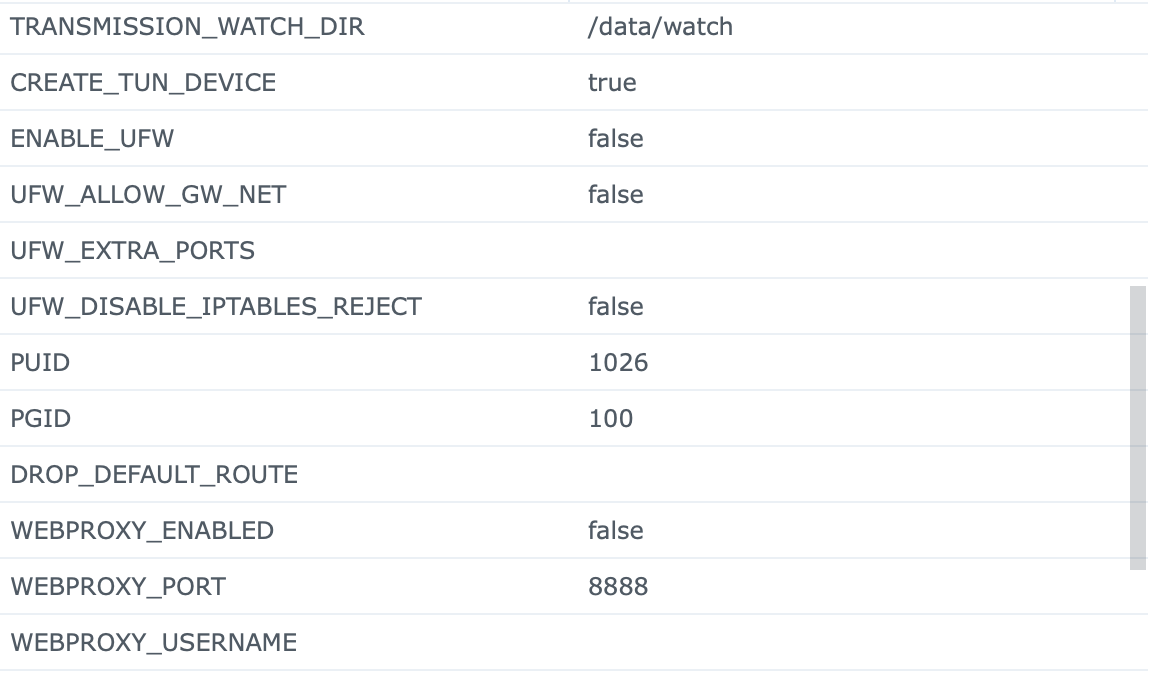
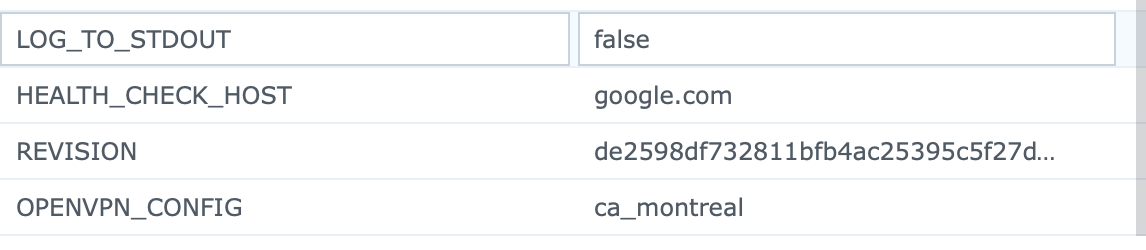
Logs
Starting container with revision: de2598df732811bfb4ac25395c5f27d6fa3b0d87
stdout
05:55:03
Creating TUN device /dev/net/tun
stdout
05:55:03
Using OpenVPN provider: PIA
stdout
05:55:03
Provider PIA has a custom setup script, executing it
stdout
05:55:03
Downloading OpenVPN config bundle openvpn into temporary file /tmp/tmp.DkoimA
stdout
05:55:03
Extract OpenVPN config bundle into PIA directory /etc/openvpn/pia
stdout
05:55:03
Starting OpenVPN using config ca_montreal.ovpn
stdout
05:55:03
Modifying /etc/openvpn/pia/ca_montreal.ovpn for best behaviour in this container
stdout
05:55:03
Setting OpenVPN credentials...
stdout
05:55:03
adding route to local network 10.0.0.0/16 via 172.17.0.1 dev eth0
stdout
05:55:03
Sun Dec 6 05:55:03 2020 OpenVPN 2.4.9 x86_64-alpine-linux-musl [SSL (OpenSSL)] [LZO] [LZ4] [EPOLL] [MH/PKTINFO] [AEAD] built on Apr 20 2020
stdout
05:55:03
Sun Dec 6 05:55:03 2020 library versions: OpenSSL 1.1.1g 21 Apr 2020, LZO 2.10
stdout
05:55:03
Sun Dec 6 05:55:03 2020 NOTE: the current --script-security setting may allow this configuration to call user-defined scripts
stdout
05:55:03
Sun Dec 6 05:55:03 2020 CRL: loaded 1 CRLs from file [[INLINE]]
stdout
05:55:03
Sun Dec 6 05:55:03 2020 TCP/UDP: Preserving recently used remote address: [AF_INET]199.36.223.31:1198
stdout
05:55:03
Sun Dec 6 05:55:03 2020 UDP link local: (not bound)
stdout
05:55:03
Sun Dec 6 05:55:03 2020 UDP link remote: [AF_INET]199.36.223.31:1198
stdout
05:55:03
Sun Dec 6 05:55:03 2020 WARNING: this configuration may cache passwords in memory -- use the auth-nocache option to prevent this
stdout
05:55:03
Sun Dec 6 05:55:03 2020 [montreal406] Peer Connection Initiated with [AF_INET]199.36.223.31:1198
stdout
05:55:04
Sun Dec 6 05:55:04 2020 AUTH: Received control message: AUTH_FAILED
stdout
05:55:04
Sun Dec 6 05:55:04 2020 SIGTERM[soft,auth-failure] received, process exiting
Host system:
Running Synology DSM 6.2, Docker, with what I think is the latest image. Additionally, my resolv.conf file has PIA nameservers:
nameserver 209.222.18.222
nameserver 209.222.18.218
Thoughts?
 marosell
All 31 comments
Have you tested different servers?
 haugene
on 6 Dec 2020
haugene
on 6 Dec 2020
The new PIA servers have not been the pinnacle of stability lately.
haugene
on 6 Dec 2020
Have you tested different servers?
DC, sweden, and a few in Canada :(
marosell
on 6 Dec 2020
Try reset the password.
 RickyXwang
on 6 Dec 2020
RickyXwang
on 6 Dec 2020
I have the exact same issue
If my authentication works fine on PIA, why could resetting the password help?
 russellgrocott
on 6 Dec 2020
russellgrocott
on 6 Dec 2020
I had seen people with the same issue solved and some of them did reset their password. Maybe it have to do with resetting password trigger update cache on server-side or something else. It's just one of the things that you can try.
RickyXwang
on 6 Dec 2020
Thanks. I gave it a shot. Unfortunately, changing the password didn’t make any difference for me:
2020-12-06 20:10:02 | stdout | Starting container with revision: de2598df732811bfb4ac25395c5f27d6fa3b0d87
2020-12-06 20:10:02 | stdout | Creating TUN device /dev/net/tun
2020-12-06 20:10:02 | stdout | mknod: /dev/net/tun: File exists
2020-12-06 20:10:02 | stdout | Using OpenVPN provider: PIA
2020-12-06 20:10:02 | stdout | Provider PIA has a custom setup script, executing it
2020-12-06 20:10:02 | stdout | Downloading OpenVPN config bundle openvpn into temporary file /tmp/tmp.jimBdf
2020-12-06 20:10:04 | stdout | Extract OpenVPN config bundle into PIA directory /etc/openvpn/pia
2020-12-06 20:10:04 | stdout | Starting OpenVPN using config austria.ovpn
2020-12-06 20:10:04 | stdout | Modifying /etc/openvpn/pia/austria.ovpn for best behaviour in this container
2020-12-06 20:10:04 | stdout | Setting OpenVPN credentials...
2020-12-06 20:10:04 | stdout | Sun Dec 6 20:10:04 2020 OpenVPN 2.4.9 x86_64-alpine-linux-musl [SSL (OpenSSL)] [LZO] [LZ4] [EPOLL] [MH/PKTINFO] [AEAD] built on Apr 20 2020
2020-12-06 20:10:04 | stdout | Sun Dec 6 20:10:04 2020 library versions: OpenSSL 1.1.1g 21 Apr 2020, LZO 2.10
2020-12-06 20:10:04 | stdout | Sun Dec 6 20:10:04 2020 NOTE: the current --script-security setting may allow this configuration to call user-defined scripts
2020-12-06 20:10:04 | stdout | Sun Dec 6 20:10:04 2020 CRL: loaded 1 CRLs from file [[INLINE]]
2020-12-06 20:10:05 | stdout | Sun Dec 6 20:10:05 2020 TCP/UDP: Preserving recently used remote address: [AF_INET]156.146.60.112:1198
2020-12-06 20:10:05 | stdout | Sun Dec 6 20:10:05 2020 UDP link local: (not bound)
2020-12-06 20:10:05 | stdout | Sun Dec 6 20:10:05 2020 UDP link remote: [AF_INET]156.146.60.112:1198
2020-12-06 20:10:05 | stdout | Sun Dec 6 20:10:05 2020 WARNING: this configuration may cache passwords in memory -- use the auth-nocache option to prevent this
2020-12-06 20:10:06 | stdout | Sun Dec 6 20:10:06 2020 [vienna403] Peer Connection Initiated with [AF_INET]156.146.60.112:1198
2020-12-06 20:10:07 | stdout | Sun Dec 6 20:10:07 2020 AUTH: Received control message: AUTH_FAILED
Sun Dec 6 20:10:07 2020 SIGTERM[soft,auth-failure] received, process exiting
russellgrocott
on 6 Dec 2020
Then I have no idea actually. I cannot remember any case where this error message were not either a user error, the container messing up the credentials or a provider error. I believe you've checked the username/password enough times and the most important check you are mentioning is the mounting of /config to make sure that what is persisted in the container is what it should be.
Next step would have to be testing even more servers, or having a chat with PIA. If you are capable in shell you can get a shell in the container and try manually instead. So run docker run --rm -it haugene/transmission-openvpn bash and then inside the container you need to trigger a download of the config files with VPN_PROVIDER_HOME=/etc/openvpn/pia /etc/openvpn/pia/configure-openvpn.sh. Now you should be able to run openvpn /etc/openvpn/pia/sweden.ovpn for example. This is now just pure vanilla openvpn and the latest config from PIA. It will prompt you for username and password inline. If that fails, that is easier to take to PIA support desk :smile:
@russellgrocott Have you also tried the stuff that @marosell refers to? This: https://haugene.github.io/docker-transmission-openvpn/faq/#auth_received_control_message_auth_failed
haugene
on 6 Dec 2020
this looks like the error I got on 2.14. Time to upgrade to 3.4 man
 superkrups20056
on 6 Dec 2020
superkrups20056
on 6 Dec 2020
I am also experiencing this issue. Have tried changing my password on PIA (it's just an alphanumeric password, no special characters). I can authenticate fine using the PIA desktop client.
Have run the commands you suggested inside the docker container and still getting the AUTH_FAILED error there - I will contact PIA support and see what they say
 andysmithfal
on 7 Dec 2020
andysmithfal
on 7 Dec 2020
Just following up to let everyone know this evening that I did the same. I changed my password, used it on the MacOS client, and successfully logged into ca_montreal. I deleted the container and set it up again (just in case password was cached), same AUTH_FAILED error. Bummer.
One thing I did notice, and it may not be anything, but when I open "openvpn-credentials.txt" which is dumped in the /config folder, there's a line return for a third line.
My text file is actually three lines:
p*******
**********
Maybe that last line is a hint at something? Could something be parsing a line return as part of the password somewhere?
marosell
on 7 Dec 2020
@russellgrocott Have you also tried the stuff that @marosell refers to? This: https://haugene.github.io/docker-transmission-openvpn/faq/#auth_received_control_message_auth_failed
Yes. I worked through all this but is hasn't helped.
when I open "openvpn-credentials.txt" which is dumped in the /config folder, there's a line return for a third line.
mine too.
russellgrocott
on 7 Dec 2020
which PIA_OPENVPN_CONFIG_BUNDLE should be used for PIA?
The guide I've followed states that openvpn should be used but elsewhere I've seen reference to openvpn-nextgen.
But when I update the variable to openvpn-nextgen I get:
Downloading OpenVPN config bundle openvpn-nextgen into temporary file /tmp/tmp.IGnjji
Extract OpenVPN config bundle into PIA directory /etc/openvpn/pia
unzip: short read
Try to delete the third line in openvpn-credentials.txt and see if that helps。
But should really try the method @haugene mentioned above and manually connect openvpn using the command line in the container bash with prompt username and password and make sure that works.
RickyXwang
on 7 Dec 2020
Try to delete the third line in openvpn-credentials.txt and see if that helps。
But should really try the method @haugene mentioned above and manually connect openvpn using the command line in the container bash with prompt username and password and make sure that works.
- I think this is write-only, as the line is added back every time the container tries to run.
- I already checked the login credentials with the Desktop client. Logs in just fine, and that also verifies that the VPN server I'm trying to connect to is verifying the credentials fine as well.
marosell
on 7 Dec 2020
But should really try the method @haugene mentioned above and manually connect openvpn using the command line in the container bash with prompt username and password and make sure that works.
I'd love to but the container restarts every few seconds. How do I stop it from restarting?
russellgrocott
on 7 Dec 2020
Try to delete the third line in openvpn-credentials.txt and see if that helps。
But should really try the method @haugene mentioned above and manually connect openvpn using the command line in the container bash with prompt username and password and make sure that works.
- I think this is write-only, as the line is added back every time the container tries to run.
- I already checked the login credentials with the Desktop client. Logs in just fine, and that also verifies that the VPN server I'm trying to connect to is verifying the credentials fine as well.
I understand that you can log in with the set credentials on Desktop client, but the docker container is a different environment here, if you can do the command line via bash, that means there is something wrong with the code we have here, if not then we can look into the set up of the container.
RickyXwang
on 7 Dec 2020
But should really try the method @haugene mentioned above and manually connect openvpn using the command line in the container bash with prompt username and password and make sure that works.
I'd love to but the container restarts every few seconds. How do I stop it from restarting?
remove the --inactive 3600 --ping 10 --ping-exit 60 in OPENVPN_OPTS if you didn't. Or provide logs and let see what is triggering the restart.
RickyXwang
on 7 Dec 2020
Or provide logs and let see what is triggering the restart.
isn't this the log?
2020-12-06 20:10:07 | stdout | Sun Dec  6 20:10:07 2020 AUTH: Received control message: AUTH_FAILED
Sun Dec  6 20:10:07 2020 SIGTERM[soft,auth-failure] received, process exiting
I was unable to resolve this issue and so switched to another VPN provider which worked just fine. Given this I feel that the problem must be with PIA rather than this project. Thanks again for trying to support. I'm going to get a refund from PIA :)
russellgrocott
on 9 Dec 2020
I was unable to resolve this issue and so switched to another VPN provider which worked just fine. Given this I feel that the problem must be with PIA rather than this project. Thanks again for trying to support. I'm going to get a refund from PIA :)
Can you reply with who and appropriate settings? Feel free to send a PM, would be helpful to know. I will also ask PIA for a refund. Thanks!!
marosell
on 9 Dec 2020
I also went with a different VPN service. I chose Mullvad. There is also a slight issue with the configuration, but you can easily edit the configuration and push it back, after that it works nicely with the forwarded port.
With PIA I couldn't make it work - asked for a refund. NordVPN was working flawlessly but without a forwarded port, you are unfortunately hidden from the peers.
 slovenec88
on 9 Dec 2020
slovenec88
on 9 Dec 2020
Fellow docker developer here, just to let you guys know i had the exact same issue with PIA new users reporting 'AUTH_FAILED', the issue is 100% to do with PIA and has actually now been resolved by PIA, if you haven't already got a refund then try again.
 binhex
on 9 Dec 2020
binhex
on 9 Dec 2020
I am actually still having this issue and I have been with PIA for years, nor do I plan to leave as I have a two year contract existing with them... I am blown away this is an issue.
The short-read is happening on the downloading scripts for me in the latest version, and dev version just auth fails now..
 Anon0ne
on 9 Dec 2020
Anon0ne
on 9 Dec 2020
Can you reply with who and appropriate settings? Feel free to send a PM, would be helpful to know. I will also ask PIA for a refund. Thanks!!
I already had a Getflix account which included VPN.
The only variables I changed were the obvious
- OPENVPN_USERNAME
- OPENVPN_PASSWORD
- OPENVPN_PROVIDER
- OPENVPN_CONFIG
Everything else I left just as it was for the PIA setup.
I didn’t touch resolv.conf file or tun.sh
russellgrocott
on 9 Dec 2020
Fellow docker developer here, just to let you guys know i had the exact same issue with PIA new users reporting 'AUTH_FAILED', the issue is 100% to do with PIA and has actually now been resolved by PIA, if you haven't already got a refund then try again.
You are 100% correct. I just tested this using the PIA account and it worked first time.
I just duplicated my working container using Portainer and then updated:
- OPENVPN_USERNAME
- OPENVPN_PASSWORD
- OPENVPN_PROVIDER
Didn’t bother to specify an OPENVPN_CONFIG - I just let it pick a server.
It connected without an errors or warnings.
russellgrocott
on 9 Dec 2020
I am actually still having this issue and I have been with PIA for years, nor do I plan to leave as I have a two year contract existing with them... I am blown away this is an issue.
The short-read is happening on the downloading scripts for me in the latest version, and dev version just auth fails now..
I dont want to really debug your issue any further as its not really my place to post on here, but you can run through my FAQ Q16 for the most frequent reasons for this as its still relevant to this image as much as it is to mine - pay particular note of the new PIA requirement to use the web ui password NOT the PPTP/Proxy generated credentials:- https://github.com/binhex/documentation/blob/master/docker/faq/vpn.md
binhex
on 9 Dec 2020
Ah yes. Thanks for posting @binhex, have seen the same issue after PIA migrated to new servers. It's been mentioned in a few other threads/issues but I totally forgot that here. The original issue specifies that it uses the p** username and I guess that was that.
So to those planning to get refunds from PIA. The old PPTP/Proxy username was on the form of x
haugene
on 9 Dec 2020
Something must've been fixed on PIA's end. Miraculously it is working this evening and I didn't change a single thing.
marosell
on 10 Dec 2020
Ah yes. Thanks for posting @binhex, have seen the same issue after PIA migrated to new servers. It's been mentioned in a few other threads/issues but I totally forgot that here. The original issue specifies that it uses the p** username and I guess that was that.
So to those planning to get refunds from PIA. The old PPTP/Proxy username was on the form of x while the one used in the web is p. And you should now use the one starting with p. The one you log in to the PIA control panel online with. I'll add it to the FAQ as well 👍
yes thats the main trip up for PIA, but there is also the issue with password length as well, PIA now does not permit passwords greater than 99 characters in length (as notes in my faq), might also be worth a mention in your faq.
binhex
on 10 Dec 2020
Thanks for the heads up :+1: 99 characters should be safe for most users though, but corner cases are the worst to find once they occur so it's good to be aware of them.
haugene
on 10 Dec 2020
Related issues
 garret
·
3Comments
garret
·
3Comments
 PriamX
·
3Comments
PriamX
·
3Comments
 silentArtifact
·
3Comments
silentArtifact
·
3Comments
 Esteidinger
·
3Comments
Esteidinger
·
3Comments
 coulterj
·
4Comments
coulterj
·
4Comments