Docker-transmission-openvpn: Auth Failed to PIA
I am using my same user id and password that I use to login directly to PIA when I visit the site. I am getting an auth failed that you can see in the logs. I was able to login fine prior to the update by PIA.
Synology 218+
VPN Provider PIA
Logs
Compose:
`version: "3.4"
services:
transmission-openvpn:
container_name: transmission
image: haugene/transmission-openvpn:latest
restart: unless-stopped
volumes:
- /volume1/Content/Downloads/Torrents:/downloads
- /volume1/docker/transmission:/config
- /etc/localtime:/etc/localtime:ro
ports:
- 9091:9091
environment:
- PUID=1024
- PGID=100
- TZ=America/Los_Angeles
- CREATE_TUN_DEVICE=true
- OPENVPN_PROVIDER=PIA
- OPENVPN_USERNAME=
- OPENVPN_PASSWORD=
- OPENVPN_CONFIG=CA Montreal
- PIA_OPENVPN_CONFIG_BUNDLE=openvpn-ip-nextgen
- OPENVPN_OPTS=--inactive 3600 --ping 10 --ping-exit 60
- WEBPROXY_ENABLED=false
- LOCAL_NETWORK=10.0.1.1
- TRANSMISSION_HOME=/config
- TRANSMISSION_WATCH_DIR_ENABLED=true
- TRANSMISSION_WATCH_DIR=/downloads/fetch # TODO: edited
- TRANSMISSION_DOWNLOAD_DIR=/downloads/completed # TODO: edited
- TRANSMISSION_INCOMPLETE_DIR=/downloads/incomplete # TODO: edited
- TRANSMISSION_BLOCKLIST_ENABLED=true
- TRANSMISSION_BLOCKLIST_URL=http://john.bitsurge.net/public/biglist.p2p.gz
- UMASK_SET=022
logging:
driver: json-file
options:
max-size: 10m
cap_add:
- NET_ADMIN
Describe the problem
Add your docker run command
Logs
Host system:
 BrettAlan128
All 20 comments
I'm getting the same, SIGTERM[soft,auth-failure] received, process exiting
I found a few forums saying to add auth-nocache
or
pull-filter ignore "auth-token"
Are supposed to fix it, but I'm unsure where this can be added in the compose or container environments
 albatross1
on 16 Nov 2020
albatross1
on 16 Nov 2020
I saw that too and did not know what it meant either. Many people assume way too much is common sense when it comes to this stuff.
BrettAlan128
on 16 Nov 2020
Allright. With 99% probability AUTH_FAIL errors come from 1 of these reasons:
- The username or password contains special characters that are scrambled when they're written to file in the container.
- It's wrong from PIAs side, a broken server or something
- The username/password is not the credentials you should use
I believe it's not nr 3. As you say, you should use the same credentials as for the web login.
Have you tried multiple locations? See my comment here: https://github.com/haugene/docker-transmission-openvpn/issues/1495#issuecomment-726388157
I see you're mounting /volume1/docker/transmission:/config. To verify that the username/password handling in the container is correct you can have a look in that mount. There should be a file called openvpn-credentials.txt after a run. It should have your username as the first line and password as the second.
Just the fact that you have mounted this folder could actually cause the issues if you've started it with the wrong credentials before. When you mount a config to use, it will not create it from the environment variables you pass. Information about this should be in the logs.
 haugene
on 16 Nov 2020
haugene
on 16 Nov 2020
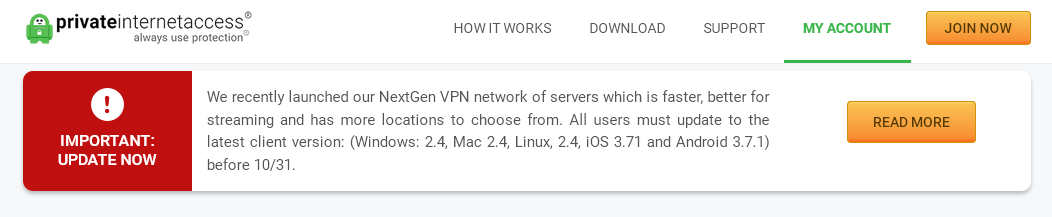
The issue is likely that PIA has disabled OpenVPN on their servers and are now only using their NextGen protocol. They announced that they would be doing it last month and this morning my setup didn't work either BUT their PIA desktop app still worked fine as long as you are using the latest version. I switched my docker container over to a different VPN until I can find a work-around.
 jcoxcomputers
on 16 Nov 2020
jcoxcomputers
on 16 Nov 2020
Ah, that's a very good point. Which container have you been using @jcoxcomputers just wondering. Have you had much luck with it?
albatross1
on 16 Nov 2020
This image is up to date with the NextGen servers from PIA, ref #1334. That being said it seems that PIA is not fully "up to date" with their own servers so to speak. There has been some weird errors from them, and the same username/password combination works on one server but gets AUTH_FAIL on another. But the comment I linked to earlier makes a workaround for that until they get it stable.
The difference for us as users is that they previously had a separate username/password for openvpn that you could find on their website. The username was something like x
Try the steps above, it should work. If not then you might not be running the latest version of the container. Remeber that :latest doesn't mean that you'll always be up to date. You need to update your local version of latest to get those changes. Do a docker pull haugene/transmission-openvpn and try again.
haugene
on 16 Nov 2020
I just setup this docker for the first time and hit the same initial issue. @haugene 's recommendation to have a list of multiple OPENVPN_CONFIG locations has worked for me. Initially I just had 'CA Toronto' , so it seems like the issue is on PIA's end
 maris-otter
on 16 Nov 2020
maris-otter
on 16 Nov 2020
@albatross1 I am using the haugene/transmission-openvpn but I also have a VPN with Privado and a duplicate copy of the container setup for it. I did change my PIA server choice from US East to US Atlanta but that failed too. Maybe I will try it with the NextGen config you can generate on their website.
jcoxcomputers
on 17 Nov 2020
Well crap... lol
albatross1
on 17 Nov 2020
@jcoxcomputers @albatross1 I don't understand. Have you tried what I wrote? The comment I linked to?
Pull the latest image and set OPENVPN_CONFIG=France,Sweden,Italy,Belgium,Austria,Denmark,Norway,Ireland.
If you still have issues please post the logs here. Because the NextGen servers are a part of this image. You don't have to download any custom configs. Also (ref linked comment) use restart: always or restart: unless-stopped when starting the container. That way it will automatically fail-over if one of the location fails.
Let me know how it goes :crossed_fingers:
haugene
on 17 Nov 2020
pretty sure I have this same issue... I am have been running into not being able to authorize with PIA even after using the above suggestions... worse yet I cannot get Mullvad to work either now
 Americanzer0
on 18 Nov 2020
Americanzer0
on 18 Nov 2020
@haugene Thanks for updating and fixing the PIA issue, pulled the latest image. Read one of your comment about username and password need to use the p* one instead of the x* one. All back to working again.
 kennethkkk
on 19 Nov 2020
kennethkkk
on 19 Nov 2020
@jcoxcomputers @albatross1 I don't understand. Have you tried what I wrote? The comment I linked to?
Pull the latest image and setOPENVPN_CONFIG=France,Sweden,Italy,Belgium,Austria,Denmark,Norway,Ireland.
It works for me, many thanks to you Haugene. !
 enorme75
on 19 Nov 2020
enorme75
on 19 Nov 2020
@haugene I am continuing to have the same problem: logs I have changed the openvpn_config with OPENVPN_CONFIG=France,Sweden,Italy,Belgium,Austria,Denmark,Norway,Ireland .
I am on a synology. Prior to the legacy servers update by PIA, I was using a different username and password. Now I am using my main username that starts with "p" and my pw that I use to log on to privateinternetaccess.com. Is it possible it is still using the previous username and pw eventhough I changed it in the compose file?
I am uncertain as to what else to try.
BrettAlan128
on 21 Nov 2020
@BrettAlan128 Hmm. Do you have special characters in your password? That has been a problem before.
Really need to get that looked at if it turns out to be the cause. Never seem to get the time.
haugene
on 26 Nov 2020
I have the same issue. The suggested fix didn't work. I use the p* username. My password has not changed.
torrents_1         | Using OpenVPN provider: PIA
torrents_1         | Supplied config France,Sweden,Italy,Belgium,Austria,Denmark,Norway,Ireland.ovpn could not be found.
torrents_1         | Using default OpenVPN gateway for provider pia
torrents_1         | Setting OPENVPN credentials...
torrents_1         | Fri Nov 27 12:28:54 2020 OpenVPN 2.4.4 x86_64-pc-linux-gnu [SSL (OpenSSL)] [LZO] [LZ4] [EPOLL] [PKCS11] [MH/PKTINFO] [AEAD] built on Sep 26 2017
torrents_1         | Fri Nov 27 12:28:54 2020 library versions: OpenSSL 1.0.2g  1 Mar 2016, LZO 2.08
torrents_1         | Fri Nov 27 12:28:54 2020 NOTE: the current --script-security setting may allow this configuration to call user-defined scripts
torrents_1         | Fri Nov 27 12:28:54 2020 TCP/UDP: Preserving recently used remote address: [AF_INET]212.102.35.103:1198
torrents_1         | Fri Nov 27 12:28:54 2020 UDP link local: (not bound)
torrents_1         | Fri Nov 27 12:28:54 2020 UDP link remote: [AF_INET]212.102.35.103:1198
 nicbou
on 27 Nov 2020
nicbou
on 27 Nov 2020
I have the same issue. The suggested fix didn't work. I use the p* username. My password has not changed.
try to write the ovpn file without a capital letter in the config, like this : OPENVPN_CONFIG=france,sweden,italy,belgium,austria etc...
It worked for me.
enorme75
on 27 Nov 2020
Already fixed. Mine is set to lowercase "netherlands". It turns out I had to pull the latest image. Now I get a different issue, but it's not related to the VPN. Thank you for your incredibly quick assistance.
nicbou
on 27 Nov 2020
Getting incorrect password how can you help?
 joebad47
on 1 Dec 2020
joebad47
on 1 Dec 2020
@joebad47, if you need help with a different problem, you should create a separate issue, and offer enough information for others to help you.
nicbou
on 1 Dec 2020
Related issues
 stefanahman
·
4Comments
stefanahman
·
4Comments
 silentArtifact
·
3Comments
silentArtifact
·
3Comments
 jsloan117
·
3Comments
jsloan117
·
3Comments
 jorgelsaba
·
3Comments
jorgelsaba
·
3Comments
 lorgio
·
4Comments
lorgio
·
4Comments