Docker-transmission-openvpn: PIA not working as of today
The container keeps crashing. It worked fine for months but stopped today. I tried updating the image but still no go. Made sure I'm using the pxxxxx login for PIA. I'm getting the following log (first line is most recent):
2020-11-11 02:44:32 | stdout | RTNETLINK answers: File exists
-- | -- | --
2020-11-11 02:44:32 | stdout | adding route to local network 172.18.0.0/16 via 172.18.0.1 dev eth0
2020-11-11 02:44:31 | stdout | Setting OpenVPN credentials...
2020-11-11 02:44:31 | stdout | Starting OpenVPN using config CA Montreal.ovpn
2020-11-11 02:44:31 | stdout | Modify configs for this container
2020-11-11 02:44:31 | stdout | Extract OpenVPN config bundle into PIA directory /etc/openvpn/pia
2020-11-11 02:44:29 | stdout | Downloading OpenVPN config bundle openvpn-nextgen into temporary file /tmp/tmp.lmmflN
2020-11-11 02:44:29 | stdout | Provider PIA has a custom startup script, executing it
2020-11-11 02:44:29 | stdout | Using OpenVPN provider: PIA
2020-11-11 02:44:29 | stdout | Starting container with revision: 05f657435af4ca118b8cdf6a03f5ce895149cbc8
 ultimateguy
All 33 comments
I'm having the same issue with the following output from the logs:
2020-11-11 03:41:41 | stdout | RTNETLINK answers: File exists
-- | -- | --
2020-11-11 03:41:41 | stdout | adding route to local network 172.22.0.0/16 via 172.22.0.1 dev eth0
2020-11-11 03:41:41 | stdout | Setting OpenVPN credentials...
2020-11-11 03:41:41 | stdout | Starting OpenVPN using config CA Montreal.ovpn
2020-11-11 03:41:40 | stdout | Modify configs for this container
2020-11-11 03:41:40 | stdout | Extract OpenVPN config bundle into PIA directory /etc/openvpn/pia
2020-11-11 03:41:39 | stdout | Downloading OpenVPN config bundle openvpn-nextgen into temporary file /tmp/tmp.DFJMgn
2020-11-11 03:41:39 | stdout | Provider PIA has a custom startup script, executing it
2020-11-11 03:41:39 | stdout | Using OpenVPN provider: PIA
2020-11-11 03:41:39 | stdout | mknod: /dev/net/tun: File exists
2020-11-11 03:41:39 | stdout | Starting container with revision: 05f657435af4ca118b8cdf6a03f5ce895149cbc8
2020-11-11 03:40:46 | stdout | RTNETLINK answers: File exists
2020-11-11 03:40:46 | stdout | adding route to local network 172.22.0.0/16 via 172.22.0.1 dev eth0
2020-11-11 03:40:46 | stdout | Setting OpenVPN credentials...
2020-11-11 03:40:46 | stdout | Starting OpenVPN using config CA Montreal.ovpn
2020-11-11 03:40:45 | stdout | Modify configs for this container
2020-11-11 03:40:45 | stdout | Extract OpenVPN config bundle into PIA directory /etc/openvpn/pia
2020-11-11 03:40:44 | stdout | Downloading OpenVPN config bundle openvpn-nextgen into temporary file /tmp/tmp.fEdBKa
2020-11-11 03:40:44 | stdout | Provider PIA has a custom startup script, executing it
2020-11-11 03:40:44 | stdout | Using OpenVPN provider: PIA
2020-11-11 03:40:44 | stdout | mknod: /dev/net/tun: File exists
2020-11-11 03:40:44 | stdout | Starting container with revision: 05f657435af4ca118b8cdf6a03f5ce895149cbc8
2020-11-11 03:40:17 | stdout | RTNETLINK answers: File exists
2020-11-11 03:40:17 | stdout | adding route to local network 172.22.0.0/16 via 172.22.0.1 dev eth0
2020-11-11 03:40:16 | stdout | Setting OpenVPN credentials...
2020-11-11 03:40:16 | stdout | Starting OpenVPN using config CA Montreal.ovpn
2020-11-11 03:40:16 | stdout | Modify configs for this container
2020-11-11 03:40:16 | stdout | Extract OpenVPN config bundle into PIA directory /etc/openvpn/pia
2020-11-11 03:40:15 | stdout | Downloading OpenVPN config bundle openvpn-nextgen into temporary file /tmp/tmp.bblMIO
2020-11-11 03:40:15 | stdout | Provider PIA has a custom startup script, executing it
2020-11-11 03:40:15 | stdout | Using OpenVPN provider: PIA
2020-11-11 03:40:15 | stdout | mknod: /dev/net/tun: File exists
2020-11-11 03:40:15 | stdout | Starting container with revision: 05f657435af4ca118b8cdf6a03f5ce895149cbc8
 Moose88
on 11 Nov 2020
Moose88
on 11 Nov 2020
I'm running into a similar issue, it stopped working around 3pm CST.
I'm pretty sure PIA turned off their "legacy" servers. On the "My Account" section on their site, they have the following:
We recently launched our NextGen VPN network of servers which is faster, better for streaming and has more locations to choose from. All users must update to the latest client version: (Windows: 2.4, Mac 2.4, Linux, 2.4, iOS 3.71 and Android 3.7.1) before 10/31.
[edit] I found that by removing my OPENVPN_CONFIG option, the configure-openvpn.sh script then chooses a random .ovpn file to connect to, which for me results in a successful vpn connection.
 mjvotaw
on 11 Nov 2020
mjvotaw
on 11 Nov 2020
So I originally had as my LOCAL_NETWORK = 172.18.0.0/16, 192.168.1.0/24
(The 172 address is the IP range of my container)
Removing the first part and changing it to LOCAL_NETWORK=192.168.1.0/24, as well as removing the OPENVPN_CONFIG variable seems to have the VPN connected and transmission running.
My problem now is that I can't connect to the transmission GUI the way I did before! Using http://[host-IP]:9091 results in an unable to connect message when it was working before.
Out of one hole and into another. I've spent a few hours trying to fix this but I haven't had much luck.
ultimateguy
on 11 Nov 2020
@ultimateguy this might be a dumb question, but I assume you've tried resetting the LOCAL_NETWORK to its original value?
FWIW, my LOCAL_NETWORK is set to 192.168.0.0/16
And regarding PIA issues, I spent a while last night trying to figure out what the heck's going on. The tl;dr is that if you add PIA_OPENVPN_CONFIG_BUNDLE=openvpn-ip-nextgen to your openvpn options, it will force the use of PIA's alternative .ovpn files, and then you can set your preferred location with OPENVPN_CONFIG once again.
mjvotaw
on 11 Nov 2020
@mjvotaw I set a variable PIA_OPENVPN_CONFIG_BUNDLE to openvpn-ip-nextgen and set my OPENVPN_CONFIG to CA Toronto and it appears to be working.
I still can't connect to the GUI. My LOCAL_NETWORK is 192.168.1.0/24 and it says unable to connect. If I set it to 192.168.1.0/16 I get an RTNETLINK answers: invalid argument. If I set it to 172.18.0.0/16, 192.168.1.0/24, I get RTNETLINK answers: file exists.
ultimateguy
on 11 Nov 2020
@ultimateguy LOCAL_NETWORK=192.168.0.0/16
What is your local IP anyways?
 haugene
on 11 Nov 2020
haugene
on 11 Nov 2020
@haugene My default gateway is 192.168.1.1.
I set LOCAL_NETWORK to 192.168.0.0/16 and transmission runs but I still get unable to connect from the GUI.
ultimateguy
on 11 Nov 2020
What host are you running this on? Is it possible that there is another layer of virtualization here? A NAT of some sort?
You do get a response from Transmission when running docker exec -it <container> curl localhost:9091?
Have you sanity-checked the settings.json file in /data/transmission-home/ (where it is mounted on your host) to see that the config for Transmission looks allright?
haugene
on 11 Nov 2020
I'm running on a Synology NAS. I don't think there is another layer as it was working fine before the update. My container's network is 172.18.0.0 (that's why I had it in LOCAL_NETWORK originally). Not sure if that counts - this is a bit over my head.
SSH into the Synology and running sudo docker exec -it <container> curl localhost:9091 returns <h1>301: Moved Permanently</h1>.
Connecting to the GUI gives the message "Connection failed. Could not connect to the server. You may need to reload the page to reconnect."
Here's my settings.json
{
    "alt-speed-down": 50,
    "alt-speed-enabled": false,
    "alt-speed-time-begin": 540,
    "alt-speed-time-day": 127,
    "alt-speed-time-enabled": false,
    "alt-speed-time-end": 1020,
    "alt-speed-up": 50,
    "bind-address-ipv4": "10.15.112.48",
    "bind-address-ipv6": "::",
    "blocklist-enabled": false,
    "blocklist-url": "http://www.example.com/blocklist",
    "cache-size-mb": 4,
    "dht-enabled": true,
    "download-dir": "/video/Downloads/Torrents/Complete",
    "download-limit": 100,
    "download-limit-enabled": 0,
    "download-queue-enabled": true,
    "download-queue-size": 5,
    "encryption": 1,
    "idle-seeding-limit": 30,
    "idle-seeding-limit-enabled": false,
    "incomplete-dir": "/video/Downloads/Torrents/InProgress",
    "incomplete-dir-enabled": true,
    "lpd-enabled": false,
    "max-peers-global": 200,
    "message-level": 2,
    "peer-congestion-algorithm": "",
    "peer-id-ttl-hours": 6,
    "peer-limit-global": 200,
    "peer-limit-per-torrent": 50,
    "peer-port": 51413,
    "peer-port-random-high": 65535,
    "peer-port-random-low": 49152,
    "peer-port-random-on-start": false,
    "peer-socket-tos": "default",
    "pex-enabled": true,
    "port-forwarding-enabled": false,
    "preallocation": 1,
    "prefetch-enabled": false,
    "queue-stalled-enabled": true,
    "queue-stalled-minutes": 30,
    "ratio-limit": 0,
    "ratio-limit-enabled": true,
    "rename-partial-files": true,
    "rpc-authentication-required": false,
    "rpc-bind-address": "0.0.0.0",
    "rpc-enabled": true,
    "rpc-host-whitelist": "",
    "rpc-host-whitelist-enabled": false,
    "rpc-password": "{0ba712b5d4cd4ee9e1a4c565b56d42a8e0246a0eZo2cTXaK",
    "rpc-port": 9091,
    "rpc-url": "/transmission",
    "rpc-username": "transmission",
    "rpc-whitelist": "127.0.0.1,192.168.*.*,",
    "rpc-whitelist-enabled": false,
    "scrape-paused-torrents-enabled": true,
    "script-torrent-done-enabled": false,
    "script-torrent-done-filename": "",
    "seed-queue-enabled": false,
    "seed-queue-size": 10,
    "speed-limit-down": 100,
    "speed-limit-down-enabled": false,
    "speed-limit-up": 100,
    "speed-limit-up-enabled": false,
    "start-added-torrents": true,
    "trash-original-torrent-files": false,
    "umask": 2,
    "upload-slots-per-torrent": 14,
    "utp-enabled": true,
    "watch-dir": "/video/Downloads/Torrents/ToFetch",
    "watch-dir-enabled": true,
    "watch-dir-force-generic": true
}
It is strange, I admit. But this definitely has to do with LOCAL_NETWORK that is modifying the iptables and somehow it's not enough. If Synology was running Docker in a thin VM or something behind the scenes then that would make sense because traffic would come from a third LAN in the middle that we don't see. But...
You could always circumvent the whole LOCAL_NETWORK stuff by running the reverse proxy described here https://haugene.github.io/docker-transmission-openvpn/access/
It works like a charm but there is a refurbishing coming some time soon. Not sure how this is done in the Synology UI but you should be able to link containers and then it will forward traffic (and it is on the Docker network that is allowed by default).
Alternatively. To debug further you can run ip r in the container and print the results here.
haugene
on 11 Nov 2020
I have the proxy container image, but with the Synology UI I'm at a loss as to how to configure it properly.
I ran ip r in the container and it outputted:
0.0.0.0/1 via 10.15.112.1 dev tun0
default via 172.18.0.1 dev eth0
10.15.112.0/24 dev tun0 proto kernel scope link src 10.15.112.48
66.115.142.81 via 172.18.0.1 dev eth0
128.0.0.0/1 via 10.15.112.1 dev tun0
172.18.0.0/16 dev eth0 proto kernel scope link src 172.18.0.2
192.168.0.0/16 via 172.18.0.1 dev eth0
Same issue here, I tried to add PIA_OPENVPN_CONFIG_BUNDLE with openvpn-IP-nextgen with no luck
[EDIT] I've updated docker images and set OPENVPN_CONFIG=Czech Republic and it's been working while DE Berlin or France doesn't work anymore since today.
 natinho68
on 12 Nov 2020
natinho68
on 12 Nov 2020
[edit] I found that by removing my OPENVPN_CONFIG option, the configure-openvpn.sh script then chooses a random .ovpn file to connect to, which for me results in a successful vpn connection.
This worked for me as well.
 TheRealBenForce
on 12 Nov 2020
TheRealBenForce
on 12 Nov 2020
Same issue here. I added this to the compose file
- PIA_OPENVPN_CONFIG_BUNDLE=openvpn-ip-nextgen
CA Toronto won't connect
Tried a few different regions
Verified my username and password
Still not connecting.
Just keep getting this over and over again
Starting container with revision: 05f657435af4ca118b8cdf6a03f5ce895149cbc8
Using OpenVPN provider: PIA
Provider PIA has a custom startup script, executing it
Downloading OpenVPN config bundle openvpn-ip-nextgen into temporary file /tmp/tmp.hBPkKk
Extract OpenVPN config bundle into PIA directory /etc/openvpn/pia
Modify configs for this container
Starting OpenVPN using config US New Jersey.ovpn
Setting OpenVPN credentials...
adding route to local network 192.168.1.0/24 via 172.18.0.1 dev eth1
adding route to local network 10.0.3.0/24 via 172.18.0.1 dev eth1
RTNETLINK answers: File exists
 JoeyG1973
on 12 Nov 2020
JoeyG1973
on 12 Nov 2020
@JoeyG1973 What is your LOCAL_NETWORK variable? The "File exists" message is probably because 10.0.3.0/24 is already added. I'm going to guess that is your docker network IP range? Try setting LOCAL_NETWORK to only 192.168.1.0/24. I think there was something in the update that affected the behavior of this. Previously I had to add my docker network address to the LOCAL_NETWORK variable, but with the new version this doesn't seem to be the case anymore.
On another note, all is working for me now. I decided to create a brand new folder for my TRANSMISSION_HOME, and now I am able to connect to the web GUI. I guess there was something from the folder created by the previous container version that the new version doesn't like?
ultimateguy
on 12 Nov 2020
I had the same issue, and fixed now.
What I did is to update image to latest, then remove OPENVPN_CONFIG
 bread22
on 12 Nov 2020
bread22
on 12 Nov 2020
I know this issue is kind of diverging into two separate conversations, but I have an idea as to what's going on with the new openvpn-nextgen connection failures. I don't really know enough to look any deeper, but I think it's a DNS issue.
I usually connect to CA Toronto. The new hostname is ca-toronto.privacy.network, and if you run nslookup on it, you should get a handful of ip addresses in the 172.* range (which matches the ip in the openvpn-ip-nextgen configs). However, my logs show that it was consistently trying to connect to 154.* ip addresses:
 docker[365499]: Sun Nov  1 11:57:23 2020 OpenVPN 2.4.9 x86_64-alpine-linux-musl [SSL (OpenSSL)] [LZO] [LZ4] [EPOLL] [MH/PKTINFO] [AEAD] built on Apr 20 2020
 docker[365499]: Sun Nov  1 11:57:23 2020 library versions: OpenSSL 1.1.1g  21 Apr 2020, LZO 2.10
 docker[365499]: Sun Nov  1 11:57:23 2020 NOTE: the current --script-security setting may allow this configuration to call user-defined scripts
 docker[365499]: Sun Nov  1 11:57:23 2020 CRL: loaded 1 CRLs from file [[INLINE]]
 docker[365499]: Sun Nov  1 11:57:23 2020 TCP/UDP: Preserving recently used remote address: [AF_INET]154.3.40.22:1198
 docker[365499]: Sun Nov  1 11:57:23 2020 UDP link local: (not bound)
 docker[365499]: Sun Nov  1 11:57:23 2020 UDP link remote: [AF_INET]154.3.40.22:1198
 docker[365499]: Sun Nov  1 11:57:23 2020 WARNING: this configuration may cache passwords in memory -- use the auth-nocache option to prevent this
 docker[365499]: Sun Nov  1 11:57:23 2020 [toronto414] Peer Connection Initiated with [AF_INET]154.3.40.22:1198
 docker[365499]: Sun Nov  1 11:57:24 2020 AUTH: Received control message: AUTH_FAILED
 docker[365499]: Sun Nov  1 11:57:24 2020 SIGTERM[soft,auth-failure] received, process exiting
As I was trying to test this again this morning, I removed the PIA_OPENVPN_CONFIG_BUNDLE option to load the default .ovpn files, and, of course, it started working. My logs are now showing that I'm connecting to a 172.* address, and the connection succeeds of course.
mjvotaw
on 12 Nov 2020
I know this issue is kind of diverging into two separate conversations, but I have an idea as to what's going on with the new openvpn-nextgen connection failures. I don't really know enough to look any deeper, but I think it's a DNS issue.
I usually connect to CA Toronto. The new hostname is ca-toronto.privacy.network, and if you run nslookup on it, you should get a handful of ip addresses in the 172.* range (which matches the ip in the openvpn-ip-nextgen configs). However, my logs show that it was consistently trying to connect to 154.* ip addresses:
 docker[365499]: Sun Nov  1 11:57:23 2020 OpenVPN 2.4.9 x86_64-alpine-linux-musl [SSL (OpenSSL)] [LZO] [LZ4] [EPOLL] [MH/PKTINFO] [AEAD] built on Apr 20 2020
 docker[365499]: Sun Nov  1 11:57:23 2020 library versions: OpenSSL 1.1.1g  21 Apr 2020, LZO 2.10
 docker[365499]: Sun Nov  1 11:57:23 2020 NOTE: the current --script-security setting may allow this configuration to call user-defined scripts
 docker[365499]: Sun Nov  1 11:57:23 2020 CRL: loaded 1 CRLs from file [[INLINE]]
 docker[365499]: Sun Nov  1 11:57:23 2020 TCP/UDP: Preserving recently used remote address: [AF_INET]154.3.40.22:1198
 docker[365499]: Sun Nov  1 11:57:23 2020 UDP link local: (not bound)
 docker[365499]: Sun Nov  1 11:57:23 2020 UDP link remote: [AF_INET]154.3.40.22:1198
 docker[365499]: Sun Nov  1 11:57:23 2020 WARNING: this configuration may cache passwords in memory -- use the auth-nocache option to prevent this
 docker[365499]: Sun Nov  1 11:57:23 2020 [toronto414] Peer Connection Initiated with [AF_INET]154.3.40.22:1198
 docker[365499]: Sun Nov  1 11:57:24 2020 AUTH: Received control message: AUTH_FAILED
 docker[365499]: Sun Nov  1 11:57:24 2020 SIGTERM[soft,auth-failure] received, process exiting
As I was trying to test this again this morning, I removed the PIA_OPENVPN_CONFIG_BUNDLE option to load the default .ovpn files, and, of course, it started working. My logs are now showing that I'm connecting to a 172.* address, and the connection succeeds of course.
Hi @mjvotaw . May I ask what do you mean by remove the PIA_OPENVPN_CONFIG_BUNDLE option? Also do ou change the OPENVPN_CONFIG to ca-toronto?
 bohaohuang
on 12 Nov 2020
bohaohuang
on 12 Nov 2020
@bohaohuang I was referring to a previous comment, where I figured out that adding PIA_OPENVPN_CONFIG_BUNDLE=openvpn-ip-nextgen solved the connection issues I was having. You probably don't have this value set, as it defaults to PIA's default openvpn config files. So if you don't have this value set, then you're probably good to go.
As for the OPENVPN_CONFIG, the correct value would be OPENVPN_CONFIG="CA Toronto".
mjvotaw
on 12 Nov 2020
I know this issue is kind of diverging into two separate conversations, but I have an idea as to what's going on with the new openvpn-nextgen connection failures. I don't really know enough to look any deeper, but I think it's a DNS issue.
I usually connect to CA Toronto. The new hostname is ca-toronto.privacy.network, and if you run nslookup on it, you should get a handful of ip addresses in the 172.* range (which matches the ip in the openvpn-ip-nextgen configs). However, my logs show that it was consistently trying to connect to 154.* ip addresses:
 docker[365499]: Sun Nov  1 11:57:23 2020 OpenVPN 2.4.9 x86_64-alpine-linux-musl [SSL (OpenSSL)] [LZO] [LZ4] [EPOLL] [MH/PKTINFO] [AEAD] built on Apr 20 2020
 docker[365499]: Sun Nov  1 11:57:23 2020 library versions: OpenSSL 1.1.1g  21 Apr 2020, LZO 2.10
 docker[365499]: Sun Nov  1 11:57:23 2020 NOTE: the current --script-security setting may allow this configuration to call user-defined scripts
 docker[365499]: Sun Nov  1 11:57:23 2020 CRL: loaded 1 CRLs from file [[INLINE]]
 docker[365499]: Sun Nov  1 11:57:23 2020 TCP/UDP: Preserving recently used remote address: [AF_INET]154.3.40.22:1198
 docker[365499]: Sun Nov  1 11:57:23 2020 UDP link local: (not bound)
 docker[365499]: Sun Nov  1 11:57:23 2020 UDP link remote: [AF_INET]154.3.40.22:1198
 docker[365499]: Sun Nov  1 11:57:23 2020 WARNING: this configuration may cache passwords in memory -- use the auth-nocache option to prevent this
 docker[365499]: Sun Nov  1 11:57:23 2020 [toronto414] Peer Connection Initiated with [AF_INET]154.3.40.22:1198
 docker[365499]: Sun Nov  1 11:57:24 2020 AUTH: Received control message: AUTH_FAILED
 docker[365499]: Sun Nov  1 11:57:24 2020 SIGTERM[soft,auth-failure] received, process exiting
As I was trying to test this again this morning, I removed the PIA_OPENVPN_CONFIG_BUNDLE option to load the default .ovpn files, and, of course, it started working. My logs are now showing that I'm connecting to a 172.* address, and the connection succeeds of course.
I am finding the same issue with Toronto servers. I don't have the PIA_OPENVPN_CONFIG_BUNDLE option set but I do observe that server toronto414 through to toronto419 seem to give me auth-failure. If I leave it for a bit it eventually hits off of toronto420 and connects no problem. I suspect the issue with auth-failure is a PIA issue related to sunsetting the old servers and not the container.
 steve-spiteri
on 12 Nov 2020
steve-spiteri
on 12 Nov 2020
[edit] I found that by removing my
OPENVPN_CONFIGoption, the configure-openvpn.sh script then chooses a random .ovpn file to connect to, which for me results in a successful vpn connection.
I had to do this plus remove LOCAL_NETWORK. On one hand it works. On the other, I'm now connected to Africa and my speeds are super slow.
 hatchcanon
on 12 Nov 2020
hatchcanon
on 12 Nov 2020
@hatchcanon What about doing OPENVPN_CONFIG=France,Sweden,Italy,Belgium,Austria,Denmark,Norway,Ireland or something similar? Then it will bounce around until it can connect successfully. Just set restart: always or restart: unless-stopped
haugene
on 12 Nov 2020
@JoeyG1973 What is your LOCAL_NETWORK variable? The "File exists" message is probably because 10.0.3.0/24 is already added. I'm going to guess that is your docker network IP range? Try setting LOCAL_NETWORK to only 192.168.1.0/24. I think there was something in the update that affected the behavior of this. Previously I had to add my docker network address to the LOCAL_NETWORK variable, but with the new version this doesn't seem to be the case anymore.
@ultimateguy yeap that was it. Originally I just removed the 192.x.x.x and left the internal docker 10.x.x.x. When I switched to 192, it all started working.
Thank you!
JoeyG1973
on 13 Nov 2020
Well after pulling the latest client down and resetting the image in docker it now works. Im using OPENVPN_CONFIG=France,Sweden,Italy,Belgium,Austria,Denmark,Norway,Ireland (@haugene suggestion) and this works well so far. One last thing to add, it crashed today (20 hours later) with the follow issue, ill report back if it happens again.
Logs
Fri Nov 13 01:04:26 2020 AEAD Decrypt error: bad packet ID (may be a replay): [ #3920430 ] -- see the man page entry for --no-replay and --replay-window for more info or silence this warning with --mute-replay-warnings
the port has been bound to 20055 Fri Nov 13 01:06:35 UTC 2020
@haugene thanks for your effort with this, its very much applicated! I know we dont always say so, but we should ;-) #Legend!
 Silversurfer79
on 13 Nov 2020
Silversurfer79
on 13 Nov 2020
Hi,
I've been having the same issue, also PIA.
When I keep LOCAL_NETWORK = 192.168.0.0/24 set, I get an 'not permitted' error in the log.
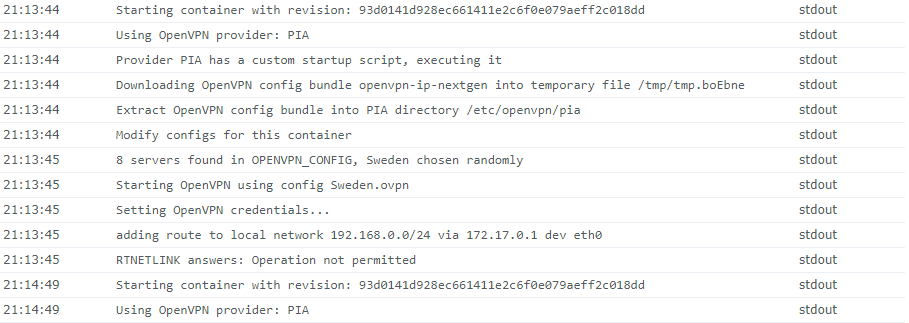
When I remove it, it doesn't crash, but I can't reach the Web UI. Also the TLS handshake seems to fail. Any ideas?
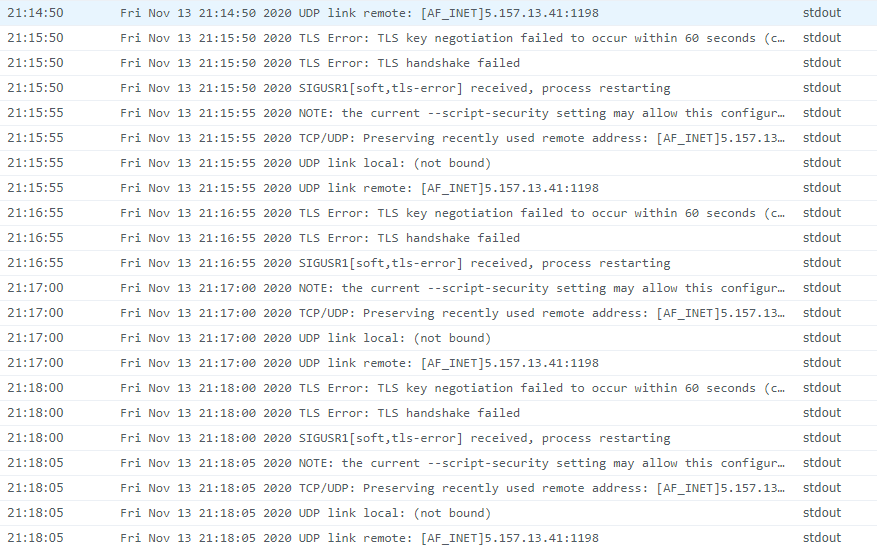
 Ascotg
on 13 Nov 2020
Ascotg
on 13 Nov 2020
@Ascotg Have you enabled cap_add: NET_ADMIN in your config? Or running it with elevated privileges?
What about 192.168.0.0/16? The /24 should also be valid, but worth a shot.
haugene
on 13 Nov 2020
@haugene Thanks for getting back to me
I'm running it on Synology, so I've got PUID=1026 and PGID=100, which is elevated access I believe.
NET_ADMIN I should set as variable?
I also just noticed this:
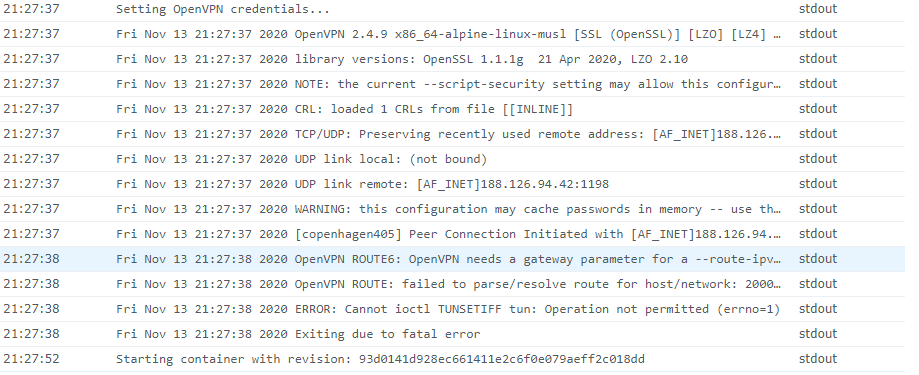
Needs a gateway? Hmm. Seems like I should do a clean install first.
Ascotg
on 13 Nov 2020
Alas, no dice.
I'll check again later.
Ascotg
on 13 Nov 2020
NET_ADMIN I should set as variable?
If you use docker run, add --cap-add=NET_ADMIN (see the wiki).
It gives the docker the ability to create and modify network devices and other related network operations (see capabilities manpage).
 clement-z
on 16 Nov 2020
clement-z
on 16 Nov 2020
I have that set "--cap-add=NET_ADMIN" and I find its stable. Uptime 2 days and counting, based on my previous comments.
Silversurfer79
on 16 Nov 2020
I was just answering to @Ascotg:
NET_ADMIN I should set as variable?
Since it wasn't clear whether he understood where to set it.
This issue kind of seems like it became a dump for several PIA related problems and resolution notices which are not necessarily linked to the original issue, but rather related to PIA problems in general. @ultimateguy, if your issue was solved (by using a clean TRANSMISSION_HOME folder) you should consider marking the issue as resolved. Other issues belong in other tickets.
clement-z
on 16 Nov 2020
@Silversurfer79 @clement-z @haugene
Thank you all for your help.
I had some issues still since I'm using a Synology server to run it, my solution:
1) I activated SSH and connected using putty and executed the following command:
sudo docker run --cap-add=NET_ADMIN -d \
-v Jails/:/data \
-e OPENVPN_PROVIDER=PIA \
-e OPENVPN_USERNAME=* \
-e OPENVPN_PASSWORD=* \
-e WEBPROXY_ENABLED=false \
-e LOCAL_NETWORK=192.168.0.0/16 \
-e PUID=1026
-e PGID=100
--log-driver json-file \
--log-opt max-size=10m \
-p 9091:9091 \
haugene/transmission-openvpn
2)
I defined a TASK on my NAS and created a file for the nameservers as described in the following page:
https://petestechblog.com/2020/10/04/how-to-run-transmission-using-openvpn-in-docker-on-a-synology-nas-dsm-6-0/
@haugene Could you perhaps mention this in the wiki for the people with a Synology?
Ascotg
on 16 Nov 2020
@Ascotg We have had special instructions for Synology in the docs. The theory now is that it shouldn't be necessary after the 3.x release of the container. But I will make a note of it. If the problem keeps arising then I will bring it back.
Apart from that I agree with what @clement-z is saying. This issue has strayed away from its initial post. I'm closing it.
For new problems, create a new issue.
haugene
on 16 Nov 2020
Related issues
 jorgelsaba
·
3Comments
jorgelsaba
·
3Comments
 holger8080
·
4Comments
holger8080
·
4Comments
 ovizii
·
3Comments
ovizii
·
3Comments
 SuperJakish
·
4Comments
SuperJakish
·
4Comments
 callahan22
·
4Comments
callahan22
·
4Comments
Most helpful comment
I'm running into a similar issue, it stopped working around 3pm CST.
I'm pretty sure PIA turned off their "legacy" servers. On the "My Account" section on their site, they have the following:
[edit] I found that by removing my OPENVPN_CONFIG option, the configure-openvpn.sh script then chooses a random .ovpn file to connect to, which for me results in a successful vpn connection.