Docker-transmission-openvpn: Tinyproxy not connecting
Hi, definitely its me. I am using this image haugene/transmission-openvpn:dev-armhf and I have these environment variables
- WEBPROXY_ENABLED=true
- WEBPROXY_PORT=8888
Thats the output after I start the container
today at 18:10 STARTING TRANSMISSION
today at 18:10 Transmission startup script complete.
today at 18:10 STARTING TINYPROXY
today at 18:10 Found config file /etc/tinyproxy/tinyproxy.conf, updating settings.
today at 18:10 Setting tinyproxy port to 8888
today at 18:10 tinyproxy is on the PATH, run it
today at 18:10 Tinyproxy startup script complete.
But its not connecting me to any website when I enter the tinyproxy details in my Microsoft Edge or any other browser. I entered this information 192.168.1.89:8888

Could you look into this? Thank you so much
 mouzzampk2014
All 9 comments
Install telnet on a computer (not the one where the container is running) and run telnet 192.168.1.89 8888 what happens then?
Can you share the rest of your config setup? Just those variables are not the only things that are relevant here. Have you set the LOCAL_NETWORK variable?
 haugene
on 8 Nov 2020
haugene
on 8 Nov 2020
Hi thats what happen when I type telnet 192.168.1.89 8888

And here is my full compose
transmissionvpn:
  image: haugene/transmission-openvpn:dev-armhf
  hostname: ${DOCKERHOSTNAME}
  ports:
    - 51413:51413
    - 51413:51413/udp
    - 6881:6881
    - 6881:6881/udp
    - 9091:9091
    - 8888:8888
  cap_add:
    - NET_ADMIN
  container_name: transmissionvpn
  dns:
    - ${NS1}
    - ${NS2}
  environment:
    - LOCAL_NETWORK=192.168.1.0/24
    - TRANSMISSION_WEB_UI=combustion
    - OPENVPN_OPTS=
    - OPENVPN_PASSWORD=password
    - OPENVPN_PROVIDER=custom
    - OPENVPN_USERNAME=username
    - PGID=1000
    - PUID=1000
    - WEBPROXY_ENABLED=true
    - WEBPROXY_PORT=8888
    - TRANSMISSION_DOWNLOAD_DIR=/storage/downloads
    - TRANSMISSION_HOME=/config
    - TRANSMISSION_INCOMPLETE_DIR=/storage/downloads
    - TRANSMISSION_WATCH_DIR=/storage/downloads
    - TZ=${TZ}
  logging:
    driver: json-file
    options:
      max-file: ${DOCKERLOGGING_MAXFILE}
      max-size: ${DOCKERLOGGING_MAXSIZE}
  restart: unless-stopped
  volumes:
    - /etc/localtime:/etc/localtime:ro
    - ${DOCKERCONFDIR}/transmissionvpn:/config
    - ${DOCKERSTORAGEDIR}:/storage
    - ${VPN_OVPNDIR}:/config/openvpn
    - ${VPN_OVPNDIR}:/etc/openvpn/custom/
Thank you so much
mouzzampk2014
on 8 Nov 2020
@haugene apologise this time I tried on my ubuntu machine and thats the output I have
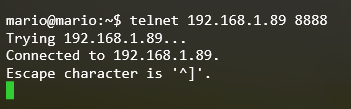
mouzzampk2014
on 8 Nov 2020
Well. Then you can connect to the proxy so it seems things are running as they should.
On your ubuntu machine. What do you get from these two curl commands?
curl ipecho.net/plain
curl --proxy 192.168.1.89:8888 ipecho.net/plain
mario@mario:~$ curl ipecho.net/plain
mywanip
mario@mario:~$ curl --proxy 192.168.1.89:8888 ipecho.net/plain
myvpnip
But not sure websites not opening when I turn on proxy on windows

mouzzampk2014
on 8 Nov 2020
Right there I'm blank :man_shrugging: It seems like the proxy is working as expected. I have no windows machines to test with and haven't used one for a decade :sweat_smile:
I would do some search on problems specifically with windows and tinyproxy. Hopefully there's something useful there. If you find a hint to what configs could be changed to make it work, let me know.
haugene
on 8 Nov 2020
Hehe awe thank you so much for your help. Yes I'm literally searching for solution on reddit and different forums about tinyproxy. I will continue my search and update you. I will leave this issue open for couple of days and then I will close it in case someone has better idea 😃 . And like always thank you so much for looking into this for me. Ta
mouzzampk2014
on 8 Nov 2020
Maybe the people over on https://github.com/tinyproxy/tinyproxy could be of help?
Can you try setting the proxy in Firefox's settings, rather than Windows globally, see if that makes any difference?
 ilike2burnthing
on 8 Nov 2020
ilike2burnthing
on 8 Nov 2020
@ilike2burnthing @haugene thank you so much guys. Firefox and Chrome works perfectly fine, but Internet Explorer and Microsoft Edge not connecting. I will check with tinyproxydirectly and find the answer. I will close this issue and update you once I have update. Thanks again
mouzzampk2014
on 8 Nov 2020
Related issues
 ovizii
·
3Comments
ovizii
·
3Comments
 beneix
·
3Comments
beneix
·
3Comments
 Jafalex
·
3Comments
Jafalex
·
3Comments
 silentArtifact
·
3Comments
silentArtifact
·
3Comments
 lorgio
·
4Comments
lorgio
·
4Comments
Most helpful comment
@ilike2burnthing @haugene thank you so much guys. Firefox and Chrome works perfectly fine, but Internet Explorer and Microsoft Edge not connecting. I will check with
tinyproxydirectly and find the answer. I will close this issue and update you once I have update. Thanks again