Docker-transmission-openvpn: Update PIA configs to next gen servers
Which provider?
PIA
Where are the configs?
Should probably update to the next gen servers.
 haugene
All 178 comments
I apologize for asking, but I downloaded the config files but I'm uncertain how I would use them with the docker compose. Any help please?
 IroesStrongarm
on 27 Aug 2020
IroesStrongarm
on 27 Aug 2020
Here's what I am using:
  tr1:
    image: haugene/transmission-openvpn
    container_name: tr1
    volumes:
      - tr1_data:/data
      - tr1_config:/config
      - '/etc/localtime:/etc/localtime:ro'
      - '/home/kriskras99/compose/transmission/Netherlands.ovpn:/etc/openvpn/custom/default.ovpn:ro'
    environment:
      - OPENVPN_PROVIDER=CUSTOM
      - OPENVPN_USERNAME=p1234567
      - OPENVPN_PASSWORD=password
    cap_add:
      - NET_ADMIN
    ports:
      - '9091:9091'
    dns:
      - 1.1.1.1
      - 1.0.0.1
Just replace your ovpn file path with mine and your good to go
 Kriskras99
on 27 Aug 2020
Kriskras99
on 27 Aug 2020
Here's what I am using:
  tr1:
    image: haugene/transmission-openvpn
    container_name: tr1
    volumes:
      - tr1_data:/data
      - tr1_config:/config
      - '/etc/localtime:/etc/localtime:ro'
      - '/home/kriskras99/compose/transmission/Netherlands.ovpn:/etc/openvpn/custom/default.ovpn:ro'
    environment:
      - OPENVPN_PROVIDER=CUSTOM
      - OPENVPN_USERNAME=p1234567
      - OPENVPN_PASSWORD=password
    cap_add:
      - NET_ADMIN
    ports:
      - '9091:9091'
    dns:
      - 1.1.1.1
      - 1.0.0.1
Just replace your ovpn file path with mine and your good to go
Problem with that config is that port forwarding does not work. If you change it to:
   tr1:
     image: haugene/transmission-openvpn
     container_name: tr1
     volumes:
       - tr1_data:/data
       - tr1_config:/config
       - '/etc/localtime:/etc/localtime:ro'
       - '/home/kriskras99/compose/transmission/France.ovpn:/etc/openvpn/pia/France.ovpn:ro'
     environment:
       - OPENVPN_PROVIDER=PIA
       -OPENVPN_CONFIG=France
       - OPENVPN_USERNAME=p1234567
       - OPENVPN_PASSWORD=password
     cap_add:
       - NET_ADMIN
     ports:
       - '9091:9091'
     dns:
       - 1.1.1.1
       - 1.0.0.1
it will use port forwarding from PIA (currently, the Netherlands is not in the list of servers supporting port forwarding)
 zjorsie
on 28 Aug 2020
zjorsie
on 28 Aug 2020
Thank you both for your help. It took much trial and error until I got it all correct. In the end I went with the way zjorsie configured and it works perfect.
Once again, thank you both very much for taking your time to help me out.
IroesStrongarm
on 28 Aug 2020
Nevermind. I'm clearly not doing something right. It's likely a backend setup for this I'm not getting...Thanks anyway
IroesStrongarm
on 28 Aug 2020
Oh yeah, do not use the x.... username pia generates for you. For the nextgen config you'll need your login credentials you also use on the app! took me some time to figure out as well (if you get auth failed messages).
And I forgot to mention that you have to change a line in your config (as received from the ovpn generator). I chose:
- nextgen config
- openvpn 2.4
- Europe, France
- 1198UDP
Then, in your file you should have a line
auth-user-pass
Change this line to:
auth-user-pass /config/openvpn-credentials.txt
zjorsie
on 28 Aug 2020
I'm sorry to keep asking. Which config file am I supposed to edit? I downloaded the ovpn file from PIA directly. I'm unfamiliar with ovpn generator. This is what my compose looks like:
version: "2"
services:
transmission-openvpn:
image: haugene/transmission-openvpn:latest
container_name: transmission-openvpn-syno
restart: always
cap_add:
- NET_ADMIN
devices:
- /dev/net/tun
volumes:
- /srv/dev-disk-by-label-scratch/scratch/downloads:/data
- /srv/dev-disk-by-id-ata-CT500MX500SSD1_1752E108A760-part4/appdata/transmission:/config
- /srv/dev-disk-by-label-data/users/roy/transmission/Switzerland.ovpn:/etc/openvpn/pia/Switzerland.ovpn:ro
environment:
- OPENVPN_PROVIDER=PIA
- OPENVPN_CONFIG=Switzerland
- OPENVPN_USERNAME=p1234567 #(I've entered my actual username here)
- OPENVPN_PASSWORD=password #(I've entered my actual password here)
- WEBPROXY_ENABLED=false
- LOCAL_NETWORK=192.168.1.0/24
- OPENVPN_OPTS=--inactive 3600 --ping 10 --ping-exit 60
- PUID=998
- PGID=100
- TRANSMISSION_SCRAPE_PAUSED_TORRENTS_ENABLED=false
logging:
driver: json-file
options:
max-size: 10m
dns:
- 8.8.8.8
- 8.8.4.4
ports:
- 9091:9091
- 8888:8888
IroesStrongarm
on 28 Aug 2020
I'm sorry to keep asking. Which config file am I supposed to edit? I downloaded the ovpn file from PIA directly. I'm unfamiliar with ovpn generator. This is what my compose looks like:
version: "2"
services:
transmission-openvpn:
image: haugene/transmission-openvpn:latest
container_name: transmission-openvpn-syno
restart: always
cap_add:
- NET_ADMIN
devices:- /dev/net/tun
volumes:- /srv/dev-disk-by-label-scratch/scratch/downloads:/data
- /srv/dev-disk-by-id-ata-CT500MX500SSD1_1752E108A760-part4/appdata/transmission:/config
- /srv/dev-disk-by-label-data/users/roy/transmission/Switzerland.ovpn:/etc/openvpn/pia/Switzerland.ovpn:ro
environment:- OPENVPN_PROVIDER=PIA
- OPENVPN_CONFIG=Switzerland
- OPENVPN_USERNAME=p1234567 #(I've entered my actual username here)
- OPENVPN_PASSWORD=password #(I've entered my actual password here)
- WEBPROXY_ENABLED=false
- LOCAL_NETWORK=192.168.1.0/24
- OPENVPN_OPTS=--inactive 3600 --ping 10 --ping-exit 60
- PUID=998
- PGID=100
- TRANSMISSION_SCRAPE_PAUSED_TORRENTS_ENABLED=false
logging:
driver: json-file
options:
max-size: 10m
dns:- 8.8.8.8
- 8.8.4.4
ports:- 9091:9091
- 8888:8888
You have to edit the line in this file: /srv/dev-disk-by-label-data/users/roy/transmission/Switzerland.ovpn
zjorsie
on 28 Aug 2020
If the line you are referring to is the auth-user-pass to auth-user-pass /config/openvpn-credentials.txt I've done that.
The error I get once I deploy and it tries to load is:
Port forwarding is already activated on this connection, has expired, or you are not connected to a PIA region that supports port forwarding
curl encountered an error looking up new port: 7
IroesStrongarm
on 28 Aug 2020
On reddit (https://www.reddit.com/r/PrivateInternetAccess/comments/i6qqu0/pia_portforward_request_ip_is_dead/) they say they are migrating servers and it could happen that it doesn't work for the next while.
For the time being you can also just use the included VPN configs and just wait until the nextgen configs are included in the haugene image.
zjorsie
on 28 Aug 2020
I'll get to it very soon. Hopefully this weekend.
haugene
on 28 Aug 2020
@zjorsie The standard ones sometimes fail to port forward so the next gen ones were recommended as the fix. That said I really do appreciate all your help.
@haugene I assumed your note at the top was just telling people like me we had to manually do it. I greatly appreciate the time you've taken in making this docker and maintaining it.
IroesStrongarm
on 28 Aug 2020
@IroesStrongarm No, you shouldn't have to do it manually ;) Trying to keep it up to date. But over the years there has come a lot of providers and there's always stuff to do. I'm using pia myself, so that should be a safe choice though.
haugene
on 28 Aug 2020
@zjorsie Sorry to keep bothering but I was hoping for a follow up question for my own clarification. After using everything I've learned this morning from this thread and reading the docs for this docker, I'm able to get connected using the original compose posted by kriskras99. That said, like you said, it doesn't support port forwarding.
Why is the port forwarding so important for this setup? When I use a tracking magnet link it does show a Swiss IP. I just want to properly understand why this setup is bad.
Thank you.
IroesStrongarm
on 28 Aug 2020
@IroesStrongarm No problem! Everything has a steep learning curve, which will eventually flatten out (I hope at least).
You don't need the port forwarding to download torrents. The connections you make all origin from your computer, so downloading will work fine.
However, when you want to upload (e.g. for private trackers, or just being someone who enjoys torrents and supports the network) you want to seed torrents. Then, you'll need people to be able to connect to you (to request data), and that's where port forwarding comes in.
Not sure how much you know about port forwarding in general but basically, the port forwarding service is nothing more than sending traffic that arrives at PIA ADDRESS:PORT to your machine over the PIA VPN, where PORT is a random port number which can be requested from PIA. This port forward can then use it to let clients connect to you (to upload torrents in this case).
zjorsie
on 28 Aug 2020
@zjorsie Thank you for that write up. So if I were to want to, for the time being (though not ideal), I could use the setup that Kriskras99 put, that did work for me, but no port forwarding, and I'd be able to download safely, just not upload to anyone?
I know that's not in the spirit of things, and obviously once I can get the next gen working with forwarding I would fix it, but just want to know if it would give me safe and functional functionality for me today?
IroesStrongarm
on 28 Aug 2020
@IroesStrongarm Yeah that's true, downloading is fine. For the time being, you can also use the 'normal' PIA config. This works the same as the 'nextgen' config (probably new software they're deploying with better throughput/latencies/routing efficiency/...).
If you want to test if IP hiding works correctly for your torrents, you can go to ipleak.net (activate the torrent address detection and add the magnet link to your torrent client).
zjorsie
on 28 Aug 2020
@zjorsie @haugene @IroesStrongarm hey everyone, i have tried this today with the old gen profiles and some of the new gen profiles, i can connect fine on all but can not get a port on any. has anyone got this working and if so which country and which gen?
 mizzi0n
on 9 Sep 2020
mizzi0n
on 9 Sep 2020
@zjorsie @haugene @IroesStrongarm hey everyone, i have tried this today with the old gen profiles and some of the new gen profiles, i can connect fine on all but can not get a port on any. has anyone got this working and if so which country and which gen?
Same here. Tried the client just in case it was the server side acting up, and the client is snagging ports just fine. Not sure if the script for this needs to be tweaked or what. Either way, appreciated your guy's time and awesome image.
 evil666
on 9 Sep 2020
evil666
on 9 Sep 2020
@mizzi0n @evil666 I tried it today as well, with no luck (both on old and new config).
For the old config I get error 52, which means the server did not return any data. Not sure why though, probably issues (or choices) at the PIA side.
The PIA page about port forwarding (https://www.privateinternetaccess.com/helpdesk/kb/articles/can-i-use-port-forwarding-without-using-the-pia-client-current-gen-only) specifies that the port forwarding is only available for their currentgen config (for now), so that's why the nextgen config doesn't work I guess. I will have a look at running the pia app in the container instead of the openvpn approach.
zjorsie
on 9 Sep 2020
@zjorsie @evil666 i done some playing this evening. after reading this https://www.privateinternetaccess.com/pages/client-support/#portforward i tried the following servers:
Spain
Romania
Israel
and they worked. what i done was download the orginal config files and changed the line auth-user-pass to auth-user-pass /config/openvpn-credentials.txt and mounted into the image - /root/config/pia:/etc/openvpn/pia:ro
it still isnt 100% consistant but once its up it doesnt seem to drop
mizzi0n
on 9 Sep 2020
@mizzi0n Thanks, tried Romania and got a port on the first try! Couldn't connect to DE Berlin however (closer to my location), they're probably busy with something.
zjorsie
on 9 Sep 2020
@mizzi0n Thanks, tried Romania and got a port on the first try! Couldn't connect to DE Berlin however (closer to my location), they're probably busy with something.
no problem, did you have to mount your own config files or just used what was there on the docker ?
mizzi0n
on 9 Sep 2020
@mizzi0n Just wanted to say that your method worked for me. Currently connected to Spain no problem, port forwarded. I haven't tried to reconnect so for now the connection just remains open.
Thanks.
IroesStrongarm
on 10 Sep 2020
Tried this with no luck. What I did to see if I made a mistake somewhere.
- went to pia ovpn generator and generated an .ovpn config
NextGen
OpenVPN 2.4 or newer
Linux
France
UDP/1198
- create config and data dirs
$ sudo mkdir -p /srv/transmission/{data,config}
$ sudo chmod -R 777 /srv/transmission/
- create user-pass file for pia next-gen
cat << 'EOF' > /srv/transmission/config/openvpn-credentials.txt
u12345
p12345
EOF
- changed the .ovpn file line that says...
> auth-user-pass
to...
auth-user-pass /config/openvpn-credentials.txt
- created dir to house .ovpn file
$ sudo mkdir -p /srv/openvpn/pia
$ sudo chmod -R 777 /srv/openvpn
- moved updated .ovpn file to...
> /srv/openvpn/pia - docker-compose.yml
---
version: "3.2"
services:
  transmission:
    image: haugene/transmission-openvpn:latest-armhf
    container_name: transmission
    cap_add:
      - NET_ADMIN
    devices:
      - /dev/net/tun
    restart: always
    ports:
      - 9091:9091
      - 8888:8888
    volumes:
      - /etc/localtime:/etc/localtime:ro
      - /srv/transmission/data:/data:rw
      - /srv/transmission/config:/config:rw
      - /srv/openvpn/pia/France.ovpn:/etc/openvpn/pia/France.ovpn:ro
      - type: bind
        source: /media/pi/Media/Torrents
        target: /torrents
    environment:
      - PUID=1001
      - PGID=1000
      - OPENVPN_PROVIDER=PIA
      - OPENVPN_CONFIG=France
      - OPENVPN_USERNAME=u12345
      - OPENVPN_PASSWORD=p12345
      - TRANSMISSION_INCOMPLETE_DIR=/torrents/incomplete
      - TRANSMISSION_DOWNLOAD_DIR=/torrents/complete
      - TRANSMISSION_WATCH_DIR=/torrents/watch
      - OPENVPN_OPTS=--inactive 3600 --ping 10 --ping-exit 60
      - LOCAL_NETWORK=192.168.68.100/24
    ports:
      - 9091:9091
    dns:
       - 1.1.1.1
       - 1.0.0.1
    logging:
      driver: json-file
      options:
        max-size: "10m"
still getting
> Port forwarding is already activated on this connection, has expired, or you are not connected to a PIA region that supports port forwarding
> curl encountered an error looking up new port: 7
I'm not sure what I did wrong but can't get it to work. Any Ideas from anyone who has got this to work????
 code-is-art
on 21 Sep 2020
code-is-art
on 21 Sep 2020
Tried this with no luck. What I did to see if I made a mistake somewhere.
- went to pia ovpn generator and generated an .ovpn config
NextGen
OpenVPN 2.4 or newer
Linux
France
UDP/1198
- create config and data dirs
$ sudo mkdir -p /srv/transmission/{data,config}
$ sudo chmod -R 777 /srv/transmission/
- create user-pass file for pia next-gen
cat << 'EOF' > /srv/transmission/config/openvpn-credentials.txt
u12345
p12345
EOF
- changed the .ovpn file line that says...
auth-user-pass
to...
auth-user-pass /config/openvpn-credentials.txt
- created dir to house .ovpn file
$ sudo mkdir -p /srv/openvpn/pia
$ sudo chmod -R 777 /srv/openvpn
- moved updated .ovpn file to...
/srv/openvpn/pia
- docker-compose.yml
---
version: "3.2"
services:
  transmission:
    image: haugene/transmission-openvpn:latest-armhf
    container_name: transmission
    cap_add:
      - NET_ADMIN
    devices:
      - /dev/net/tun
    restart: always
    ports:
      - 9091:9091
      - 8888:8888
    volumes:
      - /etc/localtime:/etc/localtime:ro
      - /srv/transmission/data:/data:rw
      - /srv/transmission/config:/config:rw
      - /srv/openvpn/pia/France.ovpn:/etc/openvpn/pia/France.ovpn:ro
      - type: bind
        source: /media/pi/Media/Torrents
        target: /torrents
    environment:
      - PUID=1001
      - PGID=1000
      - OPENVPN_PROVIDER=PIA
      - OPENVPN_CONFIG=France
      - OPENVPN_USERNAME=u12345
      - OPENVPN_PASSWORD=p12345
      - TRANSMISSION_INCOMPLETE_DIR=/torrents/incomplete
      - TRANSMISSION_DOWNLOAD_DIR=/torrents/complete
      - TRANSMISSION_WATCH_DIR=/torrents/watch
      - OPENVPN_OPTS=--inactive 3600 --ping 10 --ping-exit 60
      - LOCAL_NETWORK=192.168.68.100/24
    ports:
      - 9091:9091
    dns:
       - 1.1.1.1
       - 1.0.0.1
    logging:
      driver: json-file
      options:
        max-size: "10m"
still getting
> Port forwarding is already activated on this connection, has expired, or you are not connected to a PIA region that supports port forwarding
> curl encountered an error looking up new port: 7I'm not sure what I did wrong but can't get it to work. Any Ideas from anyone who has got this to work????
Hi, that's a pretty detailed config. Do you want to try using LOCAL_NETWORK=192.168.1.0/24 instead of LOCAL_NETWORK=192.168.68.100/24
 jhender
on 21 Sep 2020
jhender
on 21 Sep 2020
Tried this with no luck. What I did to see if I made a mistake somewhere.
* went to [pia ovpn generator](https://www.privateinternetaccess.com/pages/ovpn-config-generator) and generated an .ovpn configNextGen
OpenVPN 2.4 or newer
Linux
France
UDP/1198* create config and data dirs$ sudo mkdir -p /srv/transmission/{data,config} $ sudo chmod -R 777 /srv/transmission/* create user-pass file for pia next-gencat << 'EOF' > /srv/transmission/config/openvpn-credentials.txt u12345 p12345 EOF* changed the .ovpn file line that says...auth-user-pass
to...
auth-user-pass /config/openvpn-credentials.txt
* created dir to house .ovpn file$ sudo mkdir -p /srv/openvpn/pia $ sudo chmod -R 777 /srv/openvpn* moved updated .ovpn file to.../srv/openvpn/pia
* docker-compose.yml--- version: "3.2" services: transmission: image: haugene/transmission-openvpn:latest-armhf container_name: transmission cap_add: - NET_ADMIN devices: - /dev/net/tun restart: always ports: - 9091:9091 - 8888:8888 volumes: - /etc/localtime:/etc/localtime:ro - /srv/transmission/data:/data:rw - /srv/transmission/config:/config:rw - /srv/openvpn/pia/France.ovpn:/etc/openvpn/pia/France.ovpn:ro - type: bind source: /media/pi/Media/Torrents target: /torrents environment: - PUID=1001 - PGID=1000 - OPENVPN_PROVIDER=PIA - OPENVPN_CONFIG=France - OPENVPN_USERNAME=u12345 - OPENVPN_PASSWORD=p12345 - TRANSMISSION_INCOMPLETE_DIR=/torrents/incomplete - TRANSMISSION_DOWNLOAD_DIR=/torrents/complete - TRANSMISSION_WATCH_DIR=/torrents/watch - OPENVPN_OPTS=--inactive 3600 --ping 10 --ping-exit 60 - LOCAL_NETWORK=192.168.68.100/24 ports: - 9091:9091 dns: - 1.1.1.1 - 1.0.0.1 logging: driver: json-file options: max-size: "10m"still getting
> Port forwarding is already activated on this connection, has expired, or you are not connected to a PIA region that supports port forwarding
> curl encountered an error looking up new port: 7I'm not sure what I did wrong but can't get it to work. Any Ideas from anyone who has got this to work????
the last i heard from PIA they said the only legcy severs with working port forwarding are Toronto,Vancouver, France, Romania and isreal. my mate and i have been using israel which seems pretty consistent to work.
mizzi0n
on 21 Sep 2020
PIA just published Bash Scripts for their nextgen servers...
https://www.privateinternetaccess.com/helpdesk/kb/articles/next-generation-port-forwarding
 francisreader
on 22 Sep 2020
francisreader
on 22 Sep 2020
I just ended up canceling PIA and went with TorGuard at the same price I was paying before. No scripts needed for port forwarding just some configuration on their side which didn’t take long.
evil666
on 22 Sep 2020
I tried the new bash scripts with no luck. Any one figure out how to make this work yet?
 11jwolfe2
on 28 Sep 2020
11jwolfe2
on 28 Sep 2020
Just wondering, has this ever worked with this container? Does the port that's grabbed from PIA need to then be opened for the container itself?
 mrdink
on 28 Sep 2020
mrdink
on 28 Sep 2020
Just wondering, has this ever worked with this container? Does the port that's grabbed from PIA need to then be opened for the container itself?
this has worked as i have it working now. if you are not issuesd a port the contianer will work and you will be able to download fine, peers will not be able to connected to you however. so no upload traffic.
@11jwolfe2 i have not tested the new script with the next gen servers but i havent had too. if you get it working outside the docker, you will still need to then mount the configs and change the current updateport.sh script to use it, this is until the creator updates the image
mizzi0n
on 28 Sep 2020
Right, sorry, the container itself is working for me but has the port forwarding ever worked correctly?
mrdink
on 28 Sep 2020
Right, sorry, the container itself is working for me but has the port forwarding ever worked correctly?
yes its worked fine for a long time, the reason there is issues now is because PIA are doing alot of upgrades on their servers , as a result only server sites (listed above) currently support the port forwarding.
mizzi0n
on 28 Sep 2020
In the pull request added to this issue somebody mentioned PIA has released new scripts to allow port forwarding for their nextgen services (I think a week ago). I will check if I have time to create something using their nextgen config as a basis (and maybe wireguard).
They have changed the way how port forwarding works, so it will probably not be a 5 minute fix.
zjorsie
on 28 Sep 2020
Right, sorry, the container itself is working for me but has the port forwarding ever worked correctly?
yes its worked fine for a long time, the reason there is issues now is because PIA are doing alot of upgrades on their servers , as a result only server sites (listed above) currently support the port forwarding.
I have not had port fwding work on any server listed.
11jwolfe2
on 28 Sep 2020
Right, sorry, the container itself is working for me but has the port forwarding ever worked correctly?
yes its worked fine for a long time, the reason there is issues now is because PIA are doing alot of upgrades on their servers , as a result only server sites (listed above) currently support the port forwarding.
I have not had port fwding work on any server listed.
i have it working right now on isreal and so does my mate who put me onto this. i did have some issue recently though where i had to try connect multiple times .ie either keep restarting the dcoker or access the cli of the docker and manually request a new port. try that a few times and see what happens
mizzi0n
on 28 Sep 2020
@haugene Hello sir, hope you're doing well! Do you think you can help us here to have something working easily with the next gen PIA servers? It seems that today we're doing manual stuff and we could break other stuff and make the container not working properly... Thx in advance for you help!
 jscoys
on 29 Sep 2020
jscoys
on 29 Sep 2020
Right, sorry, the container itself is working for me but has the port forwarding ever worked correctly?
yes its worked fine for a long time, the reason there is issues now is because PIA are doing alot of upgrades on their servers , as a result only server sites (listed above) currently support the port forwarding.
I have not had port fwding work on any server listed.
i have it working right now on isreal and so does my mate who put me onto this. i did have some issue recently though where i had to try connect multiple times .ie either keep restarting the dcoker or access the cli of the docker and manually request a new port. try that a few times and see what happens
But did you try with an other supposed to be working servers (France, Toronto...) or you have been always plugged to Israel? Can you test with CA Toronto for instance and check if it works? If no, seems only Israel server can work with port forwarding, if yes, it's that we're doing something wrong in the configuration?!
jscoys
on 29 Sep 2020
I just ended up canceling PIA and went with TorGuard at the same price I was paying before. No scripts needed for port forwarding just some configuration on their side which didn’t take long.
What kind of configuration of their side? What did you/they do to make it work?
jscoys
on 29 Sep 2020
I ended up going with and configured for AirVPN for a little bit while PIA gets its act together -- the past few months have been hit or miss with PIA while the past 2 years were rock solid. No problems with AirVPN since making the move - hoping for a good deal come Black Friday for the same price as PIA.
 haroonie
on 29 Sep 2020
haroonie
on 29 Sep 2020
I ended up going with and configured for AirVPN for a little bit while PIA gets its act together -- the past few months have been hit or miss with PIA while the past 2 years were rock solid. No problems with AirVPN since making the move - hoping for a good deal come Black Friday for the same price as PIA.
Do you have port forwarding? Are you able to seed?
jscoys
on 29 Sep 2020
@jscoys i used to have France working but been sticking to Israel, i have just tested France and Toronto and neither work now. switched back to Israel and it worked right away
mizzi0n
on 29 Sep 2020
@jscoys i used to have France working but been sticking to Israel, i have just tested France and Toronto and neither work now. switched back to Israel and it worked right away
Wow man thank you! I confirm that with IPA and the container of the box (So not having to manage a custom provider or putting the config files with credentials... etc) It works! I have a "Port is open" in transmission and then I can seed! Hurray thx!
Just put - OPENVPN_CONFIG=Israel in your docker parameter and that's it!
jscoys
on 29 Sep 2020
@haugene I'm very happy with the Israel server trick, but we should be prepared when this one will not allow port forwarding anymore, so we should have a support for next gen PIA servers built-into the container image ;-)
jscoys
on 29 Sep 2020
@jscoys im glad you have it working. i have been playing about with the next gen configs and wireguard, im hoping to soon mod my updatePort.sh script to use them since they seem to be working fine all over
mizzi0n
on 29 Sep 2020
Looks like all of us who still have the legacy servers working will need an alternative solution soon: https://www.privateinternetaccess.com/blog/private-internet-access-legacy-vpn-network-sunset-announcement-30-september/
 kperinga
on 1 Oct 2020
kperinga
on 1 Oct 2020
Hmm.. I've started implementing the wireguard scripts. Think it should work now, i'll test itnprobably this weekend
zjorsie
on 1 Oct 2020
@kperinga @zjorsie i have a custom updatePort.sh working at the moment which is allowing me to connect and port forward on the next gen servers. it needs alot of tidying up and testing but my seedbox has been sharing away fine for a bit now
mizzi0n
on 1 Oct 2020
@jscoys or anyone else on here, i have a working portupdate script for the nextgen servers, anyone care to try it and see if it works universally ?
mizzi0n
on 5 Oct 2020
I'd like to try it out. Is this a pre-start script or is there a different way to add it to the container?
code-is-art
on 5 Oct 2020
I could also try it
 jameson71
on 5 Oct 2020
jameson71
on 5 Oct 2020
@kperinga @zjorsie i have a custom updatePort.sh working at the moment which is allowing me to connect and port forward on the next gen servers. it needs alot of tidying up and testing but my seedbox has been sharing away fine for a bit now
Please share! :)
 talondnb
on 7 Oct 2020
talondnb
on 7 Oct 2020
PIA - Toronto doing the port 56 error. Israel so far so good.
 asilva54
on 7 Oct 2020
asilva54
on 7 Oct 2020
@talondnb @jscoys @code-is-art @jameson71
guys i have uploaded my temp script to github, it works fine on my connection and my mates connectioin for day, just stick to end points that allow port forwarding.
its not the prettiest code but it works, it also assumes you havent heavily moddified the container via your docker-compose.yml file, such as renamming tun0. i think i have covered everything in the notes, let me know how you get on .
- Download the new next-gen profile pack from here https://www.privateinternetaccess.com/pages/download#
- Extract the files to your machine that runs docker
- Edit the config files, replacing the line auth-user-path and change it to
auth-user-path /config/openvpn-credentials.txt
this way it picks up the vpn creds already passed into the docker container. - Change your docker-compose.yml file and overwrite the files in the docker container with the files you just unpacked an example would be
- /home/user/config/pia-nextgen:/etc/openvpn/pia:ro
this will overwrite the folder in docker with your files as read only - Download the modded updatePort.sh from https://github.com/mizzi0n/docker-transmission-openvpn-PIA-replacement-files/blob/main/updatePort.sh
chmod +x updatePort.sh - Map that in your docker-compose.yml, again an example is adding the line
- /home/user/config/updatePort.sh:/etc/transmission/updatePort.sh:ro
- That should get it up and running as well as keep your port request alive every 15 minutes.
mizzi0n
on 7 Oct 2020
@mizzi0n : works fine for me ! Thank you very much. Will keep it running for a while to see if port remains open in the long run.
 gwenl
on 7 Oct 2020
gwenl
on 7 Oct 2020
@mizzi0n also working fine here. Had to chmod a+x the script but besides that, great interim solution 👍
edit: just monitored it for a while and got this:
initial setup complete!
curl: (28) Connection timed out after 15000 milliseconds
Thu Oct 8 06:36:02 AWST 2020: bindPort error
/etc/transmission/updatePort.sh: line 54: fatal_error: command not found
curl: (28) Connection timed out after 15001 milliseconds
Thu Oct 8 06:53:47 AWST 2020: bindPort error
/etc/transmission/updatePort.sh: line 54: fatal_error: command not found
curl: (28) Connection timed out after 15000 milliseconds
Thu Oct 8 07:11:32 AWST 2020: bindPort error
/etc/transmission/updatePort.sh: line 54: fatal_error: command not found
curl: (28) Connection timed out after 15001 milliseconds
Thu Oct 8 07:29:17 AWST 2020: bindPort error
/etc/transmission/updatePort.sh: line 54: fatal_error: command not found
talondnb
on 8 Oct 2020
@mizzi0n : works fine for me ! Thank you very much. Will keep it running for a while to see if port remains open in the long run.
have you had any issues?
mizzi0n
on 8 Oct 2020
Nope, so far it's working fine. Transmission still reports that the port is open.
gwenl
on 8 Oct 2020
I'm not sure what is different but after a restart of the host, it has now held onto that port for over 24hrs.
talondnb
on 9 Oct 2020
I'm not sure what is different but after a restart of the host, it has now held onto that port for over 24hrs.
Mines has been fine, I think it needs alot better error handling though. I also read their documentation today, your token lasts 7 days and the port bind can last 2 months regardless of changing IP so the rebind that is set to 15 minutes like the app is, probably doesn't need to be that strict
mizzi0n
on 9 Oct 2020
Hey guys. I'm sorry I've been afk in this project for a while. I don't always manage to stay up-to-date here and I've recently started a new job so time has been limited.
Anyways. Big thanks to @mizzi0n and @zjorsie that have taken things into their own hands here. Merging their contributions seems to be all we need to do :clap: And we need to get it done by the end of October before all the legacy servers are shut down.
But before we get going. We have several sets of configs for PIA today. The ones in the default folder are udp configs, and then we have folders for strong, ip, tcp and tcp-strong. Now we're talking about adding nextgen. But if I understand this correctly then all else than nextgen will be shut down by the end of the month? If that's the case then we should use this opportunity to clean up a bit.
Also. We're doing other cleanup on the dev branch currently. One of the changes I want to see in this repo is to remove the checked in .ovpn files and instead have scripts that fetch them. That will remove the need for the constant updates to config files. There is an outline of this in dev already. It checks for a configure-openvpn.sh script within each provider and run it if it exists. Can we change your PR to add such a script instead @zjorsie? I've also started a modify-openvpn-config.sh script that will do necessary modifications to the configs in order to work inside the container (like changing auth-user-pass line).
Are you up for adding your script as a PR @mizzi0n? If you make the PR to the dev branch I think it can be merged. The old script doesn't work anyways so let's get it in there :smile:
haugene
on 10 Oct 2020
@haugene offcourse! I was thinking the same about fetching vpn profiles dynamically, but didn't have much time lately either to implement something (congrats on the job btw!).
But with the news that pia only uses nextgen shortly, my pull request has become unnecessary, since port forwarding does not work anymore so it's probably best to dismiss it. If I have time I will look into a config that could use wireguard (if it isn't already implemented by then)..
zjorsie
on 10 Oct 2020
Hey guys. I'm sorry I've been afk in this project for a while. I don't always manage to stay up-to-date here and I've recently started a new job so time has been limited.
Anyways. Big thanks to @mizzi0n and @zjorsie that have taken things into their own hands here. Merging their contributions seems to be all we need to do 👏 And we need to get it done by the end of October before all the legacy servers are shut down.
But before we get going. We have several sets of configs for PIA today. The ones in the default folder are
udpconfigs, and then we have folders forstrong,ip,tcpandtcp-strong. Now we're talking about addingnextgen. But if I understand this correctly then all else thannextgenwill be shut down by the end of the month? If that's the case then we should use this opportunity to clean up a bit.Also. We're doing other cleanup on the
devbranch currently. One of the changes I want to see in this repo is to remove the checked in .ovpn files and instead have scripts that fetch them. That will remove the need for the constant updates to config files. There is an outline of this in dev already. It checks for aconfigure-openvpn.shscript within each provider and run it if it exists. Can we change your PR to add such a script instead @zjorsie? I've also started amodify-openvpn-config.shscript that will do necessary modifications to the configs in order to work inside the container (like changing auth-user-pass line).Are you up for adding your script as a PR @mizzi0n? If you make the PR to the dev branch I think it can be merged. The old script doesn't work anyways so let's get it in there 😄
I am currently workings on tidying the script up and adding some error handling, shall I do that first?
mizzi0n
on 11 Oct 2020
That sounds good @mizzi0n. Meanwhile I will have a look at adding the nextgen servers.
haugene
on 11 Oct 2020
Hello guys,
first at all thanks a lot @haugene for your great work on this docker setup, I was using it a long time ago and went to it again since a couple of weeks, changing from nordvpn to pia for the port forwarding ability.
I confirm I was also blocked with the port forwarding issue with PIA, trying a couple of solutions and finally just tried right now Israel server => port open again, yes :+1:
When I'll be blocked, I'll take a look as well on the @mizzi0n workaround - thanks for that!
Kindly,
Vince
 vinceh31
on 12 Oct 2020
vinceh31
on 12 Oct 2020
Nextgen config are now merged to dev and can be tested.
Two things remain for this issue to be closed.
- Port forwarding script
- Better documentation for PIA provider and config options.
haugene
on 15 Oct 2020
Hello guys,
first at all thanks a lot @haugene for your great work on this docker setup, I was using it a long time ago and went to it again since a couple of weeks, changing from nordvpn to pia for the port forwarding ability.
I confirm I was also blocked with the port forwarding issue with PIA, trying a couple of solutions and finally just tried right now Israel server => port open again, yes 👍
When I'll be blocked, I'll take a look as well on the @mizzi0n workaround - thanks for that!
Kindly,
Vince
I used the indicated server and the port was indeed opened. Now I get the message "transmission auth required" followed by this error: "Unexpected response:
401: Unauthorized
Unauthorized User"In the web client the port was set to the previous port which was closed. I changed it to the new port in the web client and it verified it was open.
Everything seems to work fine when I disable the transmission auth, username and password variables in my compose file. Does the port changing script not support authentication? I thought it had before.
edit: looking at updatePort.sh, it appears that it's getting the username and password from /config/transmission-credentials.txt and not from the environment variables, which is where I'm providing them? I'm pretty new to docker so I'm not sure.
 anon905
on 15 Oct 2020
anon905
on 15 Oct 2020
Just to clarify @anon905, the port forwarding script is not working at the moment. Hence point nr 1 of my last post, we need to fix the port forwarding script. Or are you running with the workaround proposed by @mizzi0n?
Whatever you pass inn as transmission credentials will be persisted to /config/transmission-credentials.txt so that's correct.
I need to see your docker run ... command and logs if I should be able to help you. But it seems you just have to sit tight until we've merged the new script into this project and released it.
haugene
on 15 Oct 2020
@mizzi0n If you don't have time to do cleanup of the script before it's added that's ok as well. Todays script no longer works after I merged new configs, so anything is better than nothing at this point :smile: There's a couple of weeks left of October and then we have some time to test before they shut down the old servers. We should have merged to master(/:latest) by then.
haugene
on 15 Oct 2020
I must have misunderstood mizzi0n. I just changed the openvpn_config to Israel and it fetched the port without a problem, it just wouldn't change to that port because of the authentication error. When I disabled authentication it worked fine. I thought it might be relevant for someone else who was having the same issue, and since you were working on the new script if it had an issue with the way it handled authentication you might want to know.
I'm content to sit tight till you get the new script working. I don't want to take up any more of your time on something that will work soon anyway.
anon905
on 16 Oct 2020
@haugene i have been running my own version of the scrpt which was cleaned up a bit but upon checking my docker logs i can see there has been some issues. i have made some changes tonight as well as adding some more verbosity to the output from the functions so it should be clearer to see what has went wrong when. if all goes well i can just replace the code i have up now with that
mizzi0n
on 16 Oct 2020
Sounds great @mizzi0n. Whenever you feel ready to add it to a PR it will be easier for others here to test it as well. But I understand that you want to see if you find the last issues first. Thanks again for taking the time here :+1:
@anon905 Yeah, Israel did work for a while. And the script should work with authentication as well. I might have misunderstood you as well. But let's see when we get it merged in here and then work out any issues we get after that.
haugene
on 16 Oct 2020
Sounds great @mizzi0n. Whenever you feel ready to add it to a PR it will be easier for others here to test it as well. But I understand that you want to see if you find the last issues first. Thanks again for taking the time here 👍
@anon905 Yeah, Israel did work for a while. And the script should work with authentication as well. I might have misunderstood you as well. But let's see when we get it merged in here and then work out any issues we get after that.
hey haugene i have uploaded a new version of the file i have been using for days, it happlily ticked over and rebound every 15 minutes but the other night i had a bind issue which became intermittant but i can replicate the error. as you say maybe its best to incude it, let people run with it and see if we can work out why it happens. i personally think rebuinding every 15 mionutes it to frequent
mizzi0n
on 19 Oct 2020
I understand. Yes, just add it as it is now and then more people can test it and we can get more results and experiences :+1:
haugene
on 19 Oct 2020
I understand. Yes, just add it as it is now and then more people can test it and we can get more results and experiences 👍
other than me uploading it to my git which i have, do you need me to do anything? im not too clued up on git
mizzi0n
on 19 Oct 2020
I can grab the code from your repo and add it here. But you made it so I don't want to steal your code ;)
It's quite simple to just create a PR here on Github and then you don't have to do any git magic on the command line.
Just go here: https://github.com/haugene/docker-transmission-openvpn/edit/dev/openvpn/pia/update-port.sh and just replace the script with yours and then choose "create a new branch and start pull request" or whatever that option says for you (might be a bit different). That should be it :smile:
If not. Let me know and I can add it for you.
haugene
on 19 Oct 2020
I can grab the code from your repo and add it here. But you made it so I don't want to steal your code ;)
It's quite simple to just create a PR here on Github and then you don't have to do any git magic on the command line.Just go here: https://github.com/haugene/docker-transmission-openvpn/edit/dev/openvpn/pia/update-port.sh and just replace the script with yours and then choose "create a new branch and start pull request" or whatever that option says for you (might be a bit different). That should be it 😄
If not. Let me know and I can add it for you.
i think its done lol
mizzi0n
on 19 Oct 2020
I see that the file in your repo is 13 days old so you haven't updated it with your latest fixes?
Should I just grab the file as it is and add it to this project? Then we can do tweaks from there?
haugene
on 20 Oct 2020
I see that the file in your repo is 13 days old so you haven't updated it with your latest fixes?
Should I just grab the file as it is and add it to this project? Then we can do tweaks from there?
i suggested changes to yours and i didnt update my file correctly ( git n00b) so should all be ok now
mizzi0n
on 20 Oct 2020
I see that you updated the script in your repo. But no pull-request is submitted here yet?
haugene
on 20 Oct 2020
I see that you updated the script in your repo. But no pull-request is submitted here yet?
did you see the request since?
mizzi0n
on 20 Oct 2020
Yes, I see #1408. Thanks for creating it. Been a busy day so I'll try to have a look and merge tomorrow :+1:
haugene
on 21 Oct 2020
Excited to try the merge!
 superkrups20056
on 22 Oct 2020
superkrups20056
on 22 Oct 2020
Well now it's merged. Hope that as many as possible can test it and give feedback on how it works. Remember that it's only available on the dev tag for now and that a new version has to be pulled to get any updates or fixes going forward.
haugene
on 22 Oct 2020
Yeahhhh so far so good as you can see on the picture. I switched the Israel server for the France one.

jscoys
on 22 Oct 2020
After starting the container mine seems to be getting stuck here:

Could be unrelated though.
Edit: added screenshot.
mrdink
on 22 Oct 2020
The good news is if I use the dev image port forwarding works on France etc, the bad news is the downloding torrents start paused and if I resume them they stay idle. Also I can't connect to tinyproxy.
 Biggus-Geeus
on 22 Oct 2020
Biggus-Geeus
on 22 Oct 2020
For some reason the dev container is unable to resolve www.privateinternetaccess.com on boot. The regular container I can start bash and resolve it fine soon after boot.
Using OpenVPN provider: PIA
Provider PIA has a custom startup script, executing it
Downloading OpenVPN config bundle openvpn-nextgen into temporary file /tmp/tmp.bIbGBB
curl: (6) Could not resolve host: www.privateinternetaccess.com
jameson71
on 22 Oct 2020
@jscoys :rocket: :tada:
@mrdink You can either try to run the container with environment variable DEBUG=true (be prepared for a lot of logs) or try to exec into the container and run just the modification script with debug like this: DEBUG=true find /etc/openvpn/pia -type f -name "*.ovpn" -exec /etc/openvpn/modify-openvpn-config.sh {} \;. Will also generate a ton of logs so alternative 1 is probably easier :smile:
@Biggus-Geeus Please provide your logs, and preferably also your docker run ... command if you have it
@jameson71 Are you running with --dns flags? If not try --dns 8.8.8.8. I have been thinking of adding environment variables to do a more "hard override" of the DNS servers as I'm not impressed by the Docker --dns setting always (though I don't understand why that isn't working as expected at times).
haugene
on 22 Oct 2020
@Biggus-Geeus Please provide your logs, and preferably also your docker run ... command if you have it
Also any downloading torrents start like this

Here is my docker compose
transmission-openvpn:
image: haugene/transmission-openvpn:dev
container_name: transmission-openvpn
volumes:
- '/mnt:/mnt'
- '/home/nuc/docker/transmission-openvpn/data:/data'
- '/etc/localtime:/etc/localtime:ro'
environment:
- CREATE_TUN_DEVICE=true
- OPENVPN_PROVIDER=PIA
- OPENVPN_CONFIG=Israel
- OPENVPN_USERNAME=xxxxxxxxxxxxx
- OPENVPN_PASSWORD=yyyyyyyyyyyyy
- WEBPROXY_ENABLED=true
- LOCAL_NETWORK=192.168.0.0/16
- TRANSMISSION_ALT_SPEED_DOWN=1000
- TRANSMISSION_ALT_SPEED_UP=100
- TRANSMISSION_DOWNLOAD_DIR=/mnt/completed
- TRANSMISSION_DOWNLOAD_QUEUE_SIZE=30
- TRANSMISSION_INCOMPLETE_DIR=/mnt/downloading
- TRANSMISSION_MAX_PEERS_GLOBAL=200
- TRANSMISSION_PEER_LIMIT_GLOBAL=200
- TRANSMISSION_PEER_LIMIT_PER_TORRENT=50
- TRANSMISSION_RATIO_LIMIT=2.020
- TRANSMISSION_RATIO_LIMIT_ENABLED=true
- TRANSMISSION_SPEED_LIMIT_UP=1250
- TRANSMISSION_SPEED_LIMIT_UP_ENABLED=true
- TRANSMISSION_UMASK=0
- TRANSMISSION_SCRIPT_TORRENT_DONE_FILENAME=/data/send-telegram-when-torrent-done.sh
- TRANSMISSION_SCRIPT_TORRENT_DONE_ENABLED=true
- TRANSMISSION_ENCRYPTION=0
cap_add:
- NET_ADMIN
logging:
driver: json-file
options:
max-size: 10m
ports:
- '9091:9091'
- '8888:8888'
restart: unless-stopped
network_mode: bridge
Here is the log
Using OpenVPN provider: PIA
Provider PIA has a custom startup script executing it
Downloading OpenVPN config bundle openvpn-nextgen into temporary file /tmp/tmp.McJkFi
Extract OpenVPN config bundle into PIA directory /etc/openvpn/pia
Modify configs for this container
Starting OpenVPN using config Israel.ovpn
Setting OpenVPN credentials...
adding route to local network 192.168.0.0/16 via 172.17.0.1 dev eth0
Thu Oct 22 20:23:01 2020 OpenVPN 2.4.9 x86_64-alpine-linux-musl [SSL (OpenSSL)] [LZO] [LZ4] [EPOLL] [MH/PKTINFO] [AEAD] built on Apr 20 2020
Thu Oct 22 20:23:01 2020 library versions: OpenSSL 1.1.1g 21 Apr 2020, LZO 2.10
Thu Oct 22 20:23:01 2020 NOTE: the current --script-security setting may allow this configuration to call user-defined scripts
Thu Oct 22 20:23:01 2020 CRL: loaded 1 CRLs from file [[INLINE]]
Thu Oct 22 20:23:01 2020 TCP/UDP: Preserving recently used remote address: [AF_INET]185.77.248.12:1198
Thu Oct 22 20:23:01 2020 UDP link local: (not bound)
Thu Oct 22 20:23:01 2020 UDP link remote: [AF_INET]185.77.248.12:1198
Thu Oct 22 20:23:01 2020 WARNING: this configuration may cache passwords in memory -- use the auth-nocache option to prevent this
Thu Oct 22 20:23:02 2020 [jerusalem401] Peer Connection Initiated with [AF_INET]185.77.248.12:1198
Thu Oct 22 20:23:03 2020 TUN/TAP device tun0 opened
Thu Oct 22 20:23:03 2020 /sbin/ip link set dev tun0 up mtu 1500
Thu Oct 22 20:23:03 2020 /sbin/ip addr add dev tun0 10.3.112.2/24 broadcast 10.3.112.255
Thu Oct 22 20:23:03 2020 /etc/openvpn/tunnelUp.sh tun0 1500 1558 10.3.112.2 255.255.255.0 init
Up script executed with tun0 1500 1558 10.3.112.2 255.255.255.0 init
Updating TRANSMISSION_BIND_ADDRESS_IPV4 to the ip of tun0 : 10.3.112.2
Updating Transmission settings.json with values from env variables
Using existing settings.json for Transmission /data/transmission-home/settings.json
Overriding alt-speed-down because TRANSMISSION_ALT_SPEED_DOWN is set to 1000
Overriding alt-speed-up because TRANSMISSION_ALT_SPEED_UP is set to 100
Overriding bind-address-ipv4 because TRANSMISSION_BIND_ADDRESS_IPV4 is set to 10.3.112.2
Overriding download-dir because TRANSMISSION_DOWNLOAD_DIR is set to /mnt/velma/TorrentPogoplug/completed
Overriding download-queue-size because TRANSMISSION_DOWNLOAD_QUEUE_SIZE is set to 30
Overriding encryption because TRANSMISSION_ENCRYPTION is set to 0
Overriding incomplete-dir because TRANSMISSION_INCOMPLETE_DIR is set to /mnt/velma/TorrentPogoplug/downloading
Overriding max-peers-global because TRANSMISSION_MAX_PEERS_GLOBAL is set to 200
Overriding peer-limit-global because TRANSMISSION_PEER_LIMIT_GLOBAL is set to 200
Overriding peer-limit-per-torrent because TRANSMISSION_PEER_LIMIT_PER_TORRENT is set to 50
Overriding ratio-limit because TRANSMISSION_RATIO_LIMIT is set to 2.020
Overriding ratio-limit-enabled because TRANSMISSION_RATIO_LIMIT_ENABLED is set to true
Overriding script-torrent-done-enabled because TRANSMISSION_SCRIPT_TORRENT_DONE_ENABLED is set to true
Overriding script-torrent-done-filename because TRANSMISSION_SCRIPT_TORRENT_DONE_FILENAME is set to /data/send-telegram-when-torrent-done.sh
Overriding speed-limit-up because TRANSMISSION_SPEED_LIMIT_UP is set to 1250
Overriding speed-limit-up-enabled because TRANSMISSION_SPEED_LIMIT_UP_ENABLED is set to true
Overriding umask because TRANSMISSION_UMASK is set to 0
sed'ing True to true
Transmission will run as
User name: root
User uid: 0
User gid: 0
STARTING TRANSMISSION
Provider PIA has a script for automatic port forwarding. Will run it now.
If you want to disable this, set environment variable DISABLE_PORT_UPDATER=yes
Transmission startup script complete.
STARTING TINYPROXY
Found config file /etc/tinyproxy/tinyproxy.conf, updating settings.
Setting tinyproxy port to 8888
- WARNING: tinyproxy is already starting
Tinyproxy startup script complete.
Thu Oct 22 20:23:03 2020 Initialization Sequence Completed
yes: Broken pipe
port is 58791
the port has been bound to 58791 Thu Oct 22 20:23:10 BST 2020
transmission auth not required
waiting for transmission to become responsive
transmission became responsive
88 100% 254.1 MB Done 0.0 0.0 17.4 Stopped xxxxxxxxxxxxxxxxxxxxxxxxxxxxxxx
Sum: 299.0 GB 0.0 0.0
setting transmission port to 58791
localhost:9091/transmission/rpc/ responded: "success"
Checking port...
Port is open: Yes
initial setup complete!
waiting for rebind loop.................
token expiry 1608794544
remaining = 5399943
Biggus-Geeus
on 22 Oct 2020
@Biggus-Geeus Aha... So, several things to unpack here. I don't know why tinyproxy isn't working. Have to look into that later.
But the dev branch also brings persistent settings so the whole handling of environment variables has changed but it should be backwards compatible. When this happens though I remember a bug that still exists. Can you check the contents of /data/transmission-home/settings.json after the container has started? Especially the variables that the logs reference with "Overriding some-property because XYZ is set to lala". Some of those might look weird. You can now modify them directly and they will not be overridden unless you specify them as environment variables. I would still like to know which ones failed though, so that I can try to fix it.
Hopefully that's the problem. If not then I'll have to dig deeper :thinking: :smile:
haugene
on 22 Oct 2020
Hum don't know if it's related but seems downloads still in queuing without starting. If I force a resume it looks like it starts and then sometimes after it just stops again.
jscoys
on 23 Oct 2020
Hello @haugene, thanks a lot everyone for fixing the PIA issues with the ports and the nextgen servers. I tested the dev image this evening and I had the same issue where the files wouldn't start downloading even though they had plenty of seed available. I investigate a little and the transmission.log file was complaining about not being able to reach the trackers.
I'm not sure how it's related to the errors in the log, but I had these two environment variables in my docker-compose file, and removing them fixed the issue. I was able to replicate the bug multiple times and removing these two fixed it every time:
        - TRANSMISSION_PEER_LIMIT_GLOBAL=9999
        - TRANSMISSION_PEER_LIMIT_PER_TORRENT=9999
You can find my complete docker-compose file here if you want to try it out.
https://github.com/GabrielJean/Homelab-Automation/blob/master/Docker/Plex-Stack.yml
Using OpenVPN provider: PIA
Provider PIA has a custom startup script, executing it
Downloading OpenVPN config bundle openvpn-nextgen into temporary file /tmp/tmp.LPkmcE
Extract OpenVPN config bundle into PIA directory /etc/openvpn/pia
Modify configs for this container
Starting OpenVPN using config CA Toronto.ovpn
Setting OpenVPN credentials...
adding route to local network 10.0.0.0/24 via 192.168.112.1 dev eth0
adding route to local network 172.30.224.0/20 via 192.168.112.1 dev eth0
Fri Oct 23 00:47:00 2020 OpenVPN 2.4.9 x86_64-alpine-linux-musl [SSL (OpenSSL)] [LZO] [LZ4] [EPOLL] [MH/PKTINFO] [AEAD] built on Apr 20 2020
Fri Oct 23 00:47:00 2020 library versions: OpenSSL 1.1.1g  21 Apr 2020, LZO 2.10
Fri Oct 23 00:47:00 2020 NOTE: the current --script-security setting may allow this configuration to call user-defined scripts
Fri Oct 23 00:47:00 2020 CRL: loaded 1 CRLs from file [[INLINE]]
Fri Oct 23 00:47:00 2020 TCP/UDP: Preserving recently used remote address: [AF_INET]66.115.142.14:1198
Fri Oct 23 00:47:00 2020 UDP link local: (not bound)
Fri Oct 23 00:47:00 2020 UDP link remote: [AF_INET]66.115.142.14:1198
Fri Oct 23 00:47:00 2020 WARNING: this configuration may cache passwords in memory -- use the auth-nocache option to prevent this
Fri Oct 23 00:47:00 2020 [toronto402] Peer Connection Initiated with [AF_INET]66.115.142.14:1198
Fri Oct 23 00:47:01 2020 TUN/TAP device tun0 opened
Fri Oct 23 00:47:01 2020 /sbin/ip link set dev tun0 up mtu 1500
Fri Oct 23 00:47:01 2020 /sbin/ip addr add dev tun0 10.12.112.4/24 broadcast 10.12.112.255
Fri Oct 23 00:47:01 2020 /etc/openvpn/tunnelUp.sh tun0 1500 1558 10.12.112.4 255.255.255.0 init
Up script executed with tun0 1500 1558 10.12.112.4 255.255.255.0 init
Updating TRANSMISSION_BIND_ADDRESS_IPV4 to the ip of tun0 : 10.12.112.4
Using Transmission Web Control  UI, overriding TRANSMISSION_WEB_HOME
Updating Transmission settings.json with values from env variables
Generating settings.json for Transmission from environment and defaults /etc/transmission/default-settings.json
Overriding bind-address-ipv4 because TRANSMISSION_BIND_ADDRESS_IPV4 is set to 10.12.112.4
Overriding download-dir because TRANSMISSION_DOWNLOAD_DIR is set to /downloads/Torrent
Overriding download-queue-enabled because TRANSMISSION_DOWNLOAD_QUEUE_ENABLED is set to false
Overriding incomplete-dir-enabled because TRANSMISSION_INCOMPLETE_DIR_ENABLED is set to false
Overriding ratio-limit because TRANSMISSION_RATIO_LIMIT is set to 0
Overriding ratio-limit-enabled because TRANSMISSION_RATIO_LIMIT_ENABLED is set to true
sed'ing True to true

-------------------------------------
Transmission will run as
-------------------------------------
User name:   root
User uid:    0
User gid:    0
-------------------------------------

STARTING TRANSMISSION
Provider PIA has a script for automatic port forwarding. Will run it now.
If you want to disable this, set environment variable DISABLE_PORT_UPDATER=yes
Transmission startup script complete.
Fri Oct 23 00:47:01 2020 Initialization Sequence Completed


yes: Broken pipe
port is 49113
the port has been bound to 49113  Fri Oct 23 00:47:07 UTC 2020
transmission auth not required
waiting for transmission to become responsive
transmission became responsive
    ID   Done       Have  ETA           Up    Down  Ratio  Status       Name
Sum:                None               0.0     0.0
setting transmission port to 49113
localhost:9091/transmission/rpc/ responded: "success"
Checking port...
Port is open: Yes

initial setup complete!

waiting for rebind loop.................
token expiry 1608813488
remaining = 5399451
 GabrielJean
on 23 Oct 2020
GabrielJean
on 23 Oct 2020
@haugene When you say "persistence" do you mean that the settings will stay once you turn the container off and back on again? Because that totally does not work for me. I lose my scheduling and everything when I turn off the container. I can post my docker compose file later.
superkrups20056
on 23 Oct 2020
@Biggus-Geeus Aha... So, several things to unpack here. I don't know why tinyproxy isn't working. Have to look into that later.
But the dev branch also brings persistent settings so the whole handling of environment variables has changed but it should be backwards compatible. When this happens though I remember a bug that still exists. Can you check the contents of /data/transmission-home/settings.json after the container has started? Especially the variables that the logs reference with "Overriding some-property because XYZ is set to lala". Some of those might look weird. You can now modify them directly and they will not be overridden unless you specify them as environment variables. I would still like to know which ones failed though, so that I can try to fix it.
Hopefully that's the problem. If not then I'll have to dig deeper 🤔 😄
I compared settings.json with the dev docker and the following settings I define in my docker compose file are set to zero
"speed-limit-up" :1250
"peer-limit-per-torrent": 50
"peer-limit-global": 200
"download-queue-size": 30
"alt-speed-up": 100
"alt-speed-down": 1000
As @GabrielJean pointed out commenting out the 2 peer-limit settings allowed downloads to work.
Obviously this hasn't had any impact on tinyproxy not working.
Biggus-Geeus
on 23 Oct 2020
@haugene Looks like if I change it to net=host it works. Maybe it is something with my local docker? Anyway, thank you for all you do!
jameson71
on 23 Oct 2020
I switched over to the dev image, and was able to connect no problem, and port forwarding is working. Thank you so much @haugene & @mizzi0n !
 StellaTerra
on 23 Oct 2020
StellaTerra
on 23 Oct 2020
@Biggus-Geeus @jscoys @GabrielJean Just merged #1413 that should fix the issue of torrents not starting when specifying TRANSMISSION_PEER_LIMIT_GLOBAL, TRANSMISSION_MAX_PEERS_GLOBAL, etc. I'm just assuming this also solves your problem @jscoys. Please provide your docker-compose/docker run command and logs if it doesn't.
@superkrups20056 Yes. If you run the dev tag of the image (will be merged before the end of the month) then these settings should stay put through restarts. If they don't, please share your compose file as you say.
@jameson71 If you run with --net=host you're not running the VPN inside the container and your whole host will be behind VPN. If that works for you, then I guess you're good to go. For many users though, they want only Transmission inside the container to be on VPN and the rest of the host networking to be untouched.
EDIT: I just added this commit @jameson71. It gives another way to set DNS servers directly in the container. So you can try running the container with these variables to use Google DNS:
OVERRIDE_DNS_1=8.8.8.8
OVERRIDE_DNS_2=8.8.4.4
Hi all. I seem to be having the same issue as @mrdink - https://github.com/haugene/docker-transmission-openvpn/issues/1334#issuecomment-714499721 - essentially the container starts up, stays up, but also doesn't initiate the OpenVPN profile. Using debug as suggested by @haugene , log shows that it gets stuck in an endless loop trying to "modify configs for this container" - extract: haugene_transmissionopenvpn_dev_log.txt. Any ideas appreciated.
kperinga
on 24 Oct 2020
@Biggus-Geeus @jscoys @GabrielJean Just merged #1413 that should fix the issue of torrents not starting when specifying TRANSMISSION_PEER_LIMIT_GLOBAL, TRANSMISSION_MAX_PEERS_GLOBAL, etc. I'm just assuming this also solves your problem @jscoys. Please provide your docker-compose/docker run command and logs if it doesn't.
@haugene tested and now all of the environment variables I am passing in my docker compose pass the correct values, thanks :-)
Biggus-Geeus
on 24 Oct 2020
@haugene hey thx a lot man, it indeed solved the issue and everything is working well. Thx again for your good job! 🎉
jscoys
on 24 Oct 2020
Hi all. I seem to be having the same issue as @mrdink - #1334 (comment) - essentially the container starts up, stays up, but also doesn't initiate the OpenVPN profile. Using debug as suggested by @haugene , log shows that it gets stuck in an endless loop trying to "modify configs for this container" - extract: haugene_transmissionopenvpn_dev_log.txt. Any ideas appreciated.
I got the same problem, and in my ovpn file I quickly get something like this:
auth-user-pass /config/openvpn-credentials.txt /config/openvpn-credentials.txt /config/openvpn-credentials.txt /config/openvpn-credentials.txt /config/openvpn-credentials.txt /config/openvpn-credentials.txt /config/openvpn-credentials.txt /config/openvpn-credentials.txt /config/openvpn-credentials.txt /config/openvpn-credentials.txt /config/openvpn-credentials.txt /config/openvpn-credentials.txt /config/openvpn-credentials.txt /config/openvpn-credentials.txt /config/openvpn-credentials.txt /config/openvpn-credentials.txt /config/openvpn-credentials.txt /config/openvpn-credentials.txt /config/openvpn-credentials.txt /config/openvpn-credentials.txt /config/openvpn-credentials.txt /config/openvpn-credentials.txt /config/openvpn-credentials.txt /config/openvpn-credentials.txt /config/openvpn-credentials.txt /config/openvpn-credentials.txt /config/openvpn-credentials.txt /config/openvpn-credentials.txt /config/openvpn-credentials.txt /config/openvpn-credentials.txt /config/openvpn-credentials.txt /config/openvpn-credentials.txt /config/openvpn-credentials.txt /config/openvpn-credentials.txt /config/openvpn-credentials.txt /config/openvpn-credentials.txt /config/openvpn-credentials.txt /config/openvpn-credentials.txt /config/openvpn-credentials.txt /config/openvpn-credentials.txt /config/openvpn-credentials.txt /config/openvpn-credentials.txt /config/openvpn-credentials.txt /config/openvpn-credentials.txt /config/openvpn-credentials.txt /config/openvpn-credentials.txt /config/openvpn-credentials.txt /config/openvpn-credentials.txt /config/openvpn-credentials.txt /config/openvpn-credentials.txt /config/openvpn-credentials.txt /config/openvpn-credentials.txt /config/openvpn-credentials.txt /config/openvpn-credentials.txt /config/openvpn-credentials.txt /config/openvpn-credentials.txt /config/openvpn-credentials.txt /config/openvpn-credentials.txt /config/openvpn-credentials.txt /config/openvpn-credentials.txt /config/openvpn-credentials.txt /config/openvpn-credentials.txt /config/openvpn-credentials.txt /config/openvpn-credentials.txt /config/openvpn-credentials.txt /config/openvpn-credentials.txt /config/openvpn-credentials.txt /config/openvpn-credentials.txt /config/openvpn-credentials.txt /config/openvpn-credentials.txt /config/openvpn-credentials.txt /config/openvpn-credentials.txt /config/openvpn-credentials.txt /config/openvpn-credentials.txt /config/openvpn-credentials.txt /config/openvpn-credentials.txt /config/openvpn-credentials.txt /config/openvpn-credentials.txt /config/openvpn-credentials.txt /config/openvpn-credentials.txt /config/openvpn-credentials.txt /config/openvpn-credentials.txt /config/openvpn-credentials.txt /config/openvpn-credentials.txt /config/openvpn-credentials.txt /config/openvpn-credentials.txt
 Coldorak
on 25 Oct 2020
Coldorak
on 25 Oct 2020
Just wanted to say that I changed from latest to dev tag and it worked first try! Good job!
 stephane-j
on 26 Oct 2020
stephane-j
on 26 Oct 2020
Anything else keeping this build from being merged to stable? Looks like all the major bugs are ironed out.
superkrups20056
on 26 Oct 2020
Tinyproxy isn't working for me on the dev build. I get the following warning in the log.
STARTING TINYPROXY
Found config file /etc/tinyproxy/tinyproxy.conf, updating settings.
Setting tinyproxy port to 8888
- WARNING: tinyproxy is already starting
Tinyproxy startup script complete.
Biggus-Geeus
on 26 Oct 2020
Hi all. I seem to be having the same issue as @mrdink - #1334 (comment) - essentially the container starts up, stays up, but also doesn't initiate the OpenVPN profile. Using debug as suggested by @haugene , log shows that it gets stuck in an endless loop trying to "modify configs for this container" - extract: haugene_transmissionopenvpn_dev_log.txt. Any ideas appreciated.
I got the same problem, and in my ovpn file I quickly get something like this:
auth-user-pass /config/openvpn-credentials.txt /config/openvpn-credentials.txt /config/openvpn-credentials.txt /config/openvpn-credentials.txt
Same issue here! Will probably try starting fresh later today to see if there's something which isn't playing nice when changing from latest to dev.
 Kirkerino
on 26 Oct 2020
Kirkerino
on 26 Oct 2020
Hi all. I seem to be having the same issue as @mrdink - #1334 (comment) - essentially the container starts up, stays up, but also doesn't initiate the OpenVPN profile. Using debug as suggested by @haugene , log shows that it gets stuck in an endless loop trying to "modify configs for this container" - extract: haugene_transmissionopenvpn_dev_log.txt. Any ideas appreciated.
I got the same problem, and in my ovpn file I quickly get something like this:
auth-user-pass /config/openvpn-credentials.txt /config/openvpn-credentials.txt /config/openvpn-credentials.txt /config/openvpn-credentials.txtSame issue here! Will probably try starting fresh later today to see if there's something which isn't playing nice when changing from latest to dev.
Getting the same issue as well. Attaching docker-compose .yaml
By chance are you on a Synology?
docker-compose.txt
 phasma343
on 26 Oct 2020
phasma343
on 26 Oct 2020
I'm on synology. Looks like dev build has taken a step backwards for us.
I have three problems:
- Port forwarding doesn't work anymore. It worked before. Getting the curl error.
- Backwards compatibility with environmental variables isn't working. The scheduler is not enabled and the values arent moving forward despite being specified in my Docker Compose file.
- Persistence doesn't work. When I turn off docker and turn it back on I lose my settings
Log with debug environmental variable enabled:
Transmission-OpenVPN.txt (change the file type to html before viewing this)
Docker compose:
superkrups20056
on 27 Oct 2020
I have found the issue with tinyproxy not working
In the file
/opt/tinyproxy/start.sh
at the end of the file there is the line
/etc/init.d/tinyproxy start
this need to be changed to
cd /etc/init.d
tinyproxy start
Not sure why this fixes it but it works for me.
Biggus-Geeus
on 27 Oct 2020
Getting the same issue as well. Attaching docker-compose .yaml
By chance are you on a Synology?
docker-compose.txt
I'm on Unraid! (6.8.3)
Kirkerino
on 27 Oct 2020
Weird stuff with the endless loop of "modifying configs" stuff. If it's a platform issue that might make it easier to make a broad fix, but need to narrow down what's causing it :thinking:
I'll have a look at the tinyproxy setup now. But since it seems there are barely any legacy PIA servers left I'm thinking of merging the changes to master branch soon.
haugene
on 28 Oct 2020
@Kirkerino @phasma343 I just pushed some minor changes, can you test it? I'm not super hopeful but I did see some output that I didn't like and I think running the modification script with xargs is a better approach.
@superkrups20056 Are you sure you have pulled the latest version of the dev image?
haugene
on 28 Oct 2020
@Kirkerino @phasma343 I just pushed some minor changes, can you test it? I'm not super hopeful but I did see some output that I didn't like and I think running the modification script with xargs is a better approach.
@haugene No more loop during configuration and health check comes back good. The latest changes seem to have done the trick.
Attached the container logs for you for validation that everything looks clean. If you need me to enable debug logging and re-create the container I can do that for you as well.
phasma343
on 28 Oct 2020
@Kirkerino @phasma343 I just pushed some minor changes, can you test it? I'm not super hopeful but I did see some output that I didn't like and I think running the modification script with xargs is a better approach.
@superkrups20056 Are you sure you have pulled the latest version of the
devimage?
Oh, that actually fixed it! It's working perfectly now, thank you very much!
Kirkerino
on 28 Oct 2020
@Kirkerino @phasma343 Excellent! :tada: Thanks for your quick feedback. Really glad to be able to close that. Still don't know exactly why, but I'll leave it alone for now :sweat_smile: Should have known, xargs is always the right choice. I just thing find -exec looks smoother. Never again ;)
@Biggus-Geeus I hope I just pushed a fix for the tinyproxy startup. It seems that tinyproxy actually installs to /usr/bin/tinyproxy as well so I just call it from the path if it's there. Doing it only if it's found for now, need to check how this is in the arm-based images. Hopefully we can use that start method for all images. Test it and let me know :+1:
haugene
on 28 Oct 2020
Huzzah! I pulled the latest dev and it's working for me on Synology. This was a fresh setup so I'm not sure if my issues were with trying to use old config.
mrdink
on 28 Oct 2020
FYI all. I just pushed all the changes to master :boom: :rocket:
I think we've ironed out most of the issues and now let's hope it proves to be relatively stable going forward. There are still stability issues or at least possible improvements to the PIA port forwarding script etc. But this thread has done it's job soon I think. It's time to close it and open new ones for any bugs still left.
Thank you all for helping out with the testing and debugging :pray:
haugene
on 28 Oct 2020
@Biggus-Geeus I hope I just pushed a fix for the tinyproxy startup. It seems that tinyproxy actually installs to /usr/bin/tinyproxy as well so I just call it from the path if it's there. Doing it only if it's found for now, need to check how this is in the arm-based images. Hopefully we can use that start method for all images. Test it and let me know 👍
Works perfectly, thank you
Biggus-Geeus
on 28 Oct 2020
A newbie here but this doesn't seem to have fixed the issue on arm. I am pulling latest-armhf, as instructed but it doesn't seem to have fixed the issue. am I missing something or is this a feature the raspberry pi community will have to wait for.
11jwolfe2
on 29 Oct 2020
I am pulling latest-armhf, as instructed but it doesn't seem to have fixed the issue.
I am using the image from ~12 hours ago on a pi4 without issue. Maybe try a different server?
 JB09
on 29 Oct 2020
JB09
on 29 Oct 2020
I am using Israel. What server are you using just so I can be as consistent as possible?
11jwolfe2
on 29 Oct 2020
I am using Israel. What server are you using just so I can be as consistent as possible?
Romania
JB09
on 29 Oct 2020
FYI. Others are also having issues on armhf. I'll have a look this weekend, but until then it is possible to revert to 2.14
See if there are any common issues with #1428 and we can follow up there :+1:
haugene
on 29 Oct 2020
I have been running this in Docker on Synology and with both :latest and :dev versions I'm now getting a crash when starting.
This is from the logs
Using OpenVPN provider: PIA
Provider PIA has a custom startup script, executing it
Downloading OpenVPN config bundle openvpn-nextgen into temporary file /tmp/tmp.DcahjJ
Extract OpenVPN config bundle into PIA directory /etc/openvpn/pia
Modify configs for this container
Starting OpenVPN using config CA Toronto.ovpn
Setting OpenVPN credentials...
adding route to local network 192.168.1.1/24 via 172.17.0.1 dev eth0
RTNETLINK answers: Operation not permitted
I do have set
--cap-add=NET_ADMIN
    --cap-add=NET_ADMIN \
    --device=/dev/net/tun \
    --log-opt max-size=10m \
    -d --restart always
    -v /volume1/docker/transmission-openvpn/resolv.conf:/etc/resolv.conf \
    -v /volume1/data/torrents:/data \
    -v /volume1/docker/transmission-openvpn:/config \
    -e "OPENVPN_PROVIDER"="PIA" \
    -e "OPENVPN_CONFIG"="CA Toronto" \
    -e "OPENVPN_USERNAME"="***" \
    -e "OPENVPN_PASSWORD"="***" \
    -e "GLOBAL_APPLY_PERMISSIONS"="true" \
    -e "TRANSMISSION_HOME"="/data/transmission-home" \
    -e "TRANSMISSION_WEB_UI"="/path/to/web/ui" \
    -e "TRANSMISSION_WEB_HOME"="true" \
    -e "CREATE_TUN_DEVICE"="true" \
    -e "LOCAL_NETWORK=192.168.1.1/24" \
    -e "ENABLE_UFW"="false" \
    -e "UFW_ALLOW_GW_NET"="false" \
    -e "UFW_EXTRA_PORTS"="" \
    -e "UFW_DISABLE_IPTABLES_REJECT"="false" \
    -e "DROP_DEFAULT_ROUTE"="" \
    -e "WEBPROXY_ENABLED"="true" \
    -e "WEBPROXY_PORT"="8888" \
    -e "OPENVPN_OPTS=--inactive 3600 --ping 10 --ping-exit 60" \
    -e "LOG_TO_STDOUT"="false" \
    -e "PGID=101" \
    -e "PUID=1026" \
    -p 8888:8888 \
    --name "Transmission-OpenVPN" \
    haugene/transmission-openvpn:latest
Thoughs?
 bulfinch
on 29 Oct 2020
bulfinch
on 29 Oct 2020
@bulfinch I changed the local network to 192.168.1.1/32 and that seems to have done the job.
 jt196
on 30 Oct 2020
jt196
on 30 Oct 2020
I fixed the "crash" by changing
-e "LOCAL_NETWORK=192.168.1.1/24" \
to
-e "LOCAL_NETWORK=192.168.1.0/24" \
and removed the value of
-e "OPENVPN_CONFIG"="" \
However now im seeing
setting transmission port to 53722
localhost:9091/transmission/rpc/ responded: "success"
Checking port...
Error: portTested: http error 0: No Response
initial setup complete!
edit:
I am able to get an open port using
-e "OPENVPN_CONFIG"="Spain" \
bulfinch
on 30 Oct 2020
I am running 5 instances of this on unraid and all of them started failing with:
Using OpenVPN provider: PIA
Provider PIA has a custom startup script, executing it
Downloading OpenVPN config bundle openvpn-nextgen into temporary file /tmp/tmp.GmkdLo
Extract OpenVPN config bundle into PIA directory /etc/openvpn/pia
Modify configs for this container
Starting OpenVPN using config CA Toronto.ovpn
Setting OpenVPN credentials...
adding route to local network 192.168.86.0/24 via 192.168.86.1 dev eth0
RTNETLINK answers: File exists
Reverting to 2.14 fixed the issue for me. If I can provide further info to help debug, let me know!
 nervling
on 31 Oct 2020
nervling
on 31 Oct 2020
in docker replace (using your docker instance local IP):
-e "LOCAL_NETWORK=192.168.1.1/24" \
with
-e "LOCAL_NETWORK=192.168.1.1/32" \
docker compose:
replace
        environment:
            ...
            - LOCAL_NETWORK=192.168.1.77/24
            ...
with
        environment:
            ...
            - LOCAL_NETWORK=192.168.1.77/32
            ...
This worked for me and I had the same RTNETLINK message.
jt196
on 31 Oct 2020
@bulfinch It sounds like you got it resolved. But just an FYI you should remove the --device=/dev/net/tun when you have "CREATE_TUN_DEVICE"="true". That being said, the "CREATE_TUN_DEVICE"="true" is now default and you can drop that too.
As for the issues with RTNETLINK. This is due to the iptables add command that tries to add a rule that already exists. I have yet to understand exactly why this differs on different hosts but apparently it does. This is a result of the "LOCAL_NETWORK" variable and changing it might fix it as it's proposed here.
But... Changing it to x.x.x.x/32 would only open for one single IP to access the web ui. You could read up on CIDR addresses to understand exactly how they work, but the /32 basically says how many bits are locked. For a local network setup 192.168.0.0/16 would allow anything inside the 192.168.x.x space and should be safe as this is not in the external IP ranges.
No matter if it works or not, I'm interested in seeing the ip tables setup you have when the container is running. Can you exec into the container and run ip route list and post the results here.
haugene
on 31 Oct 2020
This is mine:
0.0.0.0/1 via 10.15.11.5 dev tun0
default via 172.31.0.1 dev eth0
10.15.11.1 via 10.15.11.5 dev tun0
10.15.11.5 dev tun0 proto kernel scope link src 10.15.11.6
31.168.172.145 via 172.31.0.1 dev eth0
128.0.0.0/1 via 10.15.11.5 dev tun0
172.31.0.0/16 dev eth0 proto kernel scope link src 172.31.0.2
Allright. And just for a sanity check, are you experiencing issues now?
I am not an expert on this, but for those even less experienced with reading these: tun0 is the VPN interface, eth0 is the Docker interface - like it's normal "network card" in whatever sense we can speak about that in container terms.
Interpreting yours we see that we have two wide catching rules. The two first ones. It says that the default route is through Docker interface (without VPN) but that doesn't matter because we have the 0.0.0.0/1 that is a wide catch all with higher specificity (/1) and will therefore grab all packets and route them through VPN. The exceptions are other rules that are more specific than itself.
0.0.0.0/1 via 10.15.11.5 dev tun0 <- everything through vpn
default via 172.31.0.1 dev eth0 <- default on the regular interface)
10.15.11.1 via 10.15.11.5 dev tun0 <- guessing VPN provider is on 10.x and that this has to do with them
10.15.11.5 dev tun0 proto kernel scope link src 10.15.11.6 <- guessing VPN provider is on 10.x and that this has to do with them
31.168.172.145 via 172.31.0.1 dev eth0 <- not sure why this is there, but it would be tempting to say that you have given this in LOCAL_NETWORK?
128.0.0.0/1 via 10.15.11.5 dev tun0 <- Not sure what this does either. But it's going over the VPN interface, so it's OK. Might be provider specific.
172.31.0.0/16 dev eth0 proto kernel scope link src 172.31.0.2 <- The docker network. Other containers in the same network will be on 172.31.x.x
Hope that helps somehow.
haugene
on 31 Oct 2020
@haugene I've amended my Docker-compose.yml file with the old /24 setting, deleted and respun the container and it's back up and working now.
Thanks for the explanation of these ports, again, some work needed on my networking knowledge, this may very well help me understand a bit more!
jt196
on 1 Nov 2020
@bulfinch It sounds like you got it resolved. But just an FYI you should remove the
--device=/dev/net/tunwhen you have"CREATE_TUN_DEVICE"="true". That being said, the"CREATE_TUN_DEVICE"="true"is now default and you can drop that too.As for the issues with RTNETLINK. This is due to the iptables add command that tries to add a rule that already exists. I have yet to understand exactly why this differs on different hosts but apparently it does. This is a result of the "LOCAL_NETWORK" variable and changing it might fix it as it's proposed here.
But... Changing it to
x.x.x.x/32would only open for one single IP to access the web ui. You could read up on CIDR addresses to understand exactly how they work, but the /32 basically says how many bits are locked. For a local network setup192.168.0.0/16would allow anything inside the 192.168.x.x space and should be safe as this is not in the external IP ranges.No matter if it works or not, I'm interested in seeing the ip tables setup you have when the container is running. Can you exec into the container and run
ip route listand post the results here.
Thank you for the reply. I'll read up on the CIDR addresses.
I do have the container working, and I have removed the --device=/dev/net/tun (for testing, this was not the culprit but I understand what you are saying)
Here is the containers ip route list
0.0.0.0/1 via 10.21.112.1 dev tun0
default via 172.17.0.1 dev eth0
10.21.112.0/24 dev tun0 proto kernel scope link src 10.21.112.3
128.0.0.0/1 via 10.21.112.1 dev tun0
172.17.0.0/16 dev eth0 proto kernel scope link src 172.17.0.6
192.168.1.0/24 via 172.17.0.1 dev eth0
212.102.49.22 via 172.17.0.1 dev eth0
Thank you again for your work and help.
bulfinch
on 1 Nov 2020
Does anyone have this working on Synology yet? I'm still having crashing issues with it.
mrdink
on 1 Nov 2020
Does anyone have this working on Synology yet? I'm still having crashing issues with it.
If you look at my posts, I have it running on my Synology. Hopefully there's something useful there.
bulfinch
on 1 Nov 2020
@mrdink mine's ok too. Best you check out the logs and search here for answers. There are a couple of steps to get it running on the Syno - not sure whether you've got it up and running yet.
jt196
on 1 Nov 2020
Ok I think I got it working. I set the LOCAL_NETWORK to /32 and removed --device=/dev/net/tun
mrdink
on 1 Nov 2020
Does anyone have this working on Synology yet? I'm still having crashing issues with it.
@mrdink I finally got mine working on Synology. It seems the transmission environment settings were the issue, so I deleted all of those from my compilation file, except for TRANSMISSION_HOME. Then the container started up and I re-did all my settings inside transmission itself - I've now had three instances of the container running without issue for the last three or four days.
Trial and error shows the containers work without issue with LOCAL_NETWORK set to either /24 or to /32, and with or without --device=/dev/net/tun. However, as soon as I set any of the Transmission environment variables in the compilation file the container won't start or at best starts up and crashes. I assume all this is due to the compatibility issues mentioned by @haugene
kperinga
on 2 Nov 2020
@haugene please cancel that last comment about it working, I got my containers mixed up. v3 IS NOT working unless I run the /32 local network setting. Doesn't get past booting up. Weirdly in Portainer, the logs switch on, then off, off/on, until they just disappear.
jt196
on 2 Nov 2020
And FYI, - LOCAL_NETWORK=192.168.1.1/16 doesn't work either - same results.
jt196
on 2 Nov 2020
I am still getting auth_failed. Not sure what I've done wrong. Seems like it's not using my username/password?
 chrishilbert
on 3 Nov 2020
chrishilbert
on 3 Nov 2020
If I try to use OPENVPN_CONFIG=nextgen/
chrishilbert
on 3 Nov 2020
@chrishilbert As long as you've pulled the latest image you have the nextgen servers. There is no need to prefix anything.
The username/password that you pass in is written to the file /config/openvpn-credentials.txt. Can you exec into the container and check it's content? Is it the same as you pass in or has something happened while evaluating the environment variable?
If you can't access it before it crashes you can try to mount a folder to /config in the container and then check after a run. The file should then be there.
haugene
on 3 Nov 2020
Suddenly can not connect anymore:
Using OpenVPN provider: PIA
Provider PIA has a custom startup script, executing it
Downloading OpenVPN config bundle openvpn-nextgen into temporary file /tmp/tmp.moIMbe
Extract OpenVPN config bundle into PIA directory /etc/openvpn/pia
Modify configs for this container
Starting OpenVPN using config AU Sydney.ovpn
Setting OpenVPN credentials...
.
.
Wed Nov 4 11:06:27 2020 AUTH: Received control message: AUTH_FAILED
Wed Nov 4 11:06:27 2020 SIGTERM[soft,auth-failure] received, process exiting
 kennethkkk
on 4 Nov 2020
kennethkkk
on 4 Nov 2020
I switched to the dev image to see if it would fix port forwarding and also have the AUTH_FAILED issue. I checked openvpn-credentials.txt and it looks fine. It has my username on the first line and my password on the second line.
 wickning1
on 4 Nov 2020
wickning1
on 4 Nov 2020
latest is giving me AUTH_FAILED as well. latest-alpine is fine.
wickning1
on 4 Nov 2020
Mine has broken in the last day too - seems like it's stuck in a start up loop. Similar to @kennethkkk's log I'd say, I try to exec into the container and it says it's restarting, so it's hard to say what the problem is. Think I'll see if I can get AirVPN set up at this rate...
jt196
on 4 Nov 2020
Mine has broken in the last day too - seems like it's stuck in a start up loop. Similar to @kennethkkk's log I'd say, I try to exec into the container and it says it's restarting, so it's hard to say what the problem is. Think I'll see if I can get AirVPN set up at this rate...
Change your VPN location. Toronto seems hosed
chrishilbert
on 4 Nov 2020
Israel, Romania... not sure I really want to play whack-a-mole with the Next gen servers until none of them work...
jt196
on 4 Nov 2020
switching to /32 appears to have fixed for me. thanks!
nervling
on 4 Nov 2020
Mine has broken in the last day too - seems like it's stuck in a start up loop. Similar to @kennethkkk's log I'd say, I try to exec into the container and it says it's restarting, so it's hard to say what the problem is. Think I'll see if I can get AirVPN set up at this rate...
Tried everything, no luck with the latest image. I switched back to an old image using the old PIA config, all works again now.
kennethkkk
on 5 Nov 2020
I don't know when the nextgen servers will be fully stable and available, but I hope it's soon. I have also experienced issues where one server gives me AUTH_FAIL and others dont. And it seems to change.
If you don't want to play whack-a-mole with the servers like @jt196 puts it, you can let the container do it for you. If you provide multiple configs (comma separated) one will be selected at random and if it fails Docker will restart the container (as long as you set it to).
So... OPENVPN_CONFIG=France,Sweden,Italy,Belgium,Austria,Denmark,Norway,Ireland will then produce something like this in the logs:
transmission-openvpn_1  | 8 servers found in OPENVPN_CONFIG, Italy chosen randomly
transmission-openvpn_1  | Starting OpenVPN using config Italy.ovpn
I don't know what else to do at this point. There is no going back for this image, as the servers are going to be shut down. As long as running 2.14 works for you I guess you have an alternative. And I hope I just gave you another. Not a perfect situation, but :man_shrugging:
haugene
on 8 Nov 2020
@haugene that makes total sense - don't think there's much more you can do really unless there's a fix for getting the next gen servers working. Not everybody has the luxury of being able to switch due to yearly subscriptions etc. I'm fortunate enough to have come to the end of a 12 month sub to PIA and wanted to move to a slightly more convenient service.
jt196
on 8 Nov 2020
So you've moved and is happy with that? What service did you go for?
haugene
on 8 Nov 2020
Everything is working fine now for me using the latest build on PIA on my Synology, including port forwarding:
Strangely the log appears here in big bold font so I've attached it
syno-transmission docker log.txt
Coldorak
on 8 Nov 2020
So you've moved and is happy with that? What service did you go for?
AirVPN. Tbh I'm running it on a qBittorrent/VPN image. Been on Transmission for years but the Qbt just has the edge on functionality and configurability. Got several other Docker images running behind it too. Took a bit of playing around to get it working as the dev/tun documentation for the Syno wasn't quite as good as yours @haugene.
jt196
on 8 Nov 2020
I see. Just renewed another year with PIA so I'll follow them a bit further ;) I have been playing with the idea of another torrent client, all the way from the start. But Transmission is well known and easy, so this image has become a "one stop shop" for simple, easy and no config. Or that's the idea at least. Maybe add support for more clients in the future, but first I'm more interested in adding support for Wireguard instead :smile:
haugene
on 8 Nov 2020
I set up the [binhex] (https://github.com/binhex/arch-qbittorrentvpn) image. It's got Wireguard built in too, but the Syno won't run it as it's an older kernel version apparently, so OpenVPN it is. Anyway, been dotting around on the FOSS self hosting circuit recently and @haugene you're one of the more responsive and help full developers I've come across, so thanks for that.
jt196
on 9 Nov 2020
I'm now getting errors like the following:
Tue Nov 10 00:01:45 UTC 2020: bindPort error
the has been a fatal_error
Mon Nov 9 17:06:31 2020 NOTE: the current --script-security setting may allow this configuration to call user-defined scripts
Mon Nov 9 17:06:31 2020 TCP/UDP: Preserving recently used remote address: [AF_INET]
Mon Nov 9 17:06:31 2020 UDP link local: (not bound)
Mon Nov 9 17:06:31 2020 UDP link remote: [AF_INET]
Mon Nov 9 17:07:31 2020 [UNDEF] Inactivity timeout (--ping-restart), restarting
Is this an issue with PIA Toronto? I changed to CA Montreal and that seems to work fine (temporarily at least), but when the docker updates/restarts it reverts to the default OPENVPN_CONFIG and removes "CA Montreal". Is there a way to make that stay?
nervling
on 10 Nov 2020
PIA are having issues with their servers. Not sure which or for how long but we've been getting weird responses.
Try setting OPENVPN_CONFIG=France,Sweden,Italy,Belgium,Austria,Denmark,Norway,Ireland? Or with other regions if you want. Is it important for you that it's CA Montreal?
The container will download the latest configs from PIA on each restart. It will use the ones you tell it to though. If you want CA Montreal you can specify that in OPENVPN_CONFIG.
haugene
on 10 Nov 2020
The problem I seem to be having is on restart it clears out my OPENVPN_CONFIG setting and chooses the first one in the list. I don't have a particular attachment other then I want it to work and be fairly close to the US.
nervling
on 10 Nov 2020
Then compose a list of configs like the ones above, just with servers you feel are close enough. I'm not sure what's happening, but OPENVPN_CONFIG is not clearing. I can't see how that would happen.
If you haven't set OPENVPN_CONFIG then a new server could be chosen as the default and thereby you would get a new server.
What are your logs saying? To find all servers available just put OPENVPN_CONFIG=dummy and it will print an error that it doesn't exist followed by all that actually do.
haugene
on 10 Nov 2020
I'm having troubles as well- couldn't remember what I'd adjusted in troubleshooting so I setup from scratch. Container crashes about 10 seconds after starting. Using Synology NAS. Had it running and working for a long time prior. I tried setting OPENVPN_CONFIG = France,Sweden,Italy,Belgium,Austria,Denmark,Norway,Ireland but still have the same result.
Log contains repeats of this pattern:
2020-11-11 02:54:25 | stdout | Downloading OpenVPN config bundle openvpn-nextgen into temporary file /tmp/tmp.jGlchd
-- | -- | --
2020-11-11 02:54:25 | stdout | Provider pia has a custom startup script, executing it
2020-11-11 02:54:25 | stdout | Using OpenVPN provider: PIA
2020-11-11 02:54:25 | stdout | mknod: /dev/net/tun: File exists
2020-11-11 02:54:25 | stdout | Starting container with revision: 3d97cd5302985c1a710f46ab0c311f721f224fc6
2020-11-11 02:54:14 | stdout | curl: (6) Could not resolve host: www.privateinternetaccess.com
Any suggestions?
 maltschuld
on 11 Nov 2020
maltschuld
on 11 Nov 2020
@maltschuld It's a DNS error. Check https://haugene.github.io/docker-transmission-openvpn/known-issues/#use_google_dns_servers and let me know if that helps
haugene
on 11 Nov 2020
@Kirkerino @phasma343 I just pushed some minor changes, can you test it? I'm not super hopeful but I did see some output that I didn't like and I think running the modification script with xargs is a better approach.
FYI you two. @Kirkerino @phasma343 I've just edited the "modifying configs ..." part again because there were issues with the new solution as well. See #1496. It's on dev for now but will make it into master soon. So if you have time to test it that would be great.
haugene
on 11 Nov 2020
@Kirkerino @phasma343 I just pushed some minor changes, can you test it? I'm not super hopeful but I did see some output that I didn't like and I think running the modification script with xargs is a better approach.
FYI you two. @Kirkerino @phasma343 I've just edited the "modifying configs ..." part again because there were issues with the new solution as well. See #1496. It's on dev for now but will make it into master soon. So if you have time to test it that would be great.
Pulled the latest from Dev. It starts and reports healthy. I'll see how long it stays in a healthy state and report back.
phasma343
on 11 Nov 2020
Thanks for testing. Shouldn't make a difference after it's started.
haugene
on 11 Nov 2020
@maltschuld It's a DNS error. Check https://haugene.github.io/docker-transmission-openvpn/known-issues/#use_google_dns_servers and let me know if that helps
Since I'm using Docker GUI on a synology, how do I modify the run command? Sorry if that's a dumb question, appreciate the work you have put into this!
maltschuld
on 11 Nov 2020
@maltschuld You should have the option somewhere in an advanced tab in networking or something like that. But you can also override them using environment variables.
The env vars approach is even more "direct" in it's overriding, doing it within the container. It will disable docker internal DNS stuff but as long as you're not doing any fancy Docker networking it shouldn't matter to you.
Try setting:
OVERRIDE_DNS_1=8.8.8.8
OVERRIDE_DNS_2=8.8.4.4
@maltschuld I have it setup on a synology as well , the solution @haugene recommended is a good one.
You can also setup a file resolv.conf file on your synology that would have the following content:
nameserver 8.8.8.8
nameserver 8.8.4.4
Once that is setup you will need to modify your containers volume Configuration. You can click on "Add File" under "Volume"
and search for your local resolv.conf file you just created. In the Mount Path you need to put /etc/resolv.conf.
It should look like this:
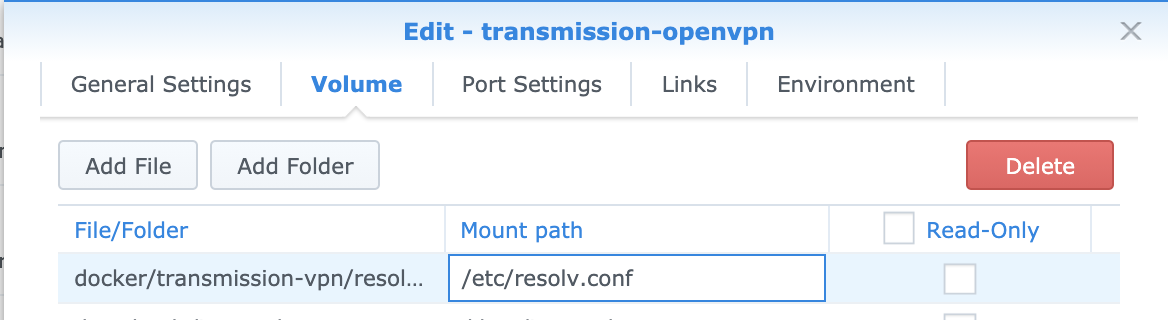
 jubeless
on 12 Nov 2020
jubeless
on 12 Nov 2020
@jubeless that's actually how I had it set up originally :(
@haugene I tried the env variables and still can't get it to run, but I get a slightly different set of logs:
date | stream | content
-- | -- | --
2020-11-12 13:38:30 | stdout | Setting OpenVPN credentials...
2020-11-12 13:38:30 | stdout | Starting OpenVPN using config Denmark.ovpn
2020-11-12 13:38:30 | stdout | 8 servers found in OPENVPN_CONFIG, Denmark chosen randomly
2020-11-12 13:38:30 | stdout | Modify configs for this container
2020-11-12 13:38:30 | stdout | Extract OpenVPN config bundle into PIA directory /etc/openvpn/pia
2020-11-12 13:38:30 | stdout | Downloading OpenVPN config bundle openvpn-nextgen into temporary file /tmp/tmp.gjHBae
2020-11-12 13:38:30 | stdout | Provider pia has a custom startup script, executing it
2020-11-12 13:38:30 | stdout | Using OpenVPN provider: PIA
2020-11-12 13:38:30 | stdout | mknod: /dev/net/tun: File exists
2020-11-12 13:38:30 | stdout | One or more OVERRIDE_DNS addresses found. Will use them to overwrite /etc/resolv.conf
2020-11-12 13:38:30 | stdout | Starting container with revision: 3d97cd5302985c1a710f46ab0c311f721f224fc6
2020-11-12 13:38:18 | stdout | RTNETLINK answers: File exists
2020-11-12 13:38:18 | stdout | adding route to local network 172.18.0.0/16 via 172.18.0.1 dev eth0
2020-11-12 13:38:18 | stdout | Setting OpenVPN credentials...
2020-11-12 13:38:18 | stdout | Starting OpenVPN using config Ireland.ovpn
2020-11-12 13:38:18 | stdout | 8 servers found in OPENVPN_CONFIG, Ireland chosen randomly
2020-11-12 13:38:18 | stdout | Modify configs for this container
2020-11-12 13:38:18 | stdout | Extract OpenVPN config bundle into PIA directory /etc/openvpn/pia
2020-11-12 13:38:17 | stdout | Downloading OpenVPN config bundle openvpn-nextgen into temporary file /tmp/tmp.AHNhbl
2020-11-12 13:38:17 | stdout | Provider pia has a custom startup script, executing it
2020-11-12 13:38:17 | stdout | Using OpenVPN provider: PIA
2020-11-12 13:38:17 | stdout | mknod: /dev/net/tun: File exists
2020-11-12 13:38:17 | stdout | One or more OVERRIDE_DNS addresses found. Will use them to overwrite /etc/resolv.conf
2020-11-12 13:38:17 | stdout | Starting container with revision: 3d97cd5302985c1a710f46ab0c311f721f224fc6
maltschuld
on 12 Nov 2020
@maltschuld Seems you've set LOCAL_NETWORK=172.18.0.0/16, why? That is the docker bridge network?
What is your local network? Something 192.168.x.x? Then it should be 192.168.0.0/16
haugene
on 12 Nov 2020
I was following this setup tutorial https://www.reddit.com/r/synology/comments/eahndo/synology_media_advanced_setup_guide/ which a lot of people had success with. 172.18.0.0/16 came from the auto-populated "mediaNet" network that the guide had me setup, I thought I was supposed to use that in LOCAL_NETWORK. Right now under network I have 'bridge' with no connected containers and subnet 172.17.0.0/16 and gateway 172.17.0.1. And 'mediaNet' with my transmission container connected and subnet 172.18.0.0/16 and gateway 172.18.0.1. In the container, env variable LOCAL_NETWORK = 172.18.0.0/16,192.168.1.0/24.
I'm lost on a lot of this and have to do about 30 minutes of research for every minute of actually doing work, and networking is by far my weakest area.
maltschuld
on 13 Nov 2020
I understand. I'm better at this now than I ever thought I'd be :laughing: I'm far from an expert though.
Thing is. OpenVPN will "grab" all the packets leaving the host it's running on (machine, vm or container). Now that's bad news because the computer needs to connect to other services on the network. It might be your printer, appleTV, chromecast another machine on the network or whatever. And you can't connect to those services if all the packets from the machine goes out through the VPN. Suffice to say that the packets that are released into the wild in Ireland or wherever won't find your printer or appleTV.
So OpenVPN solves this by checking it's own IP and then saying that all other IPs on that network are OK. It won't tunnel those packets. The issue then becomes that your Docker container is running on it's own network. 172.18.x.y or something like that. And that's not the network you are on with your other computers. Sure if you'd only access it from the host then you'd be alright - but not from another device than your server.
If you run ip r within the container without setting LOCAL_NETWORK you will see two main ingredients (there are more but let's skip them for now):
0.0.0.0/1 via 10.1.112.1 dev tun0
172.17.0.0/16 dev eth0 proto kernel scope link src 172.17.0.2
The first says: Everything through tun0, the VPN interface.
The second says: Hold that thought. Anything matching 172.17.x.x is fine. It should go through eth0. But again, you're not on that network. That's why we have the LOCAL_NETWORK variable. For you to add another. So when you add LOCAL_NETWORK=192.168.0.0/16 for example we generate a new entry here:
192.168.0.0/16 via 172.17.0.1 dev eth0
Saying that these IPs are also OK to exit the container without going into the tunnel. And that's how you can communicate with Transmission.
So when you specify 172.17.0.0/16 you get RTNETLINK answers: File exists because that route already exists and "everything in Linux is files" or something like that so I think that's what the error messages from the depths of Linux is telling us.
Hope I spared you some research ;)
haugene
on 13 Nov 2020
That explanation mostly made sense :)
I updated LOCAL_NETWORK = 192.168.1.0/16 and get RTNETLINK answers: Invalid argument now. back to :( now.
date | stream | content
-- | -- | --
2020-11-13 00:52:08 | stdout | Starting container with revision: 3d97cd5302985c1a710f46ab0c311f721f224fc6
2020-11-13 00:51:56 | stdout | RTNETLINK answers: Invalid argument
2020-11-13 00:51:56 | stdout | adding route to local network 192.168.1.0/16 via 172.18.0.1 dev eth0
2020-11-13 00:51:56 | stdout | Setting OpenVPN credentials...
2020-11-13 00:51:56 | stdout | Starting OpenVPN using config Austria.ovpn
2020-11-13 00:51:56 | stdout | 8 servers found in OPENVPN_CONFIG, Austria chosen randomly
2020-11-13 00:51:56 | stdout | Modify configs for this container
2020-11-13 00:51:56 | stdout | Extract OpenVPN config bundle into PIA directory /etc/openvpn/pia
2020-11-13 00:51:56 | stdout | Downloading OpenVPN config bundle openvpn-nextgen into temporary file /tmp/tmp.AJHgDd
2020-11-13 00:51:56 | stdout | Provider pia has a custom startup script, executing it
2020-11-13 00:51:56 | stdout | Using OpenVPN provider: PIA
2020-11-13 00:51:56 | stdout | mknod: /dev/net/tun: File exists
2020-11-13 00:51:56 | stdout | Starting container with revision: 3d97cd5302985c1a710f46ab0c311f721f224fc6
maltschuld
on 13 Nov 2020
Yeah, that's invalid sorry. I modified the example on the fly and got sloppy.
192.168.1.0/16 is invalid.
You have to use 192.168.0.0/16 or 192.168.1.0/24 etc. The first one matches 192.168.x.y and the second 192.168.1.x
Google cidr addresses for in depth fun on the topic.
haugene
on 13 Nov 2020
@haugene that worked! I know I've got some more tweaking to make it work the way I want, but seeing that beautiful web interface was great!
maltschuld
on 13 Nov 2020
Related issues
 callahan22
·
4Comments
callahan22
·
4Comments
 PriamX
·
3Comments
PriamX
·
3Comments
 SuperJakish
·
4Comments
SuperJakish
·
4Comments
 silentArtifact
·
3Comments
silentArtifact
·
3Comments
 coulterj
·
4Comments
coulterj
·
4Comments
Most helpful comment
Yes, I see #1408. Thanks for creating it. Been a busy day so I'll try to have a look and merge tomorrow :+1: