Docker-transmission-openvpn: Not working on my Synology (Firewall rules blocking)
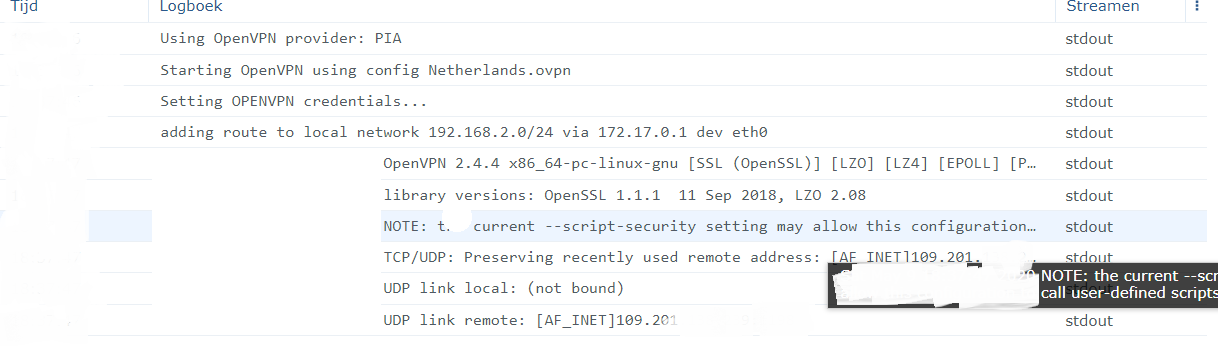
this is my docker run (with my information on the myuser/mypass/myid)
synology ds218+ dsm 6.2.2
docker run \
--cap-add=NET_ADMIN \
--device=/dev/net/tun \
-d \
-v /volume1/Transmission/resolv.conf:/etc/resolv.conf \
-v /volume1/Downloads:/data \
-e "OPENVPN_PROVIDER=PIA" \
-e "OPENVPN_CONFIG=Netherlands" \
-e "OPENVPN_USERNAME=MYUSRERHERE" \
-e "OPENVPN_PASSWORD=MYPASSHERE" \
-e "LOCAL_NETWORK=192.168.2.0/24" \
-e "OPENVPN_OPTS=--inactive 3600 --ping 10 --ping-exit 60" \
-e "PGID=MYPGIDHERE" \
-e "PUID=MYPUIDHERE" \
-p 9091:9091 \
--sysctl net.ipv6.conf.all.disable_ipv6=0 \
--name "transmission" \
haugene/transmission-openvpn:latest
I also created a TUN.sh script witch executes properly
After i started the containter it just craches after some time
( I know i installed a kill switch but it just does not go furter and does also not work without the killswitch)
Hope someone can help
Thanks already!
 nozamo
All 26 comments
Same problem here!
 Bholtland
on 11 May 2020
Bholtland
on 11 May 2020
The container crashes, or the Synology crashes? Do you have some logs from that, or are the logs above the only ones? It doesn't seem to get very far in connecting to the server. Can you try to replace --device=/dev/net/tun with -e CREATE_TUN_DEVICE=true?
 haugene
on 11 May 2020
haugene
on 11 May 2020
I will try thanks for the reply
(Unfortunately thats everything from the log)
The container crashes, or the Synology crashes? Do you have some logs from that, or are the logs above the only ones? It doesn't seem to get very far in connecting to the server. Can you try to replace
--device=/dev/net/tunwith-e CREATE_TUN_DEVICE=true?
I
nozamo
on 11 May 2020

Still keeps crashing:(
nozamo
on 11 May 2020
looks like it fails to create a new tun device and doesn't try to reuse the exiting one that I assume is created by the TUN.sh script, right? perhaps remove the device and just try using create_..
 pkishino
on 12 May 2020
pkishino
on 12 May 2020
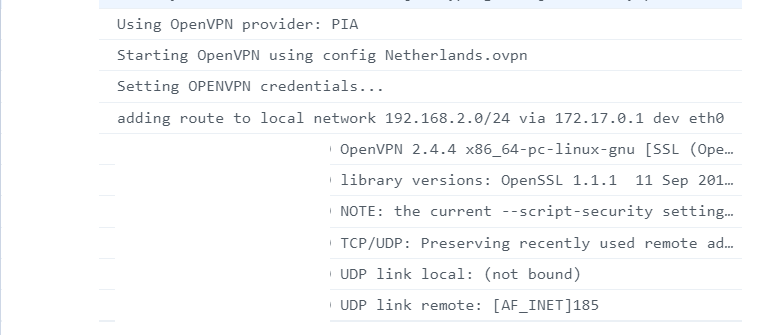
Nope does not work
als does not with root access
nozamo
on 12 May 2020
I seem to have the exact same issue. Have had this running very stable for a long time now, but this week I noticed that it was no longer running. I get the same log as above...
 mightymads
on 13 May 2020
mightymads
on 13 May 2020
Glad it's not just me! Mine will no longer work either on my Synology, I've tried all the usual things and it's failing, I always used to have an issue if I manually restarted the container, usually ended up in my having to reboot the NAS to get it to work. Now it just honest work at all. mine strangely appears to be saying soft but failure, I've checked and the auth is correct.
What I do know is that there has been a Synology update a few days ago. May well be related.
Hopefully somebody will spot the issue soon!
All my long says is as follows
`
No VPN configuration provided. Using default.
Setting OPENVPN credentials...
Fri May 15 10:18:40 2020 OpenVPN 2.4.4 x86_64-pc-linux-gnu [SSL (OpenSSL)] [LZO] [LZ4] [EPOLL] [PKCS11] [MH/PKTINFO] [AEAD] built on May 14 2019
Fri May 15 10:18:40 2020 library versions: OpenSSL 1.1.1 11 Sep 2018, LZO 2.08
Fri May 15 10:18:40 2020 NOTE: the current --script-security setting may allow this configuration to call user-defined scripts
Fri May 15 10:18:40 2020 TCP/UDP: Preserving recently used remote address: [AF_INET]172.94.19.4:80
Fri May 15 10:18:40 2020 Attempting to establish TCP connection with [AF_INET]172.94.19.4:80 [nonblock]
Fri May 15 10:18:41 2020 TCP connection established with [AF_INET]172.94.19.4:80
Fri May 15 10:18:41 2020 TCP_CLIENT link local: (not bound)
Fri May 15 10:18:41 2020 TCP_CLIENT link remote: [AF_INET]172.94.19.4:80
Fri May 15 10:18:41 2020 WARNING: this configuration may cache passwords in memory -- use the auth-nocache option to prevent this
Fri May 15 10:18:42 2020 WARNING: 'link-mtu' is used inconsistently, local='link-mtu 1559', remote='link-mtu 1560'
Fri May 15 10:18:42 2020 WARNING: 'comp-lzo' is present in remote config but missing in local config, remote='comp-lzo'
Fri May 15 10:18:42 2020 [Secure-Server] Peer Connection Initiated with [AF_INET]172.94.19.4:80
Fri May 15 10:18:44 2020 AUTH: Received control message: AUTH_FAILED
Fri May 15 10:18:44 2020 SIGTERM[soft,auth-failure] received, process exiting`
 CelticWebSolutions
on 15 May 2020
CelticWebSolutions
on 15 May 2020
About that create TUN script, I found that it's not necessary if you have the VPN Server package installed and OpenVPN enabled (I didn't try with the other options) as this will create it for you. Might worth trying that
 jocel1rondeau
on 18 May 2020
jocel1rondeau
on 18 May 2020
About that create TUN script, I found that it's not necessary if you have the VPN Server package installed and OpenVPN enabled (I didn't try with the other options) as this will create it for you. Might worth trying that
Which VPN server package? I don't use VPN on the NAS it's self, other than in this container.
CelticWebSolutions
on 18 May 2020
The package is called "VPN Server", by Synology. I don't use it as well, I just installed it so I could use the tun device in my containers

jocel1rondeau
on 18 May 2020
Once installed, when you open the admin console, on the left side you can select OpenVPN then enable it by ticking "Enable OpenVPN server"

jocel1rondeau
on 18 May 2020
Giving that a go now, just disabled the old Tun script and installed VPN Server, rebooting server now to ensure it's got a decent chance.
Mine also complains about soft auth failures, I just commented on another post where somebody has said theirs is failing auth when they know tat the credentials are definitely correct. So we'll see if this has anything to do with it.
CelticWebSolutions
on 18 May 2020
Unfortunately that's not fixed the issue of it not working. Still getting errors
`
Using OpenVPN provider: PUREVPN
No VPN configuration provided. Using default.
Setting OPENVPN credentials...
Mon May 18 15:33:18 2020 OpenVPN 2.4.4 x86_64-pc-linux-gnu [SSL (OpenSSL)] [LZO] [LZ4] [EPOLL] [PKCS11] [MH/PKTINFO] [AEAD] built on May 14 2019
Mon May 18 15:33:18 2020 library versions: OpenSSL 1.1.1 11 Sep 2018, LZO 2.08
Mon May 18 15:33:18 2020 NOTE: the current --script-security setting may allow this configuration to call user-defined scripts
Mon May 18 15:33:18 2020 TCP/UDP: Preserving recently used remote address: [AF_INET]188.72.98.4:80
Mon May 18 15:33:18 2020 Attempting to establish TCP connection with [AF_INET]188.72.98.4:80 [nonblock]
Mon May 18 15:33:19 2020 TCP connection established with [AF_INET]188.72.98.4:80
Mon May 18 15:33:19 2020 TCP_CLIENT link local: (not bound)
Mon May 18 15:33:19 2020 TCP_CLIENT link remote: [AF_INET]188.72.98.4:80
Mon May 18 15:33:26 2020 Connection reset, restarting [-1]
Mon May 18 15:33:26 2020 SIGUSR1[soft,connection-reset] received, process restarting
Mon May 18 15:33:29 2020 NOTE: the current --script-security setting may allow this configuration to call user-defined scripts
Mon May 18 15:33:29 2020 TCP/UDP: Preserving recently used remote address: [AF_INET]172.94.19.4:80
Mon May 18 15:33:29 2020 Attempting to establish TCP connection with [AF_INET]172.94.19.4:80 [nonblock]
Mon May 18 15:33:30 2020 TCP connection established with [AF_INET]172.94.19.4:80
Mon May 18 15:33:30 2020 TCP_CLIENT link local: (not bound)
Mon May 18 15:33:30 2020 TCP_CLIENT link remote: [AF_INET]172.94.19.4:80
Mon May 18 15:33:30 2020 WARNING: this configuration may cache passwords in memory -- use the auth-nocache option to prevent this
Mon May 18 15:33:30 2020 WARNING: 'link-mtu' is used inconsistently, local='link-mtu 1559', remote='link-mtu 1560'
Mon May 18 15:33:30 2020 WARNING: 'comp-lzo' is present in remote config but missing in local config, remote='comp-lzo'
Mon May 18 15:33:30 2020 [Secure-Server] Peer Connection Initiated with [AF_INET]172.94.19.4:80
Mon May 18 15:33:31 2020 AUTH: Received control message: AUTH_FAILED
Mon May 18 15:33:31 2020 SIGTERM[soft,auth-failure] received, process exiting
`
CelticWebSolutions
on 18 May 2020
I wonder if you and Nozamo have the same problem, since in your case it looks like it can connect but not authenticate. Just to be sure, are you passing CREATE_TUN_DEVICE=true to the container?
jocel1rondeau
on 18 May 2020
I wonder if you and Nazmo have the same problem, since in your case it looks like it can connect but not authenticate. Just to be sure, are you passing CREATE_TUN_DEVICE=true to the container?
Yes, I did
nozamo
on 18 May 2020
Also getting this exact issue. Every so often when recreating the container it will work, but when I restart the container it returns the same error indefinitely. CREATE_TUN_DEVICE=true did not seem to have an effect.
 ruchoff
on 26 May 2020
ruchoff
on 26 May 2020
it would be worth trying with a different provider, just to rule out any provider issues..most give free trials so..
pkishino
on 29 May 2020
Looks like nozamo is using PIA, CelticWebSolutions is using PUREVPN, and i'm using NordVPN so i'd wager to say its not a provider issue.
ruchoff
on 29 May 2020
I noticed my last successful download was on the 11th of May. Had a look in the Synology NAS (DS918+) and discovered the docker container was constantly crashing like you guys.
After trying some things suggested here with no luck, I tried using an older version of the docker image, which still didn't work but finally provided the log message
Port forwarding is already activated on this connection, has expired, or you are not connected to a PIA region that supports port forwarding
Looking up the PIA regions that support port forwarding (https://www.privateinternetaccess.com/helpdesk/kb/articles/how-do-i-enable-port-forwarding-on-my-vpn), the region I was using was not in the list. On switching to one of the regions in the list (CA Vancouver in my case) I was able to get the container running successfully again.
 tl195
on 29 May 2020
tl195
on 29 May 2020
^That comment got me thinking. I have a firewall rule that only allows VPN connections from the US. I just changed the rule to allow it from anywhere and it seems to be working now. I'll monitor for a few days but @nozamo and @CelticWebSolutions this might be worth a try.
ruchoff
on 29 May 2020
Thanks, @ruchoff I also had a few firewall rules installed (I turned it off and it fixed the problem)
Look forward to see if it will fix the problem for everyone.
nozamo
on 29 May 2020
Just a another question, does anyone know a few good firewall rules for blocking all traffic.
But still allow the transmission-openvpn container to run.
Hope someone can help.
Thanks already!
nozamo
on 29 May 2020
Just a another question, does anyone know a few good firewall rules for blocking all traffic.
But still allow the transmission-openvpn container to run.
Hope someone can help.
Thanks already!
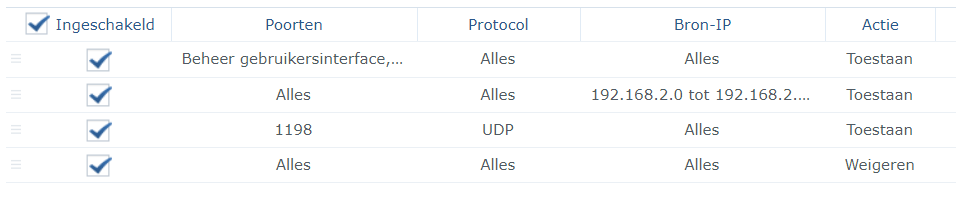
Toestaan = Allow
Weigeren = Deny
I fixed the problem myself (feel free to use it if needed)
nozamo
on 29 May 2020
This is good to know, I’ll rename the issue later to better reflect the fix, feel free to close if done
pkishino
on 29 May 2020
Fix provided,closing
pkishino
on 3 Jun 2020
Related issues
 pejotll
·
4Comments
pejotll
·
4Comments
 avDownloads
·
4Comments
avDownloads
·
4Comments
 Jafalex
·
3Comments
Jafalex
·
3Comments
 holger8080
·
4Comments
haugene
·
4Comments
holger8080
·
4Comments
haugene
·
4Comments
Most helpful comment
Thanks, @ruchoff I also had a few firewall rules installed (I turned it off and it fixed the problem)
Look forward to see if it will fix the problem for everyone.